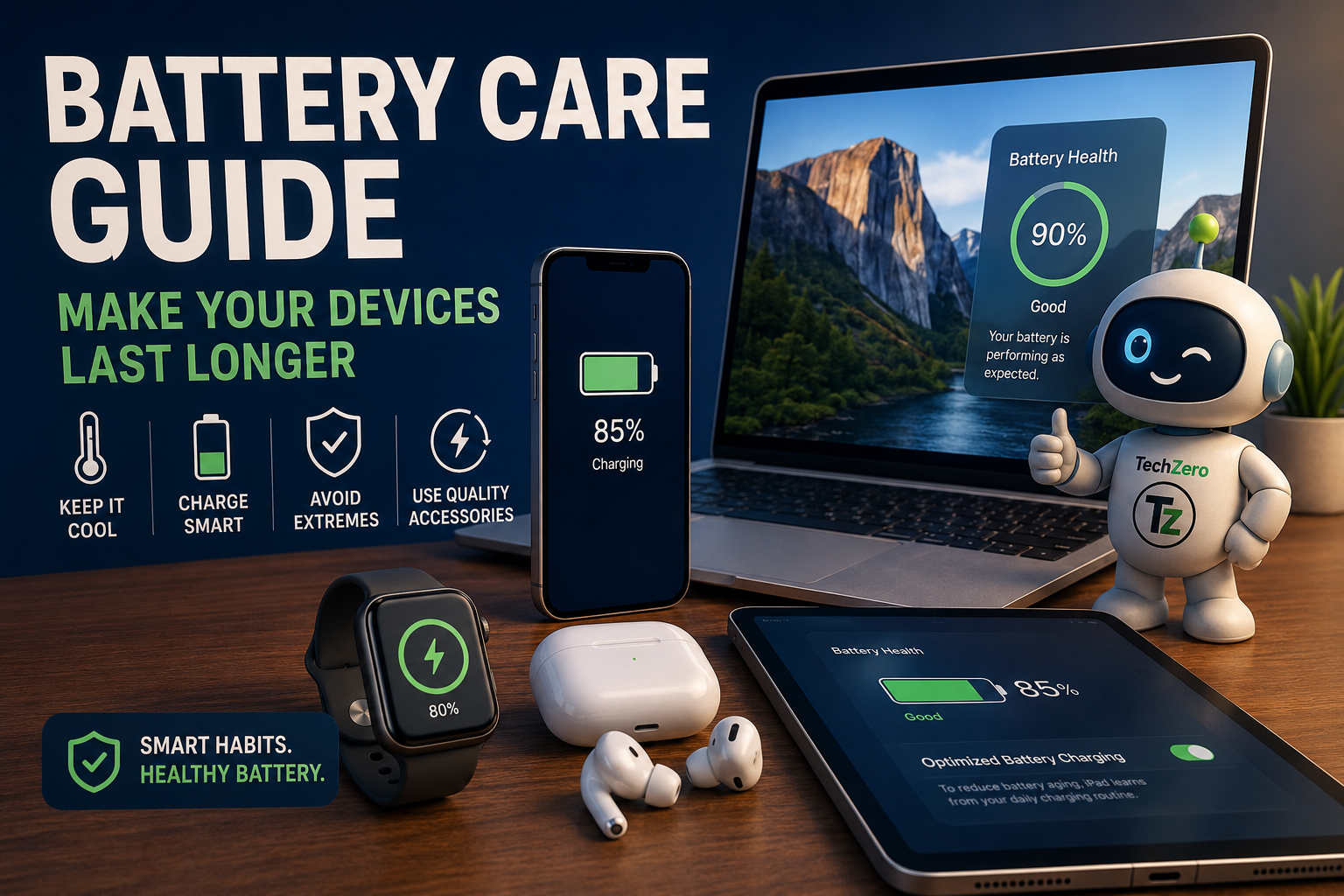

📌 TL;DR: Battery Care in 60 Seconds
Your battery will naturally lose capacity over time, but a few habits can slow the process.
- Keep it cool: Heat is one of the biggest causes of accelerated battery aging.
- Charge around 20–30%: You don’t need to wait until 0%.
- 80–90% is a good everyday target: But charging to 100% is completely reasonable when you need maximum runtime.
- Don’t obsess over 20–80%: Consistency matters more than perfection.
- Fast charging isn’t automatically bad: Excessive heat is the bigger concern.
- Overnight charging is generally fine: Use Optimized/Adaptive Charging when available.
- Wireless charging is fine: Just watch for excessive heat.
- Avoid regular 0% discharges: Occasional deep discharge isn’t something to panic about.
- Store unused devices around 50%: Keep them somewhere cool and dry.
- Replace damaged batteries: Especially if you notice swelling, unusual heat or sudden shutdowns.
Battery Care: Quick Reference
| What you want to know | Quick answer |
|---|---|
| Best everyday charge range? | 20–80% when convenient |
| Can I charge to 100%? | Yes. Do it when you need the runtime |
| Should I let it reach 0%? | No. Avoid regular deep discharges |
| Is overnight charging safe? | Generally yes on modern devices |
| Does fast charging damage batteries? | Not automatically. Heat matters more |
| Is wireless charging bad? | No. Excessive heat is the concern |
| Biggest battery enemy? | Heat |
| How should I store an unused device? | Around 50% charge, cool and dry |
| Should I use battery protection? | Yes, if your device provides it |
| Battery swelling? | Stop using it and seek professional replacement |
Want the Complete Battery Reference?
Download the TechZero Ultimate Battery Care Guide — our full deep-dive covering charging, battery chemistry, smartphones, laptops, tablets, wearables, storage, heat and more.
↓ Download the Full PDF GuideFree PDF • TechZero
Part I: Understanding Battery Health
The Short Answer: What Actually Matters
If you remember only a few things, remember these:
- Keep your device cool.
- Recharge around 20–80% when practical.
- Do not treat 100% as forbidden; use it when you need the runtime.
- Avoid making 0% discharges a daily habit.
- Enable Optimized Charging, Adaptive Charging or Battery Protection when available.
- Use original or certified chargers and good-quality cables.
- Do not charge a hot device under heavy workloads whenever you can avoid it.
- Store devices that will sit unused at roughly 50% charge.
- Do not ignore battery swelling or other physical damage.
- Let the device’s Battery Management System do its job.
Battery care is not about achieving a perfect percentage every day. It is about avoiding repeated conditions that put unnecessary stress on the battery.
Chapter 1: Why Batteries Lose Capacity
Most modern portable electronics use lithium-based rechargeable batteries because they provide high energy density, relatively low weight, good efficiency and the ability to recharge repeatedly.
Inside a lithium-ion battery are an anode, a cathode and an electrolyte. Lithium ions move between the electrodes during charging and discharging. When you charge the device, energy is stored; when you use it, that process reverses and the stored energy powers the display, processor, radios and other components.
That process is not perfectly reversible.
Every charge and discharge contributes to small chemical and physical changes inside the cell. Over time, internal resistance increases, some lithium becomes unavailable for the normal reaction, the electrolyte degrades and the structure of the electrodes changes. The result is reduced capacity and, eventually, shorter runtime.
Battery aging also happens when the device is sitting unused. This is called calendar aging. Time, temperature and the average state of charge all influence it.
So a battery does not need to be “used badly” to age. Use simply determines how quickly the process happens.
Chapter 2: What Is a Charge Cycle?
A charge cycle is not one trip from a charger to a device.
One cycle represents using energy equal to 100% of the battery’s capacity, even if that happens through several smaller sessions.
For example, using 50% of the battery one day and another 50% later adds up to one full cycle.
This is why topping up a phone during the day is not automatically worse than waiting until the battery is nearly empty and then charging it.
Different devices are designed around different cycle expectations, and battery health normally declines gradually rather than suddenly stopping when a rated cycle count is reached.
Chapter 3: Battery Health vs Battery Life
These terms are easy to confuse.
Battery capacity is how much energy the battery can store.
Battery life is how long the device actually runs before needing another charge.
A phone with a smaller battery can sometimes last longer than a phone with a larger battery because its processor, display and software are more efficient.
Battery health is a measure of how much of the battery’s original capacity remains. As health declines, the device has less stored energy available and runtime can fall.
A health reading around 80% is commonly treated as a point at which aging becomes noticeable, although the practical impact depends on the device and the user.
Part II: Charging, Heat & Everyday Battery Care
Chapter 4: The Biggest Enemy: Heat
If there is one battery-care rule worth remembering, it is this:
Keep your device cool.
Heat accelerates the chemical reactions associated with battery aging. A device becoming warm occasionally is not automatically a problem. Repeated exposure to high temperatures is the concern.
Common sources include:
- Gaming while charging
- Fast charging in a hot environment
- Wireless charging that becomes excessively warm
- Recording high-resolution video for long periods
- GPS navigation
- Direct sunlight
- Leaving a device in a parked car
- Blocking laptop ventilation
The combination of a heavy workload and charging is particularly important. Gaming, video recording and other demanding tasks already generate heat. Adding charging heat can push the battery temperature higher.
If a device becomes unusually hot, stop the demanding activity and let it cool naturally.
Do not try to cool an overheated device by putting it in a refrigerator or freezer. Rapid temperature changes can create condensation inside electronics.
More on Device Heat & Thermal Management
Heat affects more than battery health. Learn how modern phones and laptops manage temperature and performance.
Chapter 5: The 20–80 Rule: Useful, But Not a Religion
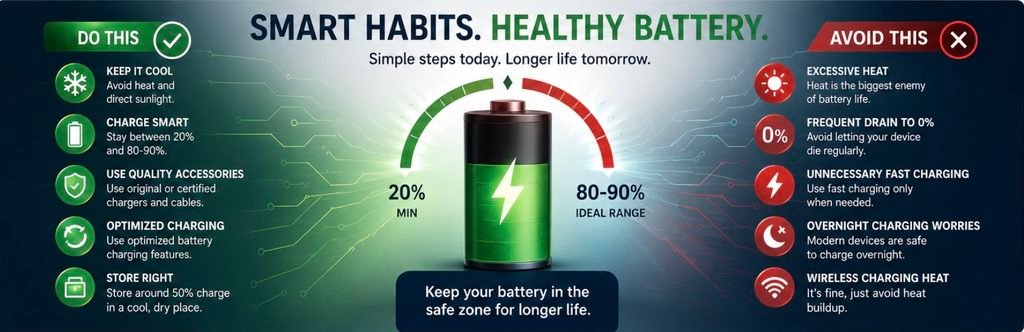
The commonly recommended 20–80 rule is simple: when convenient, keep the battery roughly between 20% and 80%.
The reason is that lithium-ion batteries experience greater stress near very low and very high charge levels.
But the rule should not become a burden.
If you are travelling, working away from a charger or expecting a long day, charging to 100% is perfectly reasonable. A single 100% charge is not what ruins a battery.
The bigger concern is spending long periods at a very high state of charge, particularly when the device is also warm.
Likewise, reaching 0% occasionally is not a disaster. The recommendation is simply to avoid making complete discharge a regular habit.
A sensible everyday approach is:
20–30% → recharge → 80–90% when convenient → use normally.
If you need 100%, charge to 100%.
Chapter 6: Ten Battery Myths You Can Stop Worrying About
Myth 1: You must always charge to 100%
Fact
Charging to 100% is safe. The concern is prolonged time at full charge, not the number itself.
Myth 2: You should regularly drain the battery to 0%
Fact
Modern lithium-ion batteries do not need complete discharge cycles. Frequent deep discharge adds unnecessary stress.
Myth 3: Overnight charging destroys batteries
Fact
Modern devices are designed to manage charging intelligently and stop or regulate charging when full. Optimized charging features can reduce the amount of time spent at full capacity.
Myth 4: Fast charging always damages the battery
Fact
Fast charging is managed by the charger, charging controller and Battery Management System. Heat is the more important concern.
Myth 5: Wireless charging is dangerous
Fact
Wireless charging is safe. Its main battery-related disadvantage is that it can generate more heat than wired charging.
Myth 6: You should constantly force-close background apps
Fact
Modern operating systems manage applications intelligently. Repeatedly closing and restarting apps can sometimes use more energy.
Myth 7: You must never use a phone while charging
Fact
Normal browsing and messaging are safe. Heavy gaming while charging is different because it combines workload heat with charging heat.
Myth 8: Only the manufacturer’s charger is safe
Fact
Certified third-party chargers that comply with recognized standards can also be safe.
Myth 9: Freezing a battery can revive it
Fact
No. Extreme cold can damage lithium-ion batteries.
Myth 10: Software updates physically reduce battery health
Fact
Battery health reflects chemical aging. Software can change power consumption or charging behavior, but it does not physically reverse or accelerate the chemistry simply because an update was installed.
Chapter 7: Fast Charging: What You Really Need to Know
Fast charging means delivering more power to a battery in less time.
The basic relationship is:
Power = Voltage × Current
The charger does not simply force maximum power into the battery. The charger, cable, charging controller and Battery Management System work together to negotiate and control the appropriate voltage and current.
Lithium-ion charging normally has two broad stages.
Constant Current
When the battery is relatively low, the system can deliver higher current and replenish a large portion of the battery quickly.
Constant Voltage
As the battery approaches full charge, the system maintains voltage while reducing current. This is why the last part of charging takes longer.
That slowdown is intentional. It reduces heat and chemical stress and improves safety.
Common charging technologies include USB Power Delivery, PPS, Qualcomm Quick Charge and manufacturer-specific systems such as SuperVOOC and other proprietary fast-charging implementations.
Is 100W or 120W charging automatically bad?
Not necessarily.
The more useful question is: How much heat does the charging system generate, and how effectively does the device manage it?
If you are not in a hurry, slower charging can be a sensible choice, especially in hot weather or when the device is already warm.
Go Deeper Into Charging & USB-C
Charging speed depends on more than the wattage printed on a charger. Understand USB-C, charging standards and the real cost of charging your devices.
Chapter 8: Wireless Charging: Convenience vs Heat
Wireless charging uses electromagnetic induction between a transmitting coil in the charging pad and a receiving coil in the device.
Standards such as Qi and Qi2 make wireless charging increasingly common.
The advantages are obvious:
- Easy drop-and-charge convenience
- Less wear on charging ports
- Cleaner desks and bedside tables
- Easy top-ups throughout the day
The main disadvantage is efficiency. Some energy is lost as heat, and poor alignment can make the problem worse.
Wireless charging therefore does not inherently damage the battery. Temperature is the issue.
For best results:
- Use a quality charging pad.
- Keep the coils properly aligned.
- Avoid charging in direct sunlight.
- Remove an unusually thick case if it causes excess heat.
- Keep the charging area ventilated.
Chapter 9: Is Overnight Charging Safe?
For modern smartphones and laptops, overnight charging is generally safe under normal conditions.
When the battery reaches its target, the device manages charging rather than continuously forcing maximum current into the cell. Many devices also provide charging features that delay the final part of charging until closer to the time you normally unplug.
If you charge overnight:
- Enable optimized or adaptive charging.
- Use a quality charger and cable.
- Keep the device uncovered.
- Do not charge under pillows or blankets.
- Avoid hot environments.
For laptops that spend most of their time on a desk, a battery preservation mode that limits charging to around 80% can be especially useful.
Part III: Battery Care by Device
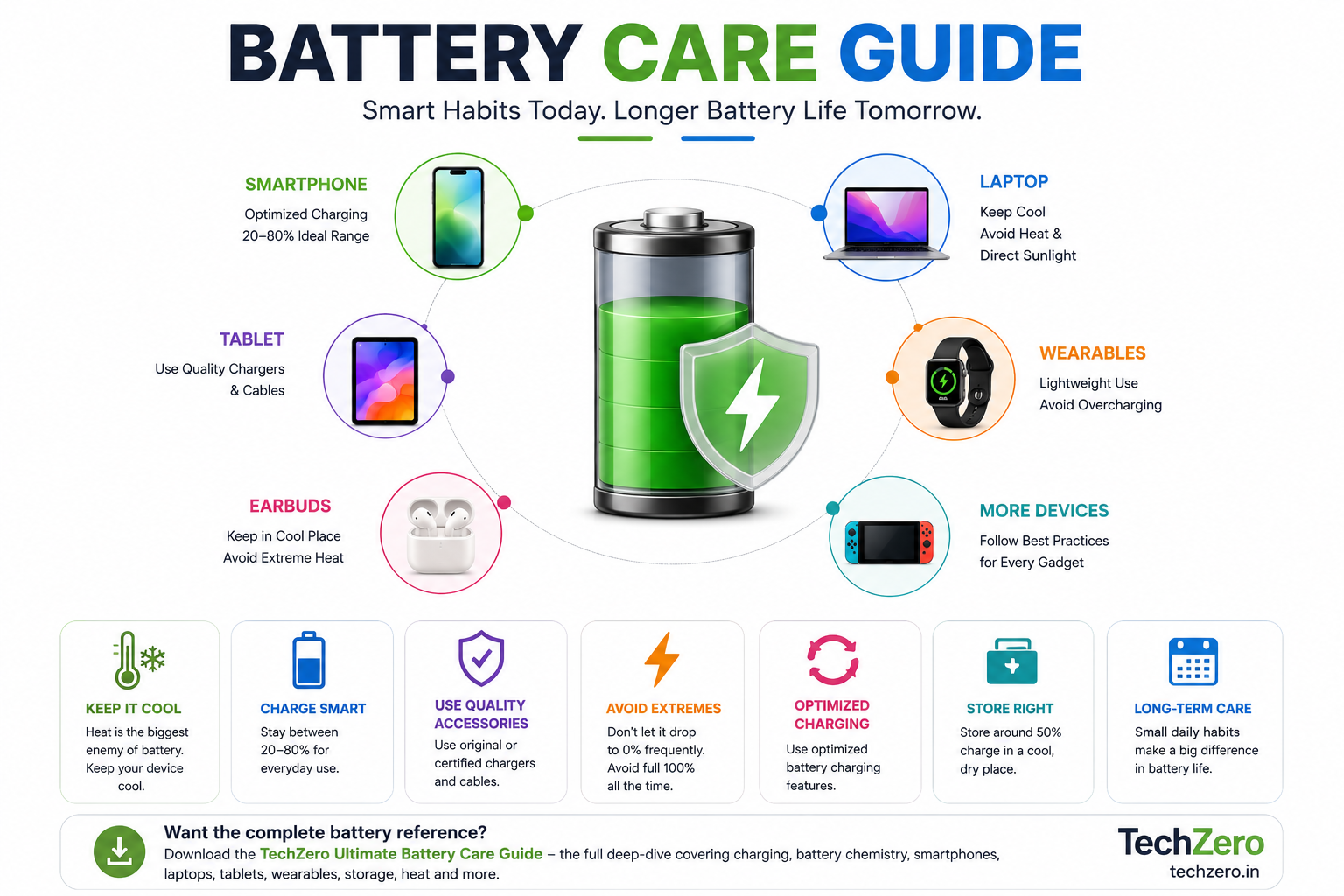
Chapter 10: Smartphone Battery Care
Phones are among the most heavily used battery-powered devices.
A practical routine is:
Charge sensibly
Recharge around 20–30% when convenient. Unplug around 80–90% if that is practical. Charge to 100% when you need the extra runtime.
Use built-in battery protection
Android phones may offer Adaptive Charging, Battery Protection, Optimized Charging or Smart Charging. iPhones include Optimized Battery Charging.
Avoid heat
Do not charge under pillows, in direct sunlight or inside a hot vehicle. Avoid combining heavy gaming with fast charging whenever possible.
Reduce unnecessary drain
Display brightness, background activity, connectivity and demanding workloads all affect runtime. Use automatic brightness and sensible screen timeout settings. Do not install unnecessary “battery saver” applications that constantly run in the background.
Replace the battery when necessary
Consider replacement when runtime has fallen significantly, the device shuts down unexpectedly, charging becomes unreliable or the battery is swollen.
More Smartphone Guides
Battery life is only one part of the smartphone experience. These TechZero guides explore overheating, storage and useful smartphone features.
Chapter 11: Tablets Need Different Attention
Tablets are often used heavily for a few hours and then left unused for days or weeks.
The most important habit is not to store one completely empty for long periods.
If a tablet will be unused, around 50% charge is a sensible storage target.
For long study, reading or creative sessions:
- Start with enough charge.
- Use automatic brightness.
- Watch for excessive heat.
- Remove a thick case temporarily if it traps heat during heavy charging.
- If the tablet is permanently connected to power as a smart display, use its battery protection mode if available.
Chapter 12: Laptop Battery Care: Windows and Mac
Laptops have one major difference from phones: many spend most of their lives plugged into power.
That is not automatically harmful.
Modern laptops are designed to manage charging and many include battery-preservation features that limit the charge level when the machine is normally used at a desk.
If available, enable the manufacturer’s battery protection mode.
Keep the laptop cool
Avoid using it on:
- Beds
- Pillows
- Blankets
- Soft cushions
These surfaces can block ventilation.
Gaming laptops need particular attention because CPU and GPU loads generate significant heat. Keep vents clear, clean cooling fans, and use a cooling pad when appropriate.
Battery calibration
Calibration does not improve the physical health of a battery. It can, however, help improve the accuracy of the battery percentage reading.
Long-term desk users
If your laptop is connected to monitors and peripherals most of the time, keeping the battery around a lower target such as 80% can reduce long-term stress.
More Laptop & Mac Guides
Battery care is only one part of getting the most from a laptop. Explore TechZero’s guides on MacBooks, processors, memory and thermal performance.
Chapter 13: Smartwatches and Earbuds
Small batteries often feel as though they age faster because they are charged frequently and have little capacity to begin with.
For smartwatches:
- Enable charging optimization.
- Avoid excessive heat.
- Do not charge immediately after intense exercise if the watch is already warm.
- Recharge before the battery reaches 0% regularly.
Wireless earbuds are more complicated because there are effectively three batteries: left earbud, right earbud and charging case.
Keep the charging contacts clean, avoid leaving earbuds unused for months without recharging, and do not leave the case in a hot vehicle.
For long-term storage, roughly 50% charge is preferable to completely empty.
Chapter 14: Gaming and Battery Health
Gaming does not inherently “damage” a battery.
The problem is heat.
A demanding game can simultaneously stress the CPU, GPU, display, wireless radios and cooling system. High brightness and high refresh rates add to power consumption.
Gaming while charging adds another source of heat.
For mobile gaming:
- Reduce graphics settings when practical.
- Lower display brightness.
- Use battery bypass or direct-power mode if your device supports it.
- Remove a thick case if it traps heat.
- Keep the device ventilated.
- Take cooling breaks during long sessions.
For gaming laptops, keep vents clear and use a cooling pad when appropriate.
Part IV: Temperature, Storage & Battery Replacement
Chapter 15: Hot and Cold Weather
Temperature affects batteries differently.
Heat
High temperatures accelerate chemical degradation and are especially harmful when repeated.
Never leave electronics inside a parked car. Vehicle interiors can become extremely hot even when outdoor temperatures seem manageable.
Avoid direct sunlight, especially while charging.
Cold
Cold temperatures generally reduce performance temporarily. Chemical reactions slow, internal resistance increases and the device may show a sudden drop in available battery percentage.
The apparent capacity loss can recover after the device warms.
Do not charge an extremely cold or frozen device. Let it return gradually to room temperature first.
A simple rule
If your device gives you a temperature warning, take it seriously. Stop demanding work, disconnect power if appropriate, move it to a cool shaded location and let it cool naturally.
Chapter 16: Long-Term Battery Storage
If a device will not be used for an extended period, do not store it empty.
A battery sitting at zero for too long can become difficult or impossible to recharge.
A practical storage routine is:
- Charge the device to around 50%.
- Power it off.
- Store it somewhere cool and dry.
- Keep it away from direct sunlight.
- Check it every few months and recharge if necessary.
The same principle applies to power banks, cameras, drones and other battery-powered equipment.
Chapter 17: When Should You Replace a Battery?
Battery replacement becomes worth considering when aging starts affecting normal use.
Watch for:
- Very short runtime
- Sudden percentage drops
- Unexpected shutdowns
- Slow or unreliable charging
- Excessive heat
- Noticeable performance problems
- Increasingly frequent charging
- Battery swelling
Swelling is different.
If a battery is visibly swollen, stop using the device and arrange for professional replacement. Do not press, puncture or attempt to repair a swollen battery yourself.
For an otherwise healthy device, replacing the battery can be much more economical than replacing the entire product.
Part V: Battery Technology & Practical Checklist
Chapter 18: For Power Users: Battery Technologies Are Changing
Battery care is not only about lithium-ion cells.
Modern devices can use or explore several chemistries and technologies, including:
- Lithium-ion
- Lithium-polymer
- LFP
- NMC
- Silicon-carbon
- Sodium-ion
- Solid-state
- Lithium-sulfur
Each has trade-offs involving energy density, cost, durability, safety, charging behavior and manufacturing complexity.
Silicon-carbon batteries are being explored for higher capacity in compact devices. Solid-state batteries promise potential improvements in energy density and safety. Sodium-ion technology may offer advantages in cost and material availability. Lithium-sulfur and graphene-related research remain important areas of battery development.
The exact future is uncertain, but one direction is clear: battery systems are becoming smarter.
AI-assisted power management, better thermal controls and improved charging algorithms may reduce the amount of manual battery care users need to think about.
Explore More Technology Explained
Battery technology is part of a much larger technology ecosystem. Continue exploring how the hardware and infrastructure behind modern devices work.
Chapter 19: The Battery Care Checklist
Daily
- Keep the device cool.
- Recharge around 20–30% when practical.
- Avoid unnecessary deep discharges.
- Do not worry about occasional 100% charging.
- Use quality charging accessories.
- Avoid heavy workloads while charging if the device becomes hot.
Weekly
- Check for unusual heating.
- Clean charging contacts on wearables and earbuds.
- Check that charging cables are not damaged.
- Look for unusual changes in battery runtime.
Monthly
- Review battery health information if your device provides it.
- Check that battery protection features remain enabled.
- Clean laptop ventilation areas if necessary.
- Review devices that have been sitting unused.
Long term
- Store unused devices around 50%.
- Keep them cool and dry.
- Recharge stored devices periodically.
- Replace damaged or swollen batteries.
- Use battery preservation modes on desk-bound laptops and tablets when available.
Chapter 20: TechZero’s 10 Golden Rules
- Keep devices cool. Heat is the biggest enemy of battery health.
- Recharge around 20–30% when practical.
- Do not fear 100%. Charge fully when you need the runtime.
- Avoid regular deep discharges.
- Use quality chargers and cables.
- Enable battery protection features.
- Store unused devices around 50%.
- Keep software and firmware updated.
- Treat swelling or physical battery damage as a serious warning.
- Let the Battery Management System do its job.
Final Thought
There is no perfect battery routine.
You do not need to watch the battery percentage all day, stop using fast charging completely, abandon wireless charging or panic when the phone reaches 100%.
The biggest gains come from simple habits repeated over years: control heat, avoid unnecessary extremes, use good charging equipment and take advantage of the protection features already built into modern devices.
Battery health is not about perfection.
It is about reducing unnecessary stress so the battery can remain useful for as long as possible.
That is the real lesson behind battery care: smart habits matter more than perfect habits.
Useful External Resources
For detailed battery specifications, charging standards and safety guidance, these official resources are useful:



[…] Battery Care Guide […]
[…] Battery Care Guide […]
[…] By switching to high-density silicon-carbon chemistry, capacity expands to 5,500 mAh. To maximize cell health and slow down degradation over time, follow our Battery Care Guide. […]
[…] full 45W speed continuously. To maximize your machine’s health over time, review our ultimate battery care guide and check out standards via PCI-SIG (Peripheral Component Interconnect Special Interest Group) for […]