
📌 Quick Summary
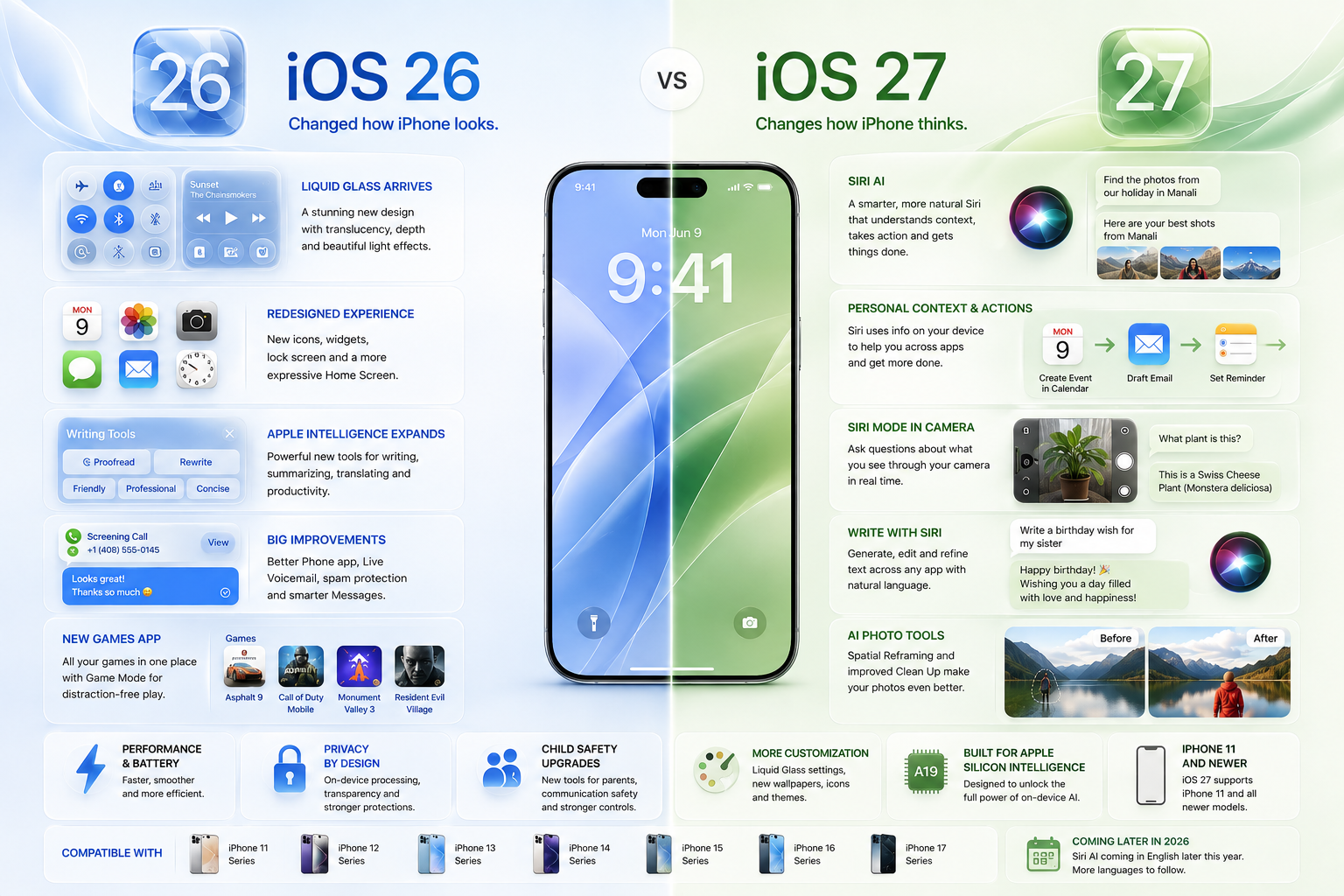
iOS 26 introduced Apple’s biggest visual change in years. iOS 27 takes that foundation further with a smarter Siri, deeper Apple Intelligence, improved responsiveness, refined Liquid Glass, and a long list of smaller but meaningful improvements.
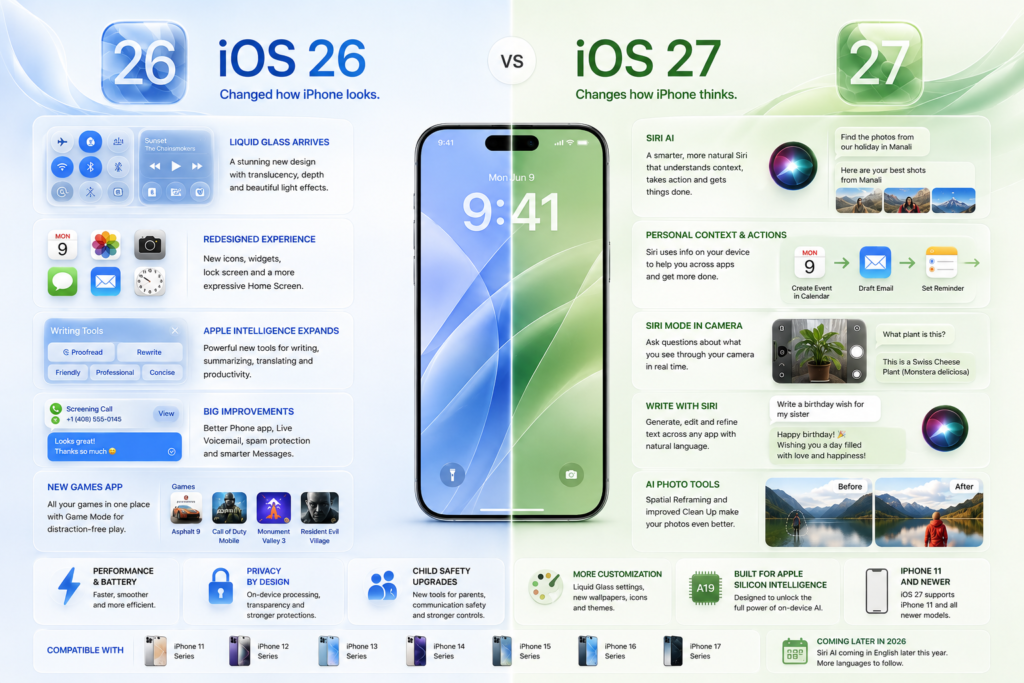
The core difference: If iOS 26 was about making the iPhone look different, iOS 27 is largely about making it work smarter and feel more responsive.
But should you upgrade from iOS 26 to iOS 27? Which iPhones support the update? And what happens to Apple Intelligence? Here is everything you need to know about the transition to iOS 27.
iOS 26 vs iOS 27: At a Glance
| Feature | iOS 26 | iOS 27 |
| Major Visual Redesign | Yes | Refined |
| Liquid Glass | Introduced | More customizable |
| Apple Intelligence | Expanded | Much deeper |
| Siri | Improved | Siri AI |
| Personal Context | Limited | Major expansion |
| Camera Intelligence | Visual Intelligence | Siri mode in Camera |
| AI Writing | Apple Intelligence tools | Write with Siri |
| AI Photo Editing | Clean Up & tools | Spatial Reframing + improved Clean Up |
| Child Safety | Existing controls | New safety features |
| Performance | Major iOS update | Focus on responsiveness |
| Games | New Games app | Refinements |
| Phone & Messages | Major improvements | Further refinements |
| Compatibility | iPhone 11 and newer | iPhone 11 and newer |
| Release Status | Current generation | Coming later in 2026 |
What’s Actually New – The Breakdown
Before looking at iOS 27, it helps to understand the foundation. iOS 26 was a broad platform redesign that introduced the Liquid Glass visual language—translucent controls, redesigned navigation, updated widgets, and a more expressive Home Screen.
iOS 27 builds upon that visual foundation rather than replacing it. The primary focus shifts heavily toward artificial intelligence, context, and system performance.
1. Siri AI Deep Dive
Siri is where iOS 27 really separates itself from iOS 26. Apple is turning Siri from a basic voice assistant into a highly conversational, contextual AI.
Moving closer to the capabilities of ChatGPT or Gemini, the new Siri AI can:
- Understand natural, conversational language.
- Search for information stored locally on your iPhone.
- Perform direct actions across supported apps (Messages, Music, Reminders, etc.).
- Answer a wider range of questions using information from the web.
- Help generate and edit text.
- Work seamlessly with visual information.
You also get a dedicated Siri app, bringing your interactions together and allowing you to continue conversations across different Apple devices.
2. Personal Context & Actions
Instead of treating every request as an isolated command, Siri AI can now use information already available on your device. If you say, “Show me the photo from our holiday,” Siri can cross-reference your photos, emails, and notes to find the exact image without needing a specific date or location.
Siri can also execute multi-step actions. You can ask your phone to create a calendar event, draft an email, and set a reminder—all in a single fluid request.
3. Siri Mode in Camera
Siri mode in the Camera app is one of the most practical additions to iOS 27. Instead of taking a photo and searching it later, Siri uses your live camera view as the starting point. Point your iPhone at a product, landmark, document, or plant, and ask Siri what it is or what you should do with it right then and there.
4. Liquid Glass: Refined, Not Replaced
Many users might mistakenly expect a brand-new interface in iOS 27. Here’s what you need to know:
- iOS 26: Liquid Glass arrives.
- iOS 27: Liquid Glass becomes customizable.
iOS 27 refines the design language introduced last year. The update adds new settings allowing you to adjust Liquid Glass from ultra-clear to fully tinted, alongside sharper, more defined app icons.
5. Performance and Responsiveness
Apple is heavily emphasizing under-the-hood improvements. iOS 27 optimizes memory usage, search speed, display rendering, and CPU utilization. A phone that launches apps faster and handles memory more efficiently feels substantially better, even if the interface looks largely identical.
What Hasn’t Changed Dramatically?
Not every part of iOS has been reinvented.
You aren’t getting another complete interface overhaul after Liquid Glass. Core iPhone functions such as the Home Screen, Control Center, Notifications, and basic navigation remain familiar.
That’s important because iOS 27 is not another visual reinvention. The biggest changes are happening in AI, Siri, contextual actions, and system performance. This ensures you won’t have to relearn how to use your phone, but it will feel noticeably smarter when you do.
Apple Intelligence Comparison
The bigger story with iOS 27 isn’t simply that Apple added more AI features. It’s that AI is becoming much more deeply integrated into iOS.
| Capability | iOS 26 | iOS 27 |
| Writing Tools | Yes | Expanded (Write with Siri) |
| Clean Up (Photos) | Yes | Improved (+ Spatial Reframing) |
| Visual Intelligence | Yes | Expanded (Siri Camera Mode) |
| Live Translation | Yes | Further integration |
| Conversational Siri | Limited | Siri AI |
| Personal Context | Limited | Major expansion |
| Cross-App Actions | Limited | Expanded |
| Dedicated Siri App | No | Yes |
Privacy, Regions, and the India Rollout
Privacy remains a massive selling point, with Apple continuing to utilize on-device processing and its Private Cloud Compute architecture.
But there is an important catch: not every AI feature will be available everywhere. Availability varies drastically by language, region, and local regulations.
For users in India: Simply installing iOS 27 does not guarantee immediate access to every Apple Intelligence feature. Siri AI will initially roll out in English later this year, with support for additional languages expanding over time. The iOS version you run and the features you actually get are two distinct things.
Compatible iPhones
Apple’s current preview list indicates that the iPhone 11 family and newer will support iOS 27.
Important Note: Compatibility with iOS 27 does not mean every device receives every Apple Intelligence feature. AI features demand heavy hardware processing. Older iPhones will receive the core OS updates, while only newer models will get the complete Apple Intelligence experience.
Full list of currently supported devices:
- iPhone 17 family (Pro Max, Pro, Air, 17, 17e)
- iPhone 16 family (Pro Max, Pro, Plus, 16, 16e)
- iPhone 15 family (Pro Max, Pro, Plus, 15)
- iPhone 14 family (Pro Max, Pro, Plus, 14)
- iPhone 13 family (Pro Max, Pro, 13, 13 mini)
- iPhone 12 family (Pro Max, Pro, 12, 12 mini)
- iPhone 11 family (Pro Max, Pro, 11)
Should You Upgrade to iOS 27?
For most existing users with a compatible iPhone, the upgrade should be worthwhile. The upgrade is particularly compelling if you own a newer iPhone capable of supporting the latest Intelligence features.
Upgrade immediately if:
- You use Apple Intelligence and AI writing tools frequently.
- You want the new Siri AI and Camera-based intelligence.
- You are looking for improved performance and responsiveness.
- You want more control over the Liquid Glass aesthetic.
You can wait if:
- You heavily depend on a mission-critical app that hasn’t been optimized yet.
- You prefer to wait until the first few post-launch updates arrive.
Should You Buy a New iPhone?
Do not buy a new iPhone just because iOS 27 exists. If your current iPhone supports the update and performs well, the software alone might feel like enough of an upgrade.
A hardware upgrade makes sense only if you are chasing substantially better cameras, battery life, or the exclusive Apple Intelligence capabilities that require newer processors and more RAM.
TechZero Verdict
iOS 26 changed how the iPhone looks. iOS 27 changes how the iPhone thinks.
That is the simplest way to understand the evolution. iOS 26 laid the visual foundation with Liquid Glass. iOS 27 builds on it with Siri AI, deep personal context, camera intelligence, and crucial performance refinements.
For anyone buying an iPhone, the decision comes down to more than just OS compatibility. The real question isn’t, “Does it support iOS 27?” It’s “Which iOS 27 features does this iPhone actually have the hardware to support?”
FAQ
Is iOS 27 better than iOS 26?
Yes. iOS 27 builds on the visual redesign introduced by iOS 26 and adds deeper AI capabilities, a conversational Siri experience, and system-wide responsiveness improvements.
Is iOS 27 a major update?
Yes, though it is less visually dramatic. Its most significant changes are under the hood, relating to Apple Intelligence and Siri AI.
Does iOS 27 replace Liquid Glass?
No. Liquid Glass remains Apple’s core design language. iOS 27 simply refines it and gives users more control over its appearance.
Will the iPhone 11 get iOS 27?
Yes. Apple’s current compatibility list includes the iPhone 11, 11 Pro, and 11 Pro Max.
Will every iPhone running iOS 27 get Siri AI?
No. Hardware limitations, regional laws, and language support dictate feature access. Older models will get the OS update but may miss out on heavy AI processing features.
When will iOS 27 be released?
Apple currently states iOS 27 is coming later in 2026. Siri AI is also listed as rolling out in English later this year.
🔗 External References
- Apple — iOS 27 Official Preview — Official overview of iOS 27, Siri AI, Apple Intelligence, performance improvements, Liquid Glass refinements, and compatible iPhone models.
- Apple — iOS 26 Official Announcement — Apple’s overview of the iOS 26 redesign, Liquid Glass, Apple Intelligence, Phone, Messages, Games, Maps, Wallet, and other major features.
- Apple — Introducing Liquid Glass — Detailed explanation of Apple’s new Liquid Glass design language and how it changes iOS.
- Apple — iOS 26 and Apple Intelligence Features — Apple’s overview of the iOS 26 release and expanded Apple Intelligence capabilities.
- Apple — iOS 26: All New Features — Apple’s detailed feature reference covering iOS 26 design, Liquid Glass, Apple Intelligence, communication, and other updates.