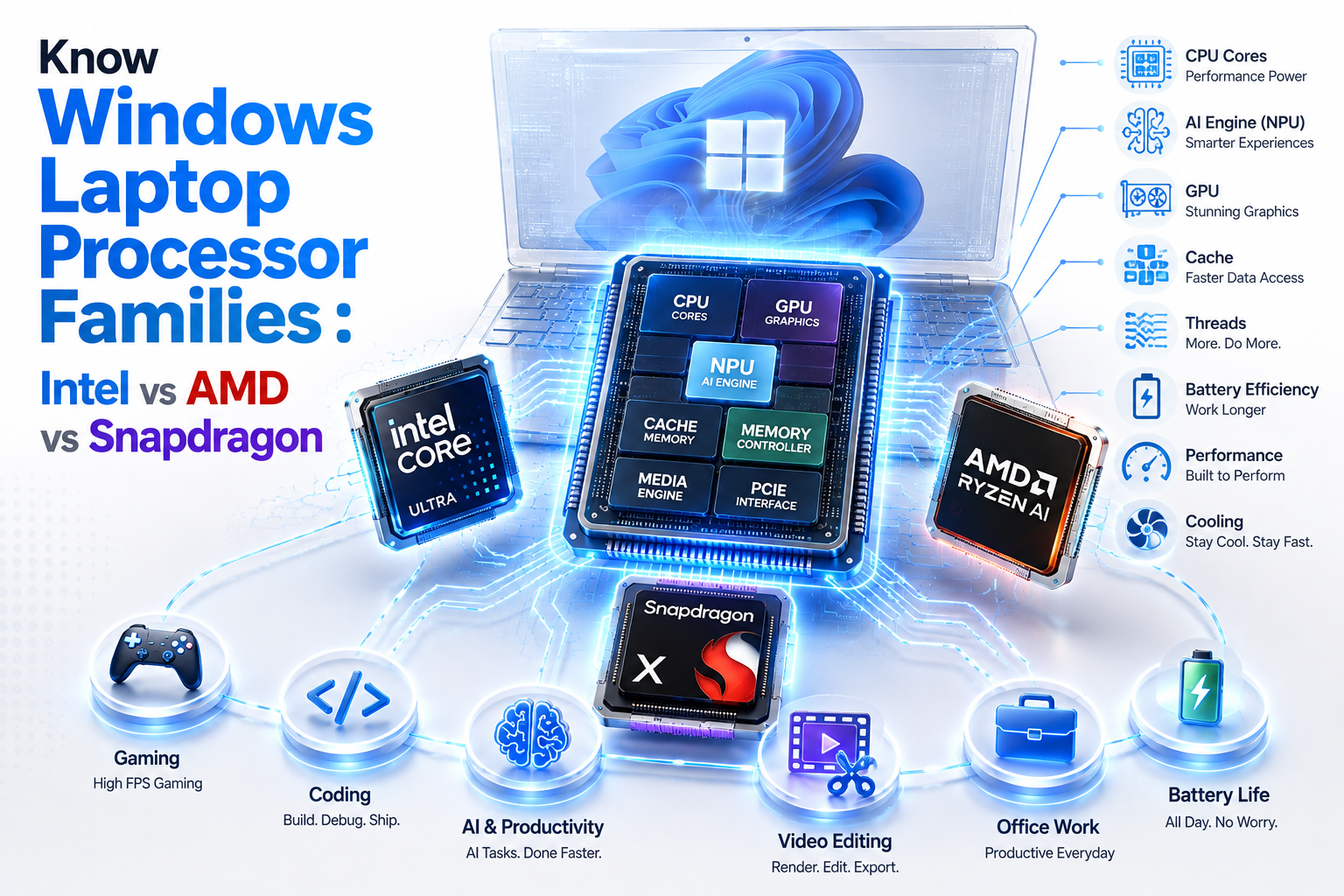

The Ultimate Windows Laptop Processor & Buying Guide (2026)
Stop relying on confusing sticker badges (`i7` or `Ryzen 7`). Systematically decode architectures, thermal power limits, and software compatibility to find your perfect machine in under 60 seconds.
Don’t buy a laptop based on sticker badges alone (`i7` or `Ryzen 7`). Make sure to perform our recommended 3 internal checks before buying a laptop in 2026 and review our comprehensive laptop buying guide before matching your processor family to your exact daily software workflow:
Key Trait: 100% universal x86 application safety.
Key Trait: Class-leading integrated 3D graphics.
Key Trait: 18+ hour battery efficiency & silent operation.
“All three Windows processor families are engineered exceptionally well in 2026. The right choice doesn’t come down to benchmark scores—it comes down to the exact software apps you launch every morning and how well the laptop chassis manages thermal cooling around the chip.”
Tap your primary requirement below. The Decision Engine will physically adapt recommendations throughout this guide:
Q1: Why does buying a Windows laptop feel so confusing (and why do sticker numbers lie)?
Buying a Windows laptop in 2026 is no longer a simple choice between two chip makers. The market is split into three entirely different computing architectures: Intel Core Ultra (x86), AMD Ryzen AI (x86), and Snapdragon X (ARM64). To understand how these co-processors interact, read our breakdown on CPU vs GPU vs TPU vs NPU explained.
For two decades, buyers assumed higher numbers equaled a faster laptop. Before opening Amazon, review our 3 internal checks you must do before buying a laptop in 2026 because badge numbers will waste your money:
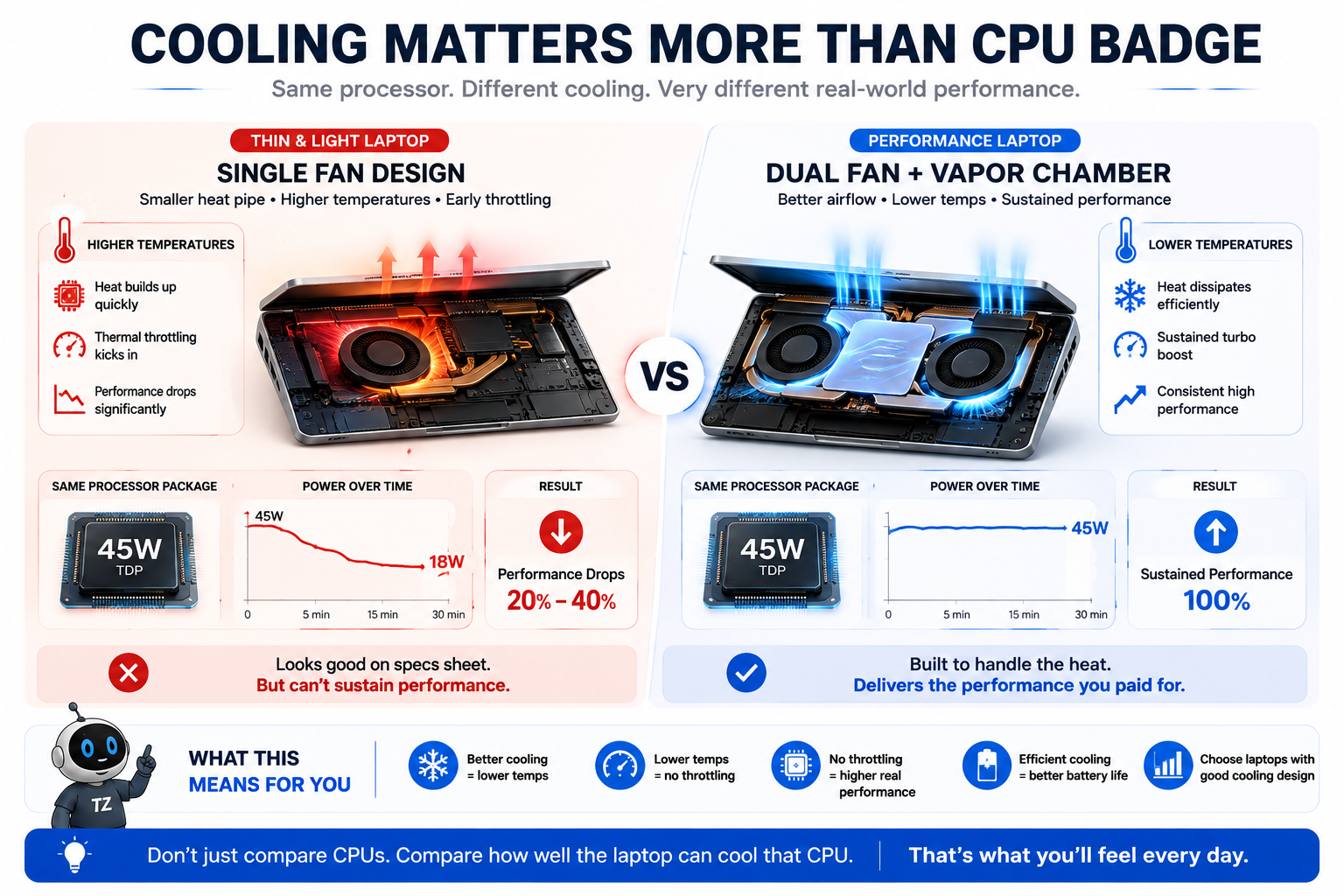
- A 15W “Ultra 7” inside a single-fan thin laptop will throttle and lose to a 45W “Ultra 5” with dual fans.
- A 10-core Snapdragon X Plus will crush an 8-core Ryzen 7 in battery life while losing to it in 3D gaming.
- Power limits (TDP), thermal cooling, and system RAM bandwidth dictate real-world speed far more than sticker badges.
- ✓ Model numbers lie: CPU wattage & cooling matter more than i5/i7 badges.
- ✓ 8GB soldered RAM in 2026 is an instant dealbreaker.
- ✓ Single-fan thin laptops will throttle performance under sustained load.
Q2: How do you decode confusing processor model strings without a CS degree?
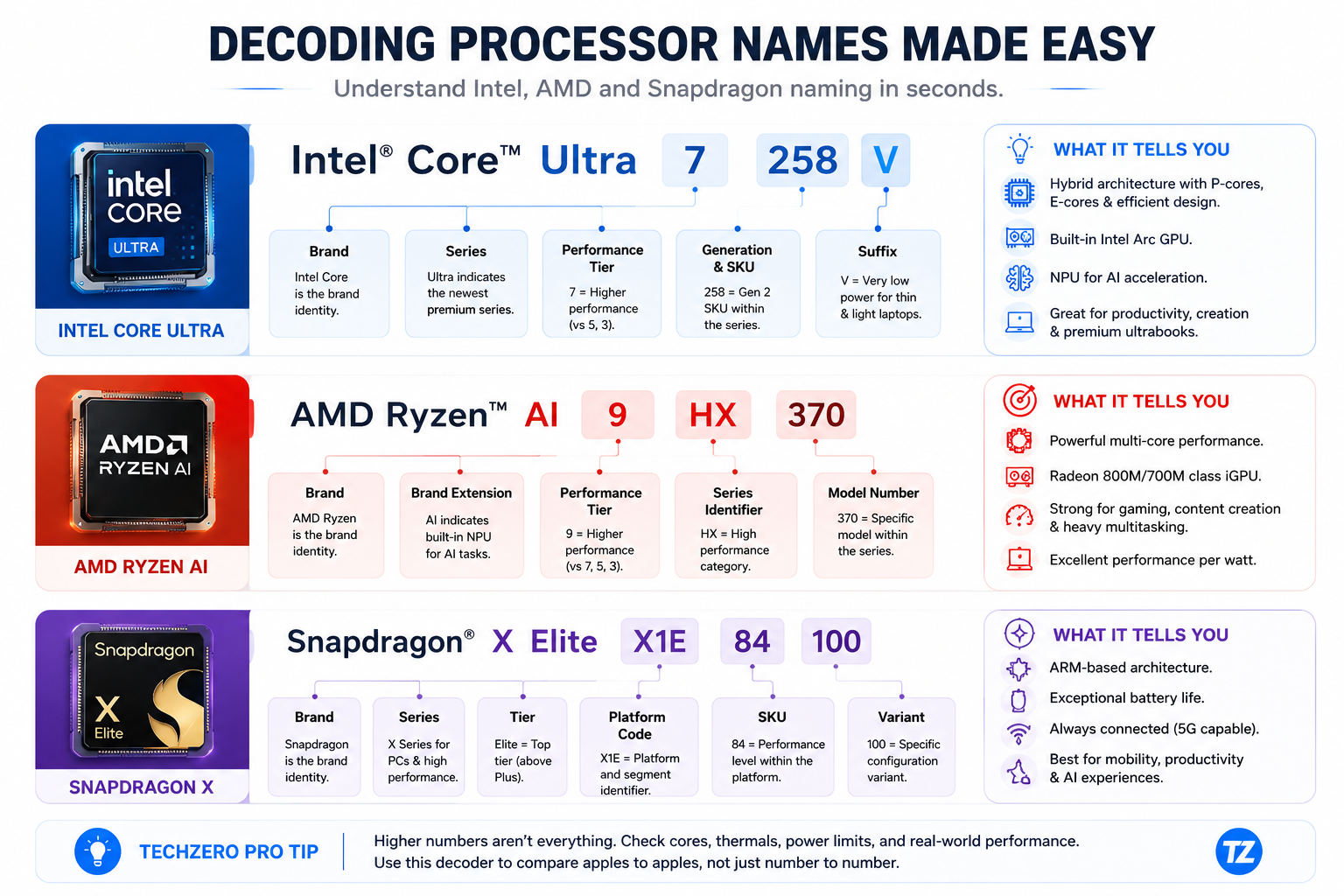
Use our visual decoder modules below to decode any complex processor string on a shopping site instantly. For a complete deep dive into Intel’s naming architecture across legacy and modern generations, check out our guide on Intel processors explained. You can also cross-reference specifications directly via the official Intel ARK Official Processor Specifications Database.
🔍 Intel Spec Decoder: Intel Core Ultra 7 258V
• 2: Series 2 Generation (Lunar Lake Architecture)
• 5: Performance SKU Index
• 8: Soldered Package Memory Indicator (8 = 32GB LPDDR5X; 6 = 16GB LPDDR5X)
• V: Ultra-efficient Lunar Lake On-Package Memory Package
🔍 AMD Spec Decoder: AMD Ryzen AI 9 HX 370
• 9: Flagship Performance Tier
• HX: High Power TDP Target (28W–54W)
• 3: 300 Series Generation Identifier
• 70: Top-Tier SKU (12 Cores / 24 Threads + Radeon 890M Graphics)
Explore official details via AMD Official Laptop Processors & Ryzen AI Specifications.
🔍 Qualcomm Snapdragon Decoder: Snapdragon X Elite X1E-84-100
• X1E: Generation 1 Elite Platform Code
• 84: Clock Speed Tier (84 = 4.2 GHz Boost; 80 = 4.0 GHz Boost; 78 = 3.4 GHz No Boost)
• 100: Silicon revision block
Review architecture highlights at Qualcomm Snapdragon X Elite Architecture Overview.
Q3: Does the laptop brand actually matter, or is it just the same chip in a different box?
You don’t buy a bare chip—you buy an integrated laptop. A Lenovo ThinkPad, an ASUS Zenbook, and a Dell XPS with the exact same processor will feel completely different in fan noise, keyboard feel, and battery life.
| Brand | Chassis DNA & Strengths | Key Lineups to Know |
|---|---|---|
| Lenovo | Industry-best keyboards, robust dual-fan cooling, durable hinge design. | ThinkPad (Business), Yoga (2-in-1), Legion (Gaming) |
| ASUS | Aggressive specs per rupee, early adopter of OLED panels & vapor chambers. | Zenbook (Premium Thin), ROG (Gaming), Vivobook (Value) |
| Dell | CNC machined aluminum, zero-lattice keyboards, enterprise IT management. | XPS (Flagship), Latitude (Enterprise), Inspiron (Consumer) |
| HP | Clean aesthetic designs, corporate security focus, Poly audio tuning. | OmniBook / Spectre (Premium), Pavilion (Value) |
| Samsung / LG | Ultra-lightweight mobility. Sub-1kg chassis and phone ecosystem syncing. | Galaxy Book Series, LG Gram Series |
Q4: Why does the exact same processor perform up to 30% faster in one laptop than another?
When a CPU works on heavy tasks (video rendering, code compiling), it generates heat. If cooling is insufficient, the chip automatically cuts its speed to avoid damage. A single-fan ultrabook will drop to 18W power within 60 seconds, whereas a dual-fan chassis maintains full 45W speed continuously. To maximize your machine’s health over time, review our ultimate battery care guide and check out standards via PCI-SIG (Peripheral Component Interconnect Special Interest Group) for PCIe bus specs.
- ✓ Brand chassis DNA determines keyboard, hinges, and screen quality.
- ✓ Dual fans or vapor chambers are essential for sustained performance.
- ✓ Single-fan designs are meant only for light browsing and document editing.
Q5: Which processor family ecosystem actually matches your daily lifestyle and mindset?
Before committing to Windows, if you are still weighing whether to jump to Apple’s macOS ecosystem, take a moment to read our comprehensive guide on Mac vs Windows: Which laptop should you buy guide.
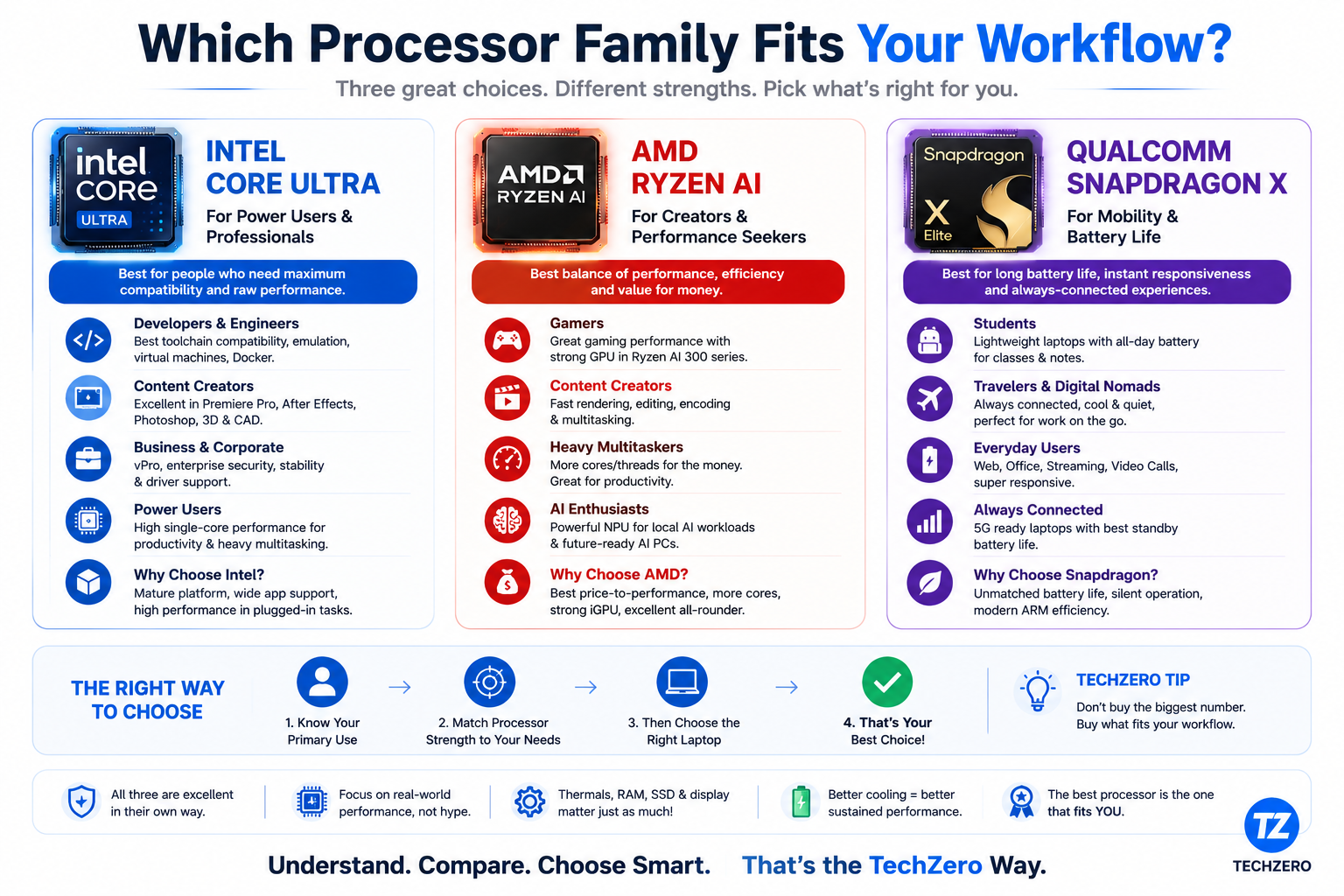
Intel Core Ultra
The Universal x86 Standard- 100% universal software compatibility
- QuickSync 4K video hardware acceleration
- Verified ISV CAD & OpenGL drivers
- Battery trails Snapdragon under light loads
AMD Ryzen AI
The Performance & iGPU King- Market-leading Radeon 890M integrated graphics
- Exceptional multi-threaded value per rupee
- Strong 50+ TOPS XDNA 2 NPU engine
- Fewer ultrabook chassis options than Intel
Snapdragon X
The Mobility & Battery Specialist- 18+ hours real-world battery efficiency
- Silent, fanless/cool physical operation
- Phone-like instant wake responsiveness
- ARM emulation issues on legacy/kernel apps
Choose Snapdragon for battery life and travel; choose Intel for professional CAD and video editing; choose AMD for iGPU gaming and maximum performance per rupee.
Q6: Who are you, and which laptop configuration was engineered specifically for your role?
🎓 Student (General / Business / Arts)
🟢 VERY HIGH CONFIDENCE
Recommended Pick: Snapdragon X Plus or AMD Ryzen 5
Why: All-day battery life across lectures without hunting for outlets. Instant wake when opening the lid. Stays completely cool on laps during typing. Looking for lower price tiers? Check out our curated list of the best future-proof laptops under ₹50,000 in India (2026).
💻 Software Developer / DevOps Engineer
🟢 VERY HIGH CONFIDENCE
Recommended Pick: Intel Core Ultra 7 or AMD Ryzen AI 7
Why: Runs native x86 Docker containers, local virtual machines, Android Studio emulators, and Linux toolchains without ARM translation layers.
🎬 Video Editor & Motion Graphics Artist
🟢 VERY HIGH CONFIDENCE
Recommended Pick: Intel Core Ultra 7 / Ultra 9
Why: Intel QuickSync hardware media engine provides unmatched timeline scrubbing and fast export times in Adobe Premiere Pro and DaVinci Resolve. Weighing your software stack? Read our detailed Adobe vs Apple Pro Apps vs Affinity creative comparison.
⚙️ Mechanical / Civil Engineer (SolidWorks, CAD)
🟢 VERY HIGH CONFIDENCE
Recommended Pick: Intel Core Ultra 7 / 9 + Dedicated NVIDIA RTX GPU
Why: Validated ISV OpenGL graphics drivers guarantee SolidWorks, ANSYS, and Revit launch without viewport crashes. Avoid Snapdragon (Incompatible).
🎮 Gamer (Integrated Slim Laptop)
🟢 VERY HIGH CONFIDENCE
Recommended Pick: AMD Ryzen AI 7 / AI 9 (Radeon 880M / 890M)
Why: Play 1080p eSports and AAA games smoothly on a slim ultrabook without carrying a heavy dedicated GPU power brick.
Q7: Will your core daily software applications work natively, or will they crash on ARM?
| Application | Intel Core Ultra | AMD Ryzen AI | Snapdragon X | Status Note |
|---|---|---|---|---|
| Microsoft Office 365 | ✅ Native | ✅ Native | ✅ Native | Fully optimized across all chips |
| Adobe Photoshop | ✅ Native | ✅ Native | ✅ Native | Native ARM64 builds available |
| Adobe Premiere Pro | ✅ Native | ✅ Native | ⚠️ Works | Native ARM build; third-party plugins vary |
| Docker Desktop / VMs | ✅ Native | ✅ Native | ⚠️ Works | x86 containers require emulation overhead |
| SolidWorks / ANSYS / CAD | ✅ Native | ✅ Native | ❌ Avoid | Fails to launch or crashes on ARM |
| Kernel Anti-Cheat Games | ✅ Native | ✅ Native | ❌ Avoid | Vanguard / Easy Anti-Cheat blocks ARM |
Stage 8: Step Decision Flow — Eliminate 90% of Laptops Instantly
• NO: Proceed to Step 2
• NO: Proceed to Step 3
• YES (iGPU Gaming / Value): Choose AMD Ryzen AI
Stage 9: Avoid Costliest Mistakes Before Hitting “Buy Now”
- Buying an 8GB RAM laptop in 2026: Soldered 8GB RAM causes severe multitasking bottlenecks within 12 months. Buy 16GB minimum.
- Buying an Ultra 9 CPU for simple Word/Excel: Wastes money and generates unnecessary thermal fan noise.
- Buying a Snapdragon ARM laptop for SolidWorks or Valorant: Kernel driver incompatibility prevents apps from launching entirely.
- Ignoring laptop cooling fan specs: A poorly cooled CPU throttles and loses up to 30% performance under load.
- Buying a heavy gaming laptop for college lectures: Short battery life and bulky power bricks make carrying it impractical.
Trace your exact budget, software requirement, and travel habits to find your single recommended hardware blueprint:
1. The Unplugged Traveler & Student
✓ Recommended Hardware Blueprint
- • Processor: Snapdragon X Plus (8/10-Core)
- • RAM: 16GB Soldered LPDDR5X
- • SSD: 512GB / 1TB PCIe Gen 4 NVMe
- • Chassis: 14″ Slim (Sub-1.3kg, Fanless/Quiet)
- • Target Models: ASUS Vivobook S 15 / Lenovo Slim 5x
2. The Developer & Video Editor
✓ Recommended Hardware Blueprint
- • Processor: Intel Core Ultra 7 (Series 2)
- • RAM: 32GB LPDDR5X (Unified)
- • SSD: 1TB PCIe Gen 4 NVMe
- • Chassis: 14″ / 16″ Dual-Fan Ultrabook
- • Target Models: Lenovo Yoga Pro 7i / ASUS Zenbook S 14
3. The iGPU Gamer & Multitasker
✓ Recommended Hardware Blueprint
- • Processor: AMD Ryzen AI 7 / AI 9
- • RAM: 32GB High-Bandwidth Memory
- • SSD: 1TB PCIe Gen 4 NVMe
- • Chassis: Slim Performance Chassis
- • Target Models: ASUS ROG Zephyrus G16 / HP OmniBook Ultra
4. The 3D Engineer & Workstation Pro
✓ Recommended Hardware Blueprint
- • Processor: Intel Core Ultra 7/9 + RTX 4060/4070
- • RAM: 32GB / 64GB DDR5 (Upgradable)
- • SSD: 2TB PCIe Gen 4/5 NVMe
- • Chassis: Heavy Vapor-Chamber Workstation
- • Target Models: Lenovo ThinkPad P-Series / Dell XPS 16
YOUR PERSONALIZED DECISION PROFILE
Generated by TechZero Decision Engine (TEDS v3)
✓ Completely cool and silent fanless operation during daily typing.
✕ Avoid if running native x86 SolidWorks or Vanguard Anti-Cheat.
Expand your research with these handpicked guides from our technical database:
Verify hardware specifications and architecture standards directly from official industry sources:
🎉 You Are 100% Ready to Buy.
Congratulations! You have systematically eliminated wrong models, understood thermal power limits, decoded spec sheets, verified software compatibility, and locked in your exact configuration.
Close This Tab & Buy ConfidentlyExpand your research with these handpicked guides from our technical database:
Verify hardware specifications and architecture standards directly from official industry sources:


[…] GPU vs NPU Understand the exact hardware powering Microsoft’s Copilot+ local processing. 💻 2026 Processor Buying Guide Don’t overpay for the wrong chip. Read this before buying y… 🧠 TechZero Deep Dives ⚡ CPU vs GPU vs NPU Understand the exact hardware powering […]