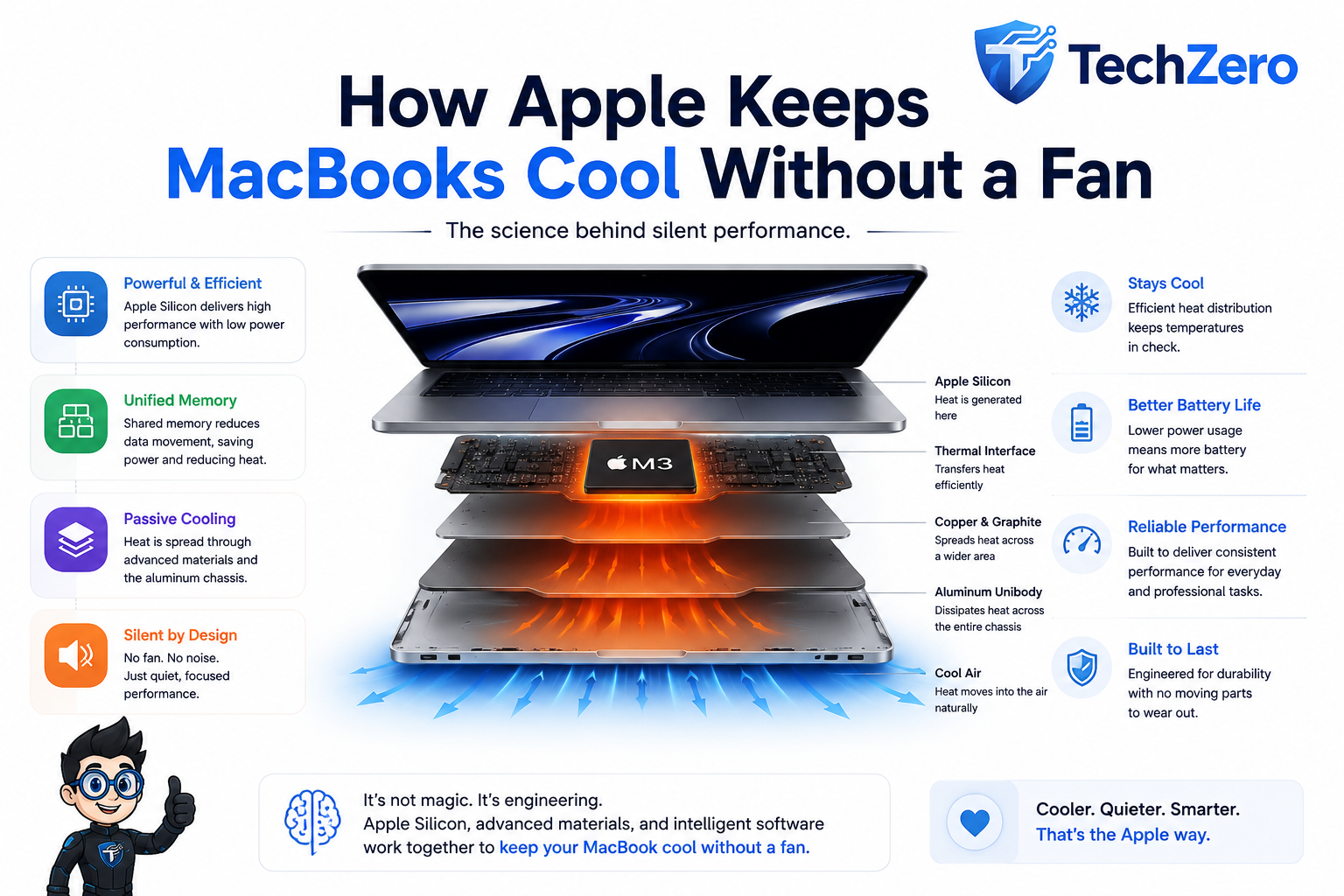

How can a MacBook Air run a powerful processor without a cooling fan?
It sounds like a simple question, but the answer reveals one of the most interesting aspects of Apple Silicon. Apple didn’t discover a magical way to eliminate heat. Instead, it redesigned the computer so that it generates considerably less heat for the work it performs. Apple Silicon, Unified Memory, dedicated processing engines, macOS power management and passive thermal engineering all contribute to the result: a MacBook that can handle everyday computing without a mechanical cooling fan.
But heat hasn’t disappeared. The real question is: where does it go?
The Basic Problem: Every Processor Makes Heat
Every computer processor produces heat. Billions of transistors switch on and off while performing calculations, consuming electrical energy in the process. A portion of that energy inevitably becomes heat, which means every computer needs some way to manage thermal energy.
Traditional laptops generally follow a familiar formula: generate heat, move it away from the processor, transfer it into a heat sink and use a fan to push hot air out of the machine. High-performance gaming laptops take this approach to the extreme, using large heat sinks, multiple heat pipes and several fans because their CPUs and GPUs can consume substantial amounts of power during sustained workloads.
Apple approached the problem from the other direction. Instead of primarily asking “How do we cool this processor?”, Apple Silicon is designed around a more important question: “How much useful performance can we get from every watt of power?”
That change in priorities is fundamental to understanding fanless MacBooks.
Performance Per Watt Is the Real Secret
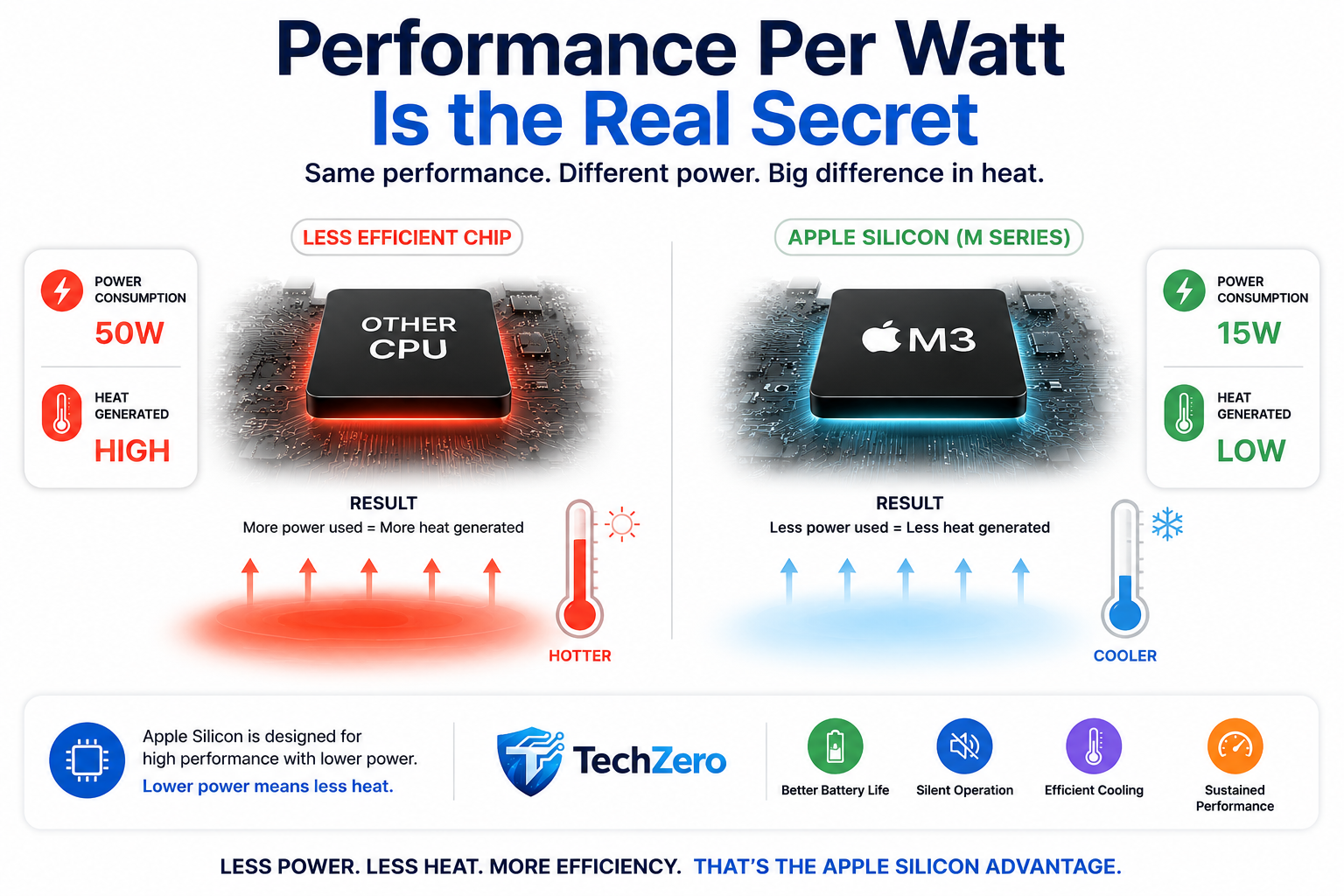
Imagine two processors delivering roughly the same amount of useful performance. One consumes 50 watts while the other consumes 15 watts. The 15-watt processor has an enormous advantage in a thin, fanless computer because it isn’t simply using less electricity; it is also producing less heat that the system has to dissipate.
That difference can translate into a thinner thermal system, longer battery life, quieter operation and greater design flexibility. For a fanless laptop, therefore, performance per watt can be more important than raw benchmark performance.
Apple Silicon’s efficiency advantage
| What lower power consumption enables | Why it matters |
|---|---|
| Less heat generation | Easier passive cooling |
| Lower battery consumption | Longer runtime |
| Smaller thermal requirements | Thinner designs |
| Less cooling hardware | Silent operation |
| Better efficiency | More performance from each watt |
This is the foundation of Apple’s fanless strategy: reduce the heat that needs to be removed before worrying about how to remove it.
If you want to go deeper into how Apple Silicon, memory and Mac configurations affect real-world performance, see our Mac Unified Memory Buying Guide.
Apple Silicon Does More With Less
Apple Silicon isn’t simply a CPU placed inside a MacBook. It is a highly integrated System-on-a-Chip (SoC) that brings together the CPU, GPU, Neural Engine, Media Engine, memory controller and other specialized components.
In a traditional computer, data may have to travel between physically separate components across the motherboard. Moving that data requires electrical energy and takes time. By integrating major processing components into a tightly connected SoC, Apple can reduce some of that unnecessary movement and improve overall efficiency.
The thermal benefit is indirect but important: less unnecessary work and data movement can mean less energy consumption, and less energy consumption means less heat.
The Unified Memory Advantage
Unified Memory is another important piece of the efficiency puzzle. Traditional computer architectures often maintain separate memory arrangements for the CPU and GPU. When both processors need access to the same information, data may need to be copied between memory pools.
Apple Silicon instead uses a shared memory architecture. The CPU, GPU and other processing engines can access the same memory pool, reducing some of the unnecessary data copying that can occur in separate-memory designs.
Unified Memory is not itself a cooling system, but reducing unnecessary data movement can reduce associated energy consumption. It is one part of Apple’s broader strategy of getting more useful work from every watt.
Why Unified Memory matters
| Traditional approach | Apple Silicon approach |
|---|---|
| Separate CPU/GPU memory pools | Shared memory pool |
| Data may need to be copied | Shared access to data |
| More data movement | Less unnecessary movement |
| Additional energy overhead | Potentially lower energy use |
| More architectural complexity | Highly integrated design |
For a deeper explanation of how memory affects Mac performance and buying decisions, see our Mac Unified Memory Buying Guide.
Dedicated Hardware Makes Specific Tasks More Efficient
Not every workload needs a general-purpose CPU. Apple Silicon includes specialized hardware designed to perform particular types of work more efficiently.
The Media Engine, for example, handles supported video encoding and decoding tasks without forcing the CPU to perform all of that work itself. Similarly, the Neural Engine is designed for certain machine-learning workloads.
This is important because specialized hardware can perform specific jobs using less power than a general-purpose processor might require. The result is another small but important contribution to the overall thermal strategy.
Efficient hardware → less power consumed → less heat generated.
So, Where Does the Heat Go?
This is the part that often confuses people.
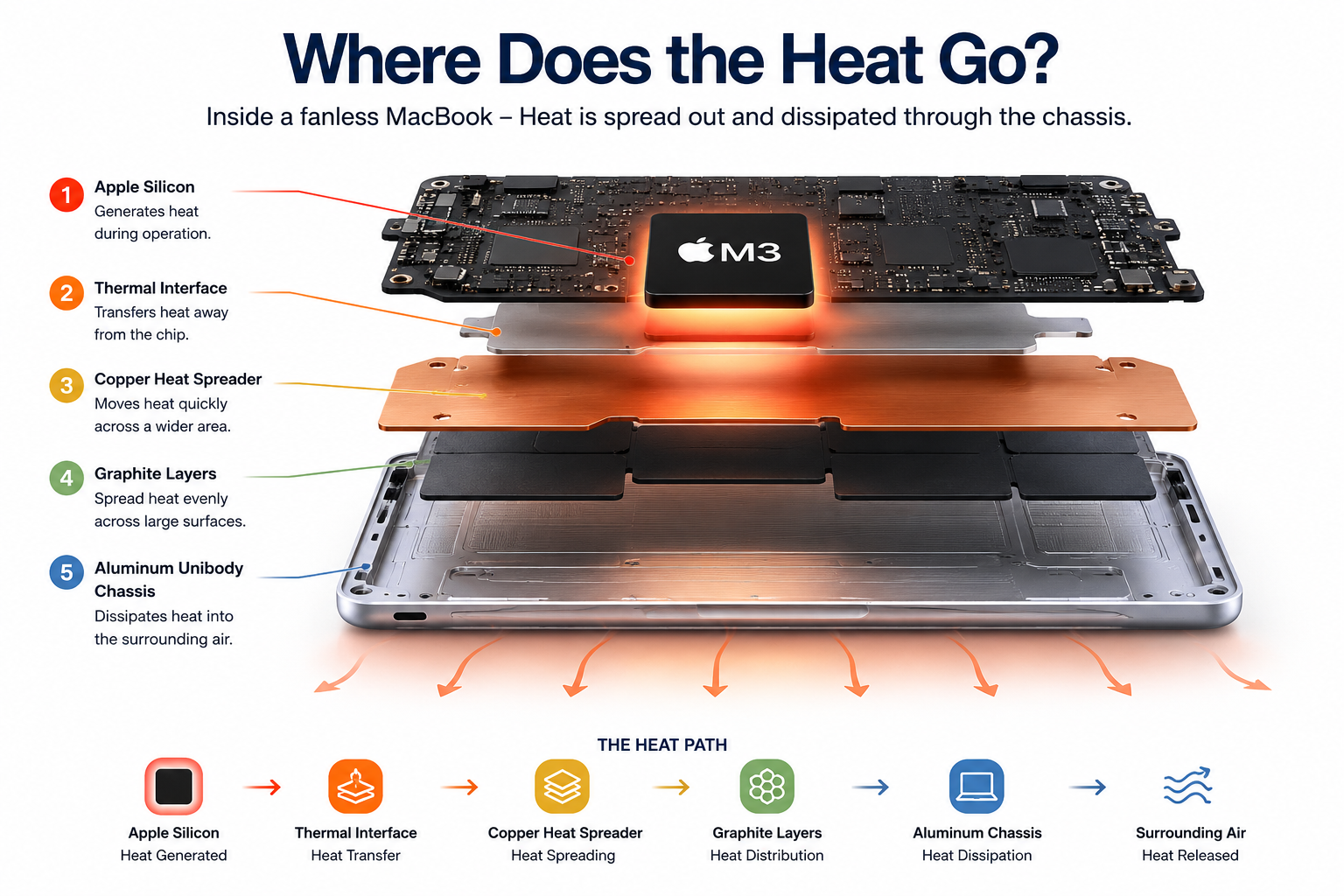
A fanless MacBook still generates heat. The heat doesn’t disappear. Instead, passive thermal engineering moves heat away from concentrated hot spots and spreads it across a much larger area before releasing it into the surrounding environment.
A simplified representation looks like this:
Apple Silicon → Thermal Interface → Heat-Spreading Materials → Aluminum Chassis → Surrounding Air
The exact thermal implementation varies between MacBook models, but the principle remains the same: move heat away from the hottest component and spread it over a larger surface so it can dissipate naturally.
The Aluminum Chassis Is Part of the Cooling System
The aluminum enclosure isn’t merely a design statement. Its large surface area also provides a useful path for passive heat dissipation.
Copper and other thermally conductive components can move heat away from concentrated hot spots, while thin graphite-based thermal materials can help spread heat across larger surfaces. The aluminum chassis then acts as a broad thermal surface that allows energy to dissipate into the surrounding environment.
This explains something MacBook owners often notice: the machine can feel warm during demanding work even though there is no fan.
Warm does not automatically mean overheating.
If heat is being transferred into the chassis, feeling warmth on the bottom of the machine can actually indicate that the thermal system is doing what it is supposed to do.
macOS Is Part of the Cooling Strategy
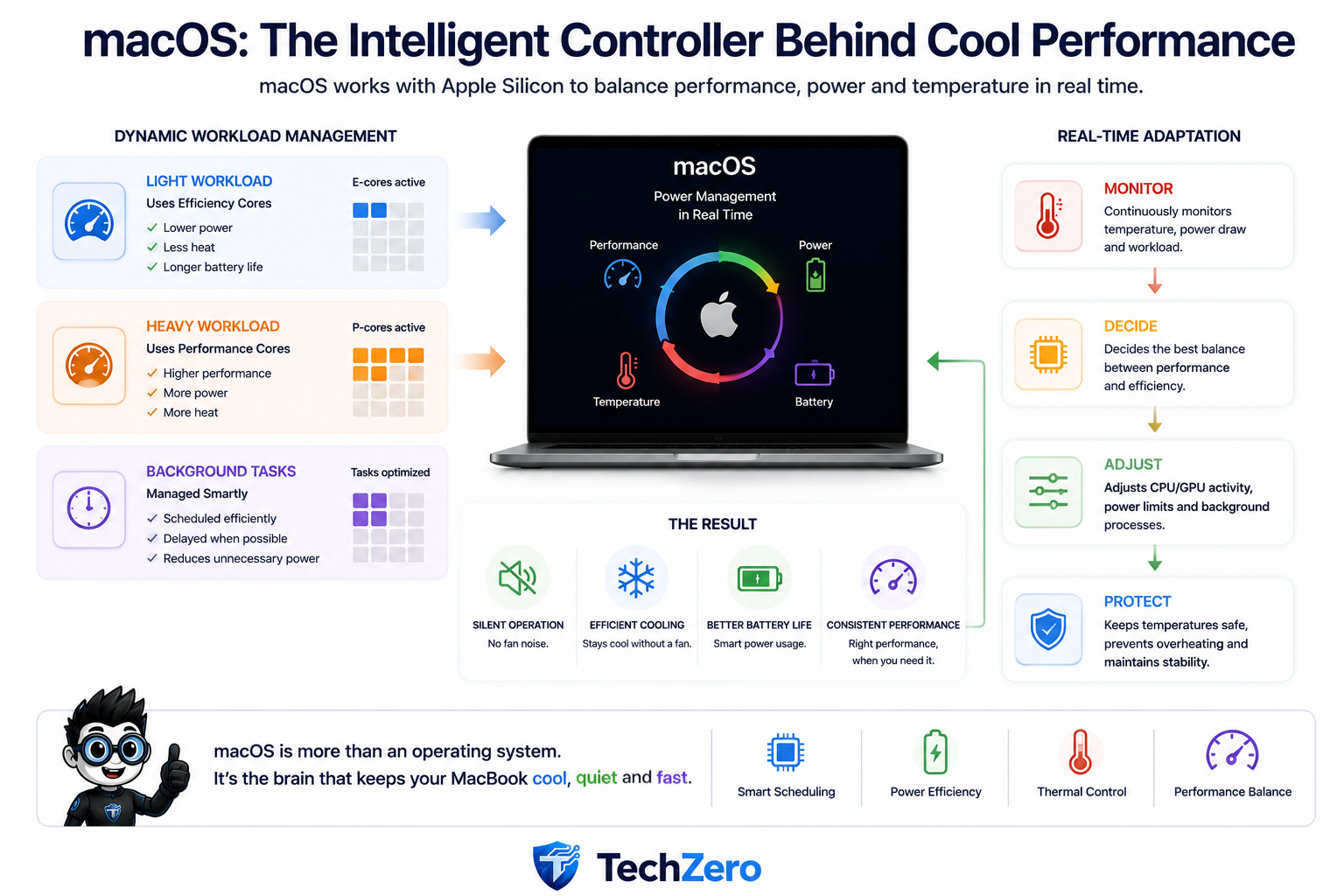
Hardware efficiency alone isn’t enough. Apple also controls the operating system running on its silicon, allowing macOS to manage processor activity, workload scheduling, background tasks and power consumption as part of the overall system.
A light background task doesn’t need the same amount of computing power as a video export or software compilation. macOS can therefore manage processor resources according to workload rather than keeping the system at maximum performance continuously.
The principle is simple:
Use as much computing power as necessary—not as much as possible all the time.
This helps reduce unnecessary energy consumption and, consequently, unnecessary heat.
You can also explore practical macOS controls in our macOS Settings Guide.
The “Finish Fast, Sleep Fast” Advantage
Most everyday computer tasks don’t require maximum processor performance for minutes at a time. Opening an application, searching the web, switching documents or performing a quick calculation may require a short burst of processing followed by a return to a low-power state.
This creates a useful pattern:
Work hard → finish quickly → return to low power.
That is very different from running a processor at high power continuously. By completing short tasks quickly and returning to an efficient state, the system can remain responsive without constantly generating large amounts of heat.
This is one reason a fanless MacBook can feel surprisingly fast while remaining silent.
The Catch: Fanless Doesn’t Mean Unlimited Performance
This is where the physical limits of passive cooling become important.
Browsing the web, writing documents, watching videos or handling normal office work generally involves relatively light or intermittent processor activity. Long 4K video exports, 3D rendering, large software builds and sustained local AI workloads are different because they can keep the CPU or GPU working at high utilization for many minutes or even hours.
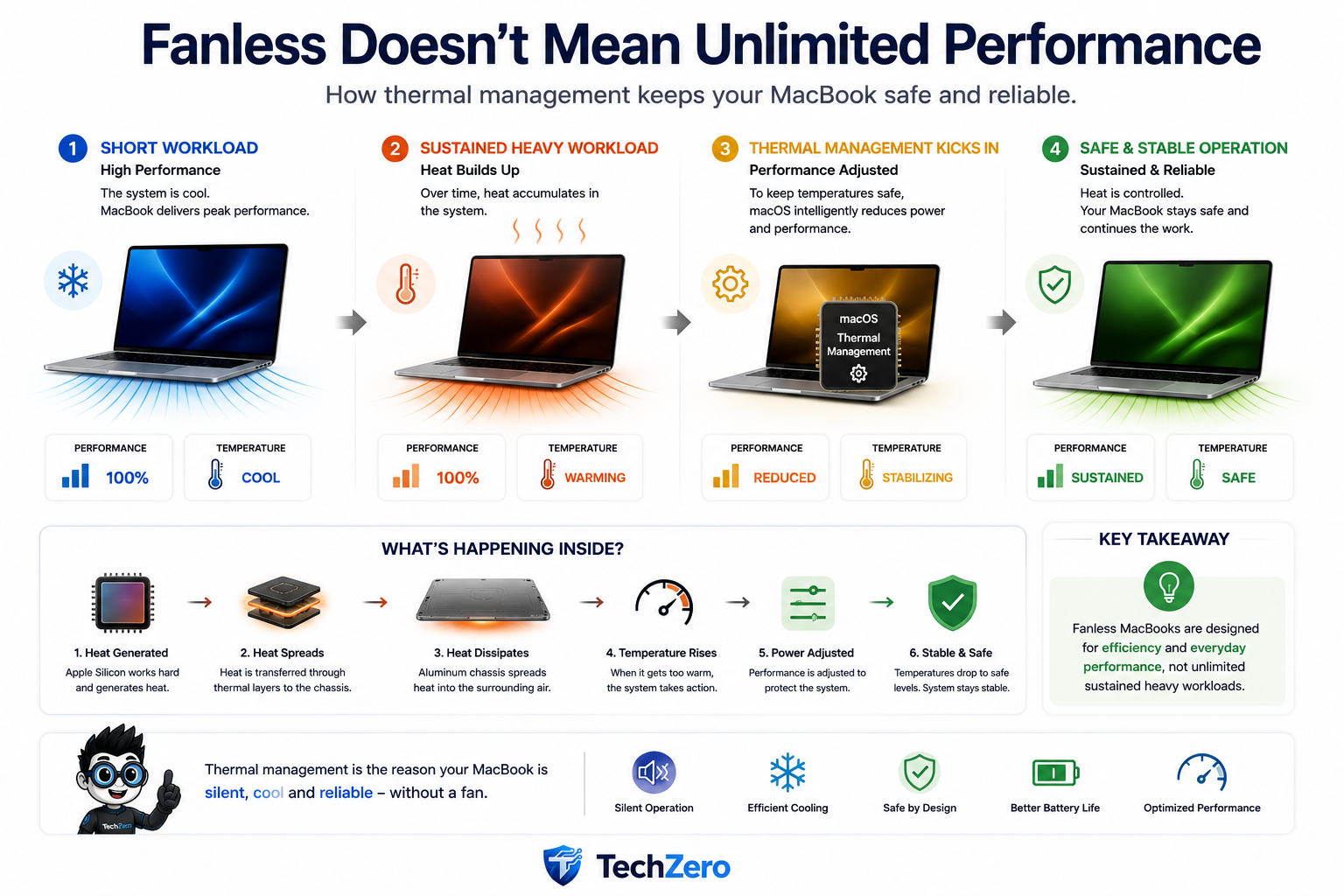
During a short burst of heavy work, the processor can operate at high performance while the thermal system absorbs and spreads the resulting heat. During a sustained workload, however, heat continues to accumulate faster than passive cooling can remove it.
Eventually, the system has to balance performance against temperature.
Thermal Throttling: The Safety Valve
If temperatures approach thermal limits, the system can reduce processor power and frequency. This behaviour is known as thermal throttling.
A simplified version looks like this:
| Thermal condition | System response |
|---|---|
| Light workload | Low power, low heat |
| Short heavy workload | Higher power and performance |
| Sustained heavy workload | Heat gradually increases |
| Thermal limit approached | Power/frequency reduced |
| Temperature stabilizes | Safe operation maintained |
Thermal throttling is not a failure. It is a protection mechanism that allows the computer to sacrifice some performance when necessary rather than allowing temperatures to continue rising.
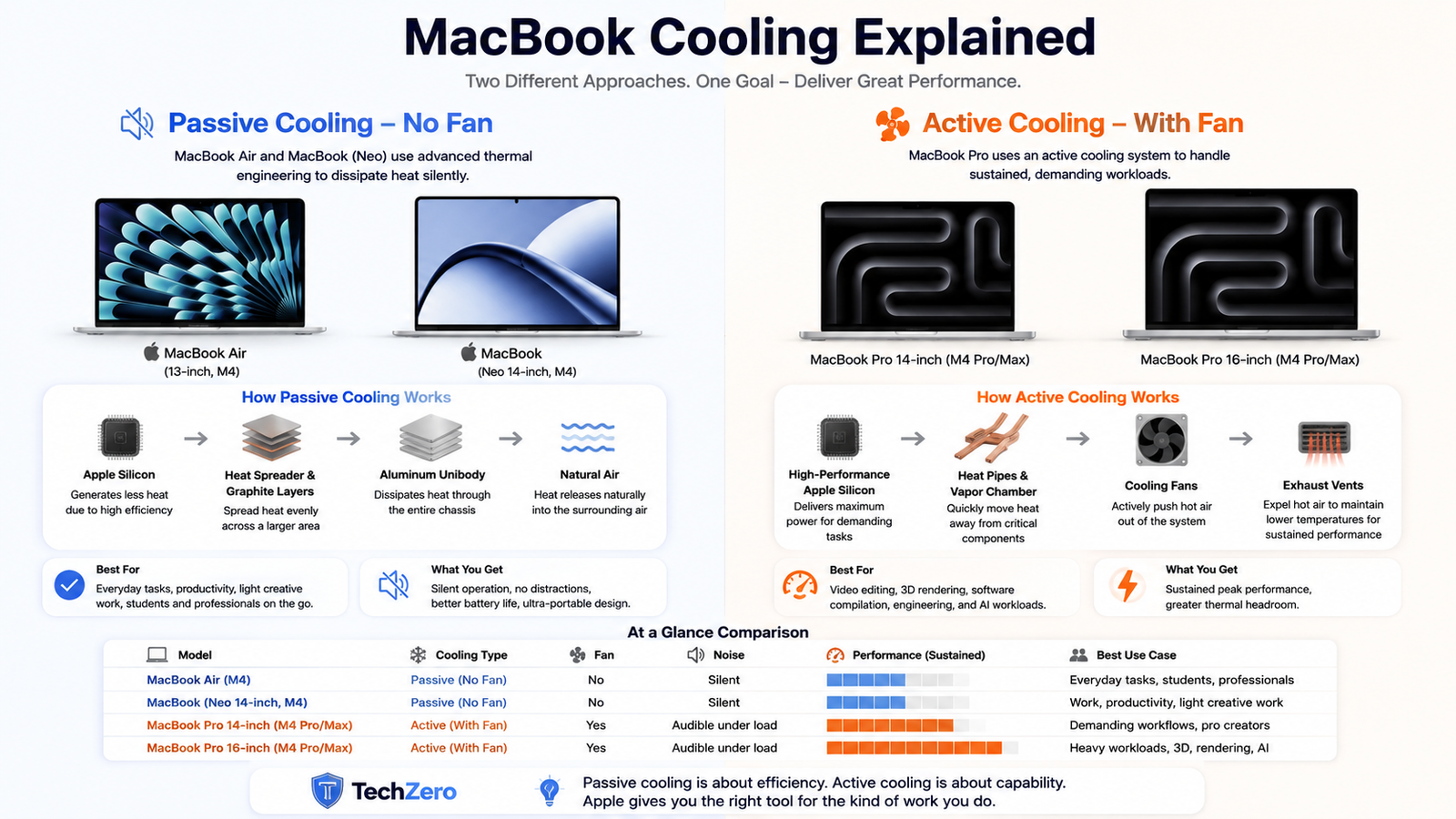
Why the MacBook Pro Has a Fan
This explains one of the most common questions about Apple’s laptop lineup:
If Apple can build a fanless MacBook, why does the MacBook Pro still need active cooling?
The answer is sustained performance.
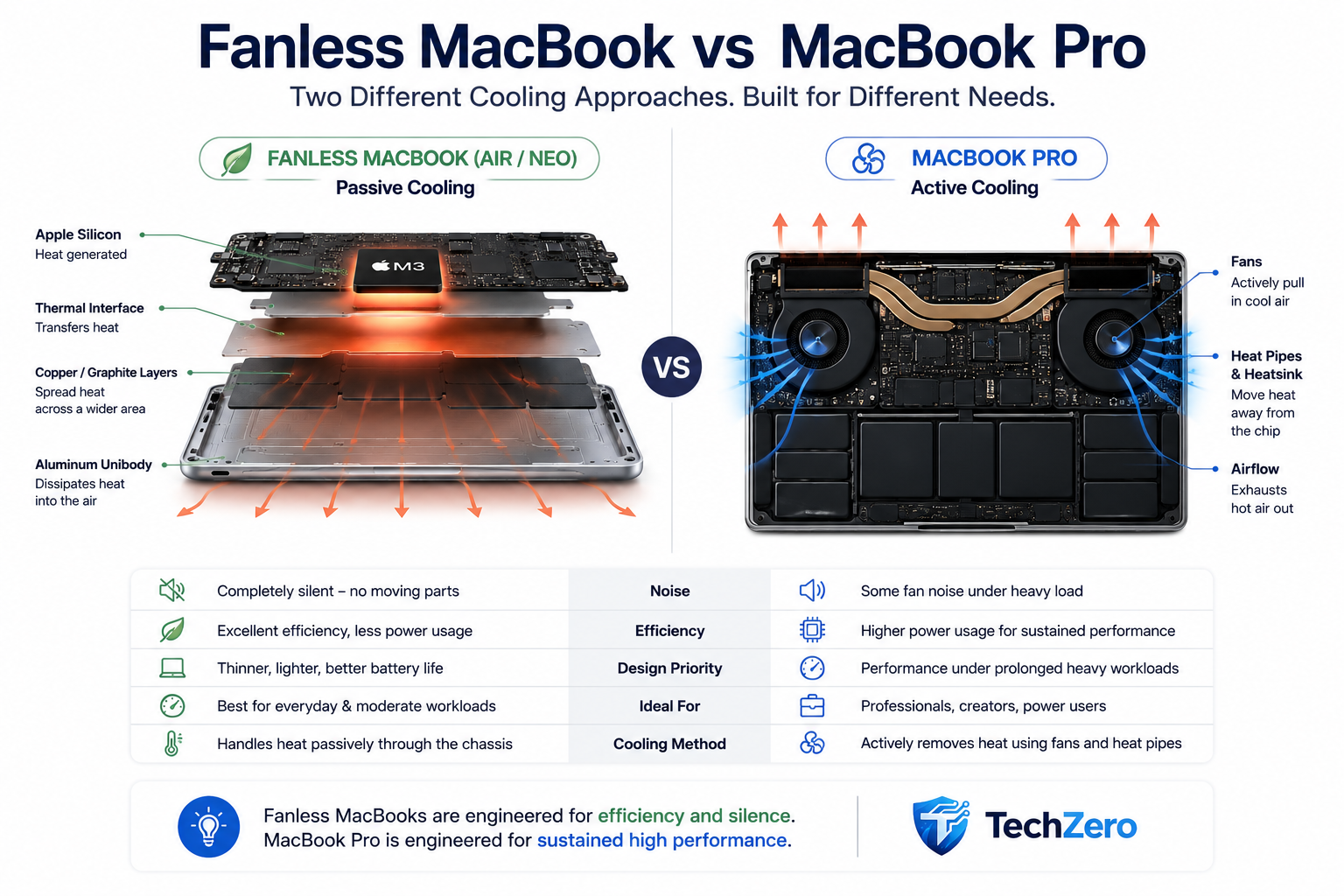
A fan continuously moves heat away from the internal cooling system, allowing a MacBook Pro to maintain higher power levels for longer periods. This creates additional thermal headroom for professional workloads such as rendering, long video exports, large software builds and sustained computational or AI workloads.
So the difference isn’t:
Fanless = slow
and
Fan = fast.
It is more accurately:
Fanless = efficient, silent and excellent for everyday and moderate workloads.
Active cooling = greater thermal capacity for sustained heavy workloads.
For a deeper look at this specific behaviour, see our guide to MacBook Air thermal throttling.
Fanless vs Active Cooling: Which Mac Is Right for You?
| Your workload | Thermal demand | Better choice |
|---|---|---|
| Browsing, Office, research | Low | Fanless Mac |
| Streaming, email, documents | Low | Fanless Mac |
| Light programming | Low–Moderate | Fanless Mac |
| Photo editing | Moderate | Fanless Mac |
| Occasional video editing | Moderate | Fanless Mac can work well |
| Frequent long video exports | High | MacBook Pro |
| 3D rendering | High / sustained | MacBook Pro |
| Heavy local AI workloads | High / sustained | MacBook Pro |
| Long software compilation | High / sustained | MacBook Pro |
The key word is sustained. A fanless Mac can be remarkably capable, but if your workload continuously pushes the processor for long periods, active cooling becomes increasingly valuable.
If you’re deciding whether a fanless MacBook Air is sufficient for your workload, our MacBook Air Buying Reference goes deeper into configurations and use cases.
For a broader look at Apple’s Mac lineup, see our MacBooks Buying Guide 2026.
What About the MacBook Neo?
The same cooling question matters when considering the MacBook Neo. Its positioning makes passive cooling particularly relevant because silent operation, efficiency and everyday usability are central to the experience.
If you’re specifically evaluating Apple’s Neo lineup, see our MacBook Neo Buying Guide 2026 for the broader buying picture.
What About a Cooling Pad?
For a fanless MacBook, a conventional USB cooling pad isn’t the solution many people imagine.
A fanless Mac doesn’t rely on an internal fan drawing air through a heat sink. Its primary thermal strategy is passive heat spreading and dissipation through the machine and its chassis.
Instead, give the Mac something much simpler: a hard, flat surface.
A desk is ideal. During demanding workloads, avoid placing the MacBook on a bed, blanket or thick cushion, where heat dissipation can be restricted.
Does a Warm MacBook Mean Something Is Wrong?
Not necessarily.
A warm chassis during a demanding workload can be completely normal. What matters more is how the computer behaves. Unexpected shutdowns, persistent severe performance degradation, temperature warnings, freezing or unusual behaviour while the Mac is otherwise idle are more meaningful warning signs than simply feeling warmth on the aluminum enclosure.
Warm is not the same thing as overheating.
The Whole System Works Together
The reason Apple’s fanless approach works isn’t one magical component. It is the combination of efficient silicon, integrated architecture, shared memory, specialized processing engines, software power management and passive thermal engineering.
| Technology | What it contributes |
|---|---|
| Apple Silicon | High performance per watt |
| SoC architecture | Highly integrated processing |
| Unified Memory | Reduces some unnecessary data movement |
| Dedicated engines | Efficient specialized processing |
| macOS | Workload and power management |
| Thermal materials | Move and spread heat |
| Aluminum chassis | Large passive heat-spreading surface |
| Thermal management | Controls temperature and protects hardware |
The important insight is that the cooling system begins before the processor even becomes hot. Apple reduces unnecessary power consumption first, then uses passive thermal engineering to manage the heat that remains.
A Fanless Mac Isn’t “Cooler” — It’s More Efficient
This distinction is worth remembering.
A MacBook Air isn’t necessarily cooler than a MacBook Pro under every workload. In fact, under sustained heavy workloads, an actively cooled MacBook Pro can move heat away more aggressively.
The advantage of the fanless design is different.
It doesn’t need to remove as much heat in the first place.
That’s why the Air can remain completely silent while delivering excellent performance for the workloads it is designed to handle.
Want to Go Deeper?
You’ve just read the concise version. If you want the complete engineering story, explore our full-length guide or download the detailed PDF edition for offline reading.
Free TechZero Engineering Guide · Full-length reference edition
TechZero Verdict
The biggest misconception about Apple’s fanless MacBooks is that Apple somehow eliminated heat.
It didn’t. Apple reduced the amount of heat that needs to be managed in the first place.
Apple Silicon’s performance-per-watt efficiency, integrated architecture, Unified Memory, specialized processing engines and macOS power management all work together. The thermal system then moves and spreads the remaining heat through the machine’s internal materials and aluminum chassis.
That’s why a fanless MacBook can be silent, thin, efficient and surprisingly powerful.
But physics still wins. If your workload involves hours of continuous rendering, compilation, 3D work or local AI processing, an actively cooled MacBook Pro remains the better tool.
📌 TechZero Takeaway
The best cooling system isn’t always the one that removes the most heat. Sometimes, it’s the one that never generates the heat in the first place.
External Sources & Further Reading
Want to explore the technology behind Apple’s fanless MacBooks in more detail? These official Apple resources provide additional information on Apple silicon, Unified Memory, MacBook Air’s fanless design, power management and thermal behaviour.
- Apple: MacBook Air with M4 and its fanless design
- Apple: M1 and the performance-per-watt advantage of Apple silicon
- Apple Developer: Understanding Apple silicon system architecture and Unified Memory
- Apple Support: Power Modes and power management on Mac
- Apple Support: Keeping your Mac laptop within acceptable operating temperatures
- Apple: MacBook Pro thermal design and sustained performance



[…] ← Read the Quick Guide […]