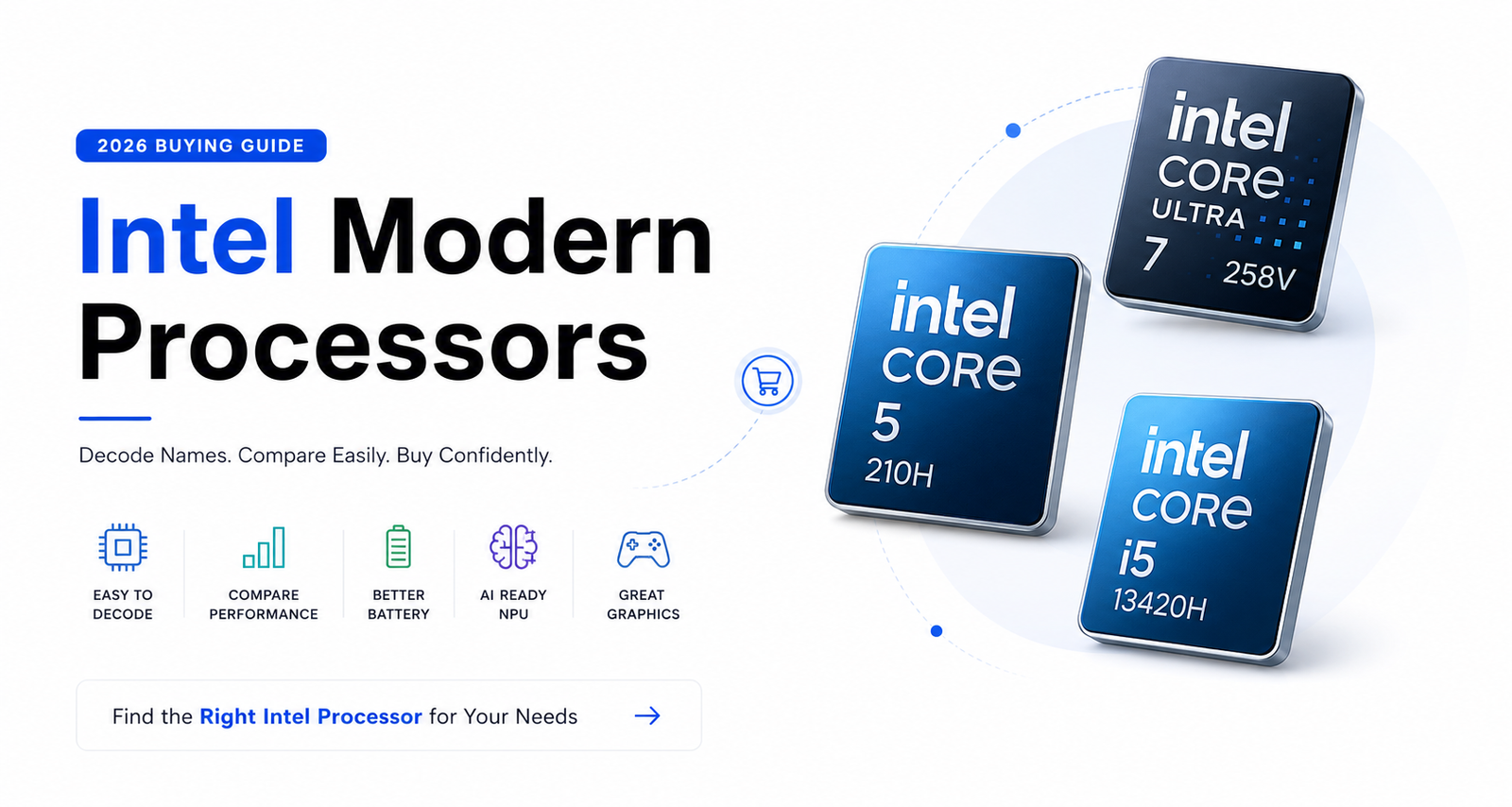
Intel Core, Core Ultra & Suffixes Explained – Don’t get confused with Intel Processors names

Intel CPU Buying Guide 2026
Understand Intel Core and Core Ultra processors, generations, CPU suffixes, AI capabilities and performance tiers before you buy.
Executive Summary & TL;DR
Key Takeaways in Under 60 Seconds🎯 At-A-Glance Intel CPU Buyer Matrix
| Your Priority | Target CPU | Typical Budget |
|---|---|---|
| All-Day Battery & AI | Core Ultra 7 / 5 V-Series | $950+ / ₹80K+ |
| Mainstream Value | Core Ultra 5 / Core 5 | $600–$950 / ₹50K–₹80K |
| 4K Video Editing / Creative Work | Core Ultra 7 / Ultra 9 H-Series | $1,200+ / ₹1L+ |
| High-FPS Gaming + RTX | Core Ultra 7 / Ultra 9 HX-Series | $1,450+ / ₹1.2L+ |
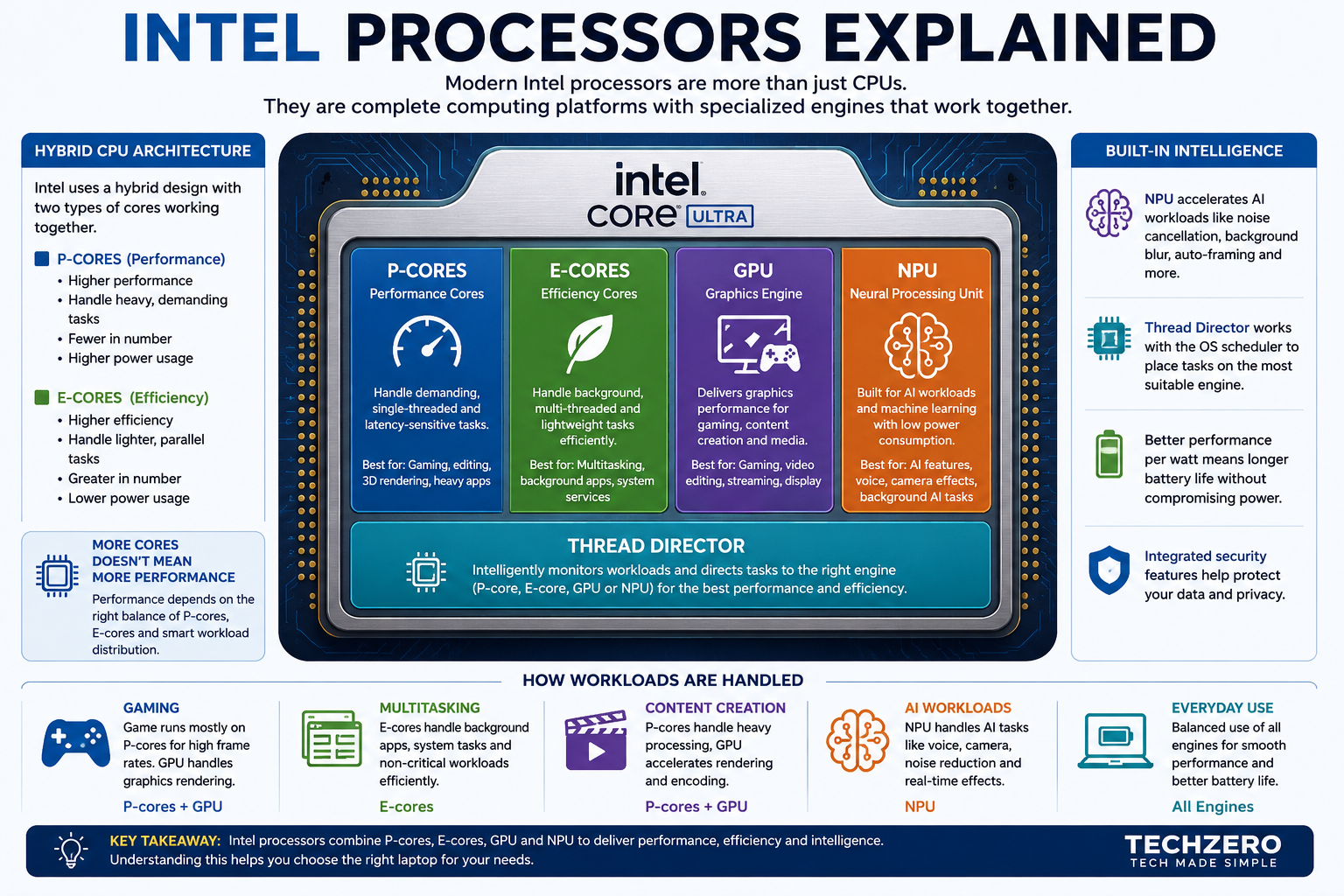
Modern Intel CPU Lineup Simplified
Understand Intel Core, Core Ultra and CPU suffixes at a glance.
Why Intel’s Naming Scheme Became So Confusing
Intel completely overhauled its processor branding, retiring the decade-old “Core i3/i5/i7/i9” badge system in favor of Core and Core Ultra. This transition created a major trap for buyers, making legacy, power-hungry chips look deceptively higher-end than faster, highly efficient modern processors.
The Retailer Trap: Name Tier vs. Real Performance
An older Core i7 sounds superior to a modern Core Ultra 5, but in reality, the newer Ultra chip obliterates it in battery life, Arc GPU speeds, and AI processing:
📊 TechZero Specification Verification
Side-by-Side Hardware Reality| Processor | Architecture | Core Config | NPU AI TOPS | Base Power |
|---|---|---|---|---|
| Core Ultra 7 258V | Lunar Lake (Series 2) | 8 Cores (4P + 4E) | 47 TOPS (Copilot+) | 17W (Ultra Efficient) |
| Core Ultra 5 225H | Arrow Lake (Series 2) | 14 Cores (4P + 10E) | 13 TOPS | 28W |
| Core i7-13620H | Legacy (13th Gen) | 10 Cores (6P + 4E) | 0 TOPS (No NPU) | 45W (High Drain) |
🎯 The 5-Second Retailer Filter Test
Part 2: Intel Naming History
Intel’s processor naming has evolved drastically over three decades. It started with the legendary Pentium and Celeron chips focused on clock speeds, moved to the iconic “Core i” generation system, and has now dropped the “i” entirely for a modern, AI-focused tiering structure.
🧬 Processor Naming Evolution
| Feature | 💾 Retro Era | ⏪ The “i” Era | ⏩ New AI Era |
|---|---|---|---|
| Family Names | Pentium, Celeron | Core i3, i5, i7, i9 | Core & Core Ultra |
| Primary Metric | Raw Clock Speed (MHz) | Generation Number (e.g., 12th) | NPU & Power Tier |
| Naming Example | Pentium 4 3.0GHz | Core i5-1135G7 | Core Ultra 7 258V |
| How to Read | Bigger MHz number = Faster | First two digits = Gen (11 = 11th Gen) | Letter suffix = Use case (V = Battery) |
Part 3: Core vs. Core Ultra
This is the most critical distinction in Intel’s lineup[cite: 1]. “Core” represents standard budget efficiency for basic daily computing, while “Core Ultra” introduces dedicated AI hardware (NPU), superior integrated graphics, and maximum battery efficiency[cite: 1].
Learn Before You Compare
Intel Core
- 🎓 Targeted at Office & Students[cite: 1]
- 🏷️ Budget-friendly pricing[cite: 1]
- 🔌 Lower total power draw[cite: 1]
- 🚫 No advanced AI or NPU[cite: 1]
Intel Core Ultra
- 💻 Designed for Premium Laptops[cite: 1]
- 🧠 Built-in NPU (Copilot+ AI PCs)[cite: 1]
- 🔋 Significantly longer battery life[cite: 1]
- 🎮 Better integrated Arc Graphics[cite: 1]
🎯 Which Tier Should You Choose?
Part 4: Decoding Processor Names
Every character in a modern Intel processor string tells a specific story about its performance, generation, and target device. Once you learn to read the 6-part formula, you can instantly determine a laptop’s true power in under three seconds.
Learn Before You Decode
🔍 TZ-006 CPU Decoder Breakdown
Interactive Model📊 Modern Intel Naming Reference Matrix
| CPU Model | Tier Class | Series # | Target Purpose |
|---|---|---|---|
| Core Ultra 7 258V | Ultra Tier | Series 2 | Thin & light, max battery, local AI |
| Core Ultra 5 225H | Ultra Tier | Series 2 | High performance gaming & editing |
| Core 7 150U | Standard Tier | Series 1 | Everyday productivity & web browsing |
| Core i5-13420H | Legacy “i” | 13th Gen | Older stock / budget clearance |
⚡ TechZero Instant Reading Rule
Part 4: Decoding Processor Names
Recommended Hardware Guides
MacBook Air: Upgrade RAM or SSD First?
Uncover whether unified memory or storage upgrades give you better long-term ROI before buying.
MacBook RAM & SSD Buying Guide 2026
Avoid the 8GB trap. Exact memory and storage sizing rules for everyday users and professionals.
MacBook vs. Microsoft Surface: Which Should You Buy?
Comparing Apple Silicon against modern Windows ARM & Intel Copilot+ PCs on performance and battery life.
Every character in a modern Intel processor name provides a specific technical specification. Reading the string correctly reveals the chip’s performance tier and power limit.
[TZ-006 CPU Decoder]
🔍 Core Ultra 7 258V Breakdown
- Core = Brand
- Ultra = Premium AI Tier
- 7 = Processor Level
- 2 = Series (Generation)
- 58 = SKU Number
- V = Suffix (Power/Class)
The Intel CPU Suffix Guide
The letter suffix at the end of an Intel processor model dictates its thermal envelope, power limits, and device form factor. Choosing the wrong suffix is the single biggest cause of buyer regret—turning what looks like a powerful chip into a battery-draining laptop or thermal bottleneck.
3 Golden Rules of Suffix Logic
📊 Suffix Master Reference Matrix
Complete Lineup Cheat Sheet| Suffix | Category & Form Factor | Best Workload Fit | Battery Life | Thermals |
|---|---|---|---|---|
| V | Lunar Lake AI Mobile | Ultraportables, Copilot+ AI, All-Day Work | 🟢 15+ Hours | 🟢 Cool / Silent |
| U | Budget Ultra-Low Power | Office Productivity, Browsing, Students | 🟢 High | 🟢 Cool |
| P | Balanced Thin & Light | Premium Business Laptops & Multitasking | 🟡 Moderate | 🟡 Warm |
| H | High-Performance Mobile | 4K Video Editing, Coding, Arc Gaming | 🔴 Medium-Low | 🔴 Warm / Fan Active |
| HX | Desktop Silicon on Mobile | AAA Gaming Laptops, RTX GPUs, 3D Rendering | 🔴 Low (1-3 Hrs) | 🔥 Hot / High Noise |
| K | Desktop Unlocked | Overclocking, Custom Liquid Cooling Desktop PCs | N/A (AC Power) | 🔥 High Heat Output |
| KF | Unlocked Desktop (No iGPU) | Overclocked Desktop Rigs paired with dedicated GPU | N/A (AC Power) | 🔥 High Heat Output |
| F | Standard Desktop (No iGPU) | Budget / Value gaming desktops with dedicated GPU | N/A (AC Power) | 🟡 Moderate |
| T | Power-Optimized Desktop | Ultra-compact mini PCs, home servers, quiet setups | N/A (AC Power) | 🟢 Cool / Low Power |
🎯 Rapid Suffix Decision Tool
Part 6: Intel Architecture Codenames
Intel uses geographical codenames (like “Lunar Lake”) to identify the physical architecture of a generation. Knowing these terms is crucial because two chips released in the same year might use entirely different technology inside.
TechZero Jargon Buster
⚔️ Architecture Head-to-Head
| Architecture | Battery Life | Raw Power | AI Speed (TOPS) | TechZero Verdict |
|---|---|---|---|---|
| Lunar Lake | Excellent 🟢 | Good 🟡 | ~48 TOPS | Best for Portability |
| Arrow Lake | Poor 🔴 | Extreme 🟢 | ~13 TOPS | Best for Gaming |
| Meteor Lake | Average 🟡 | Very Good 🟢 | ~11 TOPS | Good Value Now |
🧭 Which one should you buy?
Part 7: P-Cores vs. E-Cores
Modern Intel chips use a hybrid architecture that splits work between two distinct types of processing cores. By assigning heavy tasks to high-power cores and background tasks to efficiency cores, your laptop delivers max speed without destroying battery life.
Learn Hybrid Concepts
🏛️ TZ-014 Core Architecture Roles
The Manager (Performance)
Physically larger cores built for maximum single-threaded power and raw execution speed.
The Worker (Efficiency)
Smaller cores clustered together to handle multi-threaded background labor efficiently.
📊 Core Type Specification Comparison
| Feature | 👔 P-Core (Performance) | 👷 E-Core (Efficiency) |
|---|---|---|
| Physical Die Size | Large (1 Core = 4 E-Cores) | Ultra Small (4 Cores fit in 1 P-Core space) |
| Clock Speed Limits | Maximum (Up to 5.8 GHz+) | Moderate (Up to 4.0 GHz) |
| Hyperthreading | Yes (2 Threads per Core) | No (1 Thread per Core) |
| Primary Goal | Max Single-Thread Performance | Max Multi-Thread Efficiency & Battery Saving |
🎯 Don’t Fall For The Total Core Count Trap
Part 8: Intel Arc Graphics
Integrated graphics have evolved significantly, allowing for light gaming and rendering directly on the CPU[cite: 1]. Moving from legacy Iris Xe to modern Intel Arc graphics delivers up to double the graphical throughput without requiring a battery-draining dedicated graphics card[cite: 1].
Learn GPU Tiers First
🎮 Graphics Performance Comparison Matrix
| Graphics Tier | Capability | Gaming Level | Best Suitable For |
|---|---|---|---|
| Iris Xe[cite: 1] | Basic[cite: 1] | 🟢 Light[cite: 1] | Esports titles (Valorant, CS:GO) at low settings |
| Intel Arc[cite: 1] | Mid-Tier[cite: 1] | 🟡 Medium[cite: 1] | 1080p AAA gaming, 4K video rendering on ultraportables |
| RTX 4050[cite: 1] | Dedicated[cite: 1] | 🔴 Heavy[cite: 1] | High-FPS gaming, 3D animation, heavy Blender workloads |
🎯 Do You Need a Dedicated GPU?
Part 9: Understanding NPUs
A Neural Processing Unit (NPU) is a dedicated hardware engine built specifically for handling AI tasks locally on your device. It eliminates reliance on cloud servers while preserving battery life during continuous background AI workloads.
Learn NPU Concepts
TZ-009 TechZero Insight: Should Buyers Care?
Yes, if you want your laptop to be future-proof for local AI processing, continuous battery efficiency during video calls, and upcoming system-level OS features.
📊 Workload Distribution: CPU vs. GPU vs. NPU
| Engine | Primary Focus | AI Efficiency | Power Impact |
|---|---|---|---|
| CPU | Sequential logic & core OS tasks | Slow | 🔴 High Draw |
| GPU | Parallel graphics & massive AI render models | Fast | 🔴 Max Draw |
| NPU | Continuous low-power background AI workloads | Optimal | 🟢 Ultra Low |
🎯 Do You Need an NPU Laptop?
Recommended Hardware Guides
MacBook Air: Upgrade RAM or SSD First?
Uncover whether unified memory or storage upgrades give you better long-term ROI before buying.
MacBook RAM & SSD Buying Guide 2026
Avoid the 8GB trap. Exact memory and storage sizing rules for everyday users and professionals.
MacBook vs. Microsoft Surface: Which Should You Buy?
Comparing Apple Silicon against modern Windows ARM & Intel Copilot+ PCs on performance and battery life.
Part 10: AI PCs
An AI PC combines CPU, GPU, and a dedicated NPU to run artificial intelligence workloads locally on your laptop hardware. This architecture unlocks system-level Windows features, eliminates cloud latency, and preserves battery life during heavy background processing.
Learn AI PC Architecture First
⚙️ Key AI PC Features Enabled
📊 Intel Processor AI Capability & Copilot+ Tiering
| Processor Series | NPU TOPS | Copilot+ Badge | Feature Support |
|---|---|---|---|
| Legacy Core i / Standard Core 100 | 0 TOPS | ❌ Unsupported | No local AI features. Basic cloud Copilot only. |
| Core Ultra Series 1 (Meteor Lake) | ~11 TOPS | ⚠️ Partial AI PC | Basic Studio Effects, low-power background camera filters. |
| Core Ultra Series 2 (Lunar Lake) | 47+ TOPS | 🟢 Copilot+ Certified | Full support: Windows Recall, Live Captions, Local LLMs, Studio Effects. |
🔋 Battery Impact Comparison: Running Background AI Effects
Running background background blur or voice isolation on standard CPU cores causes fans to spin, laptop heat to spike, and drains battery in 2–3 hours.
Offloading AI effects to the low-power NPU allows continuous 8+ hour video calls with zero fan noise, cool thermals, and smooth multitasking performance.
🎯 AI PC Buying Recommendation Matrix
Part 11: Benchmark Reality
Chasing an “i7” badge without looking at the architecture generation is the most common trap for laptop buyers. A modern Core Ultra 5 frequently outperforms older Core i7 processors in single-core responsiveness, battery life, graphics, and AI processing.
Understand Benchmark Reality
📊 TZ-017 Score Card: The “i7” Trap Exposed
Head-To-Head⚔️ Direct Technical Head-to-Head Matrix
| Feature Metric | Modern Core Ultra 5 225H | Legacy Core i7-13620H | Winner |
|---|---|---|---|
| Process Node / Lithography | 3nm (TSMC Advanced) | 10nm (Intel 7) | Ultra 5 |
| Integrated GPU Engine | Intel Arc 130T (Xe2) | Legacy Intel UHD Graphics | Ultra 5 (3x Speed) |
| NPU Hardware AI Support | Integrated AI Boost NPU | None (0 TOPS) | Ultra 5 |
| Thermal Output & Heat | Cool & Quiet (28W) | Hot & Fan Noise (45W+) | Ultra 5 |
| Battery Longevity | 12 – 16 Hours Typical | 5 – 7 Hours Typical | Ultra 5 |
🎯 How to Avoid the “i7” Trap
Part 12: Global Buying Guide by Budget
Selecting the right processor depends heavily on your budget, regional import tariffs, and local tax structures. Below is an inclusive, multi-region buying matrix mapping modern Intel silicon to exact retail price tiers across the USA, India, Europe, and South East Asia.
Global Pricing Dynamics
🌍 Multi-Region Buyer Recommendation Matrix
Global Tiers| User Profile | 🇺🇸 USA ($) | 🇮🇳 India (₹) | 🇪🇺 Europe (€/£) | 🌏 SE Asia (SGD/USD) | Recommended Intel CPU |
|---|---|---|---|---|---|
| Basic Students & Entry Office | Under $600 | Under ₹50,000 | Under €550 / £500 | Under SGD 800 | Core 3 100U / Core i5 (13th Gen) |
| Office, Coders & Daily Drivers | $600 – $950 | ₹50,000 – ₹80,000 | €550 – €900 / £500 – £800 | SGD 800 – SGD 1,250 | Core Ultra 5 (125H / 225H / 115U) |
| Premium Thin & Light / Gamers | $950 – $1,450 | ₹80,000 – ₹1,20,000 | €900 – €1,400 / £800 – £1,200 | SGD 1,250 – SGD 1,900 | Core Ultra 7 (258V / 225H + RTX) |
| Creators / Heavy Workstations | $1,450+ | ₹1,20,000+ | €1,400+ / £1,200+ | SGD 1,900+ | Core Ultra 7 / Ultra 9 (285H / HX) |
💻 Recommended Hardware Target Specs By Tier
| Budget Tier Class | RAM Target | Storage Target | GPU Level | Display Type |
|---|---|---|---|---|
| Entry / Student Tier | 8GB / 16GB DDR4 | 512GB PCIe 3.0 SSD | Intel UHD Graphics | Full HD IPS LCD (60Hz) |
| Mainstream Value Tier | 16GB LPDDR5X | 512GB / 1TB Gen 4 SSD | Intel Arc iGPU | FHD+ / 2K OLED or 120Hz IPS |
| Premium Performance Tier | 16GB / 32GB LPDDR5X | 1TB PCIe 4.0 SSD | Arc Xe2 or RTX 4050 | 120Hz 3K OLED / Touchscreen |
| Flagship Workstation Tier | 32GB / 64GB DDR5 | 1TB / 2TB Gen 4 SSD | RTX 4060 / 5070 / Ada | 240Hz QHD+ or 4K AMOLED |
🎯 Regional Decision Matcher
Part 13: Biggest Mistakes to Avoid
Buying a laptop based purely on processor tiering without checking generation, RAM allocation, or thermal limits is a guaranteed recipe for buyer remorse. Avoid these five critical pitfalls when shopping for your next Intel-powered system.
Learn Buyer Traps First
🚨 TZ-008 Top 5 Buying Mistakes
Buying Old 11th / 12th Gen Processors
The Trap: Discounted heavily during sales. Uses outdated 10nm lithography with poor battery efficiency, weak Iris graphics, and zero NPU support.
Ignoring the CPU Suffix (U vs H vs V)
The Trap: Buying an H-series CPU expecting 12-hour battery life, or buying a 15W U-series CPU expecting high-FPS 4K video rendering.
Buying an i7 / Ultra 7 with Only 8GB RAM
The Trap: Fast processors choke when RAM bottlenecks. Integrated Arc graphics take 2–4GB RAM off the top, leaving Windows unusable.
Choosing Intel Over Ryzen / Apple Blindly
The Trap: Assuming Intel is universally superior. AMD Ryzen 8000/9000 offers higher multi-core value, and Apple M-series leads raw efficiency.
Ignoring Battery Size (Wh) and Thermals
The Trap: Pairing a powerful CPU with a tiny 42Wh battery or weak single-fan cooling leads to 3-hour battery life and loud, hot fan noise.
📊 Mistake vs. Real-World Consequence Matrix
| Shopping Mistake | Real-World Consequence | Smart 2026 Alternative |
|---|---|---|
| Buying 11th Gen i7 | 4-hour battery, no Windows Copilot+ AI, lagging graphics. | Core Ultra 5 225H / Core 5 120U |
| Buying H-Series for Office | Heavy power adapter, excessive heat on lap, loud fan noise. | Core Ultra V-Series (Lunar Lake) or U-Series |
| Buying 8GB Soldered RAM | System swapping to SSD, constant micro-stutters during multi-tasking. | 16GB or 32GB LPDDR5X Dual-Channel |
| Ignoring Battery Wh Rating | Laptop dies before lunch, forcing dependence on wall outlets. | Look for 65Wh to 75Wh battery capacity |
🎯 3-Second Checkout Safeguard Rule
Part 14: Quick Decision Tree
Paralyzed by processor options? Stop overthinking benchmarks and trace your exact workflow requirement below to instantly land on the ideal Intel CPU tier and suffix for your next machine.
How To Decode The Tree
⚡ TZ-013 Quick Decision Tree
📊 Suffix Quick Reference Matrix
| Suffix | Typical Power | Best Use Case | Battery Longevity |
|---|---|---|---|
| V-Series | 17W – 30W | Ultra-thin Copilot+ laptops & all-day travel | 🟢 Exceptional (15+ hrs) |
| U-Series | 15W | Budget students, office apps, basic browsing | ⚪ Great (10–12 hrs) |
| H-Series | 28W – 45W | Video editing, coding, entry-level gaming | 🟡 Moderate (7–9 hrs) |
| HX-Series | 55W – 157W+ | Heavy AAA gaming, 3D CAD modeling, desktop replacement | 🔴 Low (2–4 hrs) |
🎯 Golden Rule of Thumb
Part 15: FAQ & Cheat Sheet
Got lingering questions before clicking buy? Here are rapid-fire, fluff-free answers to the most critical Intel processor questions in 2026, paired with a pocket cheat sheet to lock in your final choice.
2026 Intel Transition Guide
❓ TZ-015 Buyer FAQ Card
Yes, unequivocally. Core Ultra chips deliver up to 3x faster integrated Arc graphics, a dedicated low-power NPU for AI, and up to 50% better energy efficiency compared to older 13th/14th Gen chips.
Yes, the “i” is officially retired. Intel replaced legacy naming with Core 7 (mainstream) and Core Ultra 7 (premium/AI). If you see an “i7” on a new laptop in 2026, it is using older architecture.
Only on a strict budget under $500 / ₹45,000. Otherwise, skip it. 13th Gen runs hotter, drains battery quicker, lacks NPU acceleration, and uses older Iris Xe graphics.
Lunar Lake (Core Ultra Series 2 – V Suffix) is Intel’s ultra-efficient architecture. It features on-package RAM, 40+ NPU TOPS for Copilot+, Arc Xe2 graphics, and rivaling Apple Silicon for 15–20 hour battery life.
Arrow Lake (Core Ultra Series 2 – H/HX Suffix & Desktop) is engineered for high performance. It focuses on multi-core speed for desktop PCs, heavy 4K video editing workstations, and high-FPS gaming rigs.
It depends on exact price and workloads. AMD Ryzen 300 AI / 8000 series offers incredible multi-core value and efficiency, but Intel Core Ultra leads in video codec decoding (QuickSync), Thunderbolt 4/5 integration, and Lunar Lake battery life.
📋 TechZero 2026 Buying Cheat Sheet
| Goal | Recommended CPU | RAM / Storage Target | TechZero Verdict |
|---|---|---|---|
| Best All-Day Battery Laptop | Core Ultra 7 258V / 256V | 16GB / 32GB LPDDR5X + 1TB SSD | 🏆 Best Efficiency |
| Best Value Productivity | Core Ultra 5 225H / 125H | 16GB LPDDR5X + 512GB SSD | 🎯 Sweet Spot Value |
| Best Video Editing Workstation | Core Ultra 9 288V / Ultra 7 H-Series | 32GB LPDDR5X + 1TB Gen 4 SSD | 🎬 Creator Champ |
| Best Hardcore Gaming Laptop | Core Ultra 7 / 9 HX-Series | 32GB DDR5 + RTX 4060 / 5070+ | 🔥 Max FPS |
Ready to Buy?
Remember: Focus on Architecture Generation (Ultra) and Suffix (V / H / HX) over raw model numbers, and never settle for under 16GB RAM.
TechZero Guide Complete ✅Part 16: Final Conclusion & TechZero Verdict
Navigating Intel’s processor lineup no longer comes down to chasing legacy “i7” labels. By prioritizing modern architecture, matching power suffixes (V, H, HX) to your specific workflow, and maintaining 16GB RAM baselines, you ensure max performance per dollar.
The 3 Commandments of Buying Intel
🏆 TechZero 2026 Buying Verdict
47+ NPU TOPS for full Copilot+ certification, 15+ hour real-world battery life, integrated Arc Xe2 graphics, and zero fan noise.
The ultimate price-to-performance sweet spot for students, developers, and office users in the $600–$950 / ₹50K–₹80K bracket.
Hardware-accelerated QuickSync for Premiere Pro 4K timeline scrubbing combined with high multi-core throughput.
Unlocks maximum power draw to feed high-end RTX 40/50 series GPUs for high-FPS AAA gaming and 3D rendering.
📊 Final Architecture Quick-Reference Matrix
| Generation / Family | Target Use Case | NPU / AI Capability | TechZero Recommendation |
|---|---|---|---|
| Legacy Core i3/i5/i7 (11th-13th) | Entry office, basic web browsing | 0 TOPS (None) | Skip unless under $500 / ₹45K |
| Core Ultra Series 1 (Meteor Lake) | Mainstream productivity & integrated Arc | ~11 TOPS (Basic) | Solid mid-range value pick |
| Core Ultra Series 2 (Lunar Lake V) | Ultra-portable Copilot+ & max battery | 47+ TOPS (Copilot+) | 🏆 Best overall ultraportable |
The TechZero Golden Rule
Always buy for the architecture, not the marketing badge. A 2026 Core Ultra 5 with 16GB RAM will outlive and outperform a discounted older Core i7 every single time.
Intel Buying Guide 2026 Completed ✅Recommended Hardware Guides
MacBook Air: Upgrade RAM or SSD First?
Uncover whether unified memory or storage upgrades give you better long-term ROI before buying.
MacBook RAM & SSD Buying Guide 2026
Avoid the 8GB trap. Exact memory and storage sizing rules for everyday users and professionals.
MacBook vs. Microsoft Surface: Which Should You Buy?
Comparing Apple Silicon against modern Windows ARM & Intel Copilot+ PCs on performance and battery life.
Processor names and specifications change frequently. For detailed technical specifications, supported features and current processor information, check Intel’s official resources.
Processor performance is only one part of the buying decision. Explore these TechZero guides to understand RAM, storage, laptops and the rest of the system before you buy.


[…] Read: Intel Processors Explained → […]
[…] Intel Processors Explained […]
[…] Intel Processors Explained — Understand how modern CPU architecture affects performance alongside memory and other system components. […]
[…] into Intel’s naming architecture across legacy and modern generations, check out our guide on Intel processors explained. You can also cross-reference specifications directly via the official Intel ARK Official Processor […]