
Category: Accessories | USB-C | Buying Guide
Introduction
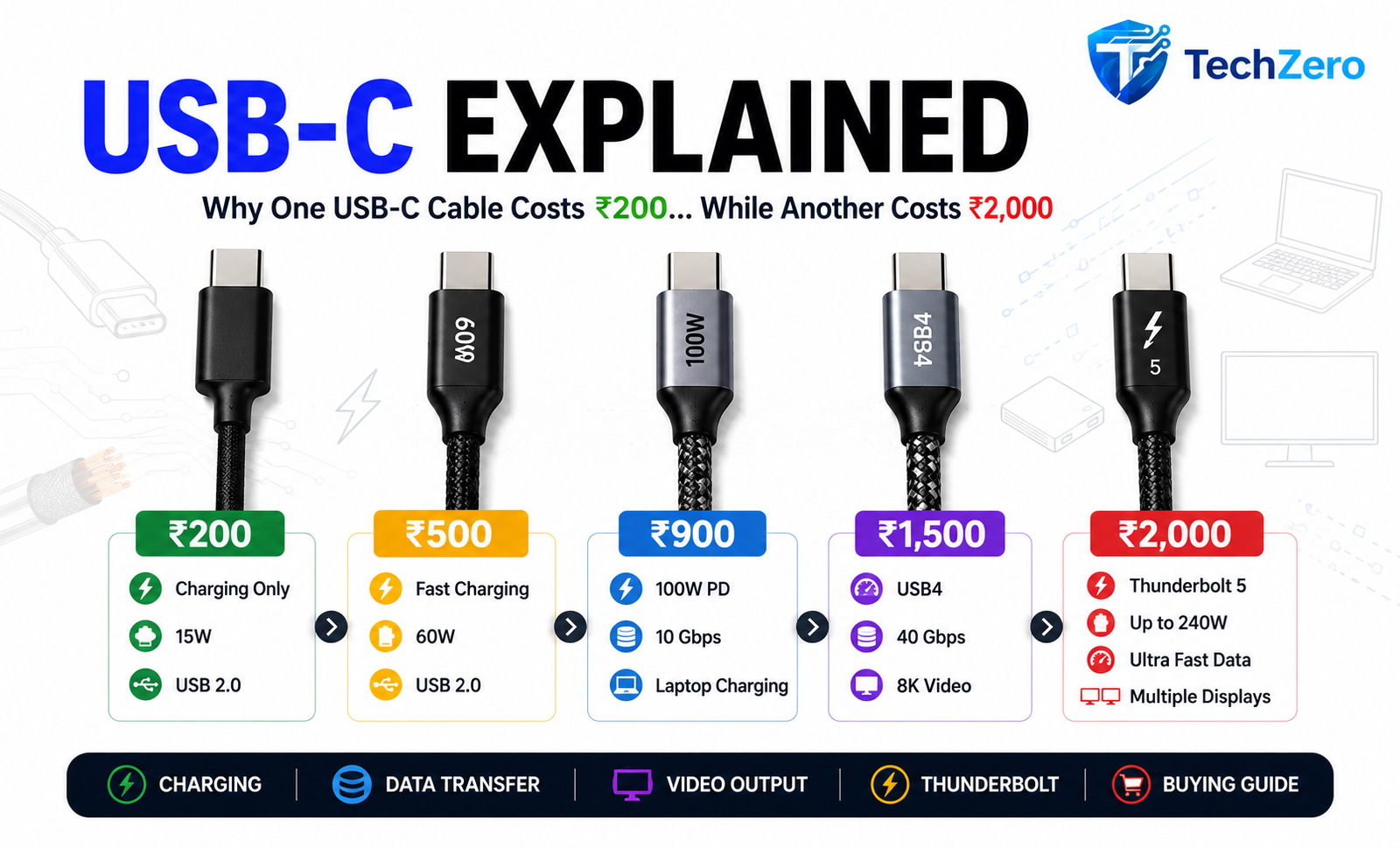
Walk into any electronics store or browse an online marketplace, and you’ll find hundreds of USB-C cables priced anywhere between ₹200 and ₹2,000.
At first glance, they all look identical. The connector is the same, the cable length is often similar, and they all claim to support charging.
So why does one cable cost ten times more than another?
The answer is simple: USB-C only describes the shape of the connector—not what the cable can actually do.
Some USB-C cables can only charge your phone slowly. Others can fast-charge a laptop, connect multiple 4K monitors, or transfer files at lightning-fast speeds.
Understanding these differences can save you money and help you avoid buying the wrong cable.
USB-C Is Just the Connector
One of the biggest misconceptions is that every USB-C cable is identical.
It isn’t.
Think of USB-C like a road. Two roads may look similar, but one could be a narrow village road while another is an eight-lane expressway.
The USB-C connector simply tells you how the cable plugs in. It doesn’t tell you:
- Charging speed
- Data transfer speed
- Video output support
- Thunderbolt compatibility
That’s why two identical-looking cables can perform very differently.
Charging Speeds: Not All Cables Deliver the Same Power
If you only charge your smartphone, almost any decent USB-C cable will work.
However, charging laptops or tablets requires cables that can safely carry much higher power.
| Cable Type | Typical Charging Support |
| Basic USB-C Cable | 15W–30W |
| Standard Fast Charging Cable | Up to 60W |
| Premium USB-C Cable | Up to 100W |
| Latest USB PD 3.1 Cable | Up to 240W |
High-power cables include an E-Marker chip, which tells compatible chargers and devices how much power the cable can safely handle.
Without this chip, your laptop may refuse to charge at full speed.
Data Transfer Speed Matters Too
Charging is only one part of the story.
Some USB-C cables are incredibly slow when transferring files.
| Standard | Maximum Speed |
| USB 2.0 | 480 Mbps |
| USB 3.2 Gen 1 | 5 Gbps |
| USB 3.2 Gen 2 | 10 Gbps |
| USB4 | 40 Gbps |
Imagine copying a 100 GB video project.
A USB 2.0 cable could take a very long time, while a USB4 cable can complete the transfer in just a fraction of that time.
If you regularly use external SSDs or transfer large files, investing in a faster cable is well worth it.
Can Every USB-C Cable Connect to a Monitor?
No.
This surprises many users.
Although the connector is identical, only certain USB-C cables support DisplayPort Alt Mode or Thunderbolt, which allows them to carry video signals.
Without this support:
- Your monitor may not detect your laptop.
- USB-C docking stations may not work correctly.
- External displays may be limited to lower resolutions or fail altogether.
If you plan to connect a monitor, always check that both your device and the cable support video output.
Why Do Expensive USB-C Cables Cost More?
Higher-priced cables aren’t expensive just because of branding.
Premium cables often include:
- Thicker copper wiring for better power delivery.
- Improved shielding to reduce electrical interference.
- Better-quality connectors that withstand thousands of insertions.
- Stronger braided exteriors for durability.
- E-Marker chips for high-wattage charging.
- Support for faster data transfer and video output.
While some premium cables are overpriced due to branding, many genuinely offer features that cheaper cables simply cannot.
What Happens If You Buy a Cheap Cable?
Using a low-quality USB-C cable can lead to several frustrating problems.
You may notice:
- Slow charging.
- Frequent charging interruptions.
- Laptop charging failures.
- Extremely slow file transfers.
- External monitors not working.
- Android Auto or Apple CarPlay disconnecting.
- Excessive heating during charging.
A poor-quality cable doesn’t just affect performance—it can also reduce reliability over time.
Which USB-C Cable Should You Buy?
Here’s a simple buying guide.
| Your Need | Recommended Cable |
| Smartphone Charging | 30W–60W USB-C Cable |
| Tablet Charging | 60W USB-C Cable |
| Laptop Charging | 100W USB-C Cable with E-Marker |
| External SSD | USB 3.2 or USB4 Cable |
| 4K Monitor | DisplayPort Alt Mode or Thunderbolt Cable |
| Docking Station | Thunderbolt or USB4 Certified Cable |
Buying the right cable for your use case is far more important than simply buying the most expensive one.
Common USB-C Myths
Myth: All USB-C cables are identical.
Reality: False. USB-C only describes the connector.
Myth: Every USB-C cable supports fast charging.
Reality: False. Many budget cables are limited to lower charging speeds.
Myth: Every USB-C cable can connect to a monitor.
Reality: False. Video output depends on the cable and the device.
Myth: The most expensive cable is always the best.
Reality: Not necessarily. Buy a cable based on your needs, not just its price.
TechZero Verdict
USB-C has made life easier by replacing multiple connector types with a single, reversible port.
But that convenience has also created confusion.
Just because two cables look identical doesn’t mean they perform the same.
A ₹200 cable may be perfectly adequate for charging your smartphone, while a ₹2,000 Thunderbolt cable is designed for professionals transferring massive files, powering laptops, or connecting multiple high-resolution displays.
The next time you shop for a USB-C cable, don’t ask “How much does it cost?”
Instead, ask:
“What do I need this cable to do?”
That simple question will help you choose the right cable without overspending—or buying one that can’t meet your needs.
Frequently Asked Questions
Does a USB-C cable affect charging speed?
Yes. The cable must support the required power level, and both the charger and the device must also support that charging standard.
Are braided cables better?
Generally yes. Braided cables are usually more durable and resist bending and fraying better than standard PVC cables.
Can one USB-C cable do everything?
Some premium USB4 or Thunderbolt cables support charging, fast data transfer, and video output simultaneously. However, they are usually more expensive.
Should I buy the cheapest USB-C cable?
If you only charge a smartphone, a good-quality budget cable is usually sufficient. For laptops, monitors, or external SSDs, investing in a higher-spec cable is recommended.
Final Take
USB-C is one of the most versatile connectors ever created—but it’s also one of the most misunderstood.
Understanding what a cable supports can save you time, money, and plenty of frustration. Spend according to your needs—not just the price tag.


[…] Related TechZero Cable Guide: Read USB-C Cables & Speed Differences Explained to choose the right fast-charging […]
[…] USB-C Explained: Why Some Cables Cost ₹200 While Others Cost ₹2000 […]
[…] USB-C Explained: Why Some USB-C Cables Cost ₹200 While Others Cost ₹2,000 […]
[…] Related TechZero Cable Guide: Read USB-C Cables & Speed Differences Explained to choose the right fast-charging […]