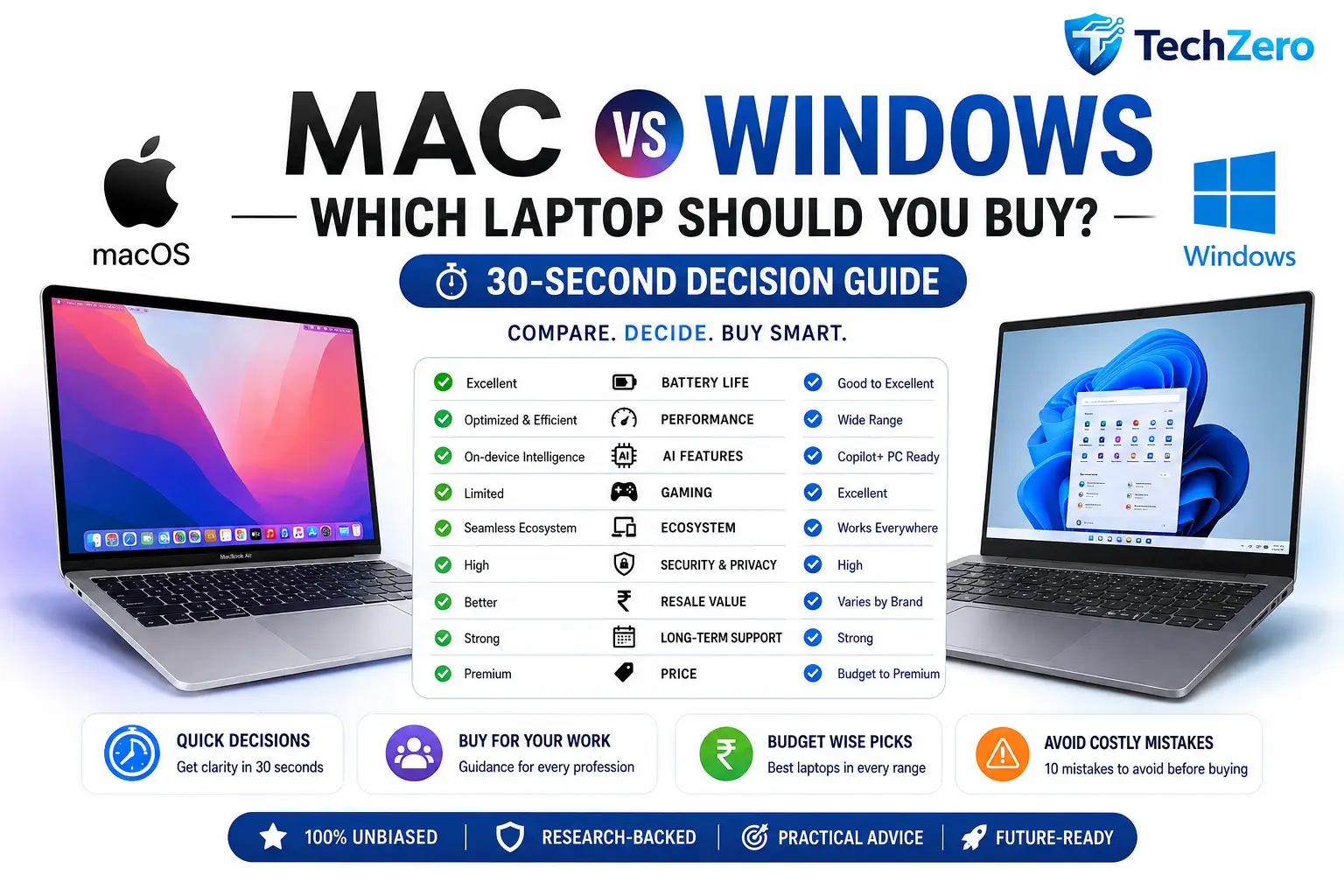
Choosing between a MacBook and a Windows laptop has never been more difficult. Modern laptops offer incredible performance, AI capabilities, excellent battery life, and premium designs—but the best choice depends on your workflow, budget, software, and long-term ownership goals.
This TechZero Decision Hub is designed for one purpose: helping you choose the right laptop in under a minute. If you’re looking for a quick recommendation, start with the decision guide below. If you want a deeper understanding of hardware, software, AI, ownership costs, and long-term value, we’ve linked our complete buying guides throughout this article.
Whether you’re a student, software developer, engineer, content creator, gamer, business professional, or frequent traveller, this guide will point you in the right direction without overwhelming you with technical jargon.
Need the short answer? Start below.
📌 Quick Summary
If you already use an iPhone, iPad, or other Apple devices, a MacBook will usually provide the best overall experience thanks to its excellent battery life, software optimization, long-term updates, and seamless ecosystem integration.
If you rely on Windows-only software, PC gaming, engineering applications, enterprise tools, or want maximum hardware choice, a Windows laptop is usually the better option.
For many buyers—including students, office professionals, writers, remote workers, and business users—both platforms are excellent. In these cases, factors like battery life, display quality, keyboard comfort, software compatibility, and budget matter more than the operating system itself.
The best laptop isn’t the one with the highest benchmark score.
It’s the one that fits your workflow, your budget, and how long you plan to keep it.
For readers who want a complete understanding before spending ₹50,000–₹2,00,000 on a laptop, explore our in-depth Mac vs Windows Laptop Buying Bible (Volume 1) and Ownership & Smart Buying Guide (Volume 2) after using this decision hub.
🔑 Key Takeaways
- Already invested in the Apple ecosystem? A MacBook is usually the smarter choice.
- Need Windows-only software, engineering tools, or PC gaming? Choose Windows.
- For office work, browsing, studies, and productivity, both platforms perform exceptionally well.
- Don’t compare laptops using processor names alone—consider battery life, display quality, software support, repairability, and resale value.
- If you plan to keep your laptop for five to six years, prioritize memory, storage, software longevity, and AI readiness over raw benchmark scores.
- Your workflow matters more than brand loyalty.
- Buy for the next six years, not just today’s needs.
- Still unsure? Follow the 30-Second Decision Flow below.
Part I — The 30-Second Decision
Chapter 1 — Start Here
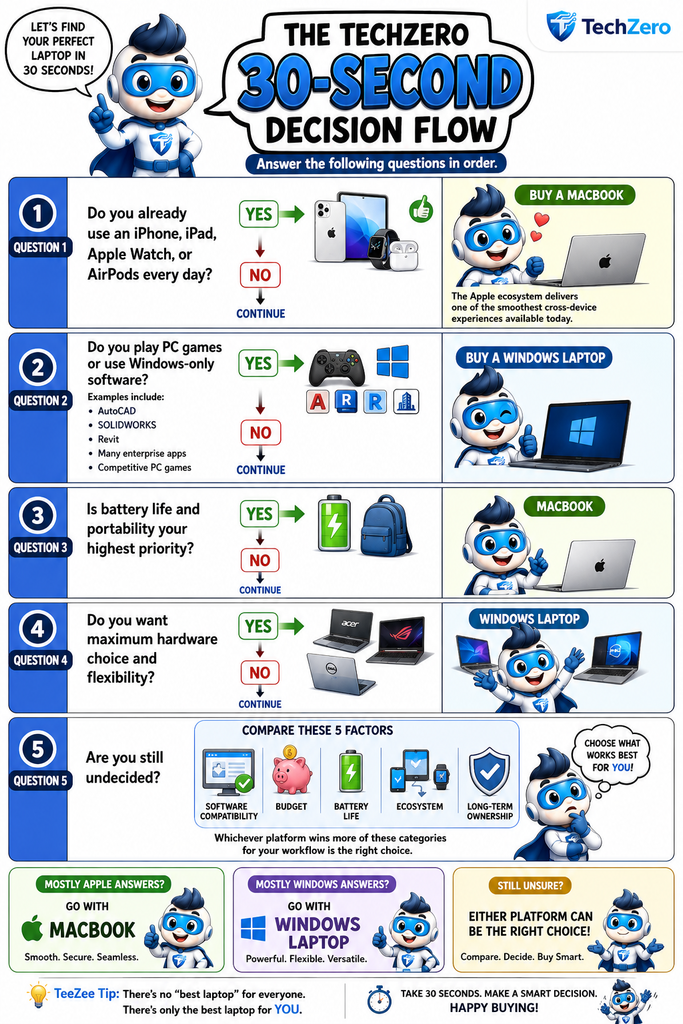
The TechZero 30-Second Decision Flow
Answer the following questions in order.

Compare these five factors:
- Software compatibility
- Budget
- Battery life
- Ecosystem
- Long-term ownership
Whichever platform wins more of these categories for your workflow is the right choice.
🧭 Decision Guide
| If You Value… | Choose |
|---|---|
| Apple Ecosystem | 🍎 Mac |
| Battery Life | 🍎 Mac |
| Gaming | 🪟 Windows |
| Engineering Software | 🪟 Windows |
| Hardware Flexibility | 🪟 Windows |
| Long Software Support | 🍎 Mac |
| Business Productivity | 🤝 Either |
| Everyday Office Work | 🤝 Either |
| Programming | 🤝 Depends on your platform |
| Long-Term Ownership | 🤝 Depends on configuration |
💡 TechZero Insight
Don’t ask,
“Which laptop is the best?”
Ask,
“Which laptop is best for the work I actually do every day?”
That one question eliminates most buying confusion.
🔜 Coming Up
Now that you’ve identified the likely platform for your needs, let’s compare Mac vs Windows side by side across the categories that matter most—battery life, performance, AI, gaming, software, security, price, resale value, and long-term ownership.
Part II — Mac vs Windows at a Glance
Chapter 2 — Side-by-Side Comparison
Why It Matters
If you’ve reached this point, you’ve probably narrowed your choice to MacBook or a Windows laptop.
Both platforms are faster, more secure, and more capable than ever before. For most buyers, the decision isn’t about finding the “better” operating system—it’s about finding the one that better matches your daily workflow.
The comparison below highlights the areas that matter most during long-term ownership.
Battery Life
Battery life is one of the biggest advantages of modern laptops.
MacBooks consistently deliver excellent battery efficiency because Apple designs the processor, operating system, and hardware together.
Windows laptops vary much more. Premium ultrabooks can offer outstanding battery life, while gaming laptops and mobile workstations generally prioritize performance over endurance.
Winner: 🍎 Mac
Performance
Both platforms offer excellent performance.
MacBooks excel in efficiency and consistent performance.
Windows offers the widest range of performance options, from affordable everyday laptops to powerful gaming systems and professional workstations.
For most users, both are more than fast enough.
Winner: 🤝 Tie
Artificial Intelligence
Artificial Intelligence is rapidly becoming part of everyday computing.
Both Apple and Microsoft are integrating AI deeply into their operating systems.
Apple emphasizes privacy and on-device intelligence.
Microsoft focuses on productivity, enterprise integration, and Copilot experiences.
For long-term buyers, both platforms are well positioned.
Winner: 🤝 Tie
Software Compatibility
Windows supports the widest range of software across industries.
Mac excels in creative applications, web development, and Apple’s own ecosystem.
Before buying, always confirm that your essential applications support your chosen platform.
Winner: 🪟 Windows
Gaming
This remains one of the clearest differences.
Windows dominates PC gaming thanks to extensive game support, dedicated graphics options, and broad hardware compatibility.
Mac gaming continues to improve but remains limited compared to Windows.
Winner: 🪟 Windows
Security & Privacy
Modern versions of both macOS and Windows include advanced security technologies.
Apple places greater emphasis on privacy-first design and tight hardware-software integration.
Windows provides outstanding enterprise-grade security and management capabilities.
For most home users, both platforms are highly secure when used responsibly.
Winner: 🤝 Tie
Repairability & Upgrades
Many Windows laptops allow SSD, memory, or battery replacement depending on the model.
Most modern Macs require buyers to choose their configuration during purchase.
If hardware flexibility is important, Windows generally offers more options.
Winner: 🪟 Windows
Resale Value
Premium MacBooks typically retain their value exceptionally well.
Windows resale varies significantly depending on the brand, model, and market demand.
If you regularly upgrade every few years, resale becomes an important consideration.
Winner: 🍎 Mac
Long-Term Ownership
Long-term ownership depends on much more than specifications.
Software support, battery health, build quality, reliability, ecosystem, and resale value all influence the overall experience.
A well-configured MacBook or premium Windows laptop can comfortably serve most users for five to six years.
Winner: 🤝 Depends on your needs
📊 The One-Page Comparison
| Category | 🍎 Mac | 🪟 Windows |
|---|---|---|
| Battery Life | ⭐⭐⭐⭐⭐ | ⭐⭐⭐⭐☆ |
| Performance | ⭐⭐⭐⭐⭐ | ⭐⭐⭐⭐⭐ |
| Gaming | ⭐⭐☆☆☆ | ⭐⭐⭐⭐⭐ |
| Software Compatibility | ⭐⭐⭐⭐☆ | ⭐⭐⭐⭐⭐ |
| AI Features | ⭐⭐⭐⭐⭐ | ⭐⭐⭐⭐⭐ |
| Security | ⭐⭐⭐⭐⭐ | ⭐⭐⭐⭐⭐ |
| Privacy | ⭐⭐⭐⭐⭐ | ⭐⭐⭐⭐☆ |
| Repairability | ⭐⭐⭐☆☆ | ⭐⭐⭐⭐☆ |
| Upgradeability | ⭐⭐☆☆☆ | ⭐⭐⭐⭐⭐ |
| Resale Value | ⭐⭐⭐⭐⭐ | ⭐⭐⭐⭐☆ |
| Hardware Choice | ⭐⭐⭐☆☆ | ⭐⭐⭐⭐⭐ |
| Long-Term Value | ⭐⭐⭐⭐⭐ | ⭐⭐⭐⭐⭐ |
⚔️ TechZero Battle Card
| If You Prioritize… | Recommended Platform |
|---|---|
| Battery Life | 🍎 Mac |
| Gaming | 🪟 Windows |
| Programming | 🤝 Depends |
| Creative Work | 🤝 Depends |
| Engineering | 🪟 Windows |
| Portability | 🍎 Mac |
| Hardware Choice | 🪟 Windows |
| Apple Ecosystem | 🍎 Mac |
| Mixed Devices | 🪟 Windows |
| Long-Term Ownership | 🤝 Depends |
⚠️ Reality Check
If you’re choosing between two premium laptops from Apple and Windows, you’re unlikely to make a “bad” decision.
Most buyers are deciding between two excellent computers.
Your software, workflow, and long-term needs matter far more than the operating system alone.
💡 TechZero Insight
The differences between Mac and Windows have become much smaller over the last decade.
Today, choosing the right laptop is less about technical superiority and more about finding the platform that fits naturally into your everyday life.
🛒 Smart Buy
If two laptops cost roughly the same, compare these four things before deciding:
- Display quality
- Battery life
- Keyboard and trackpad
- Software compatibility
Those factors influence your experience every single day.
✅ Key Decision
Choose the platform that removes the most friction from your daily workflow—not the one that wins the most comparison categories.
🔜 Coming Up
Now that you’ve seen the strengths of each platform, let’s answer an even more practical question:
Which laptop should you buy based on your profession?
Whether you’re a student, software developer, engineer, creator, gamer, or business owner, the next chapter provides quick recommendations tailored to your work.
Part III — Buy Based on Your Profession
Chapter 3 — Which Laptop Is Right for Your Work?
Why It Matters
Two people can spend the same amount of money on two completely different laptops—and both can make the right decision.
Why?
Because the best laptop isn’t determined by its specifications.
It’s determined by how well it supports your daily work.
A student doesn’t need the same laptop as an architect.
A software developer has different priorities than a photographer.
A gamer values different features than a frequent traveller.
Use the recommendations below to quickly identify which platform best matches your profession.
🎓 School Students
Typical Tasks
- Online classes
- Homework
- Web browsing
- Office documents
- Educational apps
Priorities
- Reliability
- Long battery life
- Lightweight design
- Comfortable keyboard
- Affordable pricing
Recommendation
🤝 Either Platform
Choose the laptop that offers the best value within your budget.
🎒 College Students
Typical Tasks
- Research
- Assignments
- Video calls
- Presentations
- Multitasking
Recommendation
🍎 Mac if you’re already using an iPhone or iPad.
🪟 Windows if your course requires Windows-specific software.
💼 Office Professionals
Typical Tasks
- Microsoft 365
- Video meetings
- Web applications
- Presentations
Recommendation
🤝 Either Platform
Prioritize:
- Battery life
- Webcam
- Keyboard
- Display
👨💻 Software Developers
Choose Mac if you develop:
- iOS
- macOS
- Web applications
- Cross-platform software
- UNIX-based environments
Choose Windows if you develop:
- .NET
- Windows applications
- Enterprise software
- Microsoft technologies
Recommendation
🤝 Depends on your development platform.
🏗 Engineers & Architects
Typical Software
- AutoCAD
- Revit
- SOLIDWORKS
- STAAD.Pro
- ETABS
- Civil 3D
Recommendation
🪟 Windows
Always verify software compatibility before purchasing.
🎨 Designers & Creative Professionals
Includes:
- Graphic Design
- UI/UX
- Illustration
- Photography
- Video Editing
- Motion Graphics
Recommendation
🤝 Either Platform
Prioritize:
- Excellent display
- Fast SSD
- Plenty of memory
- Color accuracy
Choose based on your preferred creative software.
🤖 AI Professionals & Data Scientists
Typical Work
- Python
- Machine Learning
- AI models
- Data analysis
- Local AI tools
Recommendation
🤝 Either Platform
Prioritize:
- Large memory
- Powerful GPU (if needed)
- Modern AI hardware
- Fast SSD
🎮 Gamers
Recommendation
🪟 Windows
Reasons:
- Larger game library
- Better GPU choices
- Better upgrade options
- Stronger gaming ecosystem
💼 Business Owners
Priorities
- Reliability
- Security
- Battery
- Long-term ownership
- Resale value
Recommendation
🤝 Either Platform
Choose based on your business software and existing ecosystem.
✈️ Frequent Travellers
Priorities
- Lightweight
- Long battery life
- Fast charging
- Bright display
- Comfortable keyboard
Recommendation
🍎 Mac
Windows premium ultrabooks are also excellent alternatives.
👨👩👧 Families
Recommendation
🤝 Either Platform
Prioritize:
- Reliability
- Ease of use
- Long software support
- Good webcam
- Comfortable keyboard
👴 Senior Citizens
Priorities
- Simplicity
- Clear display
- Easy updates
- Reliable support
Recommendation
🤝 Either Platform
Choose the one the user feels most comfortable using.
📊 Quick Recommendation Matrix
| Profession | Recommended Platform | Why |
|---|---|---|
| School Student | 🤝 Either | Value & simplicity |
| College Student | 🤝 Depends | Software requirements |
| Office Professional | 🤝 Either | Productivity |
| Software Developer | 🤝 Depends | Development platform |
| Engineer | 🪟 Windows | Professional software |
| Architect | 🪟 Windows | CAD & BIM tools |
| Designer | 🤝 Either | Workflow dependent |
| Video Editor | 🤝 Either | Application dependent |
| AI Professional | 🤝 Either | Hardware dependent |
| Gamer | 🪟 Windows | Gaming ecosystem |
| Business Owner | 🤝 Either | Reliability |
| Traveller | 🍎 Mac | Battery & portability |
| Family | 🤝 Either | Long-term value |
| Senior Citizen | 🤝 Either | Ease of use |
🧠 Did You Know?
Most professionals don’t switch platforms because one operating system is “better.”
They switch because their software, career, or workflow changes.
💡 TechZero Insight
Your profession narrows your options.
Your daily workflow makes the final decision.
Two software developers can legitimately choose different laptops because they build different kinds of applications.
🛒 Smart Buy
Before buying, list the five applications you use most often.
If all five run equally well on both platforms, base your decision on battery life, display, ecosystem, portability, and long-term ownership.
✅ Key Decision
Don’t choose a laptop because it’s recommended for your profession.
Choose the one that supports the way you actually work.
🔜 Coming Up
Profession helps narrow your choices.
Budget usually makes the final decision.
In the next chapter, we’ll recommend the best laptop choices across every major price range—from budget-friendly options to premium workstations.
Part IV — Buy Based on Your Budget
Chapter 4 — Which Laptop Should You Buy at Your Budget?
Why It Matters
Your budget doesn’t just determine which laptop you can buy.
It also determines which compromises you’ll have to make.
The good news is that modern laptops have improved dramatically across every price segment. Even budget laptops now offer solid performance for everyday work, while premium models focus on delivering a better overall ownership experience rather than simply faster hardware.
The key is to buy the best-balanced laptop within your budget, not necessarily the most expensive one you can afford.
Let’s explore what you should realistically expect at each price point.
💰 Under ₹50,000
Best For
- School students
- Home users
- Online classes
- Office documents
- Web browsing
- Streaming
What You Should Expect
- Modern entry-level processor
- 16GB RAM (preferred)
- 512GB SSD (if possible)
- Full HD IPS display
- Good keyboard
- Reliable battery
Don’t Pay Extra For
- RGB lighting
- Dedicated gaming graphics
- Ultra-premium designs
TechZero Recommendation
Choose the most balanced Windows laptop from a trusted brand.
👉 Read: Best Laptops Under ₹50,000
💰 ₹50,000–₹75,000
Best For
- College students
- Office professionals
- Everyday multitasking
- Light programming
What You Should Expect
- Modern mid-range processor
- 16GB RAM
- 512GB SSD
- Better build quality
- Improved battery life
- Better display
Sweet Spot
This is one of the best value segments for most buyers.
👉 Read: Best Laptops Under ₹75,000
💰 ₹75,000–₹1,00,000
Best For
- Developers
- Business users
- Designers
- Frequent travellers
What You Should Expect
- Premium build quality
- Excellent keyboard
- Bright display
- Long battery life
- Fast SSD
- Better portability
This budget is where premium ultrabooks begin to shine.
👉 Read: Best Laptops Under ₹1 Lakh
💰 ₹1,00,000–₹1,50,000
Best For
- Creative professionals
- Heavy multitasking
- AI users
- Business executives
- Software developers
What You Should Expect
- Premium display
- Excellent battery
- Superior build quality
- Powerful processor
- AI-ready hardware
- Long software support
At this price, you’re investing in long-term productivity rather than just specifications.
👉 Read: Best Premium Laptops
💰 Above ₹1,50,000
Best For
- Professional creators
- Engineers
- AI developers
- Researchers
- High-end video editing
- Scientific computing
Buy Only If
Your daily work genuinely benefits from:
- More CPU cores
- Professional graphics
- Larger memory
- Additional storage
- Specialized software
Buying a flagship laptop for everyday browsing and office work rarely provides proportional value.
👉 Read: Best High-End Laptops
🍎 Should You Stretch Your Budget for a MacBook?
Many buyers wonder whether spending more for a MacBook is worthwhile.
The answer depends on three questions:
- Will you use the Apple ecosystem?
- Will you keep the laptop for five years or more?
- Does your software run well on macOS?
If the answer is yes to all three, stretching your budget can make sense because of strong battery life, long software support, and excellent resale value.
If not, a premium Windows laptop may offer better value for your specific needs.
📊 Budget vs Value
| Budget | Best Choice | Ideal User |
|---|---|---|
| Under ₹50K | Windows Laptop | Students & Home Users |
| ₹50K–₹75K | Windows Ultrabook | College & Office |
| ₹75K–₹1L | Premium Ultrabook | Professionals |
| ₹1L–₹1.5L | Mac or Premium Windows | Developers & Creators |
| ₹1.5L+ | High-End Mac or Windows Workstation | Power Users |
🧠 Did You Know?
Buying a laptop that’s ₹10,000–₹15,000 above your original budget can sometimes extend its useful life by several years, making it the more economical choice over the long term.
💸 Value Over Price
A lower purchase price doesn’t always mean lower ownership cost.
When comparing laptops, consider:
- Battery life
- Build quality
- Software support
- Repair costs
- Resale value
- Expected lifespan
The cheapest laptop often becomes the most expensive if it needs replacing years earlier than expected.
📦 Quick Budget Decision
Limited Budget
↓
Buy the most balanced Windows laptop.
Comfortable Budget
↓
Compare premium Windows laptops and MacBooks based on your software and ecosystem.
Professional Budget
↓
Choose the laptop that maximizes productivity—not benchmark scores.
TechZero Graphic
Graphic 1 — Budget Ladder
A vertical ladder showing:
Under ₹50K
↓
₹50K–₹75K
↓
₹75K–₹1L
↓
₹1L–₹1.5L
↓
₹1.5L+
Highlight what improves at each step:
- Build Quality
- Display
- Battery
- Performance
- AI Readiness
- Longevity
TechZero Graphic
Graphic 2 — Where Should You Spend More?
Illustrate investment priorities:
⭐⭐⭐⭐⭐ Display
⭐⭐⭐⭐⭐ Memory
⭐⭐⭐⭐⭐ Battery
⭐⭐⭐⭐☆ Storage
⭐⭐⭐⭐☆ Build Quality
⭐⭐⭐☆☆ Processor
Message:
Upgrade the components you’ll notice every day.
TechZero Table
| Spend More On | Spend Less On |
|---|---|
| Display | RGB Lighting |
| Memory | Excessive CPU Power |
| Battery | Marketing Features |
| Build Quality | Unnecessary Accessories |
| Software Support | Unused Premium Features |
⚠️ Reality Check
The best laptop isn’t always found in the highest price bracket.
The smartest purchase is the one where your budget and your workload are perfectly aligned.
💡 TechZero Insight
Don’t ask,
“What’s the best laptop for ₹1 lakh?”
Ask,
“What’s the best laptop for the work I do with ₹1 lakh?”
That small shift almost always leads to a better buying decision.
🛒 Smart Buy
If increasing your budget by 10–15% gets you:
- More memory
- A significantly better display
- Better battery life
- Longer software support
it’s usually money well spent.
✅ Key Decision
Your budget should determine how much you spend.
Your workflow should determine what you buy.
Never confuse the two.
🔜 Coming Up
Before you click Buy Now, there’s one final step.
In the next chapter, we’ll cover the 10 biggest laptop buying mistakes that cause buyers to overspend, choose the wrong configuration, or regret their purchase—and how you can avoid every one of them.
Part V — Avoid These Costly Buying Mistakes
Chapter 5 — 10 Laptop Buying Mistakes You Should Avoid
Why It Matters
Choosing the right laptop isn’t just about knowing what to buy—it’s also about knowing what not to buy.
Every year, thousands of buyers regret their purchase because they focused on a single specification, ignored their actual workflow, or underestimated how quickly their needs would grow.
The good news?
Every one of these mistakes is avoidable.
Spend two minutes reviewing this checklist before placing your order, and you could save yourself years of frustration.
❌ Mistake 1 — Buying Only by Processor
A faster processor won’t fix:
- Poor battery life
- An average display
- Insufficient memory
- An uncomfortable keyboard
✔ Smart Move
Evaluate the complete laptop—not just the CPU.
❌ Mistake 2 — Choosing Too Little Memory
Modern browsers, AI tools, video calls, and multitasking consume far more memory than they did a few years ago.
✔ Smart Move
Buy enough memory for the next five to six years, not just today’s workload.
❌ Mistake 3 — Buying the Smallest SSD
Storage fills surprisingly quickly with:
- Photos
- Videos
- Applications
- AI tools
- Documents
- Games
✔ Smart Move
Choose a storage capacity that allows room for growth.
❌ Mistake 4 — Ignoring Display Quality
You’ll spend thousands of hours looking at your screen.
A better display improves productivity and comfort every single day.
✔ Smart Move
Prioritize brightness, colour accuracy, and viewing comfort over unnecessary specifications.
❌ Mistake 5 — Ignoring Battery Life
A laptop that constantly searches for a power outlet limits where and how you work.
✔ Smart Move
If you travel frequently or attend classes or meetings, battery life should be one of your highest priorities.
❌ Mistake 6 — Buying Without Checking Software Compatibility
The best hardware won’t help if your essential applications don’t run properly.
✔ Smart Move
List your five most important applications and verify compatibility before buying.
❌ Mistake 7 — Buying for Today’s Needs Only
Your workload will probably grow over the next several years.
Buying only for today often leads to replacing the laptop much sooner than expected.
✔ Smart Move
Think about where you’ll be in five or six years—not just next month.
❌ Mistake 8 — Falling for Marketing
AI labels.
Gaming branding.
Benchmark scores.
Ultra-performance claims.
Marketing highlights strengths—but rarely discusses compromises.
✔ Smart Move
Compare battery life, software support, reliability, repairability, and ownership value instead.
❌ Mistake 9 — Ignoring the Ecosystem
Your laptop doesn’t work alone.
It works alongside:
- Your phone
- Cloud storage
- Accessories
- Smartwatch
- Productivity apps
✔ Smart Move
Choose the platform that fits your existing digital life.
❌ Mistake 10 — Buying the Wrong Laptop for Someone Else
The laptop your friend loves.
The laptop your favourite YouTuber recommends.
The laptop with the highest benchmark.
None of those may be the right choice for you.
✔ Smart Move
Buy based on your work, your budget, and your long-term needs.
🧠 The TechZero 60-Second Buying Checklist
Before clicking Buy Now, answer these questions:
✅ Does it run the software I need?
✅ Do I have enough memory for the next six years?
✅ Is the storage sufficient?
✅ Does it fit my existing ecosystem?
✅ Am I paying for features I’ll actually use?
✅ Will I still be happy using this laptop six years from now?
If you answered “Yes” to all six questions, you’re probably making a smart purchase.
TechZero Graphic
Graphic 1 — The 60-Second Buying Checklist
Design a one-page printable checklist with six large checkboxes.
Title:
“Don’t Buy a Laptop Until You’ve Checked These Six Things.”
TechZero Graphic
Graphic 2 — The Regret Timeline
Illustrate two buyers.
Buyer A
Cheapest laptop
↓
Outgrows memory
↓
Battery problems
↓
Replaces laptop after 3 years
Buyer B
Balanced laptop
↓
Better configuration
↓
Long software support
↓
Still productive after 6 years
Message:
The cheapest laptop isn’t always the least expensive to own.
💡 TechZero Insight
Most buyers don’t regret spending a little more.
They regret buying a laptop that no longer meets their needs after only a few years.
🛒 Smart Buy
If your budget allows just one meaningful upgrade, choose:
- More memory
or
- A better display
You’ll notice those improvements every single day.
✅ Key Decision
Don’t buy the laptop with the best specifications.
Buy the laptop that’s least likely to disappoint you over the next six years.
🔜 Coming Up
You’ve compared Mac and Windows, explored recommendations by profession and budget, and learned how to avoid the most common buying mistakes.
Now it’s time for the final chapter—the TechZero 60-Second Buying Assistant, where we’ll help you reach a confident recommendation in less than a minute.
Part VI — TechZero Smart Decision Engine™
Chapter 6 — Find Your Perfect Laptop in Under 60 Seconds
Why It Matters
After comparing Mac vs Windows, evaluating your profession, understanding your budget, and avoiding the most common buying mistakes, only one question remains:
Which laptop is actually right for you?
Instead of relying on marketing claims, benchmark charts, or someone else’s recommendation, use the TechZero Smart Decision Engine.
Answer the following ten questions honestly.
By the end, you’ll know whether a MacBook, a Windows laptop, or either platform is the better choice for your workflow.
Question 1
Which phone do you use every day?
- 🍎 iPhone
- 🤖 Android
- 📱 Both
Recommendation
- Mostly iPhone → +1 Mac
- Mostly Android → +1 Windows
- Both → Tie
Question 2
What is your primary work?
- 🎓 Student
- 💼 Office
- 👨💻 Programming
- 🎨 Creative
- 🏗 Engineering
- 🎮 Gaming
- 🤖 AI
- 📈 Business
Recommendation
Programming → Depends
Engineering → Windows
Gaming → Windows
Creative → Depends
Office → Either
Question 3
How long will you keep this laptop?
- Less than 3 years
- 3–5 years
- More than 5 years
Long ownership?
Prioritize:
- Battery
- Software support
- Build quality
- Resale
Question 4
What matters most?
Choose one.
- 🔋 Battery
- 🎮 Gaming
- 🧳 Portability
- 💰 Lowest Price
- ⚙ Flexibility
- 🍎 Apple Ecosystem
Question 5
Which software can’t you live without?
- Microsoft Office
- Adobe
- AutoCAD
- Revit
- Xcode
- Visual Studio
- Blender
- Browser
This answer usually determines your platform.
Question 6
What’s your budget?
- Under ₹50K
- ₹50–75K
- ₹75K–1L
- ₹1–1.5L
- ₹1.5L+
Question 7
Do you play PC games?
YES
↓
Windows
NO
↓
Continue
Question 8
Do you travel frequently?
YES
↓
Battery becomes critical.
Question 9
Will AI matter to you during the next five years?
YES
↓
Buy a modern AI-ready laptop.
NO
↓
Prioritize overall value.
Question 10
Which statement sounds most like you?
A
“I want everything to just work.”
↓
Mac
B
“I like having maximum flexibility.”
↓
Windows
📊 Your Result
🍎 Mostly Mac Answers
A MacBook will probably provide the better ownership experience.
Ideal for:
- Apple users
- Travellers
- Students
- Writers
- Designers
- Developers
- Business users
🪟 Mostly Windows Answers
A Windows laptop is likely the better choice.
Ideal for:
- Engineers
- Gamers
- Enterprise users
- Budget buyers
- Hardware enthusiasts
🤝 Mixed Answers
Congratulations.
You’re in the fortunate position where both platforms are excellent choices.
Now compare:
- Display
- Battery
- Keyboard
- Price
- Warranty
Then buy whichever laptop feels right.
🧠 TechZero Final Advice
The internet loves asking,
“Which laptop is the best?”
The smarter question is:
“Which laptop will help me do my best work?”
That answer is different for every person.
⭐ The TechZero Promise
We don’t recommend laptops because they’re popular.
We recommend them because they’re the right fit for your work, your budget, and your long-term ownership goals.
That’s the philosophy behind every TechZero buying guide.
📚 Continue Learning
If you want to dive deeper before making your purchase, explore our complete flagship guides:
- The TechZero Laptop Buying Bible (2026): Volume 1 — Understanding Mac vs Windows
https://techzero.in/mac-vs-windows/ - The TechZero Laptop Buying Bible (2026): Volume 2 — Ownership, AI & Smart Buying
https://techzero.in/mac-vs-windows-vol2/ - The Mac Buying Bible
https://techzero.in/mac-buying-guide/ - The Windows Laptop Buying Guide
- Best Laptops Under Every Budget
https://techzero.in/best-future-proof-laptops-under-%e2%82%b950000-in-india-2026/ - Laptop Buying Guides by Profession
https://techzero.in/stop-scrolling-amazon-the-3-internal-checks-you-must-do-before-buying-a-laptop-in-2026/
Happy buying—and choose the laptop you’ll still enjoy using years from now.
— Team TechZero


[…] ecosystem to commit to for your next machine, you can explore our complete hardware deep dive on Mac vs Windows: Which Laptop Should You Buy? to see how they stack up in daily production […]