
📌 Quick Summary
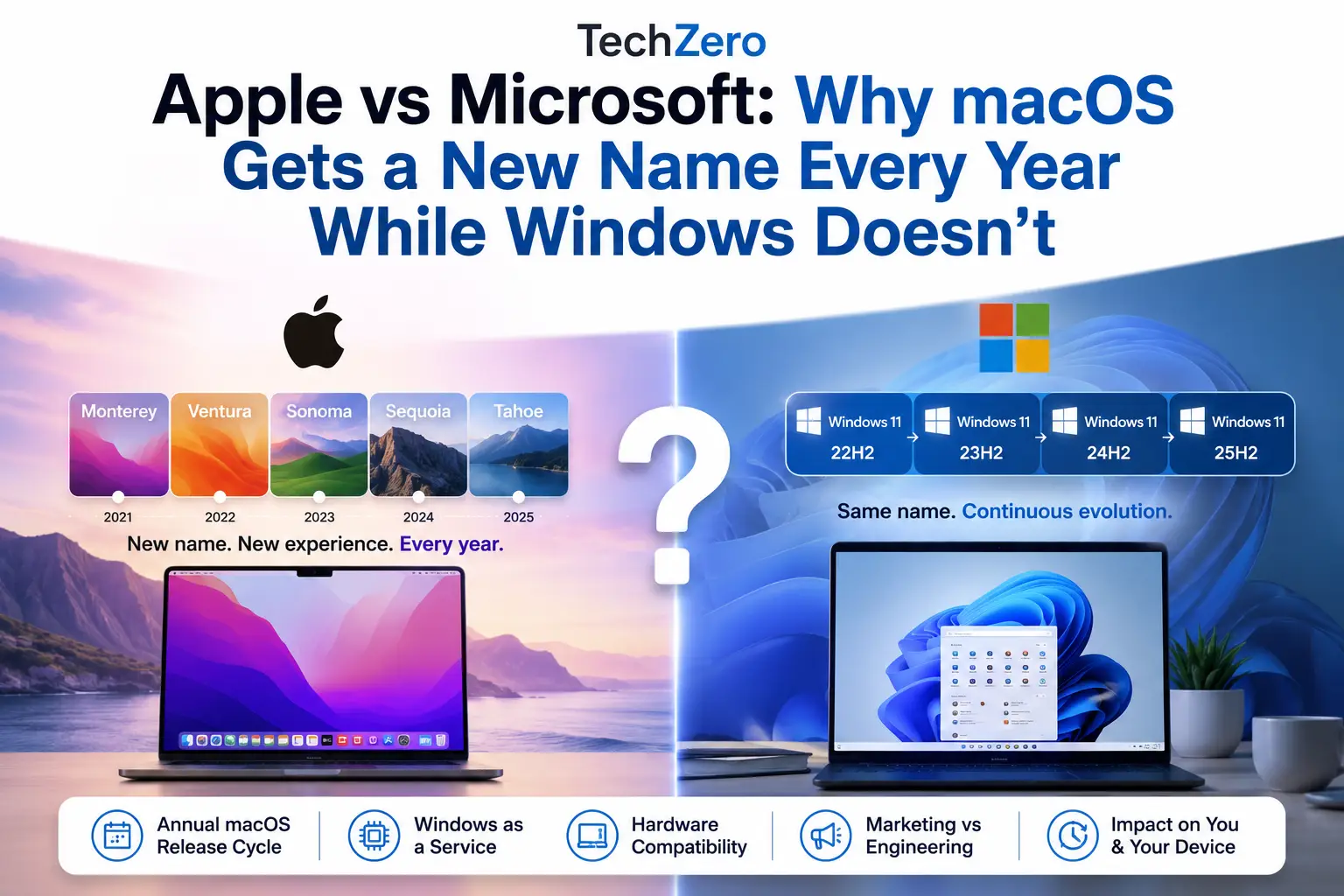
Apple vs Microsoft has been one of the defining rivalries in personal computing for decades. One of the most frequently asked questions today is why macOS gets a new name every year while Windows doesn’t. Every June, Apple unveils a new macOS identity—such as Ventura, Sonoma, Sequoia, or Tahoe—while Microsoft continues to improve Windows 11 through feature updates without changing its name.
At first glance, it is easy to conclude that Apple innovates faster while Microsoft moves more slowly. The reality is far more nuanced. If you are currently debating which ecosystem to commit to for your next machine, you can explore our complete hardware deep dive on Mac vs Windows: Which Laptop Should You Buy? to see how they stack up in daily production scenarios.
At first glance, it is easy to conclude that Apple innovates faster while Microsoft moves more slowly. The reality is far more nuanced. Both companies continuously evolve their operating systems, but they follow fundamentally different philosophies for engineering, release management, marketing, and ecosystem strategy.
Apple follows a predictable annual release cycle tightly synchronized with its hardware ecosystem, transforming every major macOS release into a highly visible product launch. Microsoft, by contrast, treats Windows as a continuously evolving platform, delivering security improvements, feature enhancements, and architectural changes under a stable product name designed for long-term continuity across millions of hardware configurations.
This in-depth comparison explores the technical, business, and marketing reasons behind these contrasting strategies. We’ll examine Apple’s annual macOS release cycle, Microsoft’s Windows as a Service model, the impact on hardware compatibility, and what these competing philosophies mean for your hardware’s lifespan, your daily workflow, and the way we perceive technology innovation.
Part I — Why This Question Matters
1. Why macOS Feels New Every Year
Every June, millions of tech enthusiasts, developers, and consumers tune into Apple’s Worldwide Developers Conference (WWDC). Amid the high-production keynotes, one specific reveal consistently dominates tech headlines: the naming of the next macOS.
| Release Year | macOS Version | Marketing Identity |
|---|---|---|
| 2021 | macOS 12 | Monterey |
| 2022 | macOS 13 | Ventura |
| 2023 | macOS 14 | Sonoma |
| 2024 | macOS 15 | Sequoia |
| 2025 | macOS 26 | Tahoe |
| 2026 | macOS 27 | Golden Gate |
Each of these annual cycles delivers more than just an updated version number. It arrives with a curated aesthetic, a dedicated marketing campaign, a brand-new desktop wallpaper, and a fresh set of consumer-facing features. For Mac users, this annual ritual creates a clear psychological milestone: it signals that their machine has crossed the threshold into a new era of computing.
2. Why Windows Appears to Stay the Same
Contrast the Mac experience with a typical Windows update notification. A Windows user rarely encounters a theatrical rebrand. Instead, they are met with technical version strings delivered quietly through Windows Update:
- Windows 11 Version 22H2
- Windows 11 Version 23H2
- Windows 11 Version 24H2
- Windows 11 Version 25H2
Underneath these sterile alphanumeric labels, the operating system may undergo radical transformations—gaining entirely new AI subsystems, redesigned user interfaces, modern file explorer paradigms, and deep architectural security overhauls. Yet, because the name on the box remains exactly the same, the public perception is often one of static continuity.
3. The Misconception Created by Branding
This divergence in communication builds a powerful, yet flawed, consumer narrative: Apple is running a sprint of continuous innovation, while Microsoft is moving at a glacial pace.
💡 The Reality Check: The distinction between a new name and a version string is not a measure of engineering volume; it is a manifestation of distinct business models. Apple uses software upgrades to drive ecosystem alignment and hardware sales. Microsoft uses platform stability to secure enterprise dependency and maximize hardware breadth.
Furthermore, these choices carry direct consequences for the lifespan of your computer. When Apple drops a new named release, it simultaneously sets a highly visible line drawn in the sand regarding hardware compatibility, leaving older machines on the other side. Microsoft also introduces hardware constraints—as seen with Windows 11’s modern CPU and TPM requirements—but delivers those adjustments over years rather than months, fundamentally shaping how users experience the aging of their hardware.
Part II — Apple’s Annual macOS Strategy
The Apple Annual Release Loop
1. The Clockwork Mechanism of WWDC
Apple’s software calendar is one of the most reliable engineering pipelines in corporate tech. Every June, the Worldwide Developers Conference acts as the anchor point. A highly structured beta framework immediately follows the keynote: developer seeds in June, public betas in July, and the final production build dropping in the September-to-October window.
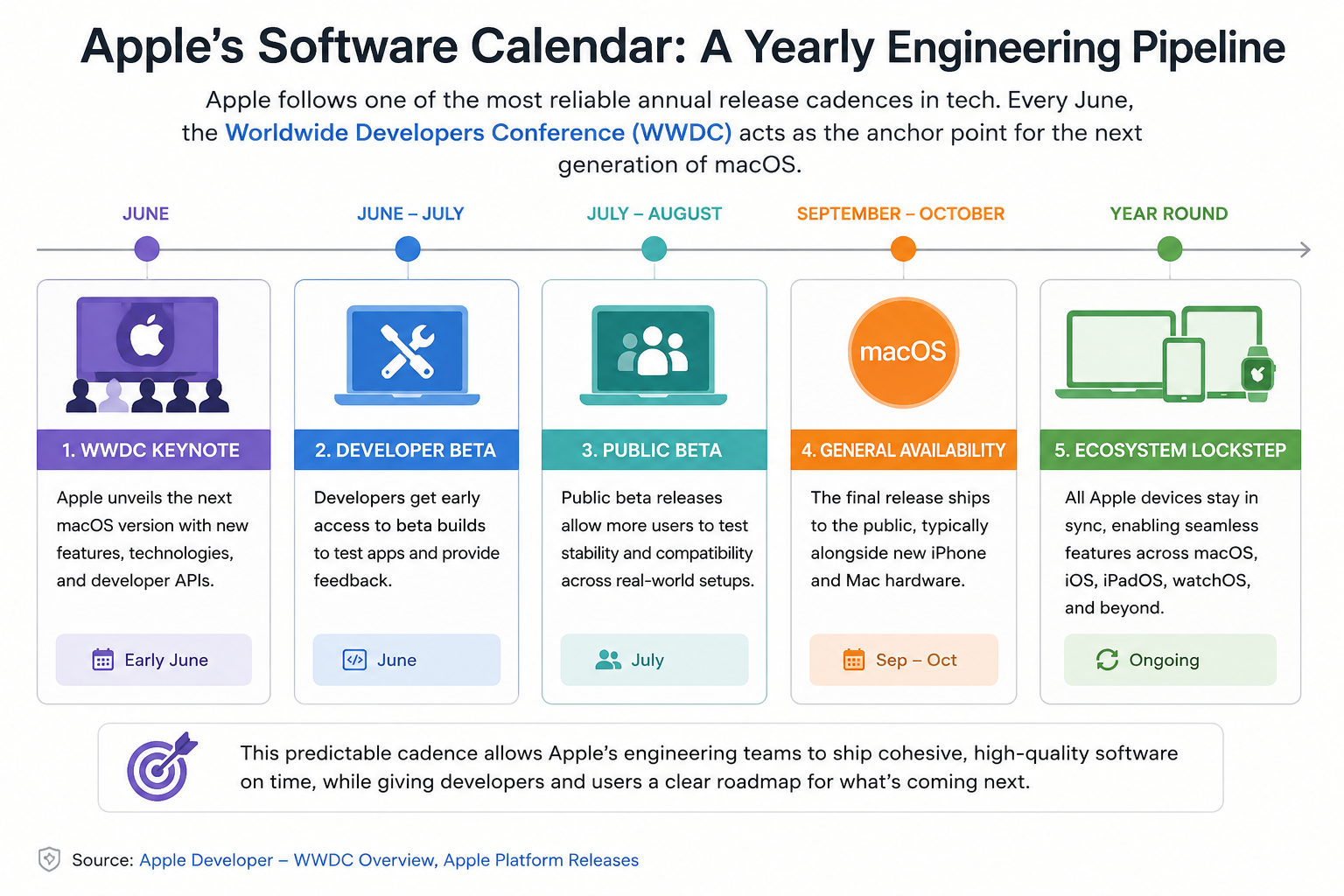
This strict rhythm forces internal engineering teams to package feature sets into definitive, shippable units. Rather than allowing feature creep to indefinitely delay a release, anything that isn’t ready is cut or held for a point update (e.g., macOS .1 or .2). This predictability allows external app developers to align their engineering sprints, ensuring their software is optimized for the new APIs the day consumer hardware ships.
Apple’s software calendar is one of the most reliable engineering pipelines in corporate tech. Every June, the Worldwide Developers Conference acts as the anchor point. A highly structured beta framework immediately follows the keynote: developer seeds in June, public betas in July, and the final production build dropping in the September-to-October window [Source 1].
Apple follows a well-established annual operating system release cycle, announcing new macOS versions at WWDC before developer betas, public betas, and a general release later in the year. This cadence has remained remarkably consistent for many years [Source 1].
2. Ecosystem Synchronization: The Connected Web
A Mac is almost never designed to be evaluated in isolation. It functions as a single pane of glass within a deeply interconnected matrix of devices including iPhones, iPads, Apple Watches, and Vision Pro headsets.
When Apple conceives a sprawling ecosystem feature, it requires coordinated platform-wide deployment. Features like Universal Control, Continuity Camera, iPhone Mirroring, or the deep integration of Apple Intelligence cannot exist on a Mac if the underlying software framework is out of sync with iOS or iPadOS. The annual macOS release cycle ensures that all Apple devices advance to the next paradigm at exactly the same time, preventing generational fracturing within the user’s personal hardware stack.
3. The Power of Vertical Integration
Apple’s updates are optimized for an incredibly exclusive pool of hardware components. Because Apple designs its own custom silicon, mainboards, displays, camera modules, and security architectures, its operating system engineers work with near-absolute predictability.
This vertical stack yields profound engineering advantages. When building graphics pipelines, memory managers, or neural processing frameworks, developers don’t have to build generic abstractions to accommodate third-party variables. They write code targeted directly at fixed silicon blocks. This allows Apple to execute deep architectural optimizations—such as Unified Memory architectures or specialized hardware video accelerators—that would be impossible to deploy cleanly across an open, fragmented marketplace.
Part III — Microsoft’s Continuous Windows Strategy
Microsoft defines Windows as a Service (WaaS) as a continuous servicing model that delivers quality updates, feature updates, and security improvements throughout the operating system lifecycle rather than relying solely on major product releases [Source 2].
With the launch of Windows 10 in 2015, Microsoft fundamentally dismantled this structure, shifting to a framework known as Windows as a Service. Under this architecture, Windows ceased to be treated as a static product running toward a replacement date. Instead, it became an ongoing, modular platform that evolves via a steady, predictable ingestion pipeline [Source 2].
1. The Paradigm Shift: Windows as a Service
To comprehend why Microsoft treats Windows branding with such continuity, one must look back to the operational crisis of the early 2000s. In that era, Microsoft operated under a “Big Bang” release model, delivering massive, monolithic updates every few years (e.g., Windows XP to Windows Vista). The friction was intense: migrations were disruptive, corporate deployments took years to validate, and user retraining costs were astronomical.
Microsoft Definition
Microsoft defines Windows as a Service as a continuous servicing model that delivers quality updates, feature updates, and security improvements throughout the operating system lifecycle rather than relying solely on major product releases.
With the launch of Windows 10 in 2015, Microsoft fundamentally dismantled this structure, shifting to a framework known as Windows as a Service (WaaS). Under this architecture, Windows ceased to be treated as a static product running toward a replacement date. Instead, it became an ongoing, modular service that evolves via a steady, predictable ingestion pipeline.
The Modern Windows Servicing Layer
“Patch Tuesday” rollouts. Mandatory security fixes, critical kernel stability patches, and immediate bug resolutions.
Targeted feature drops delivered via standard servicing channels when ready, bypassing rigid annual constraints.
Comprehensive platform updates (like 24H2) that introduce deep UI updates and major revisions under the existing name.
2. The Logistics of Endless Hardware Combinations
The most striking structural contrast between the two tech giants lies in ecosystem configuration. While Apple targets its code at a few dozens of closely related, internally designed configurations, Microsoft does not control the physical machines running its operating system.
Windows must install seamlessly on an infinite permutation of hardware:
- Silicon Variety: Components from Intel, AMD, and Qualcomm spanning multiple design generations.
- Component Fragmentation: Motherboards, graphics chips, network cards, and peripherals built by thousands of distinct OEMs (Dell, HP, Lenovo, ASUS, and custom rigs).
- Driver Abstraction: Millions of legacy and modern hardware drivers interacting with the core NT kernel.
If Microsoft forced a comprehensive operating system rebrand every twelve months, it would introduce a chaotic cycle of driver recertification and system verification for hardware component vendors worldwide. Maintaining a long-term, structurally stable platform name gives component manufacturers the architectural continuity required to publish reliable, forward-compatible software drivers.
3. The Enterprise Imperative: Why Change Breeds Resistance
To an individual consumer, a fresh name brings a sense of novelty. To an Enterprise IT Director managing a fleet of 50,000 corporate workstations, a fresh name looks like a massive operational liability.
Large organizations operate on predictability. They rely on tightly tuned proprietary business applications, deep endpoint security configurations, and extensive staff training docs. A major brand shift triggers mandatory, expensive verification pipelines, security compliance updates, and extensive internal user retraining. By keeping the core branding static and rolling improvements into predictable background packages, Microsoft allows corporate infrastructures to systematically ingest innovation without disrupting daily operations.
Part IV — Marketing vs Engineering
1. The Psychology of the Visual Reset
Branding has a profound impact on how our brains evaluate technology. Humans are naturally inclined to look for visible milestones to categorize progress. A new product name creates a strong psychological marker that signals a clean break from past limitations.
“Apple is a master of the experiential upgrade. By wrapping incremental software optimizations inside the premium skin of a new California destination, they convert standard maintenance into a highly anticipated cultural milestone.”
When an update arrives under a fresh banner, users approach it with curiosity, actively hunting down changes, learning new layout choices, and giving the company credit for major progress. Conversely, when massive visual or functional changes are dropped into a routine monthly update under the existing name, users often perceive it as mere utility work—or worse, an uninvited disruption to their established workflow.
2. The Media Dynamic: Free Advertising Pipelines
The annual renaming strategy functions as a highly effective marketing engine, feeding an extensive tech media landscape:
This cycle generates massive amounts of high-value earned media. For three months every summer, content creators produce a continuous stream of guides, tier lists, performance comparisons, and installation walkthroughs focusing on the new macOS name.
Microsoft’s alphanumeric updates struggle to command equivalent public real estate. A video titled “Is macOS Sequoia Worth the Upgrade?” naturally captures standard consumer curiosity far more effectively than a deeply technical video titled “What’s New in Windows 11 Build 26100 (Version 24H2)”, even if the actual engineering hours invested in the latter are identical or greater.
3. Does Naming Velocity Equal Architectural Innovation?
The core engineering reality is straightforward: The presence of a new product name tells you absolutely nothing about the scale of the innovation inside the code.
An operating system’s evolution is cyclical, not linear. Some years deliver deep structural transformations; other years are dedicated to clean-up, refactoring, security hardening, and refining core developer APIs. By choosing to rename every single year regardless of the update’s scope, Apple inevitably runs into years where the marketing identity outpaces the actual feature list.
Microsoft’s model permits the opposite phenomenon: monumental architectural shifts can occur quietly under a familiar name, resulting in a product that performs and looks vastly different than it did three years prior, despite retaining the exact same logo on the boot screen.
Part V — Does Every macOS Release Justify a New Name?
To understand how the choice of a name interacts with the reality of engineering output, it is highly instructive to review the structural history of macOS over the past decade. By stripping away the marketing presentation, we can categorize releases into true evolutionary shifts versus standard refinement cycles.
| macOS Generation | Primary Focus | True Architectural Impact |
|---|---|---|
| Big Sur (2020) | Architectural Transformation | Refactored the entire UI layout, restructured kernel security, and laid the critical binary framework (Rosetta 2) for the transition to Apple Silicon. A true foundational rewrite. |
| Monterey (2021) | Ecosystem Refinement | Focused on cross-device software continuity (Universal Control, Shortcuts port, AirPlay to Mac). Relied heavily on the structural foundations built by Big Sur. |
| Ventura (2022) | Window Management | Introduced Stage Manager and expanded Continuity Camera interfaces. Refined productivity tools without altering core file system or kernel layers. |
| Sonoma (2023) | Desktop Aesthetics | Brought interactive desktop widgets, customized screen savers, and a localized Game Mode. Heavily evolutionary, focusing on polish and visual quality of life. |
| Sequoia (2024) | Intelligence Integration | Built the systemic foundation for local and cloud-based AI processing (Apple Intelligence) and added iPhone Mirroring pipelines. Deep integration for modern silicon. |
| Tahoe (2025) | Silicon Consolidation | Expanded localized model integration, refined spatial workflows, and marked a massive architectural milestone as the final major macOS version containing native legacy Intel code. |
This distribution demonstrates that Apple is bound to the same engineering constraints as any other software vendor. They cannot reinvent the wheels of personal computing every twelve months. The annual rebrand is a masterclass in packaging: it provides a uniform sense of momentum even when the actual update is primarily focused on stabilizing the innovations of the previous year.
Part VI — The Hidden Cost of Annual Releases
1. The Friction of Hardware Obsolescence
The most contentious element of Apple’s annual release framework is not aesthetic; it is economic. When Apple introduces a new macOS name, it doesn’t just deliver fresh code to its servers—it establishes a definitive boundary regarding hardware support.
Because macOS is engineered to tightly exploit modern silicon architectures, each annual release systematically drops older Mac hardware generations from its official compatibility index. A perfectly functional laptop with a pristine display, a responsive keyboard, and ample processing power can find itself cut off from the next major macOS release simply because it lacks a specific secure enclave iteration, a modern integrated GPU feature set, or Apple Silicon media blocks.
The Core Compatibility Distinction
Apple addresses hardware obsolescence in annual, highly visible steps. When a new named OS drops, users are given an immediate, absolute confirmation of whether their machine continues to move forward.
Microsoft manages compatibility through generational platform changes. A PC may run Windows 11 for years, receiving continuous feature expansions, until an absolute architectural shift (such as the TPM 2.0 baseline) resets the ecosystem support floor.
2. The Intel to Apple Silicon Sunset
A clear case study of this strategy played out during the transition from x86 Intel processors to Apple’s custom M-series architectures. When the transition launched in 2020, Apple committed to supporting its legacy Intel install base. However, maintaining dual-architecture development across an identical operating system timeline is an expensive engineering hurdle.
With the arrival of macOS Tahoe, the transition reached its natural conclusion. By drawing a line and designating Tahoe as the final major release with native Intel compatibility, Apple has confirmed that macOS Tahoe is the final major macOS release supporting Intel-based Macs, with security updates continuing for supported versions after the transition. Apple signaled that future versions would optimize exclusively for the shared memory pipelines and neural processing units of Apple Silicon. For owners of late-generation Intel Macs, this named update represents a clear signal: their hardware has reached its final station, even if security patches continue to filter down for a standard grace period.
TechZero Fact
Apple announced the transition from Intel processors to Apple Silicon at WWDC 2020, completed the Mac lineup transition in approximately two years, and has since focused new platform capabilities around Apple Silicon.
3. Factoring the True Longevity of an “Unsupported” Machine
It is critical to dismantle the prevailing myth that an unsupported machine becomes an unsafe brick the moment it is omitted from a new release list.
An operating system lifecycle operates in two distinct phases: Active Feature Expansion and Extended Security Support. When a Mac model drops off the primary macOS update sheet, Apple traditionally continues to backport critical vulnerability fixes and Safari updates to the previous two macOS versions for a prolonged window. Your machine remains fundamentally secure, highly performant, and completely capable of running your application library.
Part VII — A Decade of Evolution (2015–2027)
The TechZero Timeline: macOS vs Windows
The comprehensive matrix below maps out the parallel development histories of both operating systems over an extended twelve-year arc, highlighting the structural shifts behind the naming strategies.
| Year | Apple macOS Lifecycle | Branding Shift | Microsoft Windows Servicing | Branding Shift |
|---|---|---|---|---|
| 2015 | OS X 10.11 El Capitan | ✔ New Name | Windows 10 (Initial Release) | ✔ New Brand |
| 2016 | macOS 10.12 Sierra | ✔ New Name | Windows 10 Anniversary Update | Same Name |
| 2017 | macOS 10.13 High Sierra | ✔ New Name | Windows 10 Creators Update | Same Name |
| 2018 | macOS 10.14 Mojave | ✔ New Name | Windows 10 October Update | Same Name |
| 2019 | macOS 10.15 Catalina | ✔ New Name | Windows 10 November Update | Same Name |
| 2020 | macOS 11.0 Big Sur | ✔ New Name | Windows 10 20H2 Update | Same Name |
| 2021 | macOS 12.0 Monterey | ✔ New Name | Windows 11 (Initial Release) | ✔ New Brand |
| 2022 | macOS 13.0 Ventura | ✔ New Name | Windows 11 22H2 | Same Name |
| 2023 | macOS 14.0 Sonoma | ✔ New Name | Windows 11 23H2 | Same Name |
| 2024 | macOS 15.0 Sequoia | ✔ New Name | Windows 11 24H2 | Same Name |
| 2025 | macOS 16.0 Tahoe | ✔ New Name | Windows 11 25H2 | Same Name |
| 2026 | macOS 17.0 | ✔ New Name | Windows 11 26H1 Evolution | Same Name |
| 2027 | macOS 18.0 (Pipeline) | ✔ New Name | Windows Next-Gen Platform Iteration | Retained Brand |
The Visual Takeaway
When you look at this comparative roadmap, the true nature of the two strategies becomes clear. Apple introduces fourteen distinct marketing identities over this timeframe, forcing fourteen clear evaluation steps for its global install base.
Microsoft, across the exact same twelve-year span of engineering, relies on just two primary user-facing brands. Yet, a PC running Windows 11 in 2026 contains almost no shared interface architecture or system framework code with the initial build of Windows 10 from 2015. The internal engine was completely swapped out while the car was running, all while keeping the name on the badge uniform.
Part VIII — Which Strategy Is Better?
1. The Core Academics in Direct Conflict
Declaring a definitive winner between Apple’s and Microsoft’s operating system cadences is impossible because they answer entirely different corporate mandates. The ideal strategy depends entirely on what you prioritize as a consumer, professional, or IT manager.
| Operational Core | Apple macOS Framework | Microsoft Windows Architecture |
|---|---|---|
| Primary Strengths | • Strong marketing narrative and user engagement. • Coordinated, ecosystem-wide feature rollouts. • Deep, custom-silicon software optimization. |
• Long platform continuity and stability. • Minimal disruption to enterprise pipelines. • Unrivaled software and legacy app compatibility. |
| Core Weaknesses | • Accelerated hardware obsolescence steps. • High pressure for annual developer API adoption. • Incremental updates can be over-hyped. |
• Platform innovation feels invisible to consumers. • Complex alphanumeric versioning strings. • Deep reliance on diverse OEM driver support. |
| Ideal Audience | Consumers and professionals embedded within the Apple ecosystem who value hardware optimization. | Enterprise architectures, gamers, and users requiring hardware flexibility and legacy tool support. |
2. Deciding Your Upgrade Strategy
Understanding these deep differences allows you to change how you approach system updates on your machine.
The TechZero Strategic Upgrade Path
Do not rush to click install the hour the autumn update drops. If your Mac is a production environment, wait for the .1 or .2 point releases. This ensures early bugs are resolved by the developer community while your core workflows remain functional.
Accept standard quality updates promptly to maintain endpoint protection. When major annual updates arrive, check your hardware compatibility tool and OEM driver forums to make sure your specific setup is stable before forcing the deployment.
TechZero Final Verdict
The debate surrounding operating system naming conventions reveals a key truth about tech product design: Progress is shaped by how a company communicates with its audience, not just by the code itself.
Apple’s annual macOS naming convention is a highly effective combination of marketing and ecosystem engineering. By grouping its software improvements into distinct, named packages every autumn, Apple gives its platform a clear sense of momentum. This framework successfully keeps their hardware catalog aligned and creates high public visibility, but it also draws a very clear, sometimes frustrating line that highlights the aging of older machines.
Microsoft prioritizes stability, continuity, and enterprise predictability. By delivering its updates as an ongoing service under a familiar name, Windows protects businesses from disruption and supports an incredibly wide range of third-party hardware components. The trade-off is clear: Windows rarely creates the same level of cultural excitement, and its deepest engineering changes often pass completely unnoticed by the general public.
Neither philosophy is objectively superior. Apple gives you a structured journey told in distinct annual chapters. Microsoft provides a long-running story that steadily improves in the background. As a consumer, the most important step is to look past the marketing names on the box and judge your operating system by how safely, smoothly, and effectively it runs your daily applications over the long haul.
Frequently Asked Questions
1. Why does Apple rename macOS every year?
Apple renames macOS annually to give each major software release a distinct identity. This strategy aligns the Mac with the update rhythms of iOS and iPadOS, builds strong consumer excitement, and helps developers target clear sets of features and frameworks on a predictable timeline.
2. Why doesn’t Microsoft rename Windows every year?
Microsoft treats Windows as a continuous service rather than an annual consumer product. Because Windows runs on millions of hardware configurations and serves a massive enterprise user base, keeping a stable product name reduces migration anxiety, avoids driver recertification loops, and prioritizes corporate workflow continuity.
3. Does a new macOS name guarantee major feature changes?
No. Software development naturally alternates between periods of big structural changes and cycles of smaller refinements. While Apple gives every release a fresh marketing name, some versions focus heavily on interface additions, while others focus on stability, under-the-hood optimization, and security hardening.
4. Why do older Macs stop receiving new macOS updates?
Apple optimizes its operating systems for a tight, exclusive selection of hardware. As macOS gains advanced features—such as hardware-accelerated AI models—maintaining backward compatibility with older processors and legacy graphics chips becomes incredibly resource-intensive. Apple eventually cuts off older models to focus on modern silicon architectures.
5. Does Windows also stop supporting older computers?
Yes. Microsoft also sets strict system requirements for major platform versions. The launch of Windows 11 required specific hardware, including TPM 2.0 security modules and modern processor architectures, which officially kept many older, functional Windows 10 PCs from moving forward.
TechZero Fact
Windows 11 officially requires TPM 2.0, Secure Boot, and supported processors as part of Microsoft’s modern hardware security baseline.
6. Can an Intel Mac still get updates after Apple Silicon takes over?
Yes. When a Mac model falls off the primary macOS update sheet, Apple traditionally backports critical security fixes and web engine patches to the previous two generations of macOS for an extended period. This ensures your computer remains fundamentally safe to use even if it cannot run the latest features.
7. Is Windows updated more frequently than macOS?
In terms of branding changes, no. In terms of delivery velocity, yes. Through its Windows as a Service model, Microsoft delivers essential security patches monthly (“Patch Tuesday”) and routinely deploys features via smaller updates, improving the system throughout the year instead of holding everything for one big autumn launch.
8. Should I upgrade my operating system the day a new update arrives?
For minor monthly security updates, you should install them promptly. For major named macOS versions or large annual Windows updates, it is often wiser to wait a few weeks. This allows developers to work out early stability bugs and ensures your critical daily applications are fully compatible before you make the switch.
📚 Official Documentation & Sources
- 🔹 [Source 1] Apple WWDC & OS Cadence: Verified via the Official Apple Developer WWDC Platform.
- 🔹 [Source 2] Windows as a Service (WaaS): Architectural servicing lifecycles defined in Microsoft Learn Servicing Specifications.
- 🔹 [Source 3] Intel Mac Lifecycle Endpoints: Hardware transitions archived on the official Apple macOS Hardware Compatibility Matrix.
- 🔹 [Source 4] Windows 11 Hardware Floors & TPM Baseline: Cryptographic and CPU system mandates outlined on the Microsoft Windows 11 Specifications Sheet.

[…] vs NPU Understand the exact hardware powering Microsoft’s Copilot+ local AI processing. 🏷️ The OS Naming Story Why macOS gets a shiny new name every year while Windows stubbornly st… 🍏 Mac vs Windows (2026) Security, AI integration, and ecosystem lock-in. Which platform is […]