
Introduction
📌 Quick Summary
- The TechZero Buying Principle: How you’ll use the monitor matters more than comparing specifications. Choose your workflow first, then choose the specifications that support it.
- The Sweet Spot: For 90% of users, a 27-inch 1440p (QHD) IPS or OLED monitor equipped with USB-C Power Delivery and a fully height-adjustable stand represents the ultimate balance of price, performance, and desk real estate.
- What to Avoid: For most desktop users, avoid 32-inch 1080p monitors because the low pixel density makes text and images look noticeably less sharp. Also, ignore VESA “HDR400” marketing stickers and don’t pay extra for 240Hz+ refresh rates if your primary workflow consists of Excel, Slack, and writing code.
👤 Who Should Read This?
- First-time monitor buyers looking to avoid costly mistakes.
- Professionals, developers, and creators upgrading an aging display.
- Gamers trying to balance high refresh rates with visual fidelity.
Skip this guide if: You already know the exact monitor model you want to purchase, or you only need help comparing two specific competing models.
PART I: How to Choose — The Decision Workflow
Before diving into spec sheets and comparing hundreds of models, follow the TechZero decision sequence. Making choices in this order prevents analysis paralysis:
The TechZero Decision Workflow
Follow this sequence to avoid analysis paralysis and choose the right monitor confidently.
Usage
Workflow & Needs
Panel
IPS • OLED • Mini-LED
Resolution
1080p • 1440p • 4K
Screen Size
24″ • 27″ • 32″
Refresh Rate
60–240Hz
Connectivity
USB-C • HDMI • DP
Buy
Confidently
Answer these six fundamental questions to narrow your choices down instantly:
- What will you do most? (Competitive gaming, cinematic media consumption, coding, video editing, or general administrative office work?)
- How big is your desk? (Do you have the depth and width for a massive 32-inch 4K screen or a curved 34-inch ultrawide?)
- Do you need absolute color accuracy? (Are you a photographer or video creator requiring a Delta E under 2?)
- Do you game? (Casual single-player roleplaying games, or high-refresh competitive shooters where milliseconds matter?)
- Laptop or desktop? (Do you need single-cable USB-C Power Delivery docking to charge your machine while transmitting video and data?)
- What is your hard budget limit?
PART II: Where Should You Spend Your Money? (Budget Allocation)
Not all monitor components carry equal weight in your daily experience. Here is how your budget should be weighted based on real-world impact:
Where Should You Spend Your Money?
Not every specification contributes equally to your buying decision. Prioritize your budget where it matters most.
| Buying Factor | Impact on Purchase | Difficulty Level | Why It Matters |
| Panel Technology | ⭐⭐⭐⭐⭐ (35%) | 🟡 Medium | Dictates contrast, black levels, viewing angles, and overall visual punch. |
| Resolution & Size | ⭐⭐⭐⭐⭐ (25%) | 🟢 Easy | Determines text sharpness (PPI) and multitasking workspace real estate. |
| Refresh Rate | ⭐⭐⭐⭐ (15%) | 🟢 Easy | Controls motion smoothness during scrolling, UI animations, and gaming. |
| Connectivity & Ports | ⭐⭐⭐ (10%) | 🟢 Easy | Determines how seamlessly your laptop, console, and peripherals connect. |
| Ergonomics & Stand | ⭐⭐⭐ (8%) | 🟢 Easy | Crucial for long-term posture, neck comfort, and avoiding desk wobble. |
| HDR Performance | ⭐⭐ (5%) | 🟡 Medium | Only matters if you buy high-end Mini-LED or OLED; ignore on budget screens. |
| Speakers / RGB | ⭐ (2%) | 🟢 Easy | Universally poor on built-in monitors; spend zero budget here. |
PART III: Panel Technologies Explained (TechZero Buy Scores)
The panel technology is the heart and soul of your display. The modern tech ladder scales from basic office workhorses to elite self-emissive flagships:
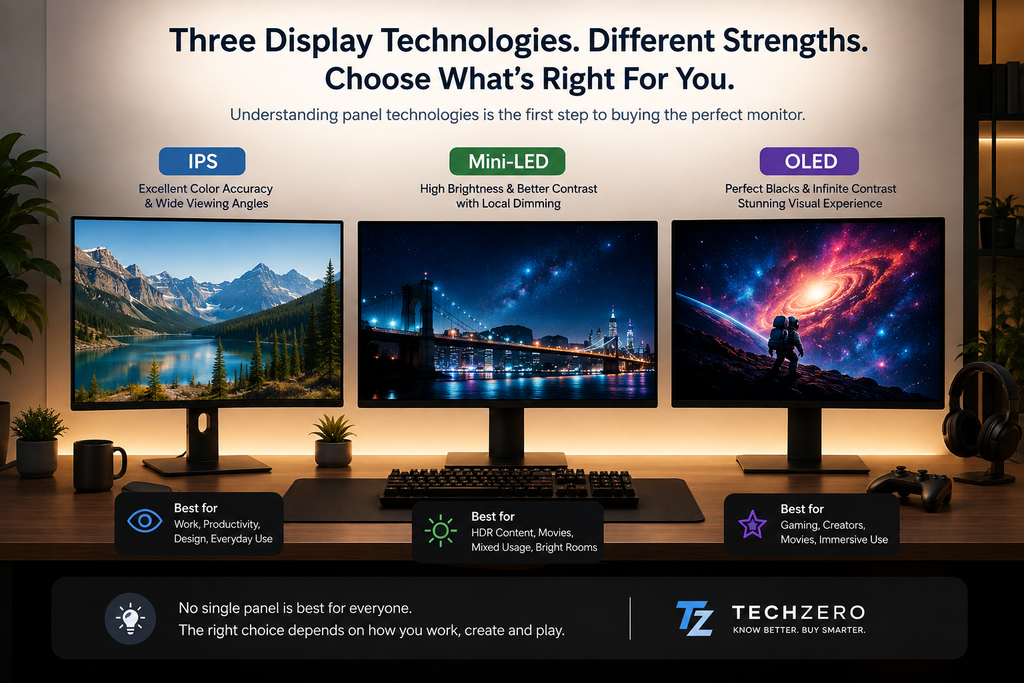
Monitor Technology Ladder
Moving upward generally brings better image quality, HDR performance, and overall viewing experience—but usually at a higher price.
OLED
Elite Contrast & Motion Clarity
Mini-LED
Brilliant HDR & Brightness
IPS
Accurate Everyday Workhorse
VA
Budget Contrast Champion
TN
Legacy Esports Panel
1. OLED (Organic Light-Emitting Diode)
- TechZero Buy Score: 98/100 🟢 Easy
- Best For: Pure gaming, HDR movies, dark-room media consumption.
- Avoid If: You leave static windows (like complex Excel sheets or editing timelines) open all day, or you’re shopping on a tight budget.
- 🎯 TechZero Take: OLED provides a visual leap in contrast and motion clarity that no traditional LCD backlight can ever replicate.
- ⚠️ Marketing Trap: “OLED burn-in will destroy your monitor in a year.” Reality: Modern Gen 5 QD-OLED and WOLED panels include advanced pixel shifting, automated refresh cycles, and multi-year warranties that make burn-in rare for normal mixed use.
2. Mini-LED
- TechZero Buy Score: 94/100 🟡 Medium
- Best For: Mixed-use content creators, programmers, and bright-room setups.
- Avoid If: You are sensitive to minor “blooming” or haloing around bright objects on dark backgrounds.
- 🎯 TechZero Take: Mini-LED delivers massive peak brightness and OLED-rivaling contrast with zero risk of burn-in, making it the ultimate multi-tasker’s screen.
- ⚠️ Marketing Trap: Buying Mini-LED monitors with low dimming zone counts. Reality: Look for 1,152 or more dimming zones to genuinely minimize light haloing.
3. IPS (In-Plane Switching)
- TechZero Buy Score: 92/100 🟢 Easy
- Best For: Standard office work, coding, students, and budget creative tasks.
- Avoid If: You demand pitch-black, theater-quality dark-room performance.
- 🎯 TechZero Take: IPS is the reliable workhorse of the digital world—offering great color accuracy, wide viewing angles, and affordability.
PART IV: The Quick Comparison Matrix & TechZero Awards
Display Technology Comparison
Compare the four major monitor panel technologies at a glance.
| Feature | IPS | Mini-LED | OLED | VA |
|---|---|---|---|---|
| Contrast | ⭐⭐⭐ | ⭐⭐⭐⭐⭐ | ⭐⭐⭐⭐⭐⭐ | ⭐⭐⭐⭐ |
| Brightness | ⭐⭐⭐⭐ | ⭐⭐⭐⭐⭐⭐ | ⭐⭐⭐⭐ | ⭐⭐⭐ |
| HDR Experience | ⭐⭐ | ⭐⭐⭐⭐⭐ | ⭐⭐⭐⭐⭐⭐ | ⭐⭐ |
| Office & Coding | ⭐⭐⭐⭐⭐ | ⭐⭐⭐⭐⭐ | ⭐⭐⭐⭐ | ⭐⭐⭐⭐ |
| Gaming | ⭐⭐⭐ | ⭐⭐⭐⭐⭐ | ⭐⭐⭐⭐⭐⭐ | ⭐⭐⭐ |
| Burn-in Risk | None | None | Low | None |
| Price Tier | Affordable | Premium | Flagship | Budget |
TechZero Category Awards
Our top recommendations for different monitor use cases based on overall value, performance, and long-term ownership.
PART V: Resolution, Screen Size & PPI
Resolution dictates how many pixels make up your workspace, but screen size determines how large those pixels appear.
- 1080p (Full HD) at 24 Inches (~92 PPI): Acceptable for extreme budget builds or ultra-competitive esports players chasing 500Hz+ refresh rates. Avoid at 27 inches or larger.
- 1440p (QHD / 2K) at 27 Inches (~109 PPI): The definitive “Goldilocks Zone” for PC gamers and general productivity. It offers sharp text and high performance without demanding an expensive graphics card. (See: [What Is PPI?])
- 4K (UHD) at 32 Inches (~140 PPI): The premium standard for professional work and high-end media. Essential for Mac users and digital artists using drawing tablets to eliminate blurry UI scaling. (See: [Best Monitor for MacBook])
- Ultrawide (21:9 or 32:9): Replaces dual-monitor setups with a seamless, immersive workspace ideal for timeline editors and financial analysts.
PART VI: Refresh Rates, Motion Clarity & Adaptive Sync
- 60Hz – 75Hz: Functional for basic office tasks, but feels noticeably sluggish if you are accustomed to modern smartphone and tablet displays.
- 120Hz – 144Hz: The modern baseline. Web scrolling is buttery smooth, and casual gaming is highly responsive.
- 240Hz – 360Hz: The sweet spot for high-end, competitive gaming.
- GTG (Gray-to-Gray) vs. MPRT: Always check the GTG response time (aim for under 3ms, or 0.03ms on OLED) to avoid ghosting. Treat 1ms MPRT marketing claims with caution, as they often rely on backlight strobing.
- VRR (Variable Refresh Rate): G-Sync and FreeSync are mandatory for gamers. They eliminate ugly screen tearing by dynamically syncing your monitor’s refresh rate to your GPU’s output. (See: [Refresh Rate Explained])
PART VII: Connectivity and Ports
Don’t buy a monitor without checking the rear input panel.
- USB-C with Power Delivery (PD): Non-negotiable for modern laptop users. A single cable transmits 4K video, USB data, and charges your laptop simultaneously. Look for 90W+ PD support. (See: [USB-C Monitor Buying Guide])
- DisplayPort 2.1 (DP 2.1): The bleeding-edge standard for high-end PC gaming, providing massive uncompressed bandwidth for high resolutions at ultra-high refresh rates. (See: [DisplayPort vs HDMI])
- HDMI 2.1: Required if you plan to connect a PS5 or Xbox Series X and output 4K at 120Hz.
PART VIII: Common Buying Mistakes to Avoid
- Buying a 32-inch 1080p monitor: For most desktop users, avoid 32-inch 1080p panels because the low pixel density results in massive, blurry pixels and poor text clarity (~69 PPI).
- Paying extra for “HDR400”: Functionally meaningless without real local dimming or per-pixel illumination.
- Ignoring stand quality: Leads to frustrating desk wobble every time you type. Always check for VESA compatibility.
- Buying 4K without a capable GPU: Choking your frame rates in games because your graphics card cannot handle the pixel count.
- Choosing solely by refresh rate: Sacrificing panel quality and color accuracy for a higher Hz number you may not even notice outside of esports.
- Overlooking USB-C: Buying a traditional power brick setup when your laptop workflow relies on single-cable docking.
PART IX: Ergonomics & VESA Mounting Principles
When you invest in a premium display, factory stands often consume excessive desk real estate and limit adjustments. Instead of chasing specific discontinued product models, look for these foundational principles when shopping for a monitor arm:
- Gas Spring or Mechanical Lift Mechanism: Ensures smooth height adjustment with fingertip pressure.
- Weight Capacity: Confirm the arm supports your monitor’s weight without the factory stand.
- Standard VESA Compatibility: Must support 75x75mm or 100x100mm mounting patterns.
- Integrated Cable Management: Keeps cords hidden along the arm channels.
- For deeper product picks, check our dedicated [Best Monitor Arms] guide.
PART X: The Decision Flowchart
Find Your Perfect Monitor in 30 Seconds
Select the profile that best matches how you use your computer.
Gaming
Fast response, high refresh rates and immersive visuals.
- 27″ QHD OLED
- 165–240Hz
- VRR (G-Sync / FreeSync)
- HDMI 2.1
Content Creator
Accurate colors for editing photos, videos and graphics.
- 32″ 4K Mini-LED
- 99% DCI-P3
- ΔE < 2
- USB-C PD
Office & Productivity
Comfortable for spreadsheets, documents and multitasking.
- 27″ QHD IPS
- 120Hz
- Height Adjustable
- USB-C
Programming
Maximum workspace with sharp text and clean ergonomics.
- 34″ Ultrawide IPS
- USB-C Hub
- QHD+
- Ergonomic Stand
MacBook Users
Retina-like sharpness with one-cable convenience.
- 27–32″ 4K IPS
- USB-C 90W+
- High PPI
- Factory Calibrated
Students
Affordable, reliable and comfortable for long study sessions.
- 24″ IPS
- 1080p
- 75–100Hz
- VESA Ready
Which Monitor Should You Buy?
Answer these simple questions to find the right monitor for your workflow.
Start Here
What is your primary use?
27″ OLED 240Hz+
Fast-paced esports27″ QD-OLED 165Hz
Immersive AAA Gaming32″ 4K Mini-LED / IPS
Editing & DesignLaptop User?
One more question27″ QHD IPS + USB-C
Single Cable Docking27″ QHD IPS
Best Overall ValuePART XI: Should You Upgrade?
Should You Upgrade Your Monitor?
Not every monitor needs replacing. Here’s our recommendation based on what you’re using today.
| Your Current Monitor | Recommendation | TechZero Verdict |
|---|---|---|
| 24″ 1080p 60Hz | ✅ Upgrade | Sharper text, larger workspace and significantly smoother everyday experience. |
| 27″ 1440p 144Hz IPS | ❌ Keep It | Still one of the best-balanced monitor configurations available today. |
| 32″ 4K IPS | ❌ Keep It | Upgrade only if you specifically need OLED, Mini-LED or USB-C improvements. |
| Older TN Panel | ✅ Upgrade | You’ll immediately notice better colours, viewing angles and overall comfort. |
| Older VA Panel | 🤔 Depends | Upgrade if HDR, gaming performance or colour accuracy are important to you. |
PART XII: Recommended Specification Cheat Sheet
Recommended Monitor Specification by User Type
Choose the configuration that best matches your daily workflow.
| User Type | Recommended Specification | Priority |
|---|---|---|
| 🎓 Student | 24″ IPS • 1080p • 75–100Hz | Budget |
| 💼 Office Worker | 27″ IPS • QHD • Height Adjustable | Productivity |
| 👨💻 Programmer | 27–34″ IPS / Mini-LED • USB-C • Ultrawide | Workspace |
| 🎬 Content Creator | 32″ 4K Mini-LED • 99% DCI-P3 • 1152+ Zones | Creator |
| 📷 Photographer | 27–32″ 4K IPS • ΔE < 2 • Hardware Calibration | Colour |
| 🎮 PC Gamer | 27″ QHD QD-OLED • 165–240Hz • VRR | Gaming |
| 🎯 Console Gamer | 32″ 4K • HDMI 2.1 • 120Hz | Console |
| 🍎 MacBook User | 27–32″ 4K • USB-C PD (90W+) • High PPI | Mac |
For most buyers, a 27-inch QHD IPS monitor with USB-C Power Delivery, a fully adjustable stand and a 120–180Hz refresh rate offers the best balance of price, productivity, gaming performance and long-term value.
If You Buy Only One Monitor, Buy This.
For the vast majority of people, the safest long-term choice is a 27-inch QHD (1440p) IPS monitor featuring USB-C Power Delivery (90W+), a 120–180Hz refresh rate, and a fully adjustable ergonomic stand.
This configuration delivers the best balance of productivity, gaming, image quality, future-proofing and value without paying flagship OLED prices.
Build Your Display Knowledge
Ready to dive deeper? These TechZero guides explain every important display technology in detail.
IPS vs VA vs OLED
Understand every display technology before buying.
Best Monitor for MacBook
The complete buying guide for Apple users.
DisplayPort vs HDMI
Which cable should you actually use?
USB-C Monitor Guide
Why one cable can replace your entire dock.
Best Monitor Arms
Improve ergonomics and reclaim desk space.
Monitor Terms A–Z
Every display specification explained simply.
Industry Standards & Trusted References
TechZero recommendations are based on official display standards, manufacturer documentation and globally recognized technology organizations. These resources are excellent if you’d like to explore the specifications in greater detail.
VESA DisplayHDR
Official HDR certification program for computer monitors.
displayhdr.org →DisplayPort (VESA)
Official DisplayPort specifications and technical standards.
displayport.org →HDMI Licensing
Official HDMI specifications, bandwidth and compatibility.
hdmi.org →USB Implementers Forum
USB-C, USB4 and Power Delivery standards.
usb.org →NVIDIA G-SYNC
Official G-SYNC technology and certified monitor list.
nvidia.com →AMD FreeSync
Adaptive Sync technology and compatibility information.
amd.com →Apple Display Support
Official guidance for using external displays with Mac.
support.apple.com →ICC Color Consortium
International colour management standards.
color.org →Explore More TechZero Buying Guides
Build your technology knowledge with our in-depth buying guides, explainers and comparisons. These articles complement this monitor buying guide and help you make smarter purchasing decisions.
💻 Buying Guides
🍎 Apple & Displays
🔌 Connectivity
🖥️ Monitor Series
- IPS vs VA vs OLED Coming Soon
- DisplayPort vs HDMI Coming Soon
- Best Monitor for MacBook Coming Soon
- Monitor Terms Explained A–Z Coming Soon
- Best Monitor Arms Coming Soon
This Monitor Buying Guide is the foundation of our upcoming Monitor Knowledge Hub. Over the coming months, we’ll publish detailed explainers, comparisons and buying guides covering every major display technology and monitor category.


[…] Learn the differences between charging, data transfer, video output, and Thunderbolt support. 🖥️ Monitor Buying Guide – Build the perfect study and productivity workstati… 📷 Camera Buying Guide – Useful if you also create lectures, presentations, or […]
[…] Monitor Buying Guide – Everything you need to know before purchasing a display panel. […]