
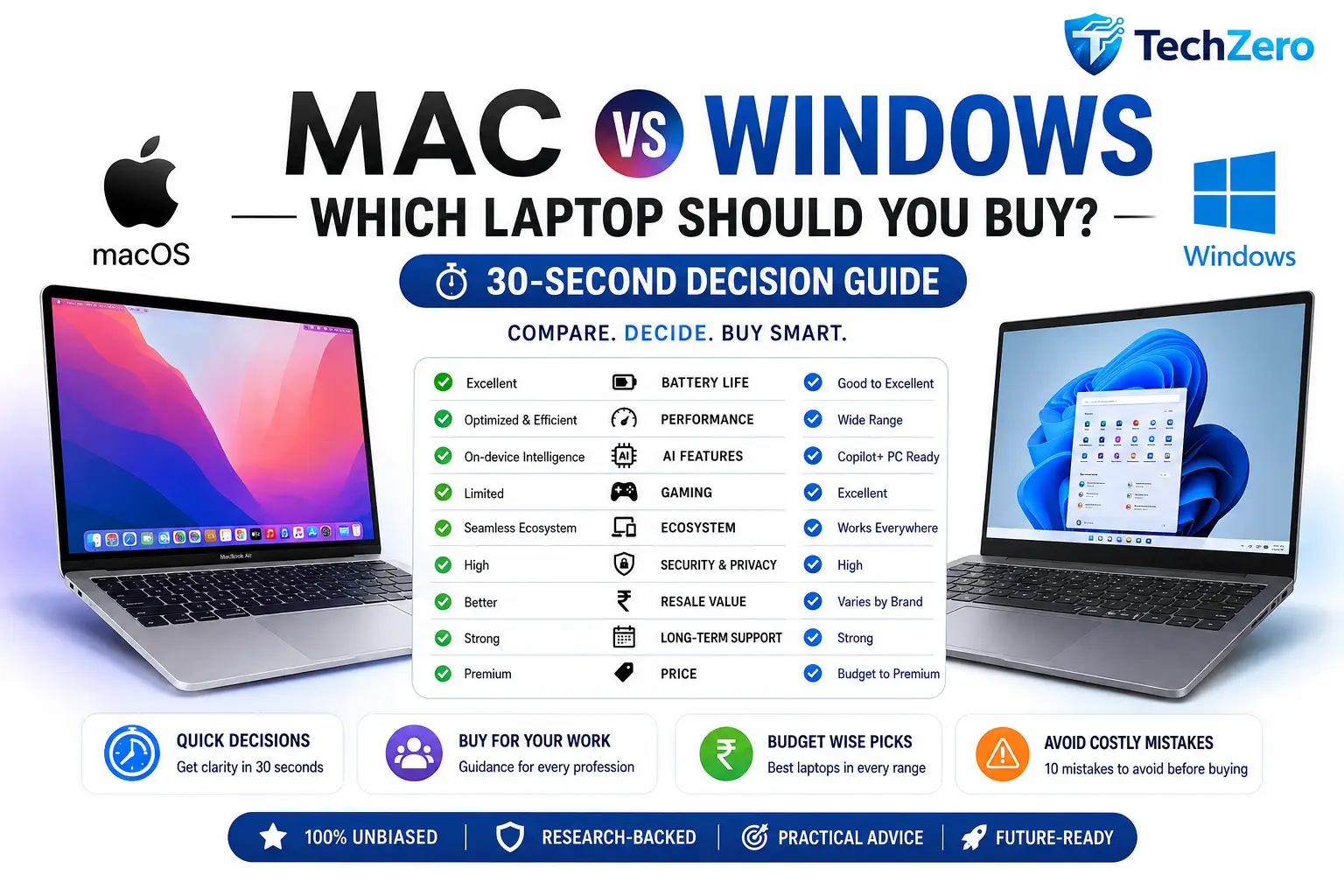
Choosing between a MacBook and a Windows laptop has never been more difficult. Modern laptops offer incredible performance, AI capabilities, excellent battery life, and premium designs—but the best choice depends on your workflow, budget, software, and long-term ownership goals.
This TechZero Decision Hub is designed for one purpose: helping you choose the right laptop in under a minute. If you’re looking for a quick recommendation, start with the decision guide below. If you want a deeper understanding of hardware, software, AI, ownership costs, and long-term value, we’ve linked our complete buying guides throughout this article.
Whether you’re a student, software developer, engineer, content creator, gamer, business professional, or frequent traveller, this guide will point you in the right direction without overwhelming you with technical jargon.
Need the short answer? Start below.
📌 Quick Summary
If you already use an iPhone, iPad, or other Apple devices, a MacBook will usually provide the best overall experience thanks to its excellent battery life, software optimization, long-term updates, and seamless ecosystem integration.
If you rely on Windows-only software, PC gaming, engineering applications, enterprise tools, or want maximum hardware choice, a Windows laptop is usually the better option.
For many buyers—including students, office professionals, writers, remote workers, and business users—both platforms are excellent. In these cases, factors like battery life, display quality, keyboard comfort, software compatibility, and budget matter more than the operating system itself.
The best laptop isn’t the one with the highest benchmark score.
It’s the one that fits your workflow, your budget, and how long you plan to keep it.
For readers who want a complete understanding before spending ₹50,000–₹2,00,000 on a laptop, explore our in-depth Mac vs Windows Laptop Buying Bible (Volume 1) and Ownership & Smart Buying Guide (Volume 2) after using this decision hub.
🔑 Key Takeaways
- Already invested in the Apple ecosystem? A MacBook is usually the smarter choice.
- Need Windows-only software, engineering tools, or PC gaming? Choose Windows.
- For office work, browsing, studies, and productivity, both platforms perform exceptionally well.
- Don’t compare laptops using processor names alone—consider battery life, display quality, software support, repairability, and resale value.
- If you plan to keep your laptop for five to six years, prioritize memory, storage, software longevity, and AI readiness over raw benchmark scores.
- Your workflow matters more than brand loyalty.
- Buy for the next six years, not just today’s needs.
- Still unsure? Follow the 30-Second Decision Flow below.
Part I — The 30-Second Decision
Chapter 1: Start Here
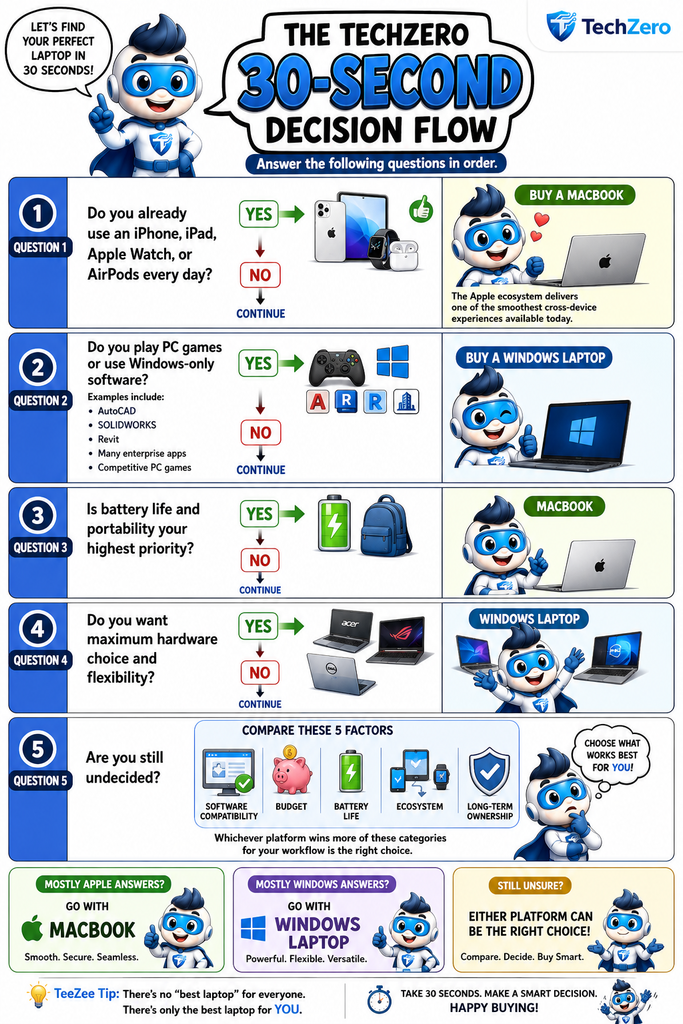
The TechZero 30-Second Decision Flow
Before diving into specs, ask yourself one simple question and evaluate these five core factors:
- Software compatibility
- Budget
- Battery life
- Ecosystem
- Long-term ownership
Whichever platform wins the most categories for your specific workflow is the right choice.
🧭 Quick Decision Guide
| If You Value… | Choose… |
| Apple Ecosystem | 🍎 Mac |
| Battery Life | 🍎 Mac |
| Gaming | 🪟 Windows |
| Engineering Software | 🪟 Windows |
| Hardware Flexibility | 🪟 Windows |
| Long Software Support | 🍎 Mac |
| Business/Office Work | 🤝 Either |
| Programming | 🤝 Depends on your dev environment |
| Long-Term Ownership | 🤝 Depends on configuration |
💡 TechZero Insight
Don’t ask: “Which laptop is the best?”
Ask: “Which laptop is best for the work I actually do every day?”
That single shift in mindset eliminates 90% of buying confusion.
🔜 Coming Up: Now that you’ve identified your likely platform, let’s put Mac and Windows head-to-head in the categories that define everyday use.
Part II — Mac vs. Windows at a Glance
Chapter 2: The Side-by-Side Comparison
If you’ve reached this point, you’re likely choosing between a MacBook and a premium Windows laptop. Both are faster, more secure, and more capable than ever. The choice isn’t about finding the superior OS—it’s about finding the perfect workflow match.
- Battery Life (Winner: 🍎 Mac): Thanks to custom silicon, Apple’s seamless integration of hardware and software delivers industry-leading battery efficiency. Windows laptops are highly variable; some ultrabooks are fantastic, but gaming and workstation rigs sacrifice battery for raw power.
- Performance (Winner: 🤝 Tie): Macs excel in consistent, quiet efficiency. Windows offers unparalleled variety, from budget basics to desktop-replacement monsters. For the average user, both are more than fast enough.
- Artificial Intelligence (Winner: 🤝 Tie): Apple focuses on privacy-first, on-device intelligence. Microsoft leans into enterprise integration and robust Copilot productivity features. Both are heavily invested in the AI future.
- Software Compatibility (Winner: 🪟 Windows): Windows remains the undeniable king of legacy and broad industry software. Mac rules the creative suite, web dev, and the Apple ecosystem.
- Gaming (Winner: 🪟 Windows): This isn’t a contest. Windows dominates PC gaming with massive libraries and dedicated hardware. Mac gaming is improving, but still miles behind.
- Security & Privacy (Winner: 🤝 Tie): Both are highly secure when used responsibly. Apple wins on consumer privacy, while Windows dominates in enterprise-grade security management.
- Repairability & Upgrades (Winner: 🪟 Windows): Most modern Macs are locked down at purchase. Windows often allows for SSD, RAM, and battery replacements down the road.
- Resale Value (Winner: 🍎 Mac): Premium MacBooks hold their value remarkably well, making them easier to sell when it’s time to upgrade. Windows resale values drop faster and vary wildly by brand.
📊 The One-Page Scorecard
| Category | 🍎 Mac | 🪟 Windows |
| Battery Life | ⭐⭐⭐⭐⭐ | ⭐⭐⭐⭐⭐ |
| Performance | ⭐⭐⭐⭐⭐ | ⭐⭐⭐⭐⭐ |
| Gaming | ⭐⭐☆☆☆ | ⭐⭐⭐⭐⭐ |
| Software Compatibility | ⭐⭐⭐⭐☆ | ⭐⭐⭐⭐⭐ |
| AI Features | ⭐⭐⭐⭐⭐ | ⭐⭐⭐⭐⭐ |
| Security | ⭐⭐⭐⭐⭐ | ⭐⭐⭐⭐⭐ |
| Privacy | ⭐⭐⭐⭐⭐ | ⭐⭐⭐⭐☆ |
| Repairability | ⭐⭐⭐☆☆ | ⭐⭐⭐⭐☆ |
| Upgradeability | ⭐⭐☆☆☆ | ⭐⭐⭐⭐⭐ |
| Resale Value | ⭐⭐⭐⭐⭐ | ⭐⭐⭐⭐☆ |
| Hardware Choice | ⭐⭐⭐☆☆ | ⭐⭐⭐⭐⭐ |
| Long-Term Value | ⭐⭐⭐⭐⭐ | ⭐⭐⭐⭐⭐ |
🛒 Smart Buy: If two laptops cost roughly the same, let these four things be your tiebreakers: Display quality, battery life, keyboard/trackpad, and software compatibility. Those dictate your daily happiness far more than a slightly faster CPU.
Part III — Buy Based on Your Profession
Chapter 3: Which Laptop is Right for Your Work?
Two people can spend the exact same amount on completely different laptops and both make the right choice. Why? Because a student’s needs are entirely different from an architect’s.
Quick Recommendation Matrix
| Profession | Recommended Platform | Why? |
| School Student | 🤝 Either | Value & simplicity |
| College Student | 🤝 Depends | Software requirements & ecosystem |
| Office Professional | 🤝 Either | Productivity & web apps |
| Software Developer | 🤝 Depends | Dev environment (iOS vs. .NET) |
| Engineer/Architect | 🪟 Windows | Heavy CAD, BIM, & specialized tools |
| Designer/Editor | 🤝 Either | Display accuracy & creative app preference |
| AI Professional | 🤝 Either | Hardware dependent (GPUs vs Neural Engines) |
| Gamer | 🪟 Windows | Ecosystem & dedicated graphics |
| Business Owner | 🤝 Either | Reliability & security |
| Frequent Traveller | 🍎 Mac | Battery life & portability |
✅ Key Decision: Don’t pick a laptop just because it’s marketed to your profession. List your top five most-used apps. If they run perfectly on both platforms, base your final decision on battery, display, and long-term value.
Part IV — Buy Based on Your Budget
Chapter 4: What Should You Expect at Your Price Point?
Your budget doesn’t just dictate what you can buy—it dictates the compromises you have to make. Buy the best-balanced laptop within your budget, rather than simply maxing out your credit card.
💰 Under ₹50,000 (The Essentials)
- Best For: School students, home users, basic office work.
- Expect: Modern entry-level CPU, 16GB RAM (prioritize this!), 512GB SSD, FHD display.
- Skip: RGB lighting, dedicated GPUs, premium metal chassis.
- The Verdict: Buy the most balanced Windows laptop from a trusted brand.
💰 ₹50,000–₹75,000 (The Sweet Spot)
- Best For: College students, office professionals, multitasking.
- Expect: Mid-range CPU, 16GB RAM, 512GB SSD, better build quality and battery.
- The Verdict: This is the highest-value segment for the average buyer. Stick to Windows ultrabooks here.
💰 ₹75,000–₹1,00,000 (The Premium Entry)
- Best For: Developers, business users, frequent travellers.
- Expect: Premium chassis, excellent keyboard/display, long battery, fast storage.
- The Verdict: This is where premium ultrabooks (like the base MacBook Air and high-end Windows portables) begin to shine.
💰 ₹1,00,000–₹1,50,000 (The Professional Tier)
- Best For: Creators, heavy multitaskers, executives.
- Expect: High-res/OLED displays, AI-ready hardware, flawless build quality, all-day battery.
- The Verdict: You are investing in long-term productivity and zero daily friction.
💰 Above ₹1,50,000 (The Heavyweights)
- Best For: 3D rendering, intense video editing, complex engineering, AI development.
- Expect: Maxed-out CPU cores, professional-grade GPUs, massive RAM/storage.
- The Verdict: Only buy in this tier if your workflow strictly demands the raw power. It is overkill for everyday browsing and office work.
💸 Value Over Price: A cheaper laptop becomes the most expensive one if it breaks or bogs down in two years. Spending an extra 10–15% upfront for more RAM or a better display often adds years to the machine’s useful life.
Part V — Avoid These Costly Mistakes
Chapter 5: 10 Buying Pitfalls
Thousands of buyers regret their purchases every year because of these easily avoidable traps:
- ❌ Buying only by Processor: A fast CPU won’t fix a terrible screen or a two-hour battery life. Look at the whole package.
- ❌ Skimping on Memory (RAM): Browsers and AI tools are memory hogs. Buy enough RAM for the next 5 years, not just today.
- ❌ Buying the Smallest SSD: Storage fills fast. Give yourself room to grow.
- ❌ Ignoring Display Quality: You will stare at this screen for thousands of hours. Prioritize brightness and color accuracy.
- ❌ Ignoring Battery Life: A laptop tethered to a wall is just a tiny desktop.
- ❌ Forgetting Software Compatibility: The best hardware is useless if it can’t run your essential apps.
- ❌ Buying for Today Only: Anticipate where your workload will be in 3-5 years.
- ❌ Falling for Marketing: “Gaming” or “AI” labels often mask compromises in battery or build quality. Look past the stickers.
- ❌ Ignoring the Ecosystem: Your laptop needs to play nice with your phone, smartwatch, and cloud services.
- ❌ Buying What Your Friend Bought: Their workload is not your workload.
Part VI — TechZero Smart Decision Engine™
Chapter 6: Find Your Match in 60 Seconds
Answer these quick questions to reveal your ideal platform:
- Your Phone: Mostly iPhone (+1 Mac) | Mostly Android (+1 Windows)
- Your Work: Engineering/Gaming (Windows) | Office/Creative (Depends)
- Lifespan: If keeping it for 5+ years, prioritize build, battery, and resale (Advantage: Mac & Premium Windows).
- Top Priority: Battery (Mac) | Gaming (Windows) | Budget (Windows).
- Must-Have Apps: Xcode/Final Cut (Mac) | Revit/AutoCAD/PC Games (Windows).
- Travel Habits: If you travel frequently, battery is critical (Mac excels here).
- Tech Philosophy: “I want it to just work” (Mac) vs. “I want maximum flexibility” (Windows).
📊 Your Results
- 🍎 Mostly Mac Answers: Perfect for Apple ecosystem users, travellers, students, writers, and creatives who want seamless reliability and insane battery life.
- 🪟 Mostly Windows Answers: The undisputed choice for engineers, gamers, enterprise power users, budget-conscious buyers, and hardware tinkerers.
- 🤝 Mixed Answers: You can’t go wrong! Focus heavily on the display, keyboard, and price-to-performance ratio, and buy whichever machine feels right to you.
📚 Continue Learning
Ready to pull the trigger? Dive deeper with our complete flagship guides:
- The Mac Buying Bible
- Best Future-Proof Laptops Under ₹50,000
- 3 Checks You Must Do Before Buying a Laptop
Happy buying—and here’s to choosing a laptop you’ll still love using years from now.
— Team TechZero
💻 Genuine Laptop Reference Sites
A curated list of trusted platforms for buying refurbished laptops and researching technical benchmarks.
🛒 Certified Refurbished Sites (India)
Amazon Renewed (India)
The safest bet for buying refurbished MacBooks and Windows laptops with a minimum 6-month warranty and easy return policies.
Visit Amazon RenewedCashify
Great inventory of graded second-hand MacBooks backed by a 6-month warranty and physical store support across India.
Visit CashifySaudewala
Specializes in highly durable, enterprise-grade Windows laptops (ThinkPads, EliteBooks) with strict testing and solid warranties.
Visit Saudewala📊 Technical Reference & Benchmark Sites
Notebookcheck
The ultimate database for laptop reviews. In-depth tests on thermals, fan noise, display brightness, and real-world battery life.
Visit NotebookcheckNanoReview
The best tool for quick, side-by-side processor comparisons. Pit Apple M-series chips against Intel or AMD with clean visuals.
Visit NanoReviewMacRumors Buyer’s Guide
Crucial before buying any Apple product. Tracks release cycles to tell you if you should buy now or wait for an upcoming release.
Check Buyer’s Guide

-
-
-
-
-
Show Comments[…] ecosystem to commit to for your next machine, you can explore our complete hardware deep dive on Mac vs Windows: Which Laptop Should You Buy? to see how they stack up in daily production […]
[…] Before committing to Windows, if you are still weighing whether to jump to Apple’s macOS ecosystem, take a moment to read our Mac vs Windows: Which laptop should you buy guide. […]
[…] Story Why macOS gets a shiny new name every year while Windows stubbornly sticks to numbers. 🍏 Mac vs Windows (2026) Security, AI integration, and ecosystem lock-in. Which platform is the … 💻 Processor Buying Guide Don’t overpay for the wrong chip. Read this before buying your […]
[…] Mac vs Windows: Which Laptop Should You Buy? — See how the two platforms differ when choosing a laptop for your specific needs. […]
[…] Still Choosing Your Platform? Mac vs Windows: Which Laptop Should You Buy? […]