
📌 Quick Summary
Choosing a productivity platform is no longer just about picking a basic word processor or a simple spreadsheet tool. Today, these suites function as complete, full-scale digital operations hubs. They dictate how your organization stores sensitive files, handles video conferencing, secures communication channels, and leverages cutting-edge artificial intelligence (AI) to automate daily workflows. Whether you are a freelance consultant, a university student, a small business owner, or an enterprise IT director, your platform choice forms the foundation of your daily productivity architecture.
For nearly two decades, the market has been a high-stakes, two-horse race. Microsoft successfully transformed its classic legacy desktop ecosystem into the cloud-connected Microsoft 365 network. Meanwhile, Google took a completely opposite path, evolving its cloud-native, browser-first G Suite into the tightly integrated Google Workspace environment. With both tech giants continuously deploying advanced AI features and complex security upgrades, picking the right option in 2026 requires a rigorous, data-driven analysis.
This deep-dive comparison strips away the marketing fluff to evaluate both ecosystems across distinct operational criteria: core architecture, feature depth, financial value, real-world user experience, and enterprise security infrastructure.
📌 The 30-Second Decision
Decision Matrix in 30 Seconds
2026 ReferenceWho Should Read This Deep Dive?
- Solo Freelancers & Bloggers looking to optimize delivery turnarounds and balance client compatibility.
- Small Business Owners & Startups evaluating onboarding friction, hidden IT support overheads, and hardware independence.
- Enterprise IT Administrators & Scrum Masters requiring granular compliance audits, advanced device management, and enterprise-grade identity controls.
- Students & Educators choosing between long-term corporate readiness and cloud-native peer collaboration.
Introduction: The Philosophy Divide
The modern workplace has changed fundamentally. Software installations are no longer isolated to localized machines. Documents are co-edited by distributed teams simultaneously, corporate communication happens in unified hubs, and embedded generative AI acts as a digital execution layer rather than a standalone chat portal.
Yet, Microsoft and Google approach this cloud-driven world from completely opposite architectural philosophies:
Microsoft’s core premise relies on raw local processing power. It built its cloud strategy on top of decades of dominant desktop software leadership, weaving cloud sync, enterprise security layers, and advanced automation directly into native applications. Google, by contrast, discarded the desktop model from day one. It treats the web browser as a universal operating system, focusing entirely on a zero-friction deployment model where logging in from any machine grants instant access to your entire office layout.
Inside the Microsoft 365 Ecosystem
The Shift from Perpetual Software to Rolling Service
For decades, Microsoft Office operated under a transaction-heavy licensing model. Users purchased physical media or digital keys for standalone versions like Office 2007 or Office Pro, ran them locally for years, and paid for another major upgrade package when compatibility broke down.
Today, Microsoft 365 functions strictly as a unified, rolling subscription service. Rather than waiting years for landmark feature releases, users receive continuous, automated cloud updates, security enhancements, and immediate access to evolving AI capabilities throughout the year.
Today, Microsoft 365 functions strictly as a unified, rolling subscription service. Rather than waiting years for landmark feature releases, users receive continuous, automated cloud updates. However, if your organization prefers avoiding recurring subscription costs, you can compare the pros and cons of Microsoft’s cloud platform against their latest one-time purchase option in our deep-dive analysis of Microsoft 365 vs. Office 2024.
The Application Blueprint
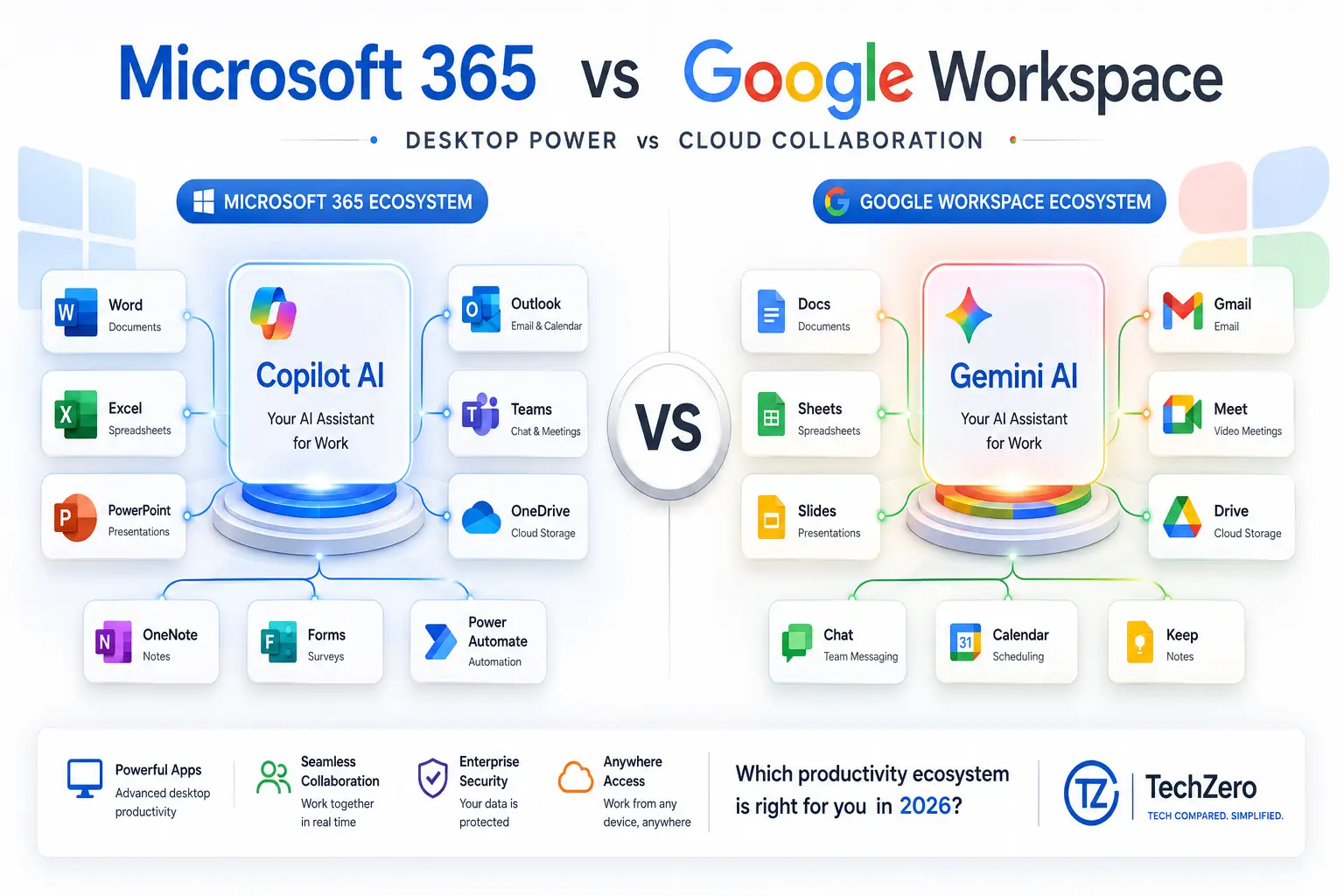
A standard Microsoft 365 environment deployment provides access to a comprehensive software matrix:
- Microsoft Word: The absolute industrial baseline for complex publishing, automated indexing, structural layout management, master documentation, and professional academic citations.
- Microsoft Excel: The gold standard for financial analysis and data manipulation. It supports highly advanced macro automations, custom PivotTables, native Power Query ETL pipelines, and complex modeling calculations that web apps struggle to execute.
- Microsoft PowerPoint: The dominant platform for corporate boardroom decks, built with complex multimedia management pipelines, fine-grained object animations, presenter view layers, and AI-driven slide assembly.
- Outlook: A dense, multi-layered enterprise communication hub combining corporate email servers, advanced shared calendars, task managers, and direct organizational contact directories.
- OneNote: A highly capable, unstructured digital binder system that organizes typed notes, audio clips, PDFs, and deep canvas stylus sketching into distinct sections and books.
- Microsoft Teams: The central operating terminal for enterprise communication, acting as a shared hub for persistent channel messaging, secure video conferencing, corporate voice routing, and live app integration.
- OneDrive & SharePoint: The storage infrastructure layer. It maps cloud directories straight into Windows File Explorer or macOS Finder while preserving granular local synchronization and deep version history controls.
- Creative Utilities (Designer & Clipchamp): Entry-level media creation assets designed for fast, AI-assisted graphic production and timeline-based video editing for business presentations.
- Microsoft Copilot: The systemic AI assistant embedded inside the core desktop apps, capable of reading structural context from Excel sheets, Word briefs, and Teams transcripts to automate prompt execution.
💡 TechZero Fact
Microsoft Word’s default file format (
.docx) is an internationally recognized open standard (Office Open XML). This format serves as the universal benchmark for file compatibility across virtually all word processors worldwide.
Inside the Google Workspace Ecosystem
The Browser-First Architecture
Google built its workspace strategy by omitting local desktop installations completely. Designed specifically to reduce the system friction of traditional software, Google Workspace lives inside the cloud architecture. Documents save continuously, links replace bulky email attachments, and hardware requirements become practically irrelevant. Formerly known as Google Apps and later G Suite, the modern Google Workspace is a highly streamlined, unified environment focused entirely on rapid team execution.
The Core Application Matrix
- Gmail: One of the planet’s fastest email platforms, anchored by exceptionally fast indexing search functions, automated priority inbox sorting, and enterprise-grade spam protection.
- Google Docs: A clean, highly minimalist word processor built specifically for fluid, frictionless co-editing and live collaborative review.
- Google Sheets: A cloud-native spreadsheet utility built for real-time tracking, immediate dashboard sharing, and collaborative workflows that do not require massive computational data processing.
- Google Slides: A straightforward presentation tool optimized for fast, multi-user slide editing and easy sharing over the web.
- Google Drive: The absolute core storage hub for the entire environment, providing instant file permissions, rapid link sharing, and intuitive document grouping via Shared Drives.
- Google Meet & Chat: Fast, lightweight video conferencing and instant team messaging channels that fire up inside standard browser windows without needing to initialize external desktop clients.
- Google Calendar: A unified scheduling engine that handles group invitations, automated appointment booking pages, and room resource allocations seamlessly.
- Google Keep & Forms: Agility utilities for immediate digital sticky-note organization and highly efficient public or internal data collection surveys.
- Gemini AI: Google’s native large language model integrated directly into the Workspace side panels, assisting users with rapid email drafting, creative content generation, and document summarization.
💡 TechZero Fact
Google Docs pioneered real-time collaborative web editing long before traditional desktop suites integrated cloud synchronization. This architecture eliminated manual “Save” buttons entirely by writing changes to cloud servers every few seconds.
The 60-Parameter Feature Matrix
To differentiate from superficial summaries, this matrix systematically breaks down both suites across 60 distinct variables. Ratings and winners reflect a weighted assessment of depth, execution speed, and platform maturity.
Core Architecture & Platform Support
| Processing Parameter | Microsoft 365 (Word/Excel) | Google Workspace (Docs/Sheets) | Winner |
|---|---|---|---|
| Advanced Layout Controls | Industry Standard | Basic / Streamlined | Microsoft |
| Academic Citations / Index | Comprehensive Native Suite | Basic Add-ons Required | Microsoft |
| Mail Merge Capabilities | Deep Advanced Integration | Standard Native/Extension | Microsoft |
| Template Library Depth | Tens of thousands (Deep) | Clean / Curated Selection | Microsoft |
| Max Data Row Processing | 1,048,576 rows per sheet | 10,000,000 cells max total | Microsoft |
| Complex PivotTables | Highly Advanced Data Models | Basic/Intermediary Arrays | Microsoft |
| ETL Pipelines (Power Query) | Built-in Native Utility | No Native Equivalent | Microsoft |
| Macro Programming Engine | Advanced VBA / JS API | Google Apps Script (JS) | Microsoft |
| Advanced Charting/Graphics | Deep Financial Formatting | Clean Vector Visualizations | Microsoft |
| Database Application | Microsoft Access (PC Only) | None | Microsoft |
| Desktop Publishing Utility | Microsoft Publisher (Legacy) | None | Microsoft |
| PDF Modification | Native In-App Conversion | Basic Export / Import View | Tie |
Document & Data Processing Depth
| Architecture Parameter | Microsoft 365 | Google Workspace | Winner |
|---|---|---|---|
| Overall Architecture | Hybrid (Desktop + Cloud) | Cloud-Native / Web First | Depends |
| Installation Required | Yes (For Full Desktop Apps) | No (Browser Native) | |
| Browser Execution Quality | Excellent | Industry Benchmark | |
| Native Windows Client | Native Core App Suite | Progressive Web Only | Microsoft |
| Native macOS Client | Native Core App Suite | Progressive Web Only | Microsoft |
| Linux Compatibility | Browser Apps Only | Full Browser Parity | |
| ChromeOS Experience | Web Apps Only | Native Deep OS Integration | |
| Android Deployment | Dedicated Mobile Apps | Native Core App Ecosystem | Tie |
| iOS/iPhone Deployment | Dedicated Mobile Apps | Dedicated Mobile Apps | Tie |
| Bulletproof Offline Mode | Seamless Local Operation | Requires Pre-Configuration | Microsoft |
| Continuous Auto-Save | Yes (Via OneDrive/SharePoint) | Yes (Native Core Layer) | Tie |
Team Communication & Digital Storage
| Communication Parameter | Microsoft 365 (Teams/OneDrive) | Google Workspace (Meet/Drive) | Winner |
|---|---|---|---|
| Email System Interface | Dense Power-User Layout | Fast, Search-Focused UI | Depends |
| Shared Team Calendars | Advanced Exchange Rooms | Seamless Group Calendaring | Tie |
| Meeting Attendee Scaling | Up to 10,000 (Webinars) | Up to 500 (Enterprise Tiers) | Microsoft |
| Persistent Project Channels | Deep Threaded Teams Layout | Google Spaces Environment | Microsoft |
| Corporate Telephony Routing | Full Enterprise VoIP Stack | Basic Phone Add-ons | Microsoft |
| Local File Explorer Sync | Native OneDrive Desktop Core | Google Drive for Desktop | Microsoft |
| Fast Search Indexing | Moderate (App-Dependent) | Exceptional Cloud Search | |
| Shared Corporate Drives | Advanced SharePoint Architecture | Managed Shared Drives | Tie |
| Note-taking Taxonomy | Deep Section/Page Notebooks | Flat Tagged Sticky Notes | Microsoft |
| Native Web Form Builders | Microsoft Forms | Google Forms | Tie |
| Digital Whiteboarding | Microsoft Whiteboard | Discontinued (Use 3rd Party) | Microsoft |
AI Integration & Execution
| AI Engine Parameter | Microsoft Copilot | Google Gemini | Winner |
|---|---|---|---|
| Contextual Email Drafting | Deep Outlook Thread Scanning | Fast Prompt-Based Replies | Tie |
| Structural Document Gen | Generates layouts from briefs | Generates text outlines | Microsoft |
| Data-Model Breakdown | Automates Charting & Trends | Creates Basic Formulas | Microsoft |
| Automated Presentation Gen | Builds Decks from Documents | Builds Text Presentation Outlines | Microsoft |
| Live Meeting Transcription | Real-Time In-Depth Recaps | Real-Time Summarization | Tie |
| Cross-Application Tracking | Scans Microsoft Graph | Scans Unified Drive/Gmail | Tie |
| Prompt Execution Speed | Moderate | Fast |
Administrative Operations & Scale
| Administrative Parameter | Microsoft 365 | Google Workspace | Winner |
|---|---|---|---|
| Multi-Factor Authentication | Advanced Identity Protection | Standard Two-Step Verification | Tie |
| Granular Data Encryption | High (Purview/Defender) | High (Cloud Encryption Keys) | Tie |
| Device Management (MDM) | Deep Enterprise Intune Stack | Clean Endpoint Dashboard | Microsoft |
| Compliance Audit Vaults | Massive Retention Matrices | Google Vault Archiving | Microsoft |
| Identity Management Hub | Microsoft Entra ID Core | Google Cloud Identity Core | Tie |
| Admin Dashboard Simplicity | Steep Learning Curve | Highly Intuitive UI | |
| Onboarding Velocity | Multi-day Corporate Deployment | Minutes-to-ready setup | |
| Third-Party Extensibility | Vast Enterprise Integration | Massive Workspace Marketplace | Tie |
| Small Business Flexibility | Strong Scalable Tiers | Exceptionally Agile Startup Base | Tie |
| Corporate Training Cost | Requires Training Paths | Zero-to-minimal Training Need | |
| Overall Computational Value | Massive Local App Footprint | Frictionless Agility Asset | Microsoft |
The 60-Parameter Feature Matrix – TechZero Results
| Evaluation Category | Microsoft 365 Score | Google Workspace Score |
|---|---|---|
| Advanced Productivity | ★★★★★★★★★★10/10 | ★★★★★★★★★★8/10 |
| Real-time Collaboration | ★★★★★★★★★★8/10 | ★★★★★★★★★★10/10 |
| Embedded AI Capabilities | ★★★★★★★★★★9/10 | ★★★★★★★★★★9/10 |
| Offline Independence | ★★★★★★★★★★10/10 | ★★★★★★★★★★6/10 |
| User Onboarding Speed | ★★★★★★★★★★7/10 | ★★★★★★★★★★10/10 |
| Enterprise Governance | ★★★★★★★★★★10/10 | ★★★★★★★★★★8/10 |
| OVERALL VALUE SCORE | 9.1 / 10 | 8.7 / 10 |
Core Apps Head-to-Head
📄 Microsoft Word vs. Google Docs
- Microsoft Word operates as a deep typographic design studio. If you are handling complex contracts with multi-level numbered lists, master corporate policies requiring tracking across dozens of contributors, or academic research requiring native endnote indexing, Word handles the structural processing effortlessly.
- Google Docs functions like a dynamic whiteboard. It strips away advanced design menus to maximize processing agility. For fast, multi-author copywriting, live document ideation sessions, and content drafting, the absolute fluid layout of Docs outpaces Word’s web browser variant.
- Takeaway: Deploy Word for final publication layouts and structural master documents; leverage Docs for active, multi-user copywriting sprints.
📊 Microsoft Excel vs. Google Sheets
- Microsoft Excel is an unmatched data laboratory. When handling massive financial ledgers stretching toward millions of rows, complex data normalization via Power Query, or intricate localized calculations running custom JavaScript/VBA macros, Excel’s local execution engine remains mandatory.
- Google Sheets is a highly connected data display dashboard. While it drops processing frames and experiences latency when forced to parse massive enterprise logs, its ability to inject web data live via native API hooks (
IMPORTXML,GOOGLEFINANCE) makes it spectacular for tracking everyday operations.
- 1,048,576 Native Rows Max per individual sheet blueprint[cite: 1].
- Dedicated Native Local Memory Pipeline leveraging full system RAM rather than web loops[cite: 1].
- Built-in Power Query ETL Engines for parsing advanced institutional data tables without lag[cite: 1].
- 10,000,000 Cells Max Limit total capacity across the file registry[cite: 1].
- Exhibits visible Web Latency when forced to process large enterprise datasets[cite: 1].
- Native web integration powers the real-time API `IMPORTXML` live data scrapers[cite: 1].
- Takeaway: Excel wins by a landslide for dedicated financial analysts and data power-users; Sheets wins for general project tracking and operational team dashboards.
📉 Microsoft PowerPoint vs. Google Slides
- PowerPoint delivers high-end cinematic control. Its localized graphics processing translates to flawless object vectors, deep spatial transition animations (Morph), and robust media embedding matrices that ensure professional corporate presentations run reliably during high-stakes client pitches.
- Google Slides serves as an agile collaborative canvas. It lacks PowerPoint’s advanced visual toolkit, but allows multiple marketing managers to drop raw copy, reference charts, and quick visual layouts into a shared deck simultaneously without experiencing file lockouts.
- Takeaway: Utilize PowerPoint for formal, high-finish executive presentations; deploy Slides for rapid, everyday team status updates.
✉️ Outlook vs. Gmail
- Outlook functions as an intensive operational command station. It is built to organize complex folders, assign categorical data metrics to tasks, handle granular inbox rule filters, and overlay multiple corporate calendars for cross-departmental scheduling.
- Gmail provides a hyper-focused, minimal workspace. It treats email as a searchable data stream, relying on rapid indexing search queries, dynamic labeling categories, and a simple interface structure to clear inbound communications fast.
- Takeaway: Outlook is optimized for dense corporate scheduling matrices; Gmail is the ideal choice for lightning-fast, search-centric communication.
📹 Microsoft Teams vs. Google Meet
- Microsoft Teams operates as a complete structural headquarters. It is designed to act as a permanent, persistent directory where users store localized project assets, track task boards, build custom communication channels, and run high-attendance corporate town halls.
- Google Meet is a zero-friction video bridge. It eliminates installation delays entirely by launching stable, clear, high-definition video connections directly within a standard browser tab.
- Takeaway: Teams is built to act as your permanent internal corporate workspace; Meet is the perfect utility for simple external calls.
Pricing Strategy & Financial Value Assessment
Both tech giants run highly competitive, tiered licensing structures, but they carve out value metrics for entirely different demographics.
Microsoft 365 Subscription Matrix
- M365 Basic: Provides web-only applications and gives each individual user a 50GB Outlook inbox along with a 1TB OneDrive cloud allocation.
- M365 Personal & Family: Designed for consumer utility. The Family plan provides up to six isolated users with individual premium desktop app suites and separate 1TB OneDrive accounts, presenting one of the strongest overall consumer value propositions in modern software.
- M365 Business Standard & Premium: Unlocks full desktop app environments, advanced Teams webinar mechanics, deep data protection rules, and enterprise device management tools (Intune).
Google Workspace Subscription Matrix
- Business Starter: Unlocks custom corporate email styling (
name@company.com) and matches it with a baseline 30GB cloud storage quota per individual user. - Business Standard: The benchmark startup plan. It expands individual storage pools to a much safer 2TB, upgrades Meet capacities to 150 concurrent users, and introduces centralized Shared Drives.
- Business Plus & Enterprise: Integrates deep legal compliance vaults (Google Vault), introduces endpoint control systems, and scales storage arrays dynamically based on enterprise headcount needs.
⚠️ Reality Check
Many operators mistakenly believe Google Workspace runs completely free of charge. While casual users can access standard consumer variants (
@gmail.com), any growing business requiring custom email routing, automated administrative overrides, advanced workspace visibility controls, or unified data governance policies must deploy a paid Workspace tier.While casual users can access standard consumer variants (
@gmail.com) for free, any growing business requiring custom email routing or automated administrative overrides must deploy a paid Workspace tier. If you are operating on a strict zero-dollar budget and don’t require premium corporate servers, look at our curated breakdown of the best free Microsoft Office alternatives in 2026 to get your work done without opening your wallet.
The Artificial Intelligence Battleground
The operational question in 2026 is no longer whether an office suite provides artificial intelligence, but which AI layer delivers the higher practical efficiency return.
Microsoft Copilot: The In-App Analytical Assistant
Copilot functions as a specialized technical advisor embedded straight inside native, localized processing loops. It accesses the comprehensive Microsoft Graph API, allowing it to parse across internal spreadsheets, presentation histories, and email strings to orchestrate deep technical output.
- Practical Operation: You can prompt Copilot inside a blank PowerPoint window to parse a 40-page technical Word brief and instantly generate a matching 10-slide presentation deck complete with corporate headers and summaries.
- Core Strength: Its unparalleled ability to interpret numeric data trends directly within Excel, suggesting complex formula corrections or building localized trend charts from raw data fields.
Google Gemini: The Agile Creative Partner
Gemini operates as a fluid, cloud-connected conversational generalist inside your browser tabs. It values agility, immediate text manipulation, and rapid informational parsing above heavy structural layout design.
- Practical Operation: You can pull open the Gemini sidebar inside Google Docs to instantly compile an external marketing summary from a disparate trail of messy customer emails located in your Gmail archives.
- Core Strength: Its speed and responsiveness. It works beautifully as an on-the-fly copywriter, brainstorming partner, and lightning-fast translator for distributed communications.
🥊 TechZero AI Verdict
Choose Microsoft Copilot if your role demands intense data parsing, automated document composition, and deep corporate slide creation. Choose Google Workspace with Gemini if your primary goal is rapidly drafting communications, summarizing sprawling text fields, and running quick operational brainstorms within the browser.
Performance, Infrastructure Stability & Offline Operations
Local Hardware Processing vs. Cloud Web Engines
- Microsoft 365 utilizes the raw computing potential of your physical workstation. When loading a multi-megabyte document layout filled with localized vector graphics, or manipulating an automated pricing grid, native execution eliminates the input lag, browser tracking crashes, and interface stutters that affect web applications.
- Google Workspace relies strictly on the performance envelope of your web browser engine. While this guarantees near-instant startup speeds—you simply open a new browser tab and begin working—it introduces noticeable system latency if forced to compute massive datasets or parse long, text-heavy reports.
The Offline Reality Check
This forms the most profound operational dividing line between the two products.
- Microsoft 365 provides complete local operational security. Because you work within native desktop apps, you can close your laptop, enter an environment completely detached from cellular networks or Wi-Fi arrays, and continue writing code scripts, formatting documents, or parsing data models uninterrupted. Files store locally and synchronize to cloud endpoints automatically the instant internet access is restored.
- Google Workspace is fundamentally dependent on an active internet pipeline. While it features an offline editing capability, it requires you to manually activate offline storage permissions within your browser configuration ahead of time, limits your access to basic file subsets, and drops advanced AI, indexing, and communication modules completely when the connection goes down.
Data Governance, Cybersecurity & System Administration
The Enterprise Enterprise Vault: Microsoft 365
Microsoft builds its security layout around granular corporate control, aligning tightly with the rigorous demands of heavily audited industries.
- Security Infrastructure: Integrates deeply with Microsoft Purview and Defender systems to deliver automated Data Loss Prevention (DLP) protocols. This allows IT teams to instantly block employees from accidentally printing or emailing documents flagged with confidential tracking tags.
- Identity Architecture: Powered by Microsoft Entra ID, offering highly detailed conditional access rules that can restrict document visibility down to specific company networks or verified corporate hardware configurations.
The Cloud-Native Guard: Google Workspace
Google approaches data security through an inherently simplified, cloud-native design that mitigates localized attack vectors.
- Security Infrastructure: Because data never leaves the central server cluster to rest on localized laptop storage drives, the physical theft of a employee machine does not expose cached organization files. Advanced tiers use Google Vault to implement clean eDiscovery retention holds across the business.
- System Administration: The Google Admin Console is exceptionally clean, straightforward, and readable. It allows a small operational management team to confidently govern user permissions, monitor active login keys, and audit document sharing parameters without requiring advanced enterprise network certifications.
Workflow Tailoring: Which Suite Is Best for You?
Students & Higher Education
- Google Workspace is highly effective for primary coursework and fast team assignments because of its zero onboarding friction and simple interface.
- However, professionals entering business environments will find that mastery of the Microsoft 365 core ecosystem—especially advanced Excel logic and structural Word management—is a critically vital, career-ready requirement that top corporate employers take for granted.
- Recommendation: Use Workspace to coordinate fast group assignments, but actively learn the Microsoft desktop suite to build corporate career leverage.
Freelance Professionals, Bloggers & Content Creators
- Microsoft 365 provides freelancers with an invaluable competitive asset: absolute client compatibility. Delivering a perfectly structured, natively executed
.docxor.xlsxfile ensures your work renders flawlessly on a client’s corporate machine. - Recommendation: Stick with Microsoft 365 if you provide high-end, complex corporate consulting deliverables; utilize Workspace if you operate on fast, short-form text outputs that route directly into web interfaces.
Small Businesses, Startups & Agile Remote Teams
- Google Workspace significantly reduces systemic operational drag for expanding startups. New hires can be provisioned with a custom corporate email, assigned cloud storage access, and placed into live project workflows within minutes using any hardware they have on hand.
- Recommendation: Deploy Google Workspace to bypass complex IT architecture overhead, maximize real-time collaboration, and maintain a highly agile business layout.
Large Scale Enterprises & Regulated Industries
- Microsoft 365 remains the undisputed bedrock of enterprise computing. Its ability to enforce rigid compliance tracking, manage device ecosystems via Intune, and process massive calculations across global departments makes it irreplaceable for large-scale operations.
- Recommendation: Standardize on Microsoft 365 to satisfy deep regulatory requirements, advanced data processing demands, and high-level enterprise security protocols.
Structural Advantages & Limitations
Microsoft 365
- Advantages:
- Unparalleled computing depth inside industry-standard desktop software.
- Flawless, multi-layer offline operational continuity.
- Elite data manipulation architecture via Power Query and advanced Excel tools.
- Highly secure enterprise data control and conditional access tracking.
- Limitations:
- Significantly higher learning curve for complete administrative governance.
- The vast matrix of applications and nested configuration menus can feel overwhelming to beginners.
Google Workspace
- Advantages:
- The gold standard for seamless, real-time web collaboration.
- Zero installation requirements, ensuring immediate hardware independence.
- Clean, highly intuitive, low-friction administrative layout.
- Lightning-fast cloud search capabilities across the entire file history.
- Limitations:
- Underpowered spreadsheet performance when handling very large datasets.
- Noticeably restricted operational capability when working offline.
Migration, System Interchange & Coexistence
Moving assets between the two platforms is no longer the operational nightmare it once was. Both tech giants have engineered deep cross-compatibility pathways into their cloud conversion layers.
Google Docs can open, edit, and export native Microsoft Office formats directly within the browser view without stripping away core data. Conversely, Microsoft applications easily parse converted web files. For organizations orchestrating a wholesale ecosystem transition, both platforms supply specialized administrative tools capable of bulk-transferring email archives, calendar scheduling hooks, unified user directories, and document permissions matrices without causing system downtime.
TechZero Final Verdict: The Strategic Choice
After balancing both ecosystems against rigorous operational criteria, it is clear that neither platform is universally superior—each serves a completely different workflow priority.
| Ecosystem Category | Microsoft 365 | Google Workspace |
|---|---|---|
| Advanced Productivity | ★★★★★★★★★★10/10 | ★★★★★★★★★★8/10 |
| Real-time Collaboration | ★★★★★★★★★★8/10 | ★★★★★★★★★★10/10 |
| Embedded AI Capabilities | ★★★★★★★★★★9/10 | ★★★★★★★★★★9/10 |
| Offline Independence | ★★★★★★★★★★10/10 | ★★★★★★★★★★6/10 |
| User Onboarding Speed | ★★★★★★★★★★7/10 | ★★★★★★★★★★10/10 |
| Enterprise Governance | ★★★★★★★★★★10/10 | ★★★★★★★★★★8/10 |
| OVERALL VALUE SCORE | 9.1 / 10 | 8.7 / 10 |
- Standardize on Microsoft 365 if: Your daily operations demand deep computational depth, advanced spreadsheet modeling, master-level publication formatting, complete offline autonomy, and rigid enterprise data governance policies. It is the definitive suite for power-users, financial professionals, and native Windows environments.
- Standardize on Google Workspace if: Your operational success relies on speed, team collaboration, minimal IT administration, and cloud-first browser agility. It is the ultimate productivity engine for fast-moving startups, creative agencies, and highly collaborative distributed teams.
Frequently Asked Questions
Q: Is Microsoft 365 fundamentally better than Google Workspace?
A: No. It is structurally deeper. Microsoft 365 delivers massive processing depth via local desktop software, making it superior for heavy individual productivity and complex data tasks. Google Workspace excels in cloud simplicity and rapid team collaboration directly within the browser window.
Q: Can I use Google Workspace completely free of charge?
A: Only if you are operating a basic, personal account (yourname@gmail.com). Any active business requiring a custom corporate web domain, team administration tools, expanded cloud storage pools, and advanced security matrices must deploy a paid Workspace tier.
Q: Does Microsoft Excel retain a clear advantage over Google Sheets?
A: Yes. While Google Sheets is excellent for everyday team trackers and quick summaries, Excel remains the mandatory global industry standard for handling massive datasets, advanced macro automations, Power Query ETL loops, and deep financial modeling.
Q: Can I work on my files reliably if I lose internet access with Google Workspace?
A: Yes, but it requires deliberate preparation. You must manually enable offline access settings within your browser profile ahead of time while connected. Even when active, the offline toolkit is significantly limited compared to the robust, native offline functionality of Microsoft’s desktop applications.
Q: Which platform offers the better overall AI implementation?
A: It depends on your daily tasks. Microsoft Copilot provides a superior analytical toolset inside desktop apps like Excel and Word to automate data trends and document generation. Google Gemini delivers a highly responsive, conversational writing and brainstorming partner directly within your browser workspace.
Q: Is it difficult to migrate my company from one suite to the other?
A: No. Both ecosystems provide IT administrators with specialized migration frameworks that safely route email servers, calendar data, active user contact cards, and directory structures across systems with minimal workflow disruption.

[…] Compare Microsoft 365 vs Google Workspace → […]