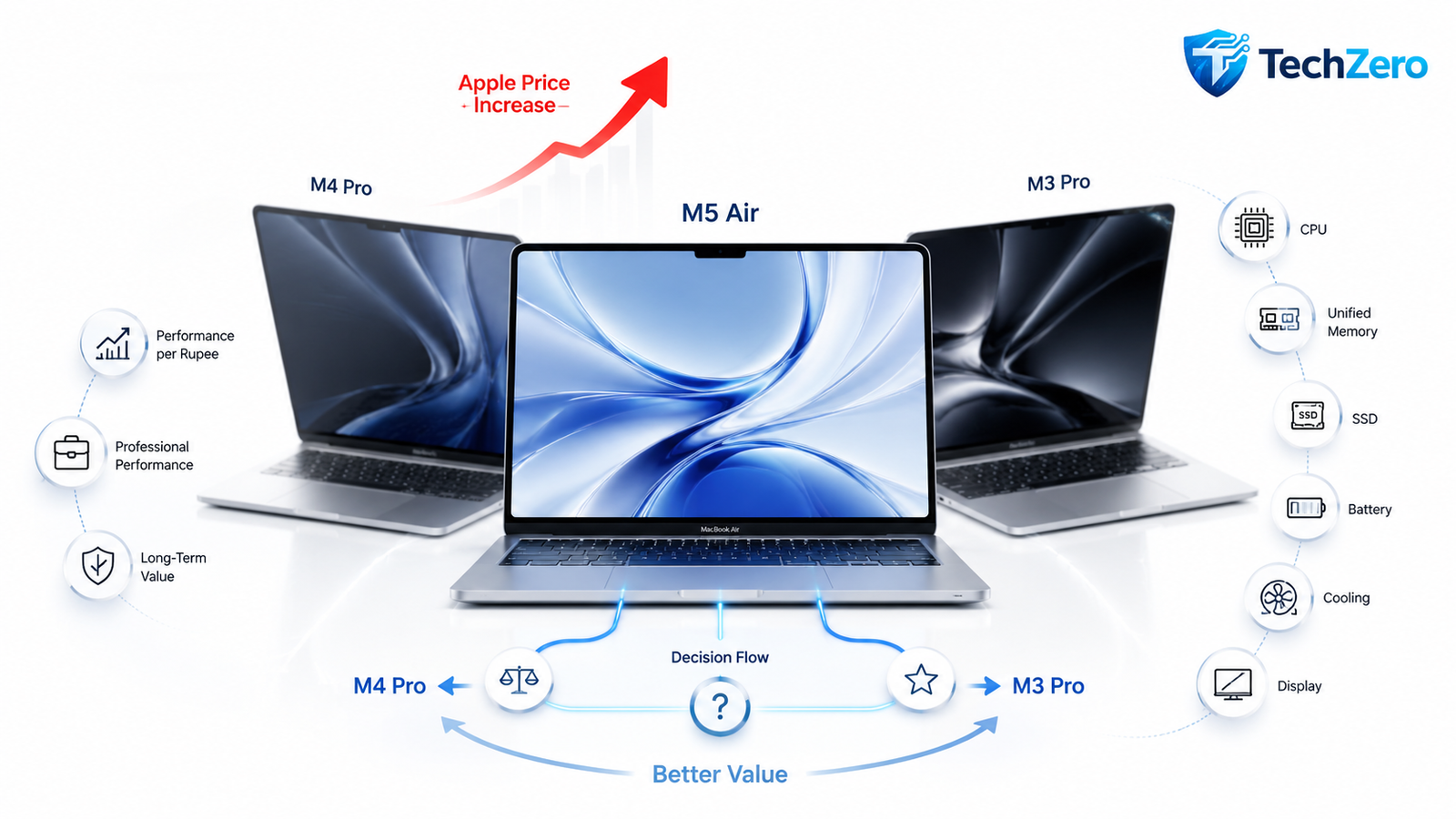

📌 ⚡ TechZero Smart Summary — 30 Seconds
Read this first if you’re short on time.
- Apple’s June 25, 2026 price increase changed the MacBook buying equation.
- Buying the newest MacBook is no longer automatically the smartest decision.
- Compare current market prices, not Apple’s launch prices.
- Always compare MacBook Air with discounted MacBook Pro models, not just the next Air generation.
- A discounted M4 Pro MacBook Pro can offer significantly more capability than a similarly priced M5 MacBook Air for professional workloads.
- The M3 Pro remains one of the strongest value options for developers, photographers, engineers, and creators.
- A discounted M2 MacBook Air is still an excellent choice for students, office work, and everyday productivity.
- Unified Memory has a greater impact on long-term usability than upgrading one processor generation.
- Choose your RAM and SSD configuration before chasing the newest chip.
- Apple Silicon has matured—generation-to-generation improvements are now evolutionary rather than revolutionary for most users.
- Fanless MacBook Air models excel in portability, battery life, and silent operation, while MacBook Pro models are designed for sustained professional performance.
- For most buyers in 2026, the smartest purchase is determined by Performance per Rupee, not processor generation.
- Buying a MacBook is no longer about asking “Which chip is newest?” It’s about asking “Which Mac delivers the most capability for my budget?”
🏆 TechZero Quick Verdict
| If You Are… | Buy This |
|---|---|
| 🎓 Student | Discounted M2 Air |
| 💼 Office Professional | M4 Air |
| 👨💻 Software Developer | M4 Pro |
| 🎬 Creator | M4 Pro |
| 📷 Photographer | M3 Pro |
| 🤖 AI / Engineering | M4 Pro |
| ✈️ Frequent Traveller | M5 Air |
📌 Should You Read the Full Guide?
Read the complete guide if you want to understand:
How to avoid the seven most common MacBook buying mistakes.
Why Apple’s June 2026 price increase changed Mac buying recommendations.
Whether an M4 Pro is a better purchase than an M5 Air.
How much Unified Memory you actually need.
Which MacBook offers the best long-term value for your workload.
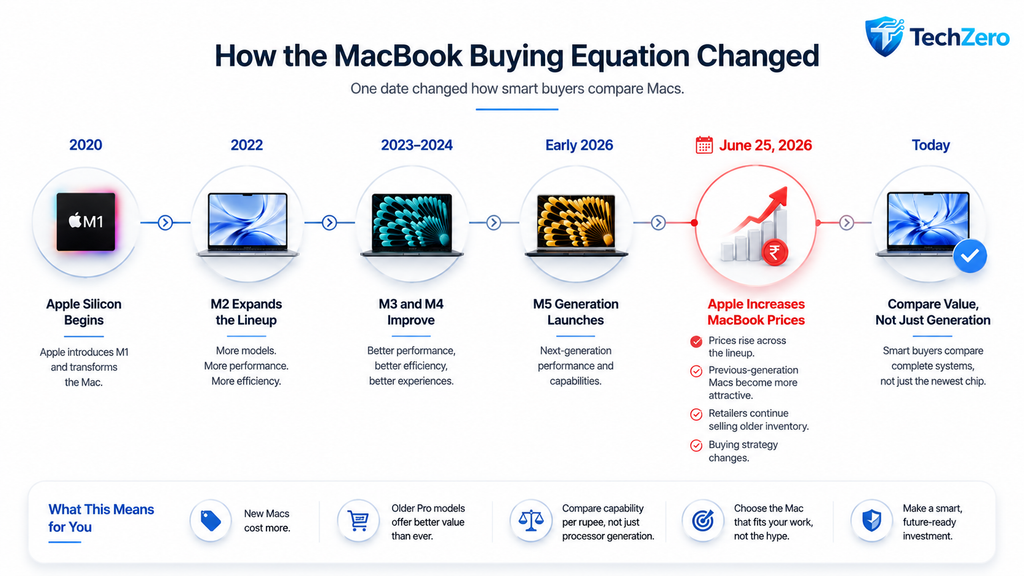
Apple’s June 25, 2026 price increase has fundamentally changed the MacBook buying equation. Before spending over ₹1 lakh on a new Mac, understand why a discounted M4 Pro, M3 Pro—or even an M2 Air—could deliver significantly better value.
Part I — The New Reality of Buying a MacBook
Chapter 1 — June 25, 2026 Changed the MacBook Market
For years, buying the newest MacBook was a relatively straightforward decision. Apple typically introduced a new chip generation while maintaining a stable pricing structure. Buyers then chose between the latest model and discounted inventory from the previous generation.
That strategy no longer applies.
On June 25, 2026, Apple increased the prices of MacBooks and several other products across multiple markets, including India. Unlike previous pricing adjustments driven primarily by exchange rates, this increase was largely attributed to rising memory and storage component costs caused by unprecedented global demand for AI infrastructure.
The result is simple.
Buying the latest MacBook has become significantly more expensive.
For the first time since Apple Silicon debuted, buyers should evaluate the entire Mac lineup instead of automatically selecting the newest generation.
This guide explains why.
Apple Didn’t Just Raise Prices
Apple’s June 25 announcement changed more than the retail price of MacBooks.
It changed the value equation.
Several factors now influence purchasing decisions more than processor generation alone.
- Current retail price
- Remaining inventory of previous-generation Macs
- Unified Memory configuration
- SSD capacity
- Product tier (Air vs Pro)
- Professional workload requirements
- Expected ownership period
Until June 2026, many buyers asked:
“Should I buy the latest MacBook?”
Today, the better question is:
“Which MacBook gives me the highest capability for my budget?”
Reality Check
Apple did not suddenly make MacBooks dramatically more powerful on June 25.
Apple made them more expensive.
That distinction changes how value should be measured.
What Triggered the Price Increase?
Multiple market forces converged during 2026.
The most significant included:
- Higher DRAM prices
- Higher NAND flash storage prices
- Explosive AI infrastructure demand
- Increased demand for high-bandwidth memory
- Supply chain pressure across semiconductor manufacturing
Memory has become one of the fastest-rising component costs in modern computers.
Since Apple Silicon relies heavily on Unified Memory and high-performance storage, these increases directly affect MacBook manufacturing costs.
Whether those costs remain elevated over the coming years is uncertain.
For buyers in 2026, however, the impact is immediate.
Why Previous-Generation Macs Suddenly Became More Attractive
Apple adjusts its official pricing immediately.
Retailers usually cannot.
Large retailers often continue selling inventory purchased before a price increase.
That creates a temporary window where buyers may find:
- Discounted M4 MacBook Air models
- Discounted M4 Pro MacBook Pro models
- Remaining M3 Pro inventory
- Clearance pricing on selected M2 configurations
The hardware has not changed.
Only the market price has.
This is one of the few situations where waiting a single chip generation can produce substantially better value.
TechZero Insight
New Apple launches usually create excitement.
Apple’s June 25 price increase created something even more valuable:
A buying opportunity for informed customers.
📊 Table 1 — What Changed After June 25, 2026?
| Before June 25 | After June 25 |
|---|---|
| Buyers compared generations. | Buyers must compare value. |
| New Macs offered predictable pricing. | Entry prices increased across the lineup. |
| Previous-generation Macs were simply older. | Previous-generation Macs became significantly more attractive. |
| Processor generation dominated buying decisions. | Price, configuration, and product tier became equally important. |
Why This Guide Is Different
Most Mac buying guides answer a familiar question.
Which MacBook is the fastest?
That is no longer the most useful question.
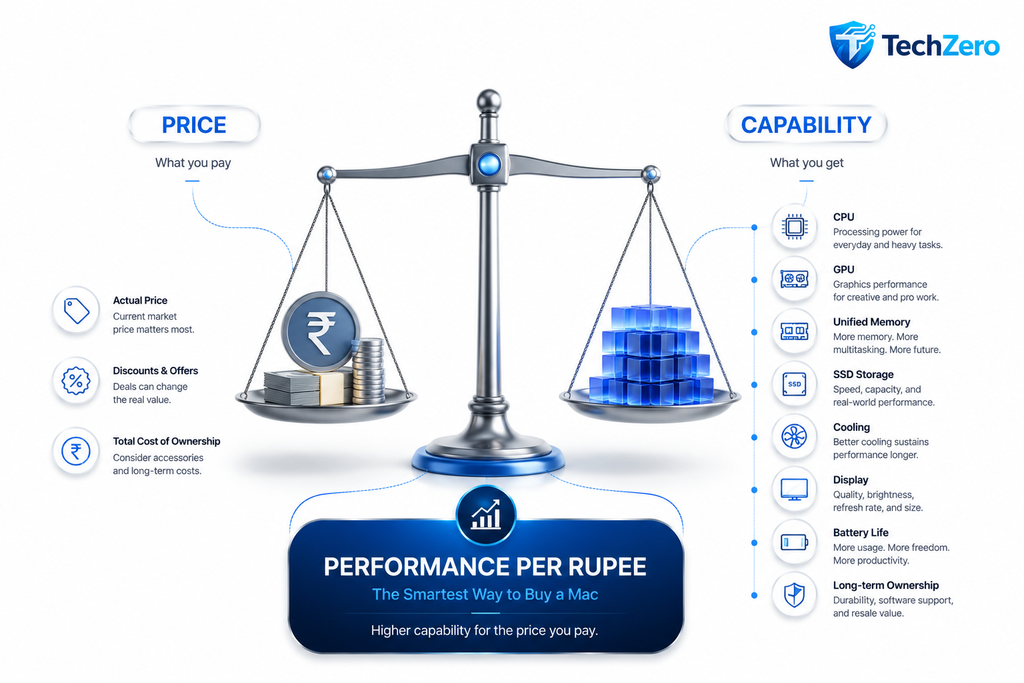
This guide focuses on Performance per Rupee—the relationship between capability, current selling price, and expected ownership period.
Instead of recommending the newest Mac by default, every recommendation in this guide considers:
- Current market pricing
- Real-world workloads
- Long-term usability
- Upgrade limitations
- Overall value
The objective is not to identify the fastest MacBook.
The objective is to identify the smartest purchase.
Smart Buy Tip
Never compare Macs using launch prices.
Always compare:
- Current Apple pricing
- Current retailer pricing
- Festival discounts
- Education pricing
- Cashback offers
- Certified refurbished pricing
The difference can be substantial.
📊 Table 2 — Launch Price vs Today’s Buying Price
| Comparison Method | Smart? | Why |
|---|---|---|
| Launch Price vs Launch Price | ❌ | No longer reflects today’s market. |
| Apple Price vs Retail Price | ✅ | Retail inventory may still follow older pricing. |
| M5 Air vs M4 Air | ⚠️ | Useful, but incomplete. |
| M5 Air vs M4 Pro | ✅ | Often reveals significantly better value. |
| M5 Air vs M3 Pro | ✅ | A higher-tier previous-generation Mac can outperform a newer entry-level model. |
📊 Table 3 — Questions Every Buyer Should Ask First
| Question | Why It Matters |
|---|---|
| What is my actual budget? | Determines realistic choices. |
| What work will I do most often? | Prevents overspending on unnecessary performance. |
| How many years will I keep this Mac? | Influences memory and storage decisions. |
| Can I find a discounted Pro model? | May provide significantly higher capability for similar money. |
| Is portability more important than sustained performance? | Determines whether Air or Pro is the better fit. |
Chapter 2 — Introducing TechZero’s Performance per Rupee Framework
Traditional reviews focus on benchmarks.
Benchmarks are useful.
Buying decisions require more.
A benchmark measures performance.
A purchase measures value.
TechZero evaluates MacBooks using a broader framework that reflects how buyers actually use and own their computers.
The framework combines:
- Purchase price
- CPU capability
- GPU capability
- Sustained performance
- Unified Memory
- Memory bandwidth
- SSD capacity
- Display quality
- Connectivity
- Battery life
- Expected ownership period
Each recommendation throughout this guide is based on this framework rather than processor generation alone.
The result is often surprising.
The newest MacBook is not always the smartest purchase.
Why Processor Generation Is Only One Variable
Apple’s chip names naturally attract attention.
M2.
M3.
M4.
M5.
The numbering suggests a simple progression.
Real-world buying decisions are more complex.
A MacBook is an integrated system.
Its long-term usefulness depends on far more than the processor.
The following chapters examine why product tier, configuration, cooling, and pricing often matter more than moving from one chip generation to the next.
Key Takeaway
The June 25, 2026 price increase shifted the MacBook conversation from “Which chip is newer?” to “Which Mac delivers the highest value today?”
That single change forms the foundation of every recommendation in this guide.
Part II — Why Previous-Generation Macs Suddenly Became Better Deals
Chapter 3 — The Biggest Buying Mistake Most People Will Make
The M5 launch has unintentionally created one of the most common buying mistakes.
Most buyers compare Macs like this:
M5 Air
        VS
M4 Air
It feels logical.
Both belong to the same product family.
Both target similar users.
Both are one generation apart.
Unfortunately, this comparison ignores the biggest opportunity in Apple’s lineup.
A smarter comparison is:
M5 Air
        VS
M4 Pro
or
M5 Air
        VS
M3 Pro
The processor may be one generation older.
The computer itself is often considerably more capable.
Why Product Tier Matters More Than Processor Generation
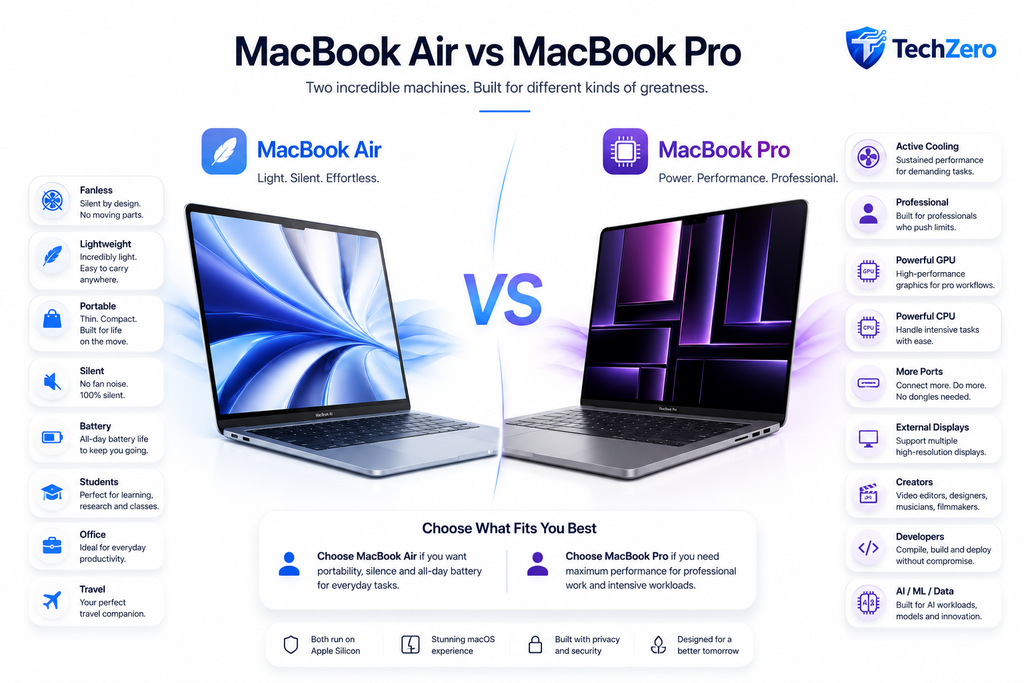
Apple sells two fundamentally different notebook families.
| MacBook Air | MacBook Pro |
|---|---|
| Designed for portability | Designed for professional workloads |
| Fanless cooling | Active cooling |
| Lightweight | Higher sustained performance |
| Everyday productivity | Long-duration professional tasks |
| Fewer ports | Professional connectivity |
| Lower starting price | Higher hardware capability |
The processor generation tells only part of the story.
The product tier determines:
- Thermal capacity
- GPU resources
- Memory bandwidth
- External display capability
- Connectivity
- Expandability
- Long-term performance
For professional users, these differences frequently outweigh a one-generation processor improvement.
Reality Check
Buying an Air instead of a Pro changes far more than the processor.
📊 Table 4 — Don’t Compare This. Compare This Instead.
| Common Comparison | Better Comparison | Why |
|---|---|---|
| M5 Air vs M4 Air | ✅ M5 Air vs M4 Pro | Similar pricing can deliver much higher capability. |
| M5 Air vs M3 Air | ✅ M5 Air vs M3 Pro | Professional hardware changes the equation. |
| M4 Air vs M3 Air | ✅ M4 Air vs M3 Pro | Product tier often matters more than generation. |
Decision Flow 1 — Which Comparison Should You Make?
Buying a MacBook?

        │
        ▼

Looking at an M5 Air?

        │
        ▼

Compare only with M4 Air?

        │

 ┌──────┴───────┐
 │              │
 │ NO           │ YES
 │              │
 ▼              ▼

Compare with    You may miss
M4 Pro          better value

        │
        ▼

Compare with M3 Pro

        │
        ▼

Choose the best value,
not the newest generation.
Chapter 4 — Apple Silicon Has Matured
The introduction of Apple Silicon in 2020 transformed Mac performance.
The jump from Intel processors to the first-generation Apple Silicon chips delivered improvements in:
- CPU performance
- GPU capability
- Battery life
- Heat generation
- Noise levels
- Battery efficiency
Each subsequent generation has refined that foundation.
Instead of dramatic year-over-year improvements, Apple has focused on:
- Better efficiency
- Higher clocks
- Improved Neural Engine performance
- Faster media engines
- Better GPU architecture
- Improved battery optimization
These improvements are valuable.
However, they rarely make an older Apple Silicon Mac obsolete.
The Gap Between Generations Is Smaller Than Many Buyers Think
Most buyers imagine yearly improvements like this.
M2

↓

Huge jump

↓

M3

↓

Huge jump

↓

M4

↓

Huge jump

↓

M5
Real-world performance often looks closer to this.
M2

↓

Moderate improvement

↓

M3

↓

Moderate improvement

↓

M4

↓

Moderate improvement

↓

M5
That is good news.
It means previous-generation Macs retain their value for much longer.
TechZero Insight
Apple Silicon is now a mature platform.
Price differences often matter more than generation differences.
📊 Table 5 — Where Newer Generations Actually Help
| Workload | M2 | M3 | M4 | M5 |
|---|---|---|---|---|
| Web Browsing | ⭐⭐⭐⭐⭐ | ⭐⭐⭐⭐⭐ | ⭐⭐⭐⭐⭐ | ⭐⭐⭐⭐⭐ |
| Microsoft Office | ⭐⭐⭐⭐⭐ | ⭐⭐⭐⭐⭐ | ⭐⭐⭐⭐⭐ | ⭐⭐⭐⭐⭐ |
| Programming | ⭐⭐⭐⭐☆ | ⭐⭐⭐⭐⭐ | ⭐⭐⭐⭐⭐ | ⭐⭐⭐⭐⭐ |
| Lightroom | ⭐⭐⭐⭐☆ | ⭐⭐⭐⭐⭐ | ⭐⭐⭐⭐⭐ | ⭐⭐⭐⭐⭐ |
| Photoshop | ⭐⭐⭐⭐☆ | ⭐⭐⭐⭐⭐ | ⭐⭐⭐⭐⭐ | ⭐⭐⭐⭐⭐ |
| Final Cut Pro | ⭐⭐⭐⭐☆ | ⭐⭐⭐⭐⭐ | ⭐⭐⭐⭐⭐ | ⭐⭐⭐⭐⭐ |
| AI Workloads | ⭐⭐⭐☆☆ | ⭐⭐⭐⭐☆ | ⭐⭐⭐⭐⭐ | ⭐⭐⭐⭐⭐ |
Observation: For productivity, web, office work, and education, all Apple Silicon generations remain highly capable. The greatest differences emerge in sustained professional workloads and AI-intensive tasks.
Chapter 5 — Performance per Rupee Is the New Benchmark
Benchmarks answer one question.
Which computer is faster?
Buyers usually need a different answer.
Which computer delivers the highest value for the money I am spending?
That is the principle behind TechZero’s Performance per Rupee framework.
It evaluates a MacBook using multiple factors rather than processor generation alone.
The Seven Factors That Determine Value
Every recommendation in this guide considers:
- Current selling price
- CPU performance
- GPU performance
- Sustained performance
- Unified Memory
- Memory bandwidth
- Long-term ownership
📊 Table 6 — TechZero Performance per Rupee Framework
| Factor | Weight | Why It Matters |
|---|---|---|
| Purchase Price | 25% | Determines overall value. |
| Unified Memory | 20% | Cannot be upgraded later. |
| Product Tier | 20% | Cooling, display, ports, speakers. |
| CPU & GPU Capability | 15% | Affects demanding workloads. |
| Memory Bandwidth | 10% | Critical for creators and AI workloads. |
| SSD Capacity | 5% | Influences long-term usability. |
| Battery & Portability | 5% | Important for mobile users. |
Smart Buy Tip
If two MacBooks cost nearly the same, choose the one with:
- More Unified Memory
- Better cooling
- Higher product tier
- Better display
- More ports
before choosing the one with the newer processor.
📊 Table 7 — Generation vs Configuration
| Better Purchase | Instead of Buying |
|---|---|
| M4 Air 24GB | Base M5 Air 16GB |
| M3 Pro 36GB | Base M5 Air |
| M2 Air 24GB | M3 Air 16GB |
| M4 Pro 48GB | Base M5 Pro (if memory is limited) |
Decision Flow 2 — Buy Configuration Before Generation
Choosing between two Macs?

        │
        ▼

Same budget?

        │
        ▼

YES

        │
        ▼

One has more Unified Memory?

        │

 ┌──────┴───────┐
 │              │
 │ YES          │ NO
 │              │
 ▼              ▼

Choose it      Compare product tier

                    │
                    ▼

             Air vs Pro?

                    │

         ┌──────────┴──────────┐
         │                     │
         ▼                     ▼

      Pro Model          Air Model

         │
         ▼

Still similar price?

         │

    YES ─────────► Buy the Pro

    NO ──────────► Compare your workload
Key Takeaway
That is why discounted M4 Pro and M3 Pro MacBooks deserve serious consideration before purchasing a new M5 Air.
Apple’s June 25 price increase shifted the buying equation.
The smartest comparison is no longer new vs old.
It is capability vs price.
Part III — Choosing the Right MacBook in 2026
Chapter 6 — Should You Buy an M2 MacBook in 2026?
At first glance, buying a four-year-old MacBook may seem like a poor decision.
Many buyers automatically eliminate the M2 because newer generations exist.
That assumption is often incorrect.
The M2 remains one of the most efficient laptop processors Apple has ever produced. For web browsing, productivity, education, office work and light creative applications, its performance continues to exceed the requirements of most users.
The question is no longer:
Is the M2 fast enough?
The better question is:
Is the M2 available at the right price?
If heavily discounted, an M2 MacBook Air can deliver exceptional value.
Who Should Buy an M2 MacBook?
An M2 Air remains an excellent choice for:
- School students
- College students
- Teachers
- Writers
- Journalists
- Office professionals
- Business users
- Frequent travellers
- Families buying a shared computer
Typical workloads include:
- Safari
- Chrome
- Microsoft Office
- Apple iWork
- Zoom
- Google Meet
- YouTube
- Netflix
- Apple Music
- PDF editing
- Canva
- Basic photo editing
For these tasks, users are unlikely to notice a meaningful performance difference between an M2 and newer Apple Silicon chips.
When Should You Avoid an M2?
An M2 is not the best choice if your daily work includes:
- 4K or 8K video editing
- Large Xcode projects
- Android Studio development
- Multiple virtual machines
- Heavy Docker workloads
- Local AI model execution
- Blender rendering
- Professional CAD software
These workloads benefit from:
- Better sustained cooling
- More CPU performance cores
- Higher GPU capability
- Greater memory bandwidth
Reality Check
Buying an M2 is not buying outdated technology.
Buying an overpriced M2 is.
📊 Table 8 — M2 Air Buying Guide
| User Type | Recommendation |
|---|---|
| Student | ⭐⭐⭐⭐⭐ |
| Office Professional | ⭐⭐⭐⭐⭐ |
| Traveller | ⭐⭐⭐⭐⭐ |
| Photographer | ⭐⭐⭐☆☆ |
| Programmer | ⭐⭐⭐⭐☆ |
| Video Editor | ⭐⭐☆☆☆ |
| AI Developer | ⭐⭐☆☆☆ |
TechZero Verdict
Buy an M2 Air if:
- You find a substantial retail discount.
- Your work is primarily productivity-focused.
- Battery life and portability matter more than peak performance.
Skip it if your work regularly pushes the CPU or GPU for extended periods.
Chapter 7 — Should You Buy an M3 MacBook?
The M3 generation occupies an interesting position.
It is no longer Apple’s latest architecture, yet it remains modern enough that software support and performance are unlikely to concern most buyers.
The real opportunity lies in M3 Pro models.
Following the launch of M4 and M5 Macs, many retailers continue selling M3 Pro inventory at attractive prices.
That makes the M3 Pro one of the strongest value propositions for professionals.
Why the M3 Pro Is Different
Unlike standard M-series chips, Pro-class processors provide:
- More CPU cores
- More GPU cores
- Higher memory bandwidth
- Better sustained performance
- Additional display support
- More Thunderbolt connectivity
These improvements remain valuable regardless of processor generation.
📊 Table 9 — Standard M3 vs M3 Pro
| Feature | M3 | M3 Pro |
|---|---|---|
| CPU Resources | Standard | Higher |
| GPU Resources | Standard | Higher |
| Memory Bandwidth | Standard | Higher |
| Cooling | Air / Pro dependent | Active cooling |
| Professional Workloads | Good | Excellent |
| Long-Term Value | Very Good | Outstanding |
Who Should Buy an M3 Pro?
Recommended for:
- Professional developers
- Photographers
- Video editors
- Engineers
- Music producers
- Researchers
- Architecture students
- AI enthusiasts
TechZero Insight
A discounted M3 Pro often delivers more professional capability than a base M5 Air selling at a similar price.
TechZero Verdict
If your budget approaches that of a new M5 Air, check discounted M3 Pro models before making a purchase.
You may gain significantly better hardware for nearly the same investment.
Chapter 8 — Should You Buy an M4 MacBook?
The M4 generation currently represents one of the strongest value opportunities in Apple’s lineup.
It combines:
- Modern Apple Silicon architecture
- Long software support expectations
- Excellent efficiency
- Strong AI capability
- Wide retail availability
Following Apple’s June 2026 price increase, discounted M4 inventory has become even more attractive.
M4 Air or M4 Pro?
This depends entirely on workload.
Choose an M4 Air if your priorities include:
- Portability
- Silent operation
- Battery life
- Office productivity
- College work
Choose an M4 Pro if your work involves:
- Software development
- Video production
- Professional photography
- Music production
- Engineering
- AI experimentation
📊 Table 10 — M4 Air vs M4 Pro
| Feature | M4 Air | M4 Pro |
|---|---|---|
| Weight | ⭐⭐⭐⭐⭐ | ⭐⭐⭐⭐☆ |
| Battery Life | ⭐⭐⭐⭐⭐ | ⭐⭐⭐⭐⭐ |
| Sustained Performance | ⭐⭐⭐☆☆ | ⭐⭐⭐⭐⭐ |
| GPU Performance | ⭐⭐⭐⭐☆ | ⭐⭐⭐⭐⭐ |
| External Displays | Good | Excellent |
| Ports | Basic | Professional |
| Professional Work | Good | Outstanding |
Why Many Professionals Should Buy an M4 Pro Instead of an M5 Air
At similar street prices, the M4 Pro frequently offers:
- Better cooling
- Higher multicore performance
- More GPU resources
- More ports
- Better display
- Better speakers
- Better long-term professional value
Processor generation alone cannot compensate for these advantages.
Smart Buy Tip
Before ordering an M5 Air, search for:
- M4 Pro clearance sales
- Authorized reseller discounts
- Festival offers
- Bank cashback promotions
The savings may be enough to upgrade from an Air to a Pro.
TechZero Verdict
For developers, creators, engineers and power users, the M4 Pro currently represents one of the smartest MacBook purchases available.
📊 Table 11 — TechZero Future-Proof Score
| Model | Performance | Value | Future-Proofing | Overall |
|---|---|---|---|---|
| M2 Air | ⭐⭐⭐⭐☆ | ⭐⭐⭐⭐⭐ | ⭐⭐⭐⭐☆ | ⭐⭐⭐⭐☆ |
| M3 Air | ⭐⭐⭐⭐☆ | ⭐⭐⭐⭐☆ | ⭐⭐⭐⭐⭐ | ⭐⭐⭐⭐☆ |
| M3 Pro | ⭐⭐⭐⭐⭐ | ⭐⭐⭐⭐⭐ | ⭐⭐⭐⭐⭐ | ⭐⭐⭐⭐⭐ |
| M4 Air | ⭐⭐⭐⭐⭐ | ⭐⭐⭐⭐☆ | ⭐⭐⭐⭐⭐ | ⭐⭐⭐⭐⭐ |
| M4 Pro | ⭐⭐⭐⭐⭐ | ⭐⭐⭐⭐⭐ | ⭐⭐⭐⭐⭐ | ⭐⭐⭐⭐⭐ |
| M5 Air | ⭐⭐⭐⭐⭐ | ⭐⭐⭐⭐☆ | ⭐⭐⭐⭐⭐ | ⭐⭐⭐⭐⭐ |
Note: These ratings are editorial assessments based on current pricing, expected software support, hardware capability, and long-term ownership value. They are not benchmark scores.
Decision Flow 3 — Which Generation Should You Start With?
Budget below ₹1 lakh?

        │

   YES ─────────► Look for M2 Air

        │

   NO

        ▼

Professional Work?

        │

 ┌──────┴─────────┐
 │                │
 │ NO             │ YES
 │                │
 ▼                ▼

M4 Air      Compare M3 Pro
                 and M4 Pro

                 │
                 ▼

Need maximum portability?

        │

 YES ─────────► M5 Air

 NO ──────────► M4 Pro
Key Takeaway
The smartest MacBook purchase in 2026 is determined by price, configuration, and workload—not by processor generation alone.
For many buyers, the strongest value lies in discounted M3 Pro and M4 Pro models, while the M2 Air remains an excellent choice for students and everyday users purchasing at the right price.
Part IV — Head-to-Head Comparisons
Chapter 9 — Battle Card: M5 MacBook Air vs M4 Pro MacBook Pro
This is the comparison most buyers should make after Apple’s June 25, 2026 price increase.
Most reviews compare the M5 Air with the M4 Air.
That comparison is incomplete.
A better comparison is:
Base M5 MacBook Air vs Discounted M4 Pro MacBook Pro
Following the June 25 price increase, the M5 Air starts at approximately ₹1,49,900 in India, while discounted M4 Pro inventory from retailers may fall into a similar price range depending on configuration and ongoing offers. :contentReference[oaicite:0]{index=0}
The question is no longer:
Which processor is newer?
The question is:
Which computer delivers more capability for nearly the same money?
Battle Overview
📊 Battle Card — M5 Air vs M4 Pro
| Category | 🟢 M5 Air | 🔵 M4 Pro | Winner |
|---|---|---|---|
| Portability | ⭐⭐⭐⭐⭐ | ⭐⭐⭐⭐☆ | 🟢 |
| Silent Operation | ⭐⭐⭐⭐⭐ | ⭐⭐⭐☆☆ | 🟢 |
| Battery Life | ⭐⭐⭐⭐⭐ | ⭐⭐⭐⭐⭐ | 🤝 |
| CPU Burst Performance | ⭐⭐⭐⭐⭐ | ⭐⭐⭐⭐⭐ | 🤝 |
| Sustained Performance | ⭐⭐⭐☆☆ | ⭐⭐⭐⭐⭐ | 🔵 |
| GPU Performance | ⭐⭐⭐⭐☆ | ⭐⭐⭐⭐⭐ | 🔵 |
| Display | ⭐⭐⭐⭐☆ | ⭐⭐⭐⭐⭐ | 🔵 |
| Speakers | ⭐⭐⭐⭐☆ | ⭐⭐⭐⭐⭐ | 🔵 |
| Ports | ⭐⭐⭐☆☆ | ⭐⭐⭐⭐⭐ | 🔵 |
| External Displays | ⭐⭐⭐☆☆ | ⭐⭐⭐⭐⭐ | 🔵 |
| Professional Work | ⭐⭐⭐☆☆ | ⭐⭐⭐⭐⭐ | 🔵 |
| Travel | ⭐⭐⭐⭐⭐ | ⭐⭐⭐⭐☆ | 🟢 |
| Performance per Rupee | ⭐⭐⭐⭐☆ | ⭐⭐⭐⭐⭐ | 🔵 |
Where the M5 Air Wins
The MacBook Air remains the better choice if your priorities are:
- Lowest possible weight
- Silent operation
- Maximum battery life
- Frequent travel
- Office productivity
- College
- General-purpose computing
Its fanless design makes it one of the quietest premium laptops available.
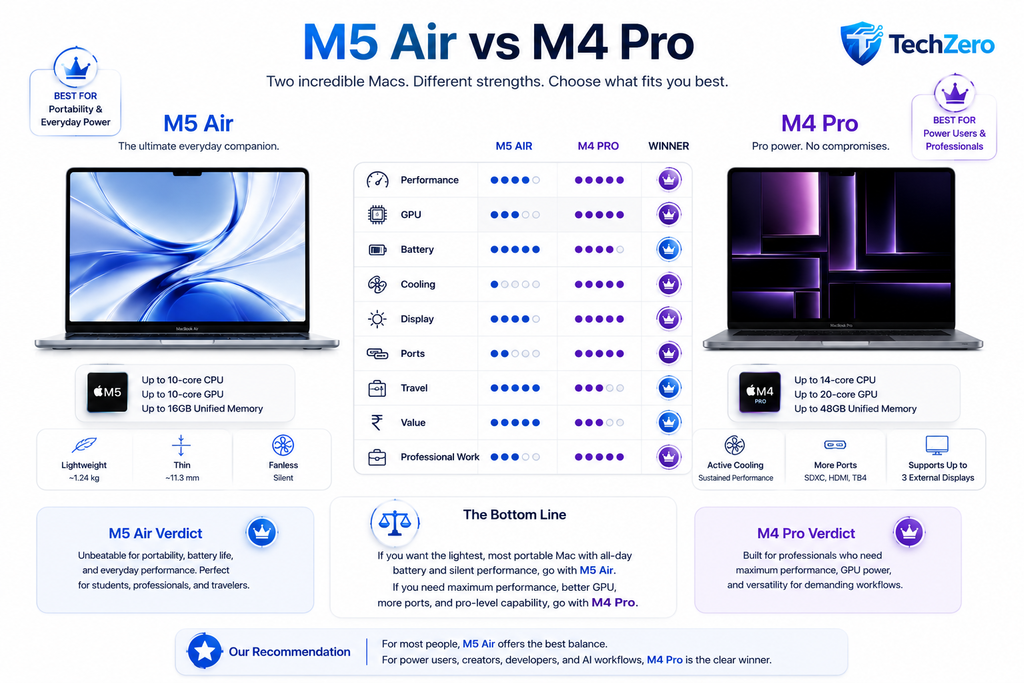
Where the M4 Pro Wins
The MacBook Pro offers advantages that extend well beyond the processor.
Professional users benefit from:
- Active cooling
- Higher sustained CPU performance
- More GPU resources
- Greater memory bandwidth
- Liquid Retina XDR display
- Additional Thunderbolt ports
- HDMI output
- SDXC card reader
- Better external monitor support
These features continue providing value throughout the ownership period.
Reality Check
Buying an M5 Air does not automatically mean buying the more capable computer.
For many professional workloads, the discounted M4 Pro remains the stronger workstation.
Decision Flow 4 — M5 Air or M4 Pro?
Need the lightest Mac?

        │

 YES ─────────► M5 Air

        │

 NO

        ▼

Professional Work?

        │

 ┌──────┴────────┐
 │               │
 │ NO            │ YES
 │               │
 ▼               ▼

M5 Air      Compare Prices

                 │
                 ▼

M4 Pro within
₹20–25K?

        │

 YES ─────────► ⭐ BUY M4 PRO

 NO ──────────► Consider M5 Pro
🏆 TechZero Verdict
Winner: 🥇 M4 Pro MacBook Pro
If the price difference is small, the M4 Pro provides substantially greater long-term capability for developers, photographers, engineers, video editors and AI users.
Choose the M5 Air only if portability and silent operation are your highest priorities.
Chapter 10 — Battle Card: M5 MacBook Air vs M3 Pro MacBook Pro
The M3 Pro is no longer Apple’s latest professional processor.
That does not make it obsolete.
In today’s market, it represents one of the strongest value opportunities.
📊 Battle Card — M5 Air vs M3 Pro
| Category | 🟢 M5 Air | 🟣 M3 Pro | Winner |
|---|---|---|---|
| Portability | ⭐⭐⭐⭐⭐ | ⭐⭐⭐⭐☆ | 🟢 |
| Battery | ⭐⭐⭐⭐⭐ | ⭐⭐⭐⭐⭐ | 🤝 |
| Cooling | ⭐⭐⭐☆☆ | ⭐⭐⭐⭐⭐ | 🟣 |
| GPU | ⭐⭐⭐⭐☆ | ⭐⭐⭐⭐⭐ | 🟣 |
| Memory Bandwidth | ⭐⭐⭐⭐☆ | ⭐⭐⭐⭐⭐ | 🟣 |
| Ports | ⭐⭐⭐☆☆ | ⭐⭐⭐⭐⭐ | 🟣 |
| Display | ⭐⭐⭐⭐☆ | ⭐⭐⭐⭐⭐ | 🟣 |
| Creative Work | ⭐⭐⭐☆☆ | ⭐⭐⭐⭐⭐ | 🟣 |
| Programming | ⭐⭐⭐⭐☆ | ⭐⭐⭐⭐⭐ | 🟣 |
| Performance per Rupee | ⭐⭐⭐⭐☆ | ⭐⭐⭐⭐⭐ | 🟣 |
Why the M3 Pro Still Matters
Many buyers incorrectly assume that an older generation automatically delivers lower value.
Professional MacBooks retain their usefulness because they were designed with higher hardware ceilings.
An M3 Pro continues offering:
- Higher sustained performance
- Better GPU capability
- More memory bandwidth
- Better connectivity
- Better professional workflow support
These characteristics remain relevant regardless of processor generation.
TechZero Insight
Product tier ages more slowly than processor generation.
🏆 TechZero Verdict
If the M3 Pro is available within your budget, it deserves serious consideration before purchasing a base M5 Air.
📊 Table 12 — Air vs Pro: What Actually Changes?
| Feature | MacBook Air | MacBook Pro |
|---|---|---|
| Cooling | Fanless | Active Cooling |
| Target User | Everyday Computing | Professional Work |
| Weight | Lower | Higher |
| Sustained Performance | Moderate | Excellent |
| Display | Excellent | Better |
| Ports | Basic | Professional |
| Speakers | Excellent | Outstanding |
| External Displays | Limited | More Extensive |
| Long Rendering | Good | Excellent |
📊 Table 13 — Performance per Rupee Score
| MacBook | Capability | Current Value | TechZero Score |
|---|---|---|---|
| M2 Air (Discounted) | ⭐⭐⭐⭐☆ | ⭐⭐⭐⭐⭐ | 9.6/10 |
| M3 Air | ⭐⭐⭐⭐☆ | ⭐⭐⭐⭐☆ | 9.0/10 |
| M3 Pro | ⭐⭐⭐⭐⭐ | ⭐⭐⭐⭐⭐ | 9.9/10 |
| M4 Air | ⭐⭐⭐⭐⭐ | ⭐⭐⭐⭐☆ | 9.2/10 |
| M4 Pro | ⭐⭐⭐⭐⭐ | ⭐⭐⭐⭐⭐ | 10/10 |
| M5 Air | ⭐⭐⭐⭐⭐ | ⭐⭐⭐⭐☆ | 9.1/10 |
| M5 Pro | ⭐⭐⭐⭐⭐ | ⭐⭐⭐⭐☆ | 9.4/10 |
Methodology: TechZero’s Performance per Rupee score is an editorial rating that combines current market pricing, hardware capability, upgrade limitations, product tier, memory configuration, and expected ownership value. It is not a synthetic benchmark.
📊 Table 14 — Who Should Buy What?
| User | Best Choice |
|---|---|
| School Student | 🥇 M2 Air |
| College Student | 🥇 M3 Air |
| Office Professional | 🥇 M4 Air |
| Software Developer | 🥇 M4 Pro |
| Photographer | 🥇 M3 Pro |
| Video Editor | 🥇 M4 Pro |
| AI Student | 🥇 M4 Pro |
| Engineer | 🥇 M4 Pro |
| Frequent Traveller | 🥇 M5 Air |
Key Takeaway
Apple’s June 25 price increase changed one fundamental rule.
The best MacBook is no longer determined by the newest processor.
It is determined by the intersection of:
- Current selling price
- Product tier
- Configuration
- Expected ownership period
- Workload
That is why discounted M4 Pro and M3 Pro models frequently outperform a brand-new M5 Air in overall value.
Part V — The TechZero Smart Buying Framework
Chapter 11 — Buy for Your Workload, Not the Chip Name
The MacBook that delivers the highest value depends on what you do every day, not on which processor carries the highest number.
A student, software developer, photographer, and filmmaker use their computers very differently.
Buying recommendations should reflect those differences.
The Student
Typical Applications
- Safari
- Chrome
- Microsoft Office
- Apple Pages
- Google Docs
- Zoom
- Canva
- YouTube
- ChatGPT
- Apple Intelligence features
Recommended Configuration
| Recommendation | Choice |
|---|---|
| Mac | M2 Air (discounted) or M3 Air |
| Unified Memory | 16GB minimum |
| SSD | 512GB preferred |
| Ownership Period | 5–7 years |
Avoid
- Paying a premium for an M5 Air if it forces you to compromise on RAM or SSD capacity.
🟢 TechZero Verdict
For students, more memory is usually a better investment than one newer processor generation.
The Office Professional
Modern office work rarely pushes Apple Silicon processors to their limits.
Typical workload:
- Microsoft Office
- Excel
- Teams
- Slack
- Outlook
- Chrome
- Safari
- PDF editing
- Video conferencing
Recommended Configuration
| Recommendation | Choice |
|---|---|
| Mac | M4 Air |
| Unified Memory | 16GB or 24GB |
| SSD | 512GB |
| Ownership | 5–6 years |
Reality Check
Office productivity depends more on:
- RAM
- SSD speed
- Battery life
- Display
- Keyboard
than moving from M4 to M5.
The Software Developer
Development workloads vary significantly.
Professional developers often run:
- Xcode
- Android Studio
- Docker
- Virtual Machines
- VS Code
- Git
- Local AI tools
- Database servers
These applications benefit from:
- More CPU Performance cores
- Active cooling
- Higher memory bandwidth
- Larger Unified Memory
📊 Persona Card — Software Developer
| Requirement | Recommendation |
|---|---|
| Best Value | 🥇 M4 Pro |
| Alternative | M3 Pro |
| Minimum RAM | 24GB |
| Recommended RAM | 36GB+ |
| SSD | 1TB |
| Ownership | 6–8 years |
🏆 TechZero Verdict
For developers, a discounted M4 Pro usually provides substantially better long-term value than a base M5 Air.
The Photographer
Photography workflows typically include:
- Lightroom
- Photoshop
- Capture One
- Affinity Photo
Priorities include:
- GPU performance
- Display quality
- Storage
- Memory bandwidth
📊 Persona Card — Photographer
| Recommendation | Choice |
|---|---|
| Best Value | 🥇 M3 Pro |
| Better Long-Term Option | 🥇 M4 Pro |
| RAM | 24GB minimum |
| SSD | 1TB |
The Video Creator
Professional video editing stresses nearly every subsystem.
Applications include:
- Final Cut Pro
- DaVinci Resolve
- Adobe Premiere Pro
- Motion
Requirements include:
- Active cooling
- GPU performance
- Media Engine capability
- External displays
- Fast SSD
📊 Persona Card — Video Creator
| Recommendation | Choice |
|---|---|
| Best Value | 🥇 M4 Pro |
| Premium Option | M5 Pro |
| RAM | 36GB+ |
| SSD | 1TB–2TB |
TechZero Insight
Buying an Air for professional video editing often saves money initially but can reduce productivity over several years of ownership.
The AI Student or Researcher
Generative AI increasingly runs locally.
Typical tools include:
- Local LLMs
- AI coding assistants
- Stable Diffusion
- ML experimentation
Primary priorities:
- Unified Memory
- GPU capability
- Memory bandwidth
- Sustained performance
📊 Persona Card — AI User
| Recommendation | Choice |
|---|---|
| Best Value | 🥇 M4 Pro |
| Premium | M5 Pro |
| Minimum RAM | 36GB |
| Preferred RAM | Highest affordable |
Smart Buy Tip
For AI workloads, Unified Memory capacity is often more important than processor generation.
Chapter 12 — The Three-Step Buying Formula
Every buyer should answer three questions before purchasing.
Step 1 — What Work Will You Do?
Office

↓

Student

↓

Programming

↓

Creative Work

↓

Professional Production

↓

AI / Engineering
Your workload determines the minimum hardware you should consider.
Step 2 — How Long Will You Keep the Mac?
| Ownership Period | Recommendation |
|---|---|
| 3 Years | Base configurations are generally sufficient. |
| 5 Years | Prioritize 24GB RAM and 512GB SSD where possible. |
| 7–8 Years | Invest in memory, storage, and product tier before chasing the newest chip. |
Step 3 — Compare Current Selling Prices
Never compare launch prices.
Instead compare:
- Apple Store price
- Authorized reseller price
- Festival offers
- Bank cashback
- Exchange bonus
- Certified refurbished price
📊 Table 15 — The Smart Buying Checklist
| Question | Yes | No |
|---|---|---|
| Have you compared retail prices? | ☐ | ☐ |
| Have you checked discounted Pro models? | ☐ | ☐ |
| Is 16GB enough for your workload? | ☐ | ☐ |
| Will you keep the Mac for more than five years? | ☐ | ☐ |
| Have you compared today’s street price rather than launch price? | ☐ | ☐ |
Complete this checklist before placing an order.
Decision Flow 5 — Which Mac Should You Buy?
START

│

▼

Budget below ₹1 lakh?

│

├── YES

│      ▼

│   M2 Air

│

└── NO

       ▼

Need maximum portability?

       │

   ├── YES

   │      ▼

   │   Office / Student?

   │

   │   ├── YES → M4 Air

   │   └── NO

   │          ▼

   │      Heavy Creative Work?

   │

   │      ├── YES → Compare M4 Pro

   │      └── NO → M5 Air

   │

   └── NO

          ▼

Need sustained professional performance?

          │

      ├── YES

      │

      ▼

   Compare M3 Pro

          │

          ▼

   Compare M4 Pro

          │

          ▼

Price Difference < ₹20–25K?

          │

      ├── YES → ⭐ BUY M4 PRO

      └── NO → Consider M5 Pro
📊 Table 16 — The Seven Biggest Buying Mistakes
| Mistake | Better Decision |
|---|---|
| Buying only by chip generation | Compare the complete system. |
| Ignoring Unified Memory | Buy enough RAM for future software. |
| Buying 256GB to save money | Choose storage based on ownership period. |
| Comparing Air only with Air | Compare Air with discounted Pro models. |
| Using launch prices | Compare today’s market prices. |
| Ignoring cooling | Sustained performance matters for professionals. |
| Buying because “it’s newer” | Buy because it fits your workload. |
🏆 TechZero Verdict
The smartest MacBook purchase is rarely the newest one.
The smartest purchase is the one that provides the highest capability for your workload at today’s market price.
For many buyers in 2026, that means looking beyond the M5 and giving serious consideration to discounted M4 Pro and M3 Pro models before making a final decision.
Part VI — Your Buying Decision
Chapter 13 — Which MacBook Should You Buy?
Every MacBook discussed in this guide is a capable computer.
The objective is not to identify the best MacBook.
The objective is to identify the right MacBook for your workload, budget, and expected ownership period.
The recommendations below assume you are buying in India after Apple’s June 25, 2026 price revision and are comparing current market prices, not launch prices.
🎓 Student
Typical Workloads
- Web browsing
- Online classes
- Microsoft Office
- Google Docs
- Canva
- Streaming
- AI study tools
Recommended Purchase
| Category | Recommendation |
|---|---|
| 🥇 Best Choice | Discounted M2 Air |
| 🥈 Alternative | M3 Air |
| Recommended RAM | 16GB minimum |
| Recommended SSD | 512GB preferred |
| Ownership Period | 5–7 years |
Avoid
Buying an M5 Air if it forces you to compromise on Unified Memory or SSD capacity.
💼 Office Professional
Typical Workloads
- Microsoft Excel
- Teams
- Outlook
- Chrome
- Slack
- Zoom
- PDF editing
Recommended Purchase
| Category | Recommendation |
|---|---|
| 🥇 Best Choice | M4 Air |
| 🥈 Alternative | M3 Air |
| Recommended RAM | 16GB–24GB |
| Recommended SSD | 512GB |
Why?
Office productivity rarely benefits from moving up a single processor generation. Better memory and storage usually provide greater long-term value.
👨💻 Software Developer
Typical Workloads
- Xcode
- VS Code
- Android Studio
- Docker
- Git
- Local databases
- Virtual Machines
Recommended Purchase
| Category | Recommendation |
|---|---|
| 🥇 Best Choice | M4 Pro |
| 🥈 Alternative | M3 Pro |
| Recommended RAM | 24GB minimum |
| Recommended SSD | 1TB |
🎬 Creator
Typical Workloads
- Final Cut Pro
- DaVinci Resolve
- Adobe Photoshop
- Adobe Lightroom
- Blender
Recommended Purchase
| Category | Recommendation |
|---|---|
| 🥇 Best Choice | M4 Pro |
| 🥈 Alternative | M5 Pro |
| Recommended RAM | 36GB+ |
| Recommended SSD | 1TB–2TB |
✈️ Traveller
Priorities
- Lowest weight
- Silent operation
- Maximum battery life
Recommended Purchase
| Category | Recommendation |
|---|---|
| 🥇 Best Choice | M5 Air |
| 🥈 Alternative | M4 Air |
🤖 AI Student / Researcher
Typical Workloads
- Local LLMs
- AI coding assistants
- Machine learning experiments
- AI inference
Recommended Purchase
| Category | Recommendation |
|---|---|
| 🥇 Best Choice | M4 Pro |
| 🥈 Alternative | M5 Pro |
| Recommended RAM | Highest affordable |
| Recommended SSD | 1TB minimum |
🏆 TechZero Insight
Choose the MacBook that matches your workload, not the one with the newest processor name.
📊 Table 17 — One-Page Buying Matrix
| Your Priority | Best Choice |
|---|---|
| Lowest Budget | M2 Air |
| Best Overall Value | M4 Pro |
| Best for Students | M2 Air |
| Best for Office Work | M4 Air |
| Best for Programming | M4 Pro |
| Best for Photography | M3 Pro |
| Best for Video Editing | M4 Pro |
| Best for AI Work | M4 Pro |
| Best for Frequent Travel | M5 Air |
| Maximum Performance | M5 Pro |
Chapter 14 — TechZero 30-Second Smart Summary
⚡ Smart Summary
- Apple increased MacBook prices on June 25, 2026.
- Buying the newest Mac is no longer automatically the smartest choice.
- Compare Air vs Pro, not just M5 vs M4.
- Prioritize Unified Memory before processor generation.
- Compare today’s selling prices—not launch prices.
- Discounted M3 Pro and M4 Pro models often deliver exceptional value.
- M2 Air remains an excellent budget option.
- Buy according to your workload—not benchmark charts.
Chapter 15 — TechZero Executive Summary
📌 If You Remember Only Five Things
- Apple’s June 25 price increase changed the Mac buying equation.
- Product tier often matters more than processor generation.
- Unified Memory is one of the most important long-term purchase decisions.
- Discounted Pro models frequently outperform newer Air models in sustained professional workloads.
- Performance per Rupee should guide every buying decision.
Decision Flow 6 — The Final Buying Decision
                              START
                                │
                                ▼
                  What is your primary workload?
                                │
 ┌───────────────┬──────────────┬───────────────┬───────────────┐
 │               │              │               │               │
 ▼               ▼              ▼               ▼               ▼
Student      Office      Programming     Photography     Video Editing
 │               │              │               │               │
 ▼               ▼              ▼               ▼               ▼
M2 Air        M4 Air     Compare M3 Pro     M3 Pro         M4 Pro
                            & M4 Pro
                                │
                                ▼
                        AI / Engineering?
                                │
                           ┌────┴────┐
                           │         │
                          YES        NO
                           │         │
                           ▼         ▼
                        M4 Pro     Need Maximum
                                   Portability?
                                        │
                                   ┌────┴────┐
                                   │         │
                                  YES        NO
                                   │         │
                                   ▼         ▼
                                M5 Air    M4 Pro
📊 Table 18 — Projected macOS Support (Editorial Estimate)
Important: Apple has not announced end-of-support versions for these Macs. The estimates below are based on Apple’s historical software support patterns and should be treated as editorial projections—not official commitments.
| Generation | Launch Year | Estimated Major macOS Support* | Ownership Confidence |
|---|---|---|---|
| M2 | 2022 | Around 2029–2031 | ⭐⭐⭐⭐☆ |
| M3 | 2023–2024 | Around 2030–2032 | ⭐⭐⭐⭐⭐ |
| M4 | 2024–2025 | Around 2031–2033 | ⭐⭐⭐⭐⭐ |
| M5 | 2026 | Around 2033–2035 | ⭐⭐⭐⭐⭐ |
*Projected using Apple’s historical software support lifecycle.
📊 Table 19 — Final Performance per Rupee Rankings
| Rank | MacBook | TechZero Editorial Verdict |
|---|---|---|
| 🥇 | M4 Pro | Best Overall Value |
| 🥈 | M3 Pro | Best Professional Bargain |
| 🥉 | M2 Air | Best Budget Choice |
| 4 | M4 Air | Best Productivity Laptop |
| 5 | M5 Air | Best Travel Laptop |
| 6 | M5 Pro | Maximum Performance |
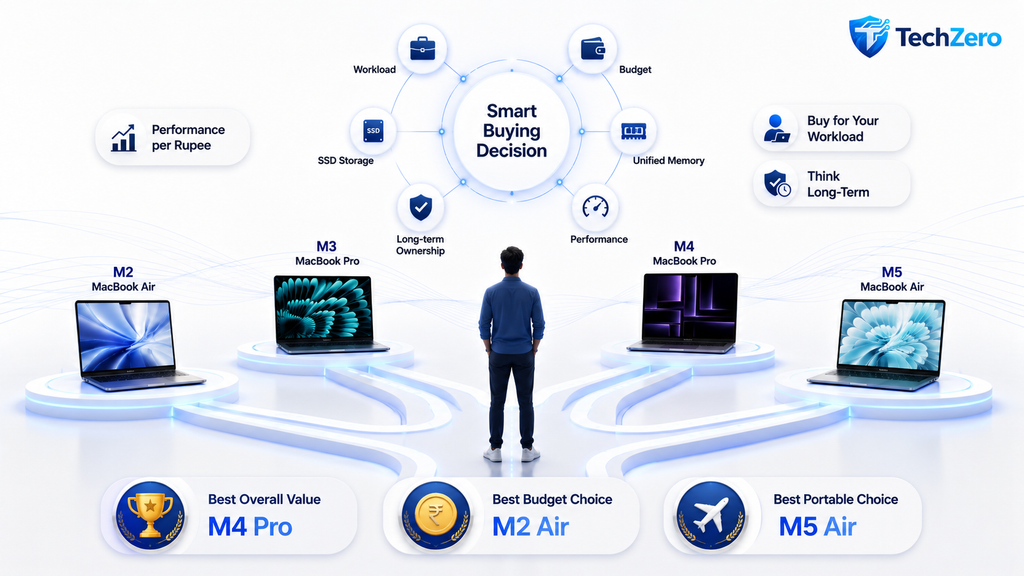
Chapter 16 — TechZero Awards 2026
🏆 TechZero Awards
| Award | Winner |
|---|---|
| 🏆 Best Overall Value | M4 Pro |
| 💰 Best Budget Buy | M2 Air |
| 🎓 Best Student Mac | M2 Air |
| 💼 Best Productivity Mac | M4 Air |
| 👨💻 Best Developer Mac | M4 Pro |
| 🎬 Best Creator Mac | M4 Pro |
| 🤖 Best AI Mac | M4 Pro |
| ✈️ Best Travel Mac | M5 Air |
| 🚀 Maximum Performance | M5 Pro |
Reality Check
The newest MacBook is not automatically the smartest purchase.
The smartest purchase is the MacBook that delivers the highest capability for your workload, at today’s market price, with a configuration that will remain useful throughout your ownership period.
That answer may be an M2, M3 Pro, M4 Pro, or M5 depending on your priorities.
Chapter 17 — Before You Click “Buy”
✅ TechZero Buying Checklist
Before placing your order, make sure you can tick every box below.
- ☐ Compared current Apple and retail prices
- ☐ Checked for discounted M3 Pro or M4 Pro inventory
- ☐ Chosen enough Unified Memory for future needs
- ☐ Selected adequate SSD capacity
- ☐ Considered how long you will keep the Mac
- ☐ Compared Air models with Pro models
- ☐ Checked education pricing, cashback and exchange offers
- ☐ Read the warranty and return policy
If every box is checked, you are ready to buy with confidence.
Chapter 18 — Frequently Asked Questions
Is an M2 MacBook Air still worth buying in 2026?
Yes. If purchased at a meaningful discount and configured appropriately, the M2 Air remains one of the best-value MacBooks for students, office users and everyday productivity.
Should I buy an M5 Air or an M4 Pro?
Choose the M4 Pro if your work involves programming, photography, video editing, engineering, AI or other sustained professional workloads.
Choose the M5 Air if portability, silent operation and battery life are your highest priorities.
Is 16GB Unified Memory enough?
For students and general productivity, yes.
Developers, creators and AI users should strongly consider 24GB or more.
Does processor generation matter more than RAM?
No.
Unified Memory often has a greater impact on long-term usability than moving up a single processor generation.
Should I compare launch prices?
No.
Always compare current Apple pricing with retailer discounts, education pricing, cashback offers and certified refurbished options.
Continue Reading
If this guide helped you, continue with:
- 📖 The TechZero Mac Buying Bible
- 🧠 Apple Silicon Explained
- 💾 Unified Memory Explained
- ⚖️ MacBook Air vs MacBook Pro
- 🧩 How Much RAM Does a Mac Really Need?
- 💽 Choosing the Right SSD Capacity for Your MacBook
- 🍎 Apple Ecosystem Buying Guide
🏁 Final TechZero Message
Buying a MacBook has become more complicated after Apple’s June 2026 price revision—but it has also created new opportunities.
The smartest buyers no longer ask:
“Which MacBook is the newest?”
They ask:
“Which MacBook gives me the greatest capability for the money I am spending today?”
That single question can save you thousands of rupees while helping you buy a Mac that will continue serving you well for years to come.
“`

-
-
-
-
-
-
Show Comments[…] Complete MacBook Buying Guide […]
[…] The Ultimate MacBooks Buying Guide 2026 […]
[…] For a broader look at Apple’s Mac lineup, see our MacBooks Buying Guide 2026. […]
[…] MacBook Buying Guide 2026 — Find out how much RAM, storage and processing power you actually need for your workload. […]
[…] TechZero Mac Guide MacBook Buying Guide 2026: Which MacBook Should You Buy? […]
[…] MacBooks Buying Guide (2026) – Find the ideal MacBook model to match your external monitor setup. […]