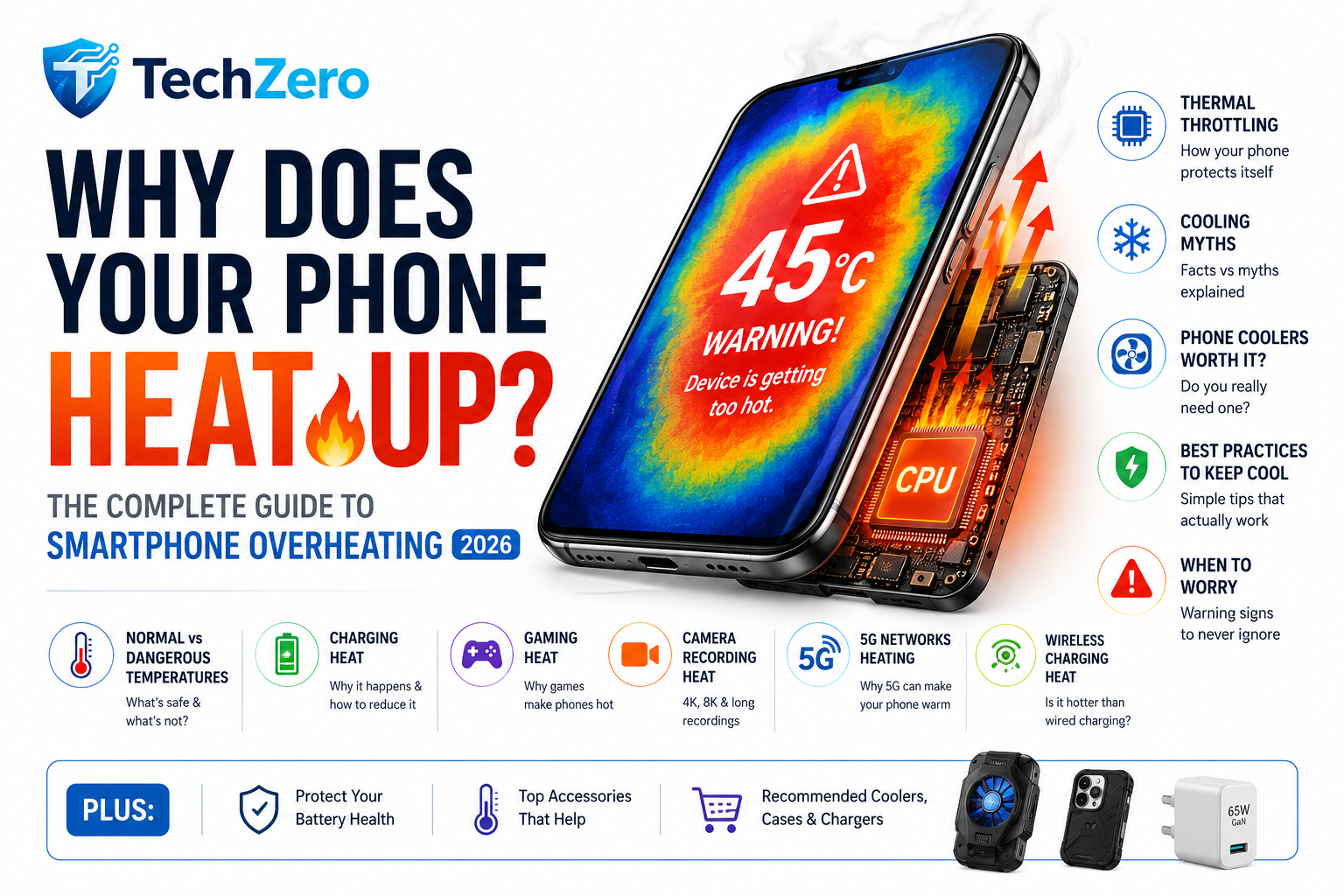

Why Does Your Phone Feel Hot?
You’re recording a 4K video on a sunny day. After a few minutes, your phone displays a warning:
“Device is getting too hot. Some functions have been limited.”
Or perhaps you’ve been gaming for an hour, and the back of your phone feels almost too warm to hold.
Maybe you’ve noticed it getting hot while charging overnight or using wireless charging.
The first thought that comes to mind is usually:
“Is my battery damaged?”
Fortunately, in most cases, the answer is no.
Modern smartphones are essentially miniature computers. They contain processors with billions of transistors, high-speed memory, advanced camera systems, multiple radios (5G, Wi-Fi, Bluetooth, GPS), and large rechargeable batteries—all packed into a body that’s only a few millimeters thick.
Every one of these components generates heat.
The real question isn’t whether your phone gets hot.
It’s how hot is too hot?
Let’s understand what actually happens inside your smartphone.
Why Smartphones Produce Heat
Every electronic device converts electricity into useful work.
Unfortunately, no electronic component is 100% efficient.
Whenever electricity flows through a processor, memory chip, display, modem or battery, a portion of that energy is inevitably lost as heat.
Think of rubbing your hands together.
The movement creates friction.
Similarly, billions of electrons moving through microscopic circuits create electrical resistance, producing heat.
Your smartphone continuously performs millions—even billions—of calculations every second.
The harder it works, the more heat it generates.
The Biggest Sources of Heat Inside Your Phone
1. Processor (CPU)
The CPU is the brain of your smartphone.
It runs Android or iOS, opens apps, processes notifications, manages background tasks and coordinates every operation.
A processor performing simple messaging tasks consumes very little power.
However, when editing videos or playing graphics-intensive games, it begins running at much higher clock speeds.
Higher speed means:
- More electricity
- More switching activity
- More heat
Modern flagship processors are incredibly powerful, but physics still applies—they generate heat under heavy workloads.
2. Graphics Processor (GPU)
The GPU renders everything you see on screen.
Gaming pushes the GPU much harder than normal phone usage.
Fast-paced titles like PUBG Mobile, BGMI, Call of Duty Mobile or Genshin Impact require the GPU to render dozens or even hundreds of frames every second.
Higher frame rates mean:
- More calculations
- Higher power consumption
- Increased temperatures
This explains why gaming often heats your phone faster than browsing social media.
3. Battery
Batteries don’t simply store energy.
They also generate heat while charging and discharging.
Whenever lithium ions move between the battery’s electrodes, internal resistance creates heat.
Fast charging increases electrical current, naturally increasing battery temperature.
A slight temperature rise during charging is completely normal.
4. Display
Modern OLED displays are extremely efficient, but they’re still one of the biggest power consumers.
Brightness matters.
Running your display at maximum brightness outdoors can significantly increase power consumption.
High refresh rates like 120Hz or 144Hz also require the display and processor to work harder.
5. Camera Processing
Taking a single photo isn’t very demanding.
Recording 4K or 8K video is another story.
The phone must:
- Capture massive image data
- Process HDR
- Reduce image noise
- Stabilize footage
- Compress video
- Save files to storage
All simultaneously.
This heavily loads the CPU, GPU and Image Signal Processor (ISP).
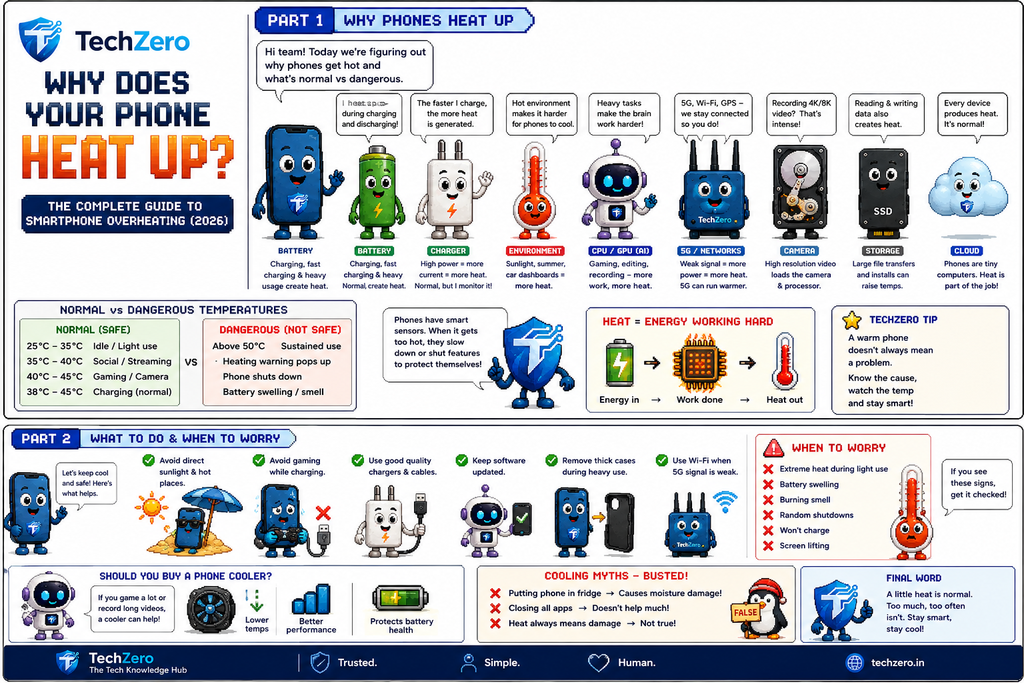
What Is a Normal Phone Temperature?
Many users assume any warm phone is overheating.
That’s simply not true.
Typical surface temperatures:
| Situation | Normal Temperature |
|---|---|
| Idle | 25–35°C |
| Social media | 30–38°C |
| Video streaming | 35–40°C |
| Gaming | 40–45°C |
| Fast charging | 38–45°C |
| 4K video recording | 42–47°C |
Feeling warmth does not automatically mean something is wrong.
Most flagship phones are designed to safely operate at these temperatures.
Problems begin when temperatures continue rising beyond safe operating limits.
When Does Heat Become Dangerous?
Most smartphones automatically protect themselves.
As temperatures rise, the phone starts reducing performance to prevent damage.
This process is called thermal throttling.
If temperatures continue increasing, the phone may:
- Reduce screen brightness
- Slow the processor
- Stop charging
- Disable the camera
- Turn off 5G
- Close apps
- Display overheating warnings
- Shut down completely
These protections are intentional.
They’re designed to protect both the battery and internal electronics.
Why Phones Heat Up While Charging
Charging is one of the most common causes of smartphone heating.
Why?
Because charging isn’t just filling the battery.
It’s a complex electrochemical process.
Energy travels from the charger…
through the cable…
into the charging circuitry…
through voltage regulators…
and finally into the battery.
Each step loses a little energy as heat.
That’s perfectly normal.
Why Fast Charging Generates More Heat
Imagine filling a bucket.
You can pour water slowly…
or blast it with a high-pressure hose.
Fast charging works like the second example.
Instead of 10W, modern phones may charge at:
- 25W
- 45W
- 67W
- 80W
- 100W
- 120W
Higher power means more electrical current.
Higher current naturally creates more heat.
Fortunately, manufacturers include multiple temperature sensors throughout the phone.
If temperatures rise too much, charging speed automatically slows.
Gaming: The Biggest Heat Generator
Gaming pushes almost every component simultaneously.
The CPU calculates game logic.
The GPU renders graphics.
The display refreshes rapidly.
The speakers output sound.
Wi-Fi or 5G transfers multiplayer data.
The touchscreen constantly scans for input.
No other everyday activity stresses a smartphone this much.
That’s why gaming temperatures are often the highest you’ll experience.
Many gaming phones include vapor chambers, graphite sheets and large cooling systems specifically for this reason.
Why Phones Heat Up in Summer
Ambient temperature matters more than many people realize.
Your phone cools itself by transferring heat to the surrounding air.
If the air itself is already 42°C on a hot summer afternoon, there’s far less cooling potential.
That’s why phones overheat much faster when:
- Left inside a parked car
- Used under direct sunlight
- Navigation is running on the dashboard
- Recording outdoor videos
Even flagship phones struggle under these conditions.
Why Recording Videos Makes Phones Hot
Recording 4K HDR video is one of the most processor-intensive tasks a smartphone can perform.
The phone is simultaneously:
- Reading sensor data
- Running autofocus
- Stabilizing footage
- Processing HDR
- Compressing video
- Writing huge files to storage
If you’re recording in 4K at 60fps or 8K, the workload increases dramatically.
That’s why many phones automatically limit recording duration in hot environments.
Does 5G Heat Up Your Phone?
Yes—but not always.
5G itself isn’t inherently “hot.”
However, maintaining high-speed connections—especially in areas with weak signal—requires the modem to work harder.
When signal strength is poor, the phone increases transmission power to stay connected.
That extra effort generates additional heat and drains the battery faster.
This is why many users notice more warmth during extended 5G usage than on stable Wi-Fi connections.
Does Wireless Charging Make Your Phone Hotter?
Yes—and in most cases, wireless charging generates more heat than wired charging.
The reason lies in how power is transferred.
With a wired charger, electricity travels directly through a cable into your phone.
Wireless charging is different. A charging pad creates an electromagnetic field, and a coil inside your phone converts that energy back into electricity. This process, called inductive charging, is convenient but less efficient.
Some energy is lost during this conversion, and that lost energy becomes heat.
That’s why you’ll often notice your phone becoming warmer on a wireless charger than when connected with a cable.
Heat increases further if:
- The phone isn’t perfectly aligned with the charging coil.
- You’re using a thick protective case.
- The charger doesn’t have an internal cooling fan.
- You’re using the phone while it’s charging wirelessly.
Many premium wireless chargers now include cooling fans specifically to reduce heat buildup during charging.
TechZero Tip: If charging speed matters, use a wired charger. If battery longevity is your priority, a slower wired charge generally produces less heat than high-speed wireless charging.
What Is Thermal Throttling?
Imagine running a marathon in the middle of summer.
As your body temperature rises, you naturally slow down to avoid overheating.
Your smartphone behaves in exactly the same way.
When internal sensors detect excessive heat, the operating system intentionally reduces processor performance. This protective mechanism is called thermal throttling.
Instead of running at maximum speed, the CPU and GPU lower their clock frequencies, reducing both power consumption and heat generation.
The result?
- Games may lose a few frames per second.
- Apps can take slightly longer to open.
- Video rendering slows down.
- Benchmarks show lower scores.
Many users assume their phone has become “slow.” In reality, it’s protecting itself.
Thermal throttling is not a defect—it’s an important safety feature that helps prevent permanent damage.
How Smartphones Stay Cool
Modern smartphones use surprisingly advanced cooling systems.
Depending on the model, your phone may include:
Graphite Sheets
Thin graphite layers spread heat across a larger surface area instead of allowing it to concentrate in one spot.
Copper Heat Pipes
These tiny pipes transfer heat away from the processor toward cooler areas inside the phone.
Vapor Chambers
Common in flagship and gaming phones, vapor chambers use a small amount of liquid sealed inside a metal chamber. As the processor heats up, the liquid evaporates, carrying heat away. It then condenses and repeats the cycle.
This technology dramatically improves cooling efficiency.
Metal Frames
Aluminum frames don’t just make phones feel premium—they also act as heat sinks, helping dissipate internal heat.
Common Cooling Myths
Let’s separate fact from fiction.
Myth 1: Put Your Phone in the Refrigerator
False.
Sudden temperature changes can cause condensation inside the phone.
Moisture is far more dangerous than temporary heat.
Never place your phone in a refrigerator or freezer.
Myth 2: Close Every Background App
Mostly false.
Modern Android and iOS versions are designed to manage background apps efficiently.
Force-closing apps repeatedly can actually increase processor activity because the system has to reload them from scratch.
Unless an app is malfunctioning, leave it alone.
Myth 3: Fast Charging Always Damages Batteries
Not necessarily.
Modern smartphones continuously monitor:
- Battery temperature
- Charging current
- Voltage
- Cell health
If temperatures rise too much, charging speed automatically decreases.
Fast charging creates more heat, but when implemented correctly by reputable manufacturers, it’s designed to stay within safe operating limits.
Myth 4: Removing the Phone Case Always Solves Heating
Sometimes—but not always.
Very thick rubber or rugged cases can trap heat.
However, a normal silicone or TPU case usually has only a minor impact.
Removing the case may help during heavy gaming or extended charging sessions, but it’s not a universal solution.
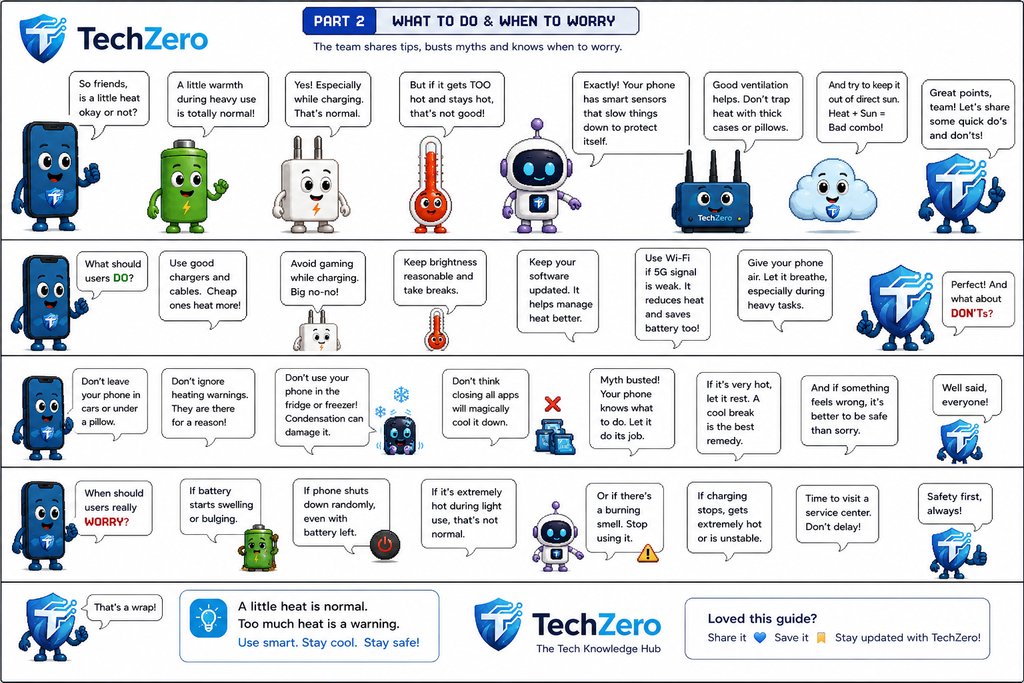
Should You Buy a Phone Cooler?
Phone coolers have become increasingly popular among gamers and content creators.
These accessories attach to the back of your phone and use either fans or thermoelectric (Peltier) cooling technology to reduce surface temperatures.
They can be useful if you:
- Play games for several hours.
- Record long 4K or 8K videos.
- Live in extremely hot climates.
- Frequently experience thermal throttling.
They are probably unnecessary if you:
- Mostly browse the web.
- Use social media.
- Watch videos.
- Take occasional photos.
For the average user, spending money on a quality charger is usually more beneficial than buying a phone cooler.
How to Keep Your Phone Cool
Fortunately, preventing overheating is simple.
Avoid Direct Sunlight
Never leave your phone on a car dashboard or in direct sunlight for extended periods.
Dark-colored phones absorb even more heat.
Remove Thick Cases During Gaming
If your phone becomes unusually warm while gaming or charging, temporarily removing a thick protective case can improve airflow.
Lower Screen Brightness
The display is one of the largest power consumers.
Reducing brightness by even 20–30% can noticeably reduce heat generation.
Use Wi-Fi Instead of Weak 5G
If you’re in an area with poor cellular reception, switching to Wi-Fi reduces modem workload and often lowers temperatures.
Keep Software Updated
Manufacturers frequently release updates that improve thermal management and optimize processor efficiency.
Ignoring updates may leave performance improvements on the table.
Avoid Gaming While Charging
This is one of the worst combinations.
The processor is generating heat from gaming while the battery generates additional heat from charging.
The two heat sources combine, raising internal temperatures significantly.
If possible, finish charging first—then play.
Use Certified Chargers
Cheap, uncertified chargers often provide unstable power, increasing heat and potentially damaging battery health.
Always use reputable chargers that support your phone’s charging standards.
Warning Signs You Should Never Ignore
Warmth is normal.
These symptoms are not.
Seek professional service if you notice:
- The battery swelling or lifting the back panel.
- A burning smell.
- Random shutdowns even with adequate battery charge.
- Extreme overheating during light tasks.
- Charging failures accompanied by excessive heat.
- The screen separating from the frame.
Battery swelling is particularly serious.
If your phone appears swollen, stop using it immediately and have it inspected.
Does Heat Damage Battery Life?
Yes.
Heat is one of the biggest factors affecting long-term battery health.
Lithium-ion batteries naturally degrade over time, but high temperatures accelerate chemical aging.
Repeated exposure to excessive heat can reduce maximum battery capacity faster than normal use.
This doesn’t mean occasional warmth is harmful.
What matters is repeated, prolonged exposure to high temperatures.
Keeping your phone cool whenever practical helps preserve battery health over the long term.
Frequently Asked Questions
Is it normal for a phone to get warm while charging?
Yes. Mild warmth during charging is completely normal, especially with fast charging.
Is gaming supposed to heat my phone?
Absolutely. Gaming is one of the most demanding tasks for any smartphone.
Should I stop charging if my phone feels warm?
Not necessarily.
If it’s only mildly warm, there’s usually nothing to worry about.
If it becomes extremely hot or displays an overheating warning, disconnect the charger and allow it to cool naturally.
Can overheating permanently damage my phone?
Occasional overheating is unlikely to cause permanent damage because modern phones include multiple safety protections.
However, repeated extreme heat over months or years can reduce battery lifespan and may affect internal components.
Is it safe to use my phone while charging?
For light activities like messaging or quick notification checks, yes.
For making calls, gaming, video editing, or recording 4K video, it’s better to avoid charging simultaneously because it significantly increases heat.
Quick Checklist: How to Prevent Smartphone Overheating
✅ Keep your phone out of direct sunlight.
✅ Use certified chargers and cables.
✅ Avoid gaming while charging.
✅ Remove very thick cases during intensive tasks if necessary.
✅ Reduce screen brightness outdoors.
✅ Keep your phone updated.
✅ Close apps that are genuinely malfunctioning.
✅ Prefer Wi-Fi over weak cellular signals when available.
✅ Allow your phone to cool naturally—never use a refrigerator or freezer.
Final Verdict
Smartphones are more powerful than ever, and with that power comes heat. Whether you’re charging, gaming, recording high-resolution videos, or using 5G, some warmth is not only expected—it’s a sign that your device is working hard.
The key is understanding the difference between normal operating heat and dangerous overheating. Modern phones are equipped with sophisticated cooling systems, temperature sensors, and thermal throttling to keep internal components within safe limits. In most situations, your phone will protect itself long before permanent damage occurs.
If you notice only mild warmth during demanding tasks, there’s usually no reason to worry. But if your phone becomes excessively hot during simple activities, repeatedly shuts down, shows swelling, or emits unusual odors, it’s time to stop using it and seek professional service.
The best way to extend the life of your smartphone isn’t to avoid heat entirely—that’s impossible. Instead, avoid unnecessary heat by using quality chargers, keeping the device out of direct sunlight, giving it time to cool during heavy workloads, and following good charging habits.
A cool phone is not just more comfortable to hold—it performs better, protects its battery, and is likely to last longer.



[…] Phone Overheating: Why It Happens and How to Fix It […]
[…] Thermal performance is becoming increasingly important in flagship smartphones. See our guide on why smartphones overheat and how cooling systems work. […]
[…] 🔗 Related TechZero Troubleshooting: Experiencing thermal throttling on your current device? Check our guide on Phone Overheating: Causes & Thermal Fixes. […]