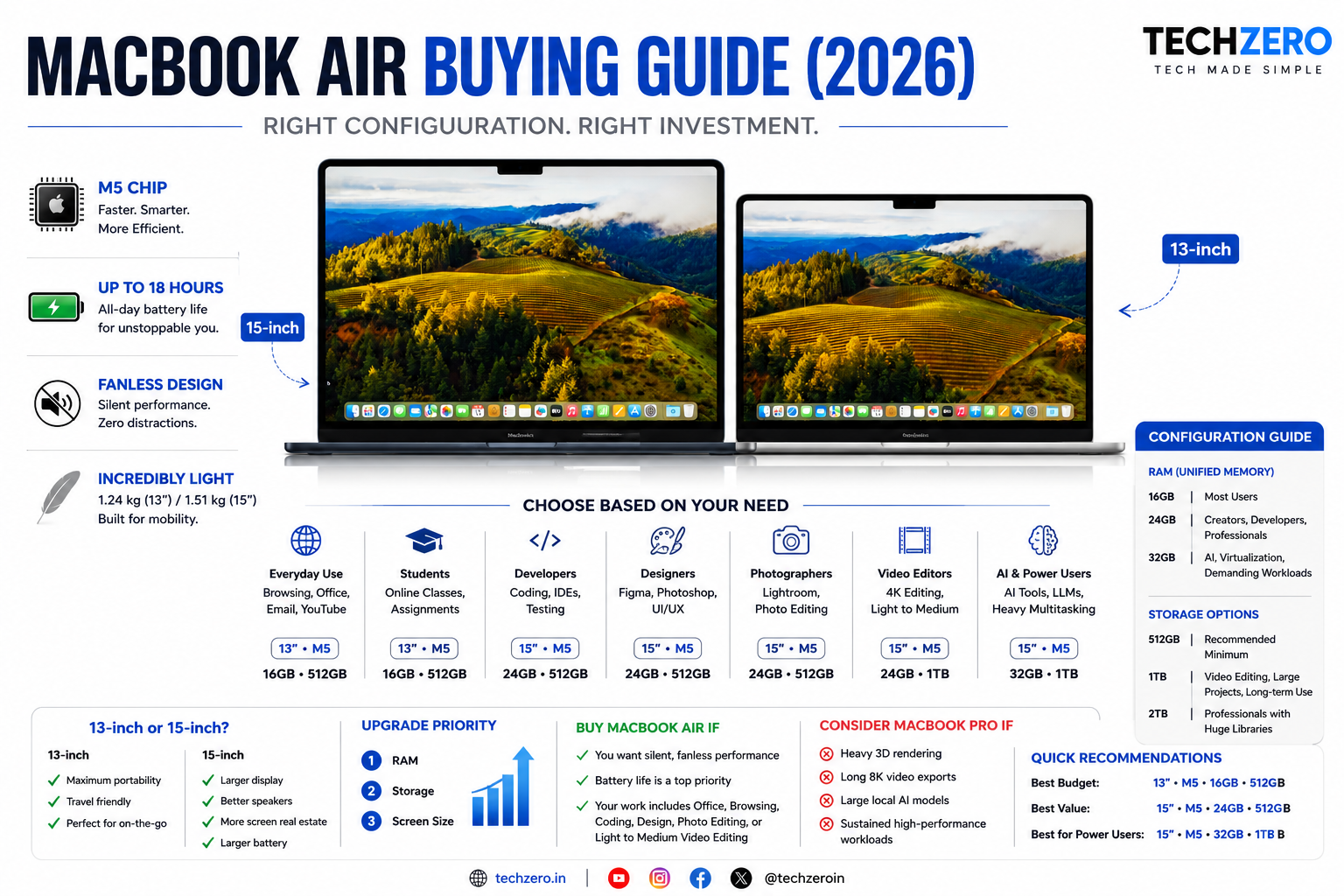

Choose your MacBook Air based on what you do—not the highest specifications.
Choose Based on Your Need
| Your Need | Recommended Configuration |
|---|---|
| Web browsing, Office, email, online classes | 13-inch • M5 • 16GB RAM • 512GB SSD |
| College & university | 13-inch • M5 • 16GB RAM • 512GB SSD |
| Programming & software development | 15-inch • M5 • 24GB RAM • 512GB SSD |
| UI/UX, Figma, Photoshop | 15-inch • M5 • 24GB RAM • 512GB SSD |
| Lightroom & photo editing | 15-inch • M5 • 24GB RAM • 512GB SSD |
| Light to medium 4K video editing | 15-inch • M5 • 24GB RAM • 1TB SSD |
| Heavy multitasking | 15-inch • M5 • 24GB RAM • 512GB SSD |
| AI tools & small local LLMs | 15-inch • M5 • 32GB RAM • 1TB SSD |
| Business & frequent travel | 13-inch • M5 • 16GB RAM • 512GB SSD |
| Future-proof for 5–7 years | 15-inch • M5 • 24GB RAM • 512GB SSD |
RAM Guide
| RAM | Best For |
|---|---|
| 16GB | Most users |
| 24GB | Developers, creators, professionals |
| 32GB | AI, virtualization, demanding creative workloads |
Storage Guide
| Storage | Best For |
|---|---|
| 512GB | Recommended minimum for most buyers |
| 1TB | Video editing, large projects, long-term use |
| 2TB | Professional creators with very large media libraries |
13-inch or 15-inch?
Choose 13-inch if you:
- Travel frequently
- Prioritize portability
- Work mostly on the go
Choose 15-inch if you:
- Multitask extensively
- Prefer a larger display
- Spend long hours working
- Want better speakers
Upgrade Priority
- RAM
- Storage
- Screen Size
Buy MacBook Air If
- You want a silent, fanless laptop.
- Battery life is a top priority.
- Your work includes Office, browsing, coding, design, photo editing, or light-to-medium video editing.
Skip MacBook Air If
Consider a MacBook Pro if you regularly:
- Render complex 3D scenes
- Edit long 8K videos
- Run large local AI models
- Perform sustained high-performance workloads
Quick Recommendations
Best Budget: 13-inch • M5 • 16GB • 512GB SSD
Best Value: 15-inch • M5 • 24GB • 512GB SSD
Best for Power Users: 15-inch • M5 • 32GB • 1TB SSD

[…] you’re deciding whether a fanless MacBook Air is sufficient for your workload, our MacBook Air Buying Reference goes deeper into configurations and use […]