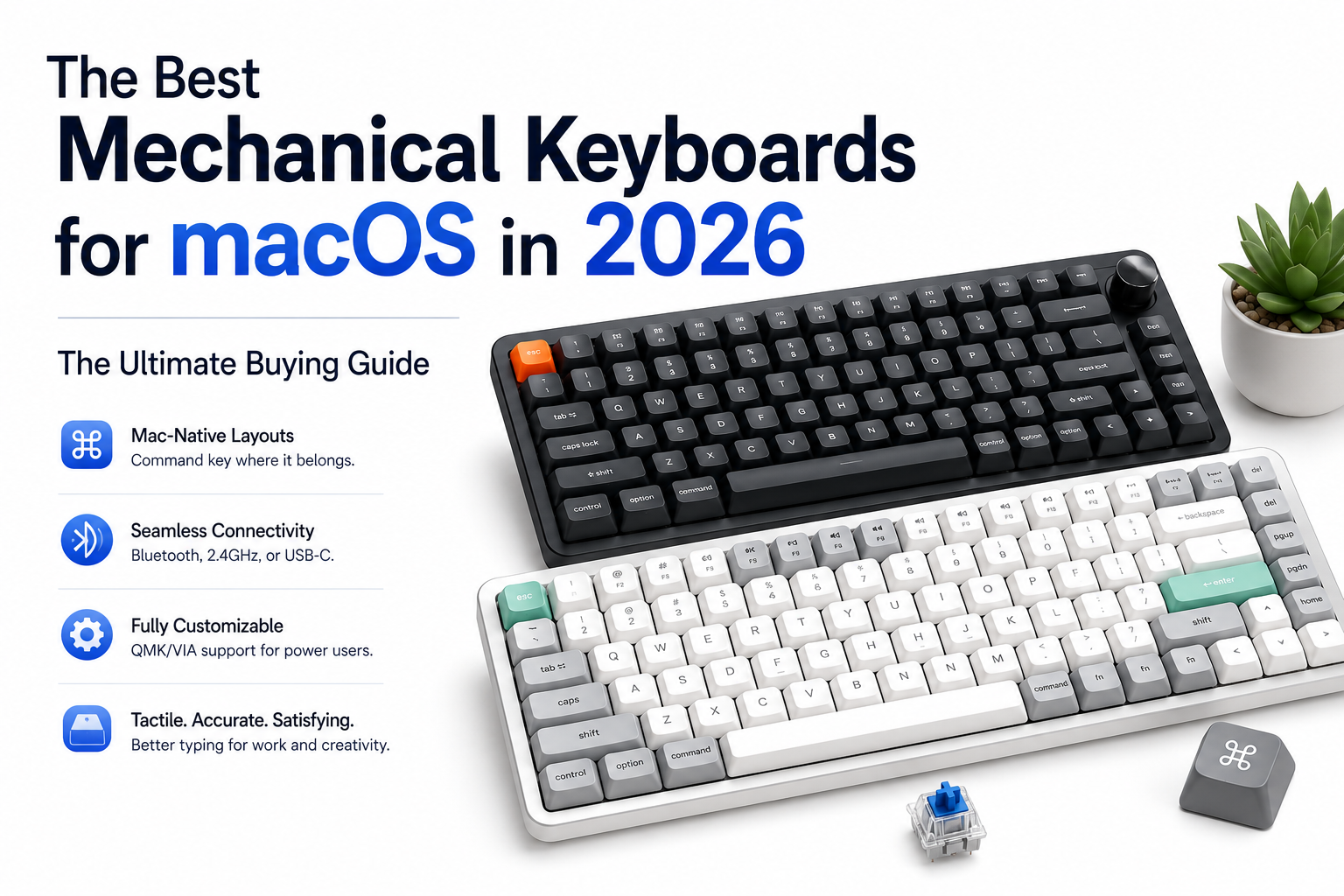

Pairing your MacBook or Mac mini or ipads with an external monitor is only half the battle. If you spend hours typing code, writing articles, or managing spreadsheets, using Apple’s flat Magic Keyboard can lead to finger fatigue. Upgrading to a dedicated mechanical keyboard transforms your typing experience, offering satisfying tactile feedback, deep travel, and customisable keycaps.
However, just like external monitors, choosing a mechanical keyboard for macOS requires paying attention to details that Windows-centric reviewers often overlook—such as native Mac command key placement, Bluetooth/2.4GHz switching, QMK/VIA software compatibility, and proper profile layouts.
This comprehensive TechZero guide cuts through the marketing noise to bring you the definitive reference for macOS mechanical keyboards in 2026.
👥 Who Should Read This Guide?
- ✅ You want a tactile, satisfying typing experience for your MacBook setup.
- ✅ You are tired of cramped layouts and low-travel chiclet keys.
- ✅ You need a keyboard that easily toggles between macOS and Windows layouts.
- ✅ You want wireless clean desk aesthetics with robust battery life.
- ✅ You write code or text professionally and care about ergonomics.
🛑 This Guide May Not Be Right for You If:
- ❌ You strictly prefer ultra-thin laptop-style keyboards (stick with the Apple Magic Keyboard).
- ❌ You only care about RGB gaming aesthetics without regard for typing acoustics (look toward mainstream PC gaming boards).
Part I: What Makes a Mechanical Keyboard Mac-Friendly?
- Dedicated macOS / Windows Toggle SwitchesUnlike generic PC keyboards where you have to manually remap keys in software every time, top-tier Mac-compatible mechanical keyboards feature a physical hardware switch on the side or back to instantly remap modifier keys (Command and Option) to match standard Apple conventions.
- Software Customization (VIA / QMK Support)True enthusiasts rely on VIA or QMK firmware. This allows you to remap keys, build custom macros, and adjust layers directly in a web browser without installing bloated, resource-heavy proprietary drivers on macOS.
- Connectivity Options
- Bluetooth 5.1+: Allows seamless multi-device switching between your MacBook, iPad, and iPhone without using up valuable USB ports.
- 2.4GHz Wireless (Dongle): Provides ultra-low latency, though it requires a USB-A or USB-C receiver plugged into your Mac or dock.
- Wired USB-C: Zero latency, infinite battery life, and stable desktop performance.
Part II: At-a-Glance Comparison
| Model | Size / Layout | Connectivity | Switch Type | Mac Toggle | Approx. Price |
| Keychron Q1 Max | 75% Compact | BT / 2.4GHz / Wired | Hot-swappable Mechanical | Hardware Switch | ₹14,000–₹18,000 / $170–$210 |
| NuPhy Air75 V2 | Low-Profile 75% | BT / 2.4GHz / Wired | Low-profile Mechanical | Hardware Switch | ₹10,000–₹13,000 / $120–$150 |
| Logitech MX Mechanical | Full-Size / Mini | BT / Logi Bolt | Low-profile Tactile | Software / OS Switch | ₹13,000–₹17,000 / $150–$199 |
| Lofree Flow | 75% Ultra-Slim | Bluetooth / Wired | POM Low-profile | Dedicated OS Switch | ₹13,000–₹15,000 / $159–$169 |
| Keychron V Max Series | TKL / Full-Size | BT / 2.4GHz / Wired | Budget Mechanical | Hardware Switch | ₹8,000–₹11,000 / $90–$110 |
Part III: Detailed Reviews
1. Best Overall for Mac: Keychron Q1 Max
Keychron is the gold standard for Mac-native mechanical keyboards because they ship with pre-installed Mac keycaps and a physical OS toggle switch.
- Why it wins: CNC aluminum body, gasket-mounted design for a cushioned typing feel, hot-swappable PCB, and full VIA/QMK programmability over both Bluetooth 5.1 and 2.4GHz wireless.
- TechZero Verdict: The ultimate desk keyboard for developers and writers who want premium build quality and true macOS integration.
2. Best Low-Profile for Travel & Magic Keyboard Switchers: NuPhy Air75 V2
If you love the slim profile of Apple’s Magic Keyboard but want genuine mechanical switches and rich acoustics, the NuPhy Air75 V2 is unmatched.
- Why it wins: Ultra-slim profile that sits flush in front of a MacBook, vibrant RGB side-lights, 1000Hz polling rate over 2.4GHz wireless, and exceptional stock keycap feel.
- TechZero Verdict: The easiest transition keyboard for anyone moving from Apple’s stock keyboards to mechanical setups.
3. Best Low-Profile Luxury: Lofree Flow
If aesthetic minimalism and buttery-smooth typing acoustics are your top priorities, the Lofree Flow is a masterclass in modern keyboard design.
- Why it wins: Proprietary POM switches that become smoother the more you type on them, a sleek all-aluminum chassis, gasket-mount structure (rare for low-profile boards), and gorgeous minimalist styling that complements a MacBook Pro.
- TechZero Verdict: The best-sounding low-profile keyboard on the market, ideal for open-office environments and minimalist desk setups.
4. Best Low-Profile Full-Size / Productivity: Logitech MX Mechanical
For data entry professionals, accountants, and spreadsheet power users who refuse to live without a dedicated numpad, Logitech’s MX Mechanical is the premier choice.
- Why it wins: Seamless switching between three separate devices via Bluetooth or Logi Bolt receiver, smart backlighting that illuminates as your hands approach, and deep integration with Logitech Options+ software for macOS shortcut mapping.
- TechZero Verdict: The ultimate wireless productivity workhorse for office environments and numbers-heavy workflows.
5. Best Budget Enthusiast Pick: Keychron V Max Series
You don’t need to spend over $150 to get a phenomenal wireless mechanical keyboard. The Keychron V Max series delivers enthusiast-grade features on a budget.
- Why it wins: ABS plastic case (keeping costs low while maintaining sturdy acoustics), 2.4GHz wireless + Bluetooth + wired connectivity, hot-swappable sockets, and full QMK/VIA support.
- TechZero Verdict: The smartest entry point into custom mechanical keyboards without breaking the bank.
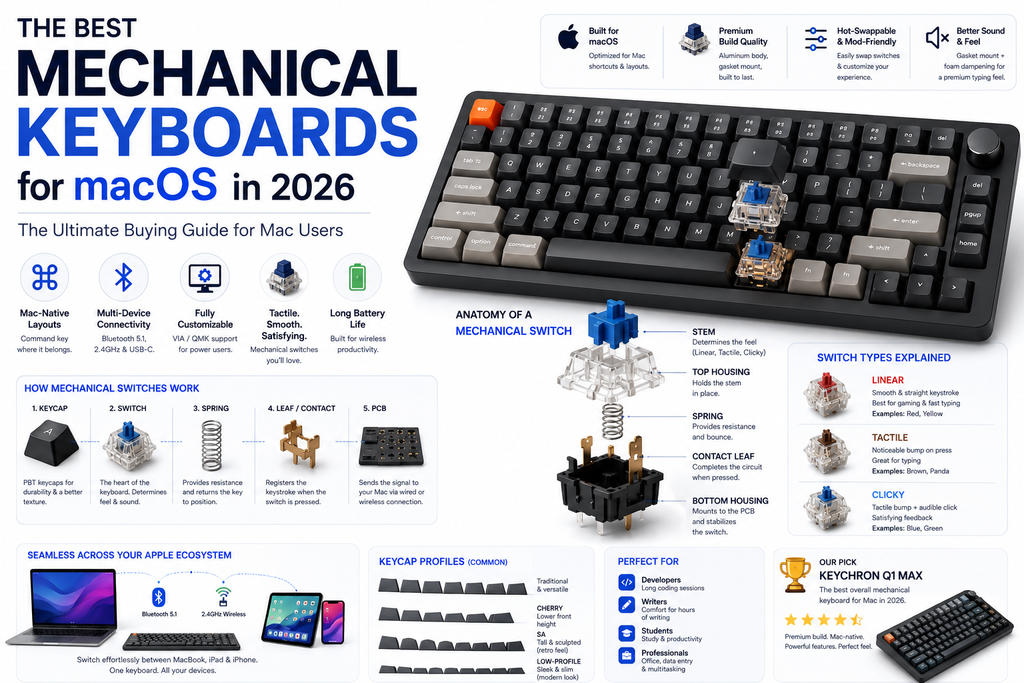
Part IV: Mechanical Switch Types Decoded
Choosing the right mechanical switch changes how your keyboard feels and sounds. Here is how to pick:
| Switch Type | Tactile Feedback | Sound Level | Best For |
| Linear | Smooth, uniform travel (no bump) | Quiet to Moderate | Fast typing, gaming, and open offices. |
| Tactile | Noticeable “bump” at activation | Moderate | General typing, coding, and tactile feedback lovers. |
| Clicky | Sharp bump with an audible “click” | Loud | Solo offices where you enjoy loud, crisp acoustics. |
💡 TechZero Recommendation for Mac Users: If you work in an office or share a home workspace, stick with Tactile (like Brown switches) or Linear (like Red or Banana switches). Avoid Clicky switches unless you work entirely alone—your colleagues or family members will thank you.
Part V: Choosing the Right Keyboard Layout
- 60% / 65% (Compact): Strips away the function row and arrow clusters (or packs arrows tightly). Great for ultra-minimalist desks, but requires memorizing modifier layers for media keys.
- 75% (The Mac Sweet Spot): Retains the dedicated function row, arrow keys, and navigation cluster in a compact footprint. This is the most popular layout for Mac users.
- TKL (Tenkeyless): Same as a 75% but with a traditional spaced-out navigation cluster. Slightly wider, but very familiar.
- Full-Size (100%): Includes a dedicated number pad. Perfect for finance professionals and spreadsheet jockeys, but forces your mouse further away from your right hand.
Part VI: Troubleshooting Mac Keyboard Quirks
- Wrong Modifier Keys (Command and Option swapped): Ensure the physical hardware toggle switch on the side of your keyboard is flipped to “Mac” mode, or remap them under
System Settings > Keyboard > Keyboard Shortcuts > Modifier Keys. - Bluetooth Lag or Dropouts: Wireless interference can disrupt 2.4GHz or Bluetooth signals. If your Mac is connected to an external 4K/5K monitor via a dense USB-C hub, plug your keyboard’s 2.4GHz USB receiver into a port further away from the display cable to eliminate radio frequency interference.
- Function Keys Acting Like Media Keys: By default, macOS uses top row keys for media controls (brightness, volume). To use standard F1–F12 keys, check
System Settings > Keyboardand toggle “Use F1, F2, etc. keys as standard function keys”.
Part VII: Maintenance & Care
- Keycap Cleaning: Remove keycaps every 3 to 6 months using a wire keycap puller and wash them in warm, soapy water to remove skin oils and dust.
- Switch Hot-Swapping: If a switch ever chatters or fails, hot-swappable boards let you pop the individual switch out with a tool and replace it in 30 seconds without soldering.
- Battery Longevity: To maximize wireless battery life, let the keyboard enter its deep-sleep mode after 10–15 minutes of inactivity and turn off RGB backlighting when working in brightly lit rooms.
🏆 TechZero Keyboard Awards & Final Verdict
| Award Category | Winner | Why It Wins |
| 🏆 Best Overall for Mac | Keychron Q1 Max | Premium aluminum build, hot-swappable, and flawless native Mac layout. |
| ✈️ Best Low-Profile / Travel | NuPhy Air75 V2 | Magic Keyboard slimness paired with rich mechanical acoustics. |
| 💼 Best Full-Size Office | Logitech MX Mechanical | Dedicated number pad and multi-device Logi ecosystem sync. |
| 🎨 Best Acoustics / Style | Lofree Flow | Luxurious POM low-profile switches and stunning minimalist design. |
| 💰 Best Budget Value | Keychron V Max | Enthusiast-grade wireless performance under $100. |
Final Verdict
- Buy the Keychron Q1 Max if you want the ultimate, uncompromised mechanical typing experience with heavy aluminum construction and full Mac toggle support.
- Choose the NuPhy Air75 V2 if you are transitioning directly from Apple’s Magic Keyboard and want a sleek, portable low-profile board.
- Go with the Logitech MX Mechanical if your daily workflow demands a full number pad and effortless multi-computer pairing.
Official Resources & Authoritative References
- VIA Web Configurator – The official browser-based tool for remapping and customizing QMK-compatible mechanical keyboards without third-party software installation on macOS.
- QMK Firmware Documentation – Comprehensive technical documentation explaining open-source firmware, custom layers, and macro programming.
- Bluetooth Core Specification – Official standards detailing Bluetooth 5.1+ multi-device connectivity protocols and low-latency wireless transmission.
- Keychron Official Website – Explore spec sheets, layout configurations, and firmware downloads for Mac-native mechanical keyboards.
- NuPhy Official Store – Discover low-profile mechanical keyboard designs tailored for Apple Magic Keyboard switchers and mobile desk setups.

[…] Best Mechanical Keyboards for MacBook & iPad […]