VPN Explained: What It Is, How It Works, When You Need One, and When You Don’t

A VPN (Virtual Private Network) creates an encrypted connection between your device and a VPN server, helping protect your internet traffic and hide your IP address from websites. But a VPN does not make you completely anonymous or protect you from every online threat. This comprehensive TechZero guide explains how VPNs work, what they actually hide, when you need one, and the myths that VPN marketing often gets wrong.
You’ll also learn the difference between privacy and security, how VPNs compare with HTTPS, proxies, Tor, and Cloudflare WARP, how to test for DNS and WebRTC leaks, and how to choose a trustworthy provider. Whether you use public Wi-Fi, work remotely, or are deciding if a VPN is worth paying for, this guide helps you make an informed decision based on facts, not hype.
📌 Quick Summary: How VPN Privacy Works
🎯 Who Should Read This Guide
- ✓ You regularly connect to unsecured airport, hotel, cafe, or workplace Wi-Fi networks.
- ✓ You work remotely and require encrypted access to internal company systems.
- ✓ You want to prevent your home ISP from collecting and selling your browsing metadata.
- ✓ You need to safely bypass network-level censorship, firewalls, or geographic content locks.
- ✓ You are evaluating whether paying for a VPN subscription provides actual return on investment (ROI).
- ✕ You expect a magic security tool that grants total immunity from law enforcement or web trackers.
- ✕ You are seeking tools to conduct illegal activities under the assumption of complete impunity.
Controlling who can observe your network activity. (Hiding what sites you visit and where you connect from.)
Protecting your local system and credentials from compromise. (Stopping viruses, phishing links, or credential theft.)
Ready to Choose a VPN?
Now that you understand what a VPN is, how VPN encryption works, and when you actually need one, the next question is simple: Which VPN should you buy?
Instead of relying on affiliate rankings, TechZero compares the Top 5 Paid and Top 5 Free VPNs using independent security audits, no-logs verification, real-world speed testing, RAM usage, battery impact, and overall value.
🔍 Compare the Best VPN Services →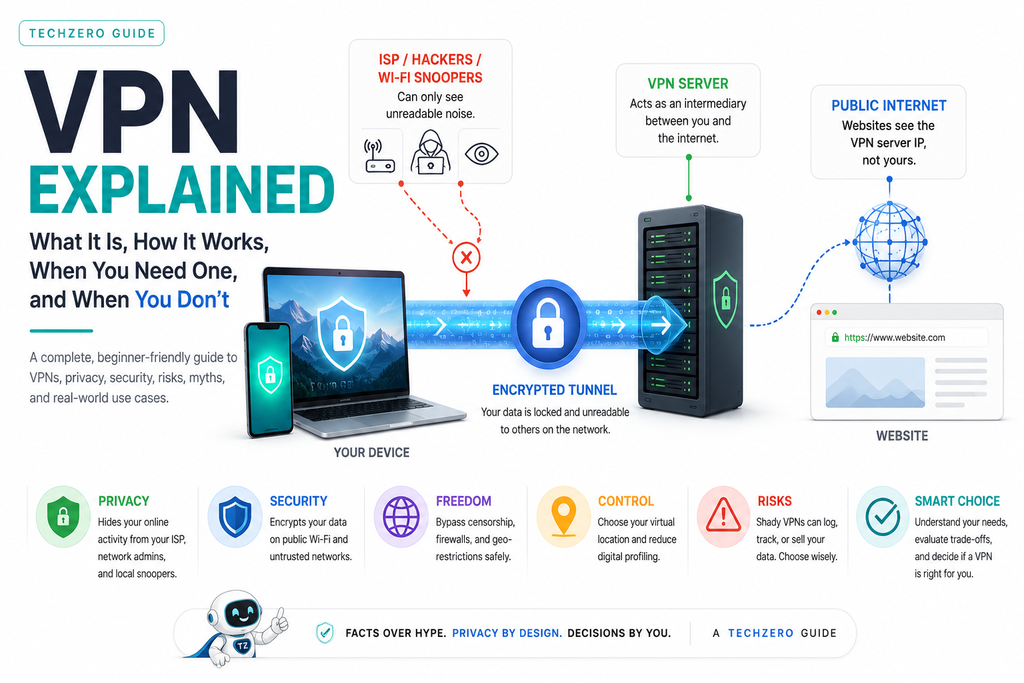
Eavesdroppers on your connection see only unreadable ciphertext & noise.
PART 1: Why Everyone Suddenly Talks About VPNs
Turn on a podcast, open YouTube, or read a tech site, and you will hear a VPN pitch. Marketers frame VPNs as digital body armor, promising total online invisibility and complete immunity from cybercrime.
This marketing push stems from five real drivers:
- High-Margin Affiliate Sponsorships: VPN companies pay creators substantial affiliate commissions, driving aggressive promotion regardless of actual user need.
- Aggressive Data Profiling: Widespread ad tracking, data broker aggregations, and ISP metadata collection have led users to seek privacy tools.
- The Remote Work Shift: Accessing corporate systems securely from home or coffee shops moved enterprise VPN tools into daily consumer life.
- Unsecured Public Networks: Open Wi-Fi access points in venues like airports remain vulnerable to packet-sniffing and fake access point attacks.
- Censorship & Regional Blocks: Streaming platforms restrict content by region, while institutions and governments restrict web access.
Do you need one running 24/7? On a trusted home broadband network, usually no. Understanding why requires examining the exact problem a VPN solves—and what it leaves open.
PART 2: What Problem Does a VPN Actually Solve?
A Virtual Private Network is a targeted routing tool built to fix specific network and visibility problems:
+--------------------------------------------------------------------+
|                      COMMON NETWORK PROBLEMS                       |
+--------------------------------------------------------------------+
| 1. ISP Browsing History Metadata Logging                           |
| 2. Eavesdropping on Unencrypted Public Wi-Fi Networks              |
| 3. Exposure of Your Physical Location via Public IP                |
| 4. Untrusted Local Network Surveillance and Domain Filtering      |
| 5. Restricted Access to Isolated Corporate Subnets                |
+--------------------------------------------------------------------+
- Problem 1: ISP Traffic Profiling. Without a VPN, your ISP acts as your gateway. They log every domain request you make, build behavioral profiles, and in many jurisdictions, sell that data to ad brokers.
- Problem 2: Untrusted Local Wi-Fi. Open public Wi-Fi allows adjacent devices on the same frequency to inspect unencrypted packets or deploy fake access points (“Evil Twin” attacks).
- Problem 3: IP Address Exposure. Every site you visit reads your assigned IP address, revealing your coarse geographic location (city/region).
- Problem 4: Network Censorship. Local network administrators at schools, offices, or national firewalls use DNS or IP filtering to block access to specific web resources.
- Problem 5: Remote System Isolation. Businesses cannot safely expose sensitive staging servers or local databases to the open internet without an encrypted entry point.
Your home router is the first device every internet packet passes through. Understanding how routers work makes it much easier to understand what a VPN can—and cannot—protect.
Read: Modern Router Explained →PART 3: The Threat Model: Who Are You Hiding From?
Security and privacy are never absolute; they are defined by your threat model. Evaluating a VPN requires asking: Who am I protecting my data against?
+---------------------+-----------------------+---------------------------------------+
| POTENTIAL ADVERSARY | WITHOUT A VPN         | WITH A TRUSTED VPN                    |
+---------------------+-----------------------+---------------------------------------+
| Local Wi-Fi Hacker  | Sees unencrypted data | Sees only unreadable encrypted noise  |
| School / Work Admin | Logs visited domains  | Sees connection to VPN server IP only |
| Your Internet (ISP) | Logs all web requests | Sees connection to VPN server IP only |
| Target Websites     | Sees real home IP     | Sees VPN server IP                    |
| Ad Tracking Networks| Tracks via IP/Cookies | Tracks via Cookies/Fingerprinting     |
| Your VPN Provider   | No visibility         | Sees destination IPs/domains          |
+---------------------+-----------------------+---------------------------------------+
A VPN shifts visibility away from local observers (your ISP, the coffee shop Wi-Fi admin, a local hacker) and moves that visibility entirely to your chosen VPN provider.
PART 4: Why HTTPS and Encrypted DNS/ECH Aren’t Always Enough
A common question arises: “If almost every website uses HTTPS (the padlock icon), why do I need a VPN?”
HTTPS encrypts the content of your web traffic—passwords, messages, credit card details, and page inputs. However, standard HTTPS leaves critical metadata exposed to your ISP and local network admins.
+----------------------------------+------------------+------------------+
| DATA TYPE                        | PROTECTED BY     | PROTECTED BY     |
|                                  | HTTPS ALONE?     | VPN + HTTPS?     |
+----------------------------------+------------------+------------------+
| Form Inputs & Passwords          | YES              | YES              |
| Specific URL Path (/account/pay) | YES              | YES              |
| Destination Domain (example.com) | NO (Exposed SNI) | YES              |
| Your True IP Address             | NO               | YES              |
| Your DNS Lookup Requests         | NO               | YES              |
+----------------------------------+------------------+------------------+
What About Modern Protocols Like ECH and DoH?
- DNS-over-HTTPS (DoH): Encrypts your domain lookup requests so your ISP cannot read your DNS queries. However, once resolved, your device still connects directly to the target IP address, leaving the connection visible to your ISP.
- Encrypted Client Hello (ECH): Encrypts the Server Name Indication (SNI) field in TLS handshakes, hiding the destination hostname. However, ECH requires support from both the client browser and the destination hosting network/CDN. Even with ECH, your ISP sees the destination IP address you connect to, and non-web application traffic remains unencrypted.
Summary: HTTPS and ECH protect payload content and host headers on supported sites; a VPN wraps your entire device connection—all protocols and all applications—inside an encrypted tunnel that masks your IP address.
Modern VPN encryption is accelerated by today’s processors. Learn why newer CPUs complete encryption faster while using less power.
Read: Intel Processors Explained →PART 5: What Exactly Is a VPN?
Strip away technical jargon, and a VPN is a private tunnel across a public road.
Imagine driving your car from your garage to a store downtown:
[ Your House ] ───► ( Public Main Road with Observers ) ───► [ Store ]
Observers along the main road note your car, read your license plate, and log where you park.
Now imagine building an opaque, subterranean tunnel straight from your driveway to a public garage on the far side of town:
[ Your House ] ═══ [ Encrypted Underground Tunnel ] ═══► [ Public Garage ] ───► [ Store ]
Observers on the main road cannot see your car, read your license plate, or tell where you are going. They only see a car entering the tunnel. You emerge at the public garage, blend in with other traffic, and drive to the store.
To the store, you arrived from the public garage. To roadside observers, your destination remains unknown.
PART 6: The Complete Privacy Journey
To see how data moves across the web, trace a single network request from your keyboard to its destination and back:
[ YOU ] ──► [ ROUTER ] ──► [ ISP ] ──► [ IXP ] ──► [ VPN SERVER ] ──► [ CDN ] ──► [ WEBSITE ] ──► [ TRACKERS ]
  │            │            │          │             │                 │            │               │
  │            │            │          │             │                 │            │               └─ Read cookies
  │            │            │          │             │                 │            └─ Delivers web pages
  │            │            │          │             │                 └─ Caches regional assets
  │            │            │          │             └─ Decrypts tunnel & proxies connection
  │            │            │          └─ Internet Exchange Point routes bulk traffic
  │            │            └─ Sees only encrypted data packets heading to the VPN IP address
  │            └─ Forwards local data packets
  └─ Generates encrypted payload using client keys
When a VPN is enabled, encryption happens at Your Device. The local router, your ISP, and Internet Exchange Points (IXPs) handle raw cipher bytes without reading the destination domain or payload contents. The VPN Server decrypts the payload and routes it onward.
Want to understand what happens before your VPN encrypts your traffic? Learn how your request travels from your device to routers, ISPs, DNS servers, Internet Exchange Points (IXPs), CDNs, and finally the website you visit.
Read: How the Internet Actually Works →PART 7: How the Internet Works (With vs. Without a VPN)
Standard Connection (No VPN)
[ Device ] ──► [ Local Router ] ──► [ ISP ] ──► [ Target Website ]
- Device: Sends an unencrypted request for
example.com. - ISP: Inspects the request, resolves the domain via DNS, logs the event, and forwards the packet.
- Website: Reads your assigned home IP address and serves content back directly.
Encrypted VPN Connection
[ Device ] ═══ ( Encrypted Tunnel ) ═══► [ ISP ] ───► [ VPN Server ] ───► [ Target Website ]
- Device: Encrypts the request at the OS layer.
- ISP: Reads only the destination IP of the VPN server. It routes the encrypted data without inspecting its contents.
- VPN Server: Decrypts the request and forwards it to
example.com. - Website: Sees the IP address of the VPN server, processes the request, and responds via the VPN path.
Curious about routers, switches, TCP/IP, DNS, ports, packets and internet protocols? Our complete networking guide explains the technologies that power every VPN connection.
Explore Network Architecture & Protocols →PART 8: What Information Does a VPN Hide (and What It Exposes)
+------------------------------------+------------------------------------+
| WHAT IT HIDES                      | WHAT IT DOES NOT HIDE              |
+------------------------------------+------------------------------------+
| ✔ Your true residential IP address | ❌ Logged-in user accounts         |
| ✔ Your geographical location       | ❌ Tracking cookies & local storage|
| ✔ Your DNS resolution lookups      | ❌ Browser fingerprinting profiles |
| ✔ Domain metadata from your ISP    | ❌ Form fields & payment info      |
| ✔ Unencrypted public Wi-Fi packets | ❌ Device malware & keystroke logs |
+------------------------------------+------------------------------------+
- Your IP Address: Masked by the VPN server IP.
- Your Geographic Location: Obscured and replaced with the location of the selected VPN server node.
- Logged-in Accounts: Exposed. If you connect to Gmail or Facebook, those platforms identify you by your active session, not your IP.
- Tracking Cookies: Exposed. Cookies stored in your browser follow you across IP address changes.
- Browser Fingerprinting: Exposed. Websites measure your screen resolution, system fonts, GPU rendering, and browser extensions to build a hardware ID.
PART 9: How VPN Encryption & Protocols Work
+-------------------------------------------------------------------------+
|                         VPN CONNECTION HANDSHAKE                        |
+-------------------------------------------------------------------------+
| 1. AUTHENTICATION  ───► Validates server identity using TLS/certificates|
| 2. KEY EXCHANGE    ───► Generates short-lived session key (Diffie-Hellman)|
| 3. ENCRYPTION      ───► Scrambles data via ciphers (AES-256 or ChaCha20)|
| 4. ENCAPSULATION   ───► Wraps cipher data into standard UDP/TCP packets |
+-------------------------------------------------------------------------+
Modern VPN Protocols Compared
- WireGuard: Modern protocol with a lightweight codebase (~4,000 lines). Uses modern cryptography (ChaCha20, Poly1305), connects quickly, and handles network transitions smoothly.
- OpenVPN: Industry standard for decades. Highly configurable and thoroughly audited. Runs on TCP or UDP to bypass strict firewalls, though with higher processing overhead than WireGuard.
- IKEv2/IPsec: Excellent protocol for mobile devices. Instantly reconnects when transitioning between cellular data and Wi-Fi networks.
PART 10: Crucial Features: Kill Switch, Split Tunneling, & Leak Protection
1. The Kill Switch
A Kill Switch prevents data leaks by monitoring your system’s connection to the VPN server. If the tunnel drops unexpectedly, the Kill Switch instantly blocks all internet traffic at the OS or firewall level before your hardware can fall back to an unencrypted connection through your ISP.
[ VPN Drops Unexpectedly ] ──► [ Kill Switch Activates ] ──► [ Blocks Outbound Traffic ]
                                                                (Zero Unencrypted Leaks)
2. Leak Protection (DNS, IPv6, WebRTC)
A VPN app can report an active connection while still leaking user data through system misconfigurations:
- DNS Leaks: Occur when your OS routes domain queries to your default ISP servers instead of the VPN’s encrypted DNS nodes.
- IPv6 Leaks: Occur when your ISP supports IPv6, but your VPN tunnel only routes IPv4. Outbound IPv6 requests bypass the tunnel entirely.
- WebRTC Leaks: WebRTC features in browsers like Chrome or Firefox can expose your true local and public IP addresses through STUN requests, even with an active VPN. A quality VPN blocks these leaks natively.
3. Split Tunneling
Split tunneling allows you to choose which applications run through the encrypted VPN tunnel and which connect directly to your local network.
                             ┌──► Encrypted VPN Tunnel ──► Untrusted Web / Public Sites
[ Split Tunnel Routing Engine ]│
                             └──► Local Direct Network ──► Netflix / Local Printer / Games
- Use Case: Encrypt web browsing over public Wi-Fi while letting local activities (like printing or local network streaming) run directly without added latency.
PART 11: Performance & Speed: What Actually Slows You Down?
Using a VPN introduces physical latency and processing overhead that can affect connection performance:
+-------------------+---------------------------------------------------+
| FACTOR            | IMPACT ON CONNECTION PERFORMANCE                  |
+-------------------+---------------------------------------------------+
| Server Distance   | Increases ping (latency) due to physical distance |
| Server Load       | Overcrowded servers cause throughput drops        |
| Protocol Choice   | WireGuard is faster than OpenVPN TCP              |
| Encryption Cipher | AES-256 uses hardware acceleration; ChaCha20 is  |
|                   | optimized for mobile CPUs without AES hardware    |
+-------------------+---------------------------------------------------+
Clarifying ISP Throttling vs. Physical Congestion
- What a VPN Can Fix: Application-Specific Throttling. If your ISP selectively slows down video streaming or P2P torrent traffic by inspecting packet types, a VPN obscures packet contents and restores full connection speed.
- What a VPN Cannot Fix: Network Congestion & Bandwidth Caps. A VPN cannot magically bypass a congested Wi-Fi channel, physical line noise, or an overall bandwidth limit enforced by your internet provider.
PART 12: Business VPN vs. Consumer VPN vs. Zero Trust (ZTNA)
Not all VPNs serve the same function:
+---------------------+-----------------------+-----------------------+-----------------------+
| FEATURE             | CONSUMER VPN          | BUSINESS VPN          | ZTNA (ZERO TRUST)     |
+---------------------+-----------------------+-----------------------+-----------------------+
| Primary Objective   | Privacy & Geo-Unblock | Internal Network Access| Context-Based Access  |
| Access Model        | Outbound to Public Web| Inbound to Internal Sub| Per-Application Access|
| Trust Assumption    | Trust Provider Fully  | Full Network Exposure | Trust Nothing/Check OS|
| User Experience     | Simple On/Off Switch  | Client Agent Login    | Seamless Background   |
+---------------------+-----------------------+-----------------------+-----------------------+
- Consumer VPN: Routes outbound traffic through commercial servers to obscure privacy from local network observers.
- Business VPN: Connects remote workers directly into a private corporate subnet, granting access to internal resources.
- Zero Trust Network Access (ZTNA): Modern alternative to enterprise VPNs. Rather than granting access to an entire corporate network, ZTNA authenticates user identity, device health, and context for each specific app.
Remote work often combines VPNs with cloud collaboration platforms. See how Microsoft 365 compares with Google Workspace for secure business workflows.
Compare Microsoft 365 vs Google Workspace →PART 13: History & Future of VPNs
Evolution Timeline
[ Dial-Up / PPTP ] ──► [ IPSec / OpenVPN ] ──► [ WireGuard ] ──► [ Modern Privacy Stack ]
    (1990s Era)          (2000s–2010s)         (2020s Era)       (2026+ Future Architectures)
- 1996 (PPTP): Developed by Microsoft to allow remote workers to connect to office desktops securely over dial-up connections.
- 2000s (OpenVPN & IPSec): Open-source, strong cryptographic standards emerge, laying the foundation for consumer privacy applications.
- 2020s (WireGuard Era): A lean codebase revolutionizes the industry with fast connection handshakes, low CPU usage, and high speeds.
Future Protocols & Privacy Technologies
- Encrypted Client Hello (ECH): Encrypts the SNI header in TLS, hiding destination domain names from ISPs even without an active VPN.
- MASQUE Protocol: Modern HTTP/3-based proxying architecture that makes VPN traffic blend in with standard web traffic to resist deep packet inspection.
- Decentralized VPNs (dVPN): Distributed peer-to-peer networks that eliminate single corporate points of failure or data logging.
- Post-Quantum Cryptography: Upgraded key exchanges designed to withstand decryption attempts from quantum computing systems.
PART 14: What a VPN Protection CAN and CANNOT Do
+---------------------------------------+---------------------------------------+
| WHAT A VPN CAN DO                     | WHAT A VPN CANNOT DO                  |
+---------------------------------------+---------------------------------------+
| ✔ Stop local Wi-Fi packet sniffing    | ❌ Stop you from downloading malware  |
| ✔ Prevent ISP domain activity logging | ❌ Block phishing scams or fake sites |
| ✔ Bypass network access blocks        | ❌ Prevent tracking on logged-in sites|
| ✔ Hide location metadata from sites   | ❌ Fix weak or stolen passwords       |
+---------------------------------------+---------------------------------------+
A VPN secures data in transit. It does not inspect local device storage, stop malicious software execution, or prevent social engineering attacks.
PART 15: VPN vs. Everything Else (Expanded Technical Comparison)
+--------------------+------------------------------------+------------------------------------+
| TOOL               | PRIMARY FUNCTION                   | LIMITATION                         |
+--------------------+------------------------------------+------------------------------------+
| VPN                | OS-level network encryption tunnel | Requires trust in provider         |
| SOCKS5 Proxy       | Application-level IP routing       | No default payload encryption      |
| Tor Network        | Onion-routed multi-hop anonymity   | High latency; blocks streaming     |
| HTTPS              | End-to-end payload encryption      | Reveals host domain names to ISP   |
| Antivirus          | Local malware & process scanning   | Zero protection for data in transit|
| iCloud Relay       | Safari dual-hop web proxy          | Safari and Apple ecosystem only    |
| DoH / Private DNS  | Encrypts DNS lookups               | Does not alter target IP routing   |
| Cloudflare WARP    | Encrypted routing via Cloudflare   | Optimizes speed; does not mask IP  |
| ZTNA               | Identity-based network perimeter   | Managed for enterprise access only |
+--------------------+------------------------------------+------------------------------------+
PART 16: Common VPN Marketing Tricks & Buzzwords Exposed
Don’t fall for slick marketing claims. Here is what common VPN buzzwords actually mean:
+----------------------------+------------------------------------+------------------------------------+
| MARKETING CLAIM            | WHAT THEY WANT YOU TO THINK        | TECHNICAL REALITY                  |
+----------------------------+------------------------------------+------------------------------------+
| "Military-Grade Encryption"| High-sec government tech           | AES-256 or ChaCha20; standard      |
|                            |                                    | across almost all web encryption.  |
| "100% Anonymous"           | You leave zero digital traces      | Impossible; account logins and     |
|                            |                                    | cookies still track identity.      |
| "Unlimited Privacy"        | Total digital immunity             | Vague term; privacy depends on     |
|                            |                                    | server logging and threat model.   |
| "Fastest VPN on Earth"     | Speeds up your internet            | Speed depends on server distance,  |
|                            |                                    | current load, and local bandwidth. |
| "Zero Logs"                | No records exist anywhere          | Meaningless without live third-    |
|                            |                                    | party audits & RAM-only servers.   |
+----------------------------+------------------------------------+------------------------------------+
PART 17: Common VPN Mistakes People Make
Avoid these common user mistakes when configuring and using a VPN:
- Leaving the Kill Switch Disabled: If the VPN connection drops briefly, your device silently falls back to your unencrypted ISP connection, leaking your real IP address and active connections.
- Choosing the Farthest Server: Selecting a distant country server for routine browsing adds unnecessary physical latency and reduces speeds. Connect to the nearest geographic server for daily privacy.
- Assuming Free VPNs Are Equal to Paid VPNs: Operating global server infrastructure costs real money. If you aren’t paying for the product, your browsing data is usually being monetized.
- Forgetting to Test for DNS/WebRTC Leaks: Installing an app without testing whether your browser leaks WebRTC or DNS requests leaves major privacy gaps open.
- Logging Into Personal Accounts Expecting Anonymity: Using a VPN while logged into your Google, Amazon, or Facebook profile links your activity directly to your identity regardless of your IP address.
- Believing a VPN Replaces Antivirus Software: A VPN will happily transport a downloaded virus file over an encrypted connection directly onto your machine. Endpoint protection is still required.
PART 18: How to Verify Your VPN Is Actually Working
Don’t take your VPN client’s “Connected” status at face value. Test it yourself:
Step-by-Step Leak Test Procedure
1. VERIFY IP CHANGE       ──► Visit ipinfo.io (Confirm location matches VPN server).
2. RUN DNS LEAK TEST      ──► Visit dnsleaktest.com (Confirm DNS servers belong to VPN).
3. TEST WEBRTC LEAKS      ──► Visit browserleaks.com/webrtc (Confirm real IP is hidden).
4. TEST KILL SWITCH       ──► Start a download, manually disconnect VPN, confirm traffic halts.
- Verify Your IP Address: Disconnect your VPN, visit an IP lookup site (such as
ipinfo.io), and record your real residential IP. Connect to your VPN and refresh the page. Confirm that the visible IP address and geographic location have changed. - Run a DNS Leak Test: Visit
dnsleaktest.comand run an extended test. If you see your ISP’s name listed in the results, your system is leaking DNS requests. - Test WebRTC Leak Prevention: Visit
[browserleaks.com/webrtc](https://browserleaks.com/webrtc). Check the “Public IP Address” field. If your real ISP IP address appears here, your browser is leaking via WebRTC STUN requests. - Verify Kill Switch Functionality: Connect to your VPN, start a continuous ping or large file download, and terminate the VPN app process abruptly. If your network traffic continues flowing outside the tunnel, your Kill Switch is inactive or failing.
PART 19: The Dangers and Risks of Using a VPN
Enabling a VPN transfers trust from your ISP to your VPN provider. Choosing an untrustworthy service introduces real risks:
WITHOUT VPN: You Trust ──► Your Internet Service Provider (ISP)
WITH VPN:    You Trust ──► Your Chosen VPN Provider
- Free VPN Monetization: Free VPN services often sell user activity logs, inject tracking scripts into webpages, or rent out idle user bandwidth to third-party networks.
- Untraceable Shell Companies: Dozens of popular mobile VPN apps are owned by obscured entities operating out of jurisdictions with zero consumer protection oversight.
- Data Breaches: Misconfigured VPN infrastructure can expose user logs and authentication tokens.
PART 20: Can a VPN Company Spy on You?
Yes. A VPN provider sits at the center of your network traffic. They can read unencrypted metadata, log connection timestamps, and record target IP addresses unless held back by technology and legal jurisdiction.
                          TRUST MODEL BREAKDOWN

   [ MARKETING PROMISE ]             [ TECHNICAL REALITY ]
  "We maintain zero logs."  ───►  Must be verified via live audits,
                                  RAM-only server architecture,
                                  and favorable operating jurisdictions.
Verifying Trust Features
- Independent Third-Party Audits: Legitimate providers hire external cybersecurity firms (like Cure53, PwC, or KPMG) to audit their source code and server stacks, then release the unredacted results.
- RAM-Only Infrastructure: Servers run entirely on volatile memory (RAM) rather than persistent hard drives, so all data wipes automatically upon reboot.
- Favorable Jurisdiction: Providers based in privacy-friendly nations operate free from mandatory data retention laws.
PART 21: Ethical and Legal Framework
Legal Considerations & Regulatory Updates
VPN usage is legal across most of the world. Businesses rely on VPNs daily to protect remote operations. However, legal frameworks vary by country:
- Restricted / Blocked Nations: Countries like China, Russia, Iran, and North Korea restrict or block unauthorized consumer VPNs to maintain government control over internet access.
- Log Retention Mandates (e.g., India CERT-In): Cybersecurity regulations in India mandate that VPN providers operating physical servers within the country maintain subscriber KYC details and access logs. In response, most privacy-focused consumer VPN providers removed physical servers from India and replaced them with virtual server locations hosted outside the jurisdiction.
Ethical Boundaries
- Legitimate Use: Securing traffic on public Wi-Fi, protecting remote access, avoiding ISP monetization, and researching safely.
- Terms-of-Service Boundaries: Spoofing locations to bypass streaming regional locks or international store pricing. While not illegal in most regions, this violates service ToS and can result in account bans.
- Unlawful Use: Concealing identity to execute cyberattacks, steal data, or commit fraud. Using a VPN does not grant legal immunity.
PART 22: Real-Life Scenarios & Platform Guide
+-------------------+--------------------+---------------------------------------------------+
| SCENARIO          | USE A VPN?         | STRATEGIC REASONING                               |
+-------------------+--------------------+---------------------------------------------------+
| Airport / Hotel   | YES (Essential)    | Prevents packet sniffing and rogue Wi-Fi spots    |
| Home Broadband    | OPTIONAL           | Stops ISP profiling, but adds latency             |
| Mobile (Cellular) | USUALLY NO         | Cellular infrastructure is safer than open Wi-Fi  |
| Online Banking    | NO                 | May trigger fraud protection flags                |
| Torrenting / P2P  | YES                | Conceals IP address from public torrent swarms    |
+-------------------+--------------------+---------------------------------------------------+
PART 23: The Privacy Stack: Where VPN Fits
A VPN is only one layer of a comprehensive digital security stack. It cannot replace foundational security hygiene:
               [ RECOVER ] ──► Backups (3-2-1 Rule)
                    │
               [ MAINTAIN] ──► OS & Application Updates
                    │
               [ PROTECT ] ──► Endpoint Antivirus / EDR
                    │
             ┌─[ ROUTE ]   ──► VPN (Transport Layer Security)
             │      │
SECURITY ────┼─[ ENCRYPT ] ──► HTTPS / TLS
LAYERS       │      │
             ├─[ AUTH ]    ──► Two-Factor Authentication (2FA)
             │      │
             └─[ ACCESS ]  ──► Password Manager (Unique Credentials)
Without strong passwords, 2FA, updated software, and local threat protection, a VPN offers little value. Security works through layers.
A VPN is only one layer of protection. Good battery health, secure operating systems, strong passwords, and regular software updates all contribute to a safer computing experience.
Read: Ultimate Battery Care Guide →PART 24: Decision Framework: “Which VPN User Are You?”
               START HERE: What is your primary internet goal?
                                  │
      ┌───────────────────────────┼───────────────────────────┐
      │                           │                           │
  PUBLIC WI-FI              REMOTE WORK                HOME PRIVACY
      │                           │                           │
  Connecting at              Accessing company           Preventing ISP
  coffee/airports?           internal systems?          metadata tracking?
      │                           │                           │
  [ NEED PAID VPN ]          [ USE WORK VPN ]           [ OPTIONAL VPN ]
 (Focus: Wi-Fi safety)     (Focus: Access control)    (Focus: ISP privacy)
PART 25: Should You Buy a VPN? (Value Decision Matrix)
+--------------------+---------------------+---------------------------------------------------+
| USER PROFILE       | BUY A VPN?          | SUMMARY REASONING                                 |
+--------------------+---------------------+---------------------------------------------------+
| Frequent Traveler  | YES                 | Essential for protection on public Wi-Fi networks |
| Remote Employee    | YES (Work-provided) | Required to access internal business systems      |
| Privacy Advocate   | YES                 | Reduces ISP profiling and tracking metadata       |
| Average Home User  | USUALLY NO          | Home connections with HTTPS suffice for daily use |
| Online Gamer       | NO                  | Adds latency/ping without notable security gain   |
| Student on Campus  | YES                 | Bypasses school network blocks and local monitoring|
+--------------------+---------------------+---------------------------------------------------+
PART 26: How to Choose a Trustworthy VPN
Check providers against this technical checklist before purchasing a subscription:
+-------------------------------------------------------------------------+
|                       VPN TRUST CHECKLIST                               |
+-------------------------------------------------------------------------+
| [ ] Published independent audit report (within the last 18 months)      |
| [ ] Diskless, RAM-only server infrastructure                            |
| [ ] Native WireGuard and OpenVPN protocol options                       |
| [ ] System-level Kill Switch implementation                             |
| [ ] Built-in DNS and IPv6 leak protection                               |
| [ ] Based in a privacy-friendly legal jurisdiction                      |
| [ ] Transparent ownership and leadership details                        |
| [ ] Clear, non-deceptive marketing without "100% anonymity" claims      |
+-------------------------------------------------------------------------+
PART 27: TechZero Reality Check
| Claim | Reality | Score | Strategic Assessment |
| “A VPN provides total privacy.” | True | ★★★★★ | Encrypts local traffic, conceals metadata from ISPs, and secures untrusted networks. |
| “A VPN provides complete anonymity.” | False | ★☆☆☆☆ | Tracking cookies, account logins, and device fingerprinting can still identify you. |
| “A VPN stops hackers.” | Partially True | ★★☆☆☆ | Protects against public Wi-Fi network sniffing, but offers zero protection from phishing or scams. |
| “A VPN replaces antivirus software.” | False | ☆☆☆☆☆ | Does not scan local files or prevent malware execution. |
| “Everyone needs a VPN turned on 24/7.” | False | ★★☆☆☆ | High value on untrusted networks; unnecessary for everyday browsing on a trusted home network. |
PART 28: Frequently Asked Questions
Can the police track you if you use a VPN?
Yes. A VPN protects against casual observation, but law enforcement agencies can use court orders, timing analysis, and endpoint warrants to trace unlawful acts back to their source.
Can your ISP detect that you are using a VPN?
Yes. Your ISP cannot see the specific websites you visit, but they can see encrypted traffic moving to a known VPN server IP address.
Does a VPN slow down your internet speed?
Usually, yes. Encrypting data packets and routing them through an intermediary server adds overhead and latency. Modern providers minimize this drop using WireGuard protocol nodes.
Can Google track you while you use a VPN?
Yes. If you log into a Google account while using a VPN, Google associates your activity directly with your profile, regardless of your IP address.
Should I turn on my VPN for online banking?
Usually, no. Online banking connections are already encrypted end-to-end via HTTPS. Connecting from a foreign VPN IP address can trigger fraud protection systems and lock your account.
TechZero Exclusive Modules
🎯 Module 1: “Should You Use a VPN?” Decision Flow
                     START HERE: Are you on a Public Wi-Fi Network?
                                  │
                  ┌───────────────┴───────────────┐
                 YES                             NO
                  │                               │
            [ USE A VPN ]             Is your goal accessing an internal
      (Protect local traffic)         corporate work network?
                                                  │
                                  ┌───────────────┴───────────────┐
                                 YES                             NO
                                  │                               │
                            [ USE A VPN ]             Are you trying to prevent your home
                      (Corporate requirement)         ISP from logging domain names?
                                                                  │
                                                  ┌───────────────┴───────────────┐
                                                 YES                             NO
                                                  │                               │
                                            [ USE A VPN ]           [ NO VPN NEEDED ]
                                      (Shifts trust to VPN)       (Standard HTTPS suffices)
🛡 Module 2: Threat Coverage Matrix
+------------------------------------+------------------+------------------+------------------+
| THREAT VECTOR                      | VPN HELPS        | PARTIALLY HELPS  | DOES NOT HELP    |
+------------------------------------+------------------+------------------+------------------+
| Wi-Fi Packet Sniffing              | [ X ] FULLY      |                  |                  |
| ISP Browsing Profile Collection     | [ X ] FULLY      |                  |                  |
| Local Router DNS Logging           | [ X ] FULLY      |                  |                  |
| Location Tracking via IP Address   | [ X ] FULLY      |                  |                  |
| Website Ad Tracker Cookies         |                  | [ X ] PARTIAL    |                  |
| Device Hardware Fingerprinting     |                  |                  | [ X ] NO HELP    |
| Phishing Email Links               |                  |                  | [ X ] NO HELP    |
| Downloading Malicious Software     |                  |                  | [ X ] NO HELP    |
| Stolen Account Passwords           |                  |                  | [ X ] NO HELP    |
+------------------------------------+------------------+------------------+------------------+
🧠 Module 3: Myth vs. Fact Cards
🧠 MYTH: “A VPN protects my computer from viruses and malware.”
FACT: A VPN is a network routing tool, not an antivirus program. It encrypts data in transit, but does not scan local files or block malware execution.
🧠 MYTH: “Using a free VPN provides the same privacy as a paid service.”
FACT: Free VPNs often monetize by selling browsing history, injecting ads into webpages, or bundling tracking scripts into their apps.
🔍 Module 4: Trust Checklist
- [ ] Independent Audits: No-logs policy verified by a third-party security audit in the past 18 months.
- [ ] RAM-Only Fleet: Infrastructure operates entirely on volatile memory without persistent storage.
- [ ] Modern Protocols: Offers native WireGuard support out of the box.
- [ ] Protection Features: Includes a system-level Kill Switch and native DNS leak protection.
- [ ] Transparent Ownership: Clearly discloses legal jurisdiction and corporate leadership.
⚠ Module 5: Privacy Reality Check
+-------------------------------------------------------------------------+
|                        WHO SEES WHAT WITH A VPN                         |
+-------------------------------------------------------------------------+
| ❌ Your ISP                 ───► Sees only an encrypted connection     |
|                                  to a VPN server IP.                    |
|                                                                         |
| ❌ Wi-Fi Snoopers           ───► Sees unreadable cipher data.           |
|                                                                         |
| ⚠️ Your VPN Provider        ───► Sees target domains, connection        |
|                                  timestamps, and real IP address.       |
|                                                                         |
| ⚠️ Logged-in Web Services   ───► Sees your personal profile, form       |
| (Google, Amazon, Meta)           inputs, and tracking cookies.          |
+-------------------------------------------------------------------------+
Appendix A: Glossary
- IP Address: A unique numerical label assigned to every device on a network, used for identity and routing.
- ISP (Internet Service Provider): The telecommunications company that provides your device with internet access.
- DNS (Domain Name System): The system that translates human-friendly domain names (e.g.,
example.com) into IP addresses. - Encryption: Encoding raw data so that only authorized parties holding the key can decode and read it.
- Kill Switch: A safety feature that cuts off internet access if the VPN tunnel drops unexpectedly, preventing leaks.
- DNS Leak: A flaw where domain lookup requests bypass the VPN tunnel and leak to local ISP servers.
- Split Tunneling: A feature that allows you to route specific apps through the VPN while keeping others on your direct connection.
- Zero-Logs Policy: A commitment by a VPN provider not to log or store user connection histories or activity metrics.
Appendix B: Further Reading
- Understanding Public Wi-Fi Vulnerabilities: Packet Sniffing Demystified
- HTTPS, TLS 1.3, and ECH: How Modern Protocols Shape Web Privacy
- Browser Fingerprinting and Tracker Mitigation Strategies
- Practical Threat Modeling for Personal Digital Privacy
If online privacy matters to you, choosing the right hardware is just as important as choosing the right VPN. Our comprehensive Mac buying guide explains memory, storage, performance, and long-term value.
Read the TechZero Mac Buying Guide →Final Verdict
Should YOU use a VPN?
- If you spend most of your time browsing on a trusted home broadband network, use HTTPS-secured sites, and have no specific threat model requiring IP masking: A paid consumer VPN subscription is unlikely to offer enough benefit to justify the cost. Focus instead on basic digital security hygiene: use a password manager, enable two-factor authentication (2FA), and keep your operating system updated.
- If you frequently travel, connect to public or untrusted Wi-Fi networks, work remotely, live under internet censorship, or want to prevent your ISP from collecting and selling your browsing metadata: A reputable, independently audited VPN service is a valuable privacy tool for your digital security stack.
You’ve Learned How VPNs Work. Now Choose the Right One.
Understanding VPN technology is only the first step. The next challenge is choosing a service that actually delivers on its promises. Marketing claims often sound identical, but real-world performance, privacy protections, independent audits, and system efficiency can vary dramatically between providers.
To help you make an informed decision, TechZero independently compared the Top 5 Paid and Top 5 Free VPN Services using engineering benchmarks, independent security audits, no-logs verification, streaming performance, RAM usage, battery impact, pricing, and overall value.
TechZero Recommendation: Read this guide first to understand VPN technology, then use our comprehensive comparison to confidently choose the VPN that best matches your privacy, streaming, gaming, work, or travel needs.
A VPN, or Virtual Private Network, is a technology used to create a protected network connection over a public or shared network. For a formal technical definition and cybersecurity terminology, see the NIST definition of a Virtual Private Network (VPN).
If you’ve decided that a VPN makes sense for your situation, see our best VPN services guide for a detailed comparison of paid and free VPN options.


[…] Read VPN Explained → […]