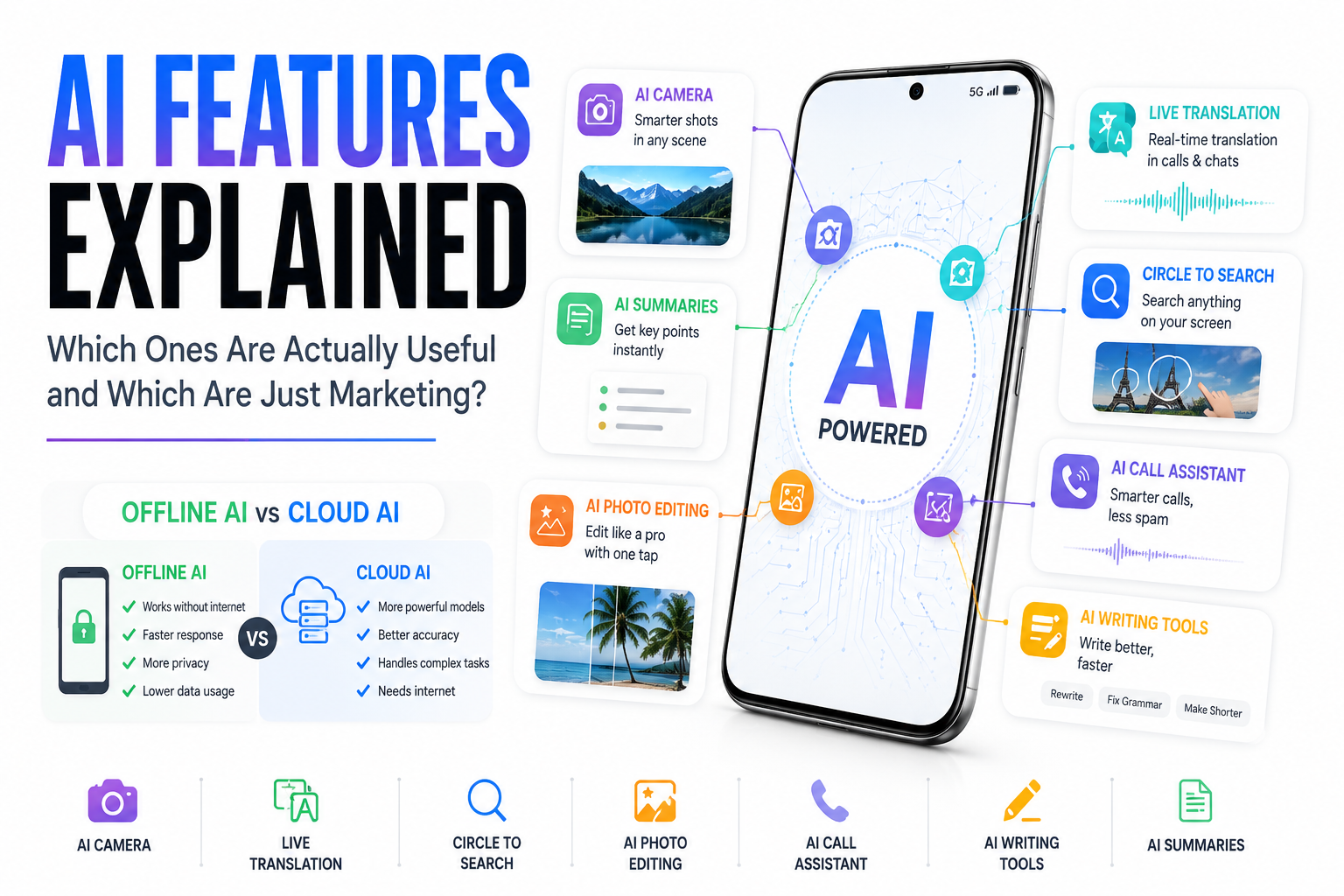
AI Features Explained: Which Smartphone AI Features Are Actually Useful and Which Are Just Marketing?

Introduction
Artificial Intelligence has become the biggest buzzword in the smartphone industry. Whether you’re buying an iPhone, Samsung Galaxy, Google Pixel, OnePlus, Xiaomi, Vivo, or Oppo, you’ll see one term repeated everywhere—AI.
Manufacturers promise AI-powered cameras, AI photo editing, AI writing, AI translation, AI call assistants, AI battery optimization, and even AI wallpapers. It almost feels like every feature on a modern smartphone has “AI” attached to it.
But here’s the big question:
How much of this AI is genuinely useful, and how much is simply clever marketing?
The truth lies somewhere in between.
Some AI features can genuinely save time, improve photos, help during travel, and boost productivity. Others exist mainly to make spec sheets look more impressive.
Let’s break down the most common smartphone AI features and find out which ones deserve your attention.
1. AI Camera – The Most Useful AI Feature
If there’s one place where AI has made a noticeable difference, it’s smartphone photography.
Modern smartphones don’t just capture a photo—they analyze the entire scene in milliseconds. AI identifies people, pets, food, landscapes, sunsets, and even fireworks before automatically adjusting exposure, colors, white balance, HDR, and sharpness.
Night Mode is another excellent example. Instead of relying solely on a larger camera sensor, AI combines multiple images captured in quick succession to reduce noise and brighten dark scenes.
Portrait Mode also benefits from AI. The phone can accurately separate a person from the background, creating a natural-looking blur similar to professional cameras.
Verdict: ★★★★★
Actually Useful? Absolutely.
2. AI Photo Editing – Like Having Photoshop in Your Pocket
Editing photos once required expensive software and advanced skills. Today, AI can perform many of those tasks with a single tap.
Popular AI editing tools include:
- Magic Eraser for removing unwanted objects
- Reflection removal
- Sky replacement
- Background removal
- Image expansion
- Generative Fill
- Face enhancement
- Old photo restoration
Imagine someone accidentally walking into your vacation photo. AI can identify the unwanted person, analyze the surrounding area, and intelligently fill the missing background.
While results aren’t always perfect, they’re often surprisingly good.
Verdict: ★★★★★
One of the best real-world uses of AI.
3. AI Summaries – Saving Time Every Day
Reading long emails, PDFs, meeting notes, or news articles can be time-consuming.
AI summaries solve this problem by identifying the most important points and presenting them in a concise format.
Modern smartphones can summarize:
- Emails
- Web pages
- Notes
- Documents
- Voice recordings
- Meetings
- Notifications
Instead of reading a 20-page report, you might get the key information in just a few bullet points.
The summaries aren’t perfect and may occasionally miss important context, but they’re becoming increasingly reliable.
Verdict: ★★★★☆
Very useful for students and professionals.
4. Live Translation – Breaking Language Barriers
Live translation has improved dramatically over the last few years.
Instead of translating text after you type it, AI can now translate conversations in real time.
Current smartphones can translate:
- Phone calls
- Face-to-face conversations
- Messages
- Camera text
- Restaurant menus
- Street signs
Imagine visiting Japan, France, or Germany without speaking the local language. Your phone listens, translates, and speaks the translated sentence almost instantly.
Offline translation is also available for many languages, making it useful even without internet access.
Although complex conversations still confuse AI occasionally, it performs surprisingly well for travel and everyday communication.
Verdict: ★★★★★
One of the most practical AI innovations.
5. Circle to Search – Surprisingly Brilliant
This is one of those features that sounds simple but quickly becomes addictive.
Instead of taking screenshots or typing search queries, you simply circle anything on your screen.
A shoe.
A landmark.
A celebrity.
A math equation.
A product.
The phone instantly identifies it and searches the internet without leaving your current app.
Whether you’re shopping, studying, watching YouTube, or browsing Instagram, Circle to Search eliminates several unnecessary steps.
It’s fast, intuitive, and genuinely useful.
Verdict: ★★★★★
One of the smartest AI features available today.
6. AI Call Assistant – More Than Spam Protection
Phone calls are becoming smarter thanks to AI.
Modern AI call assistants can:
- Screen spam calls
- Transcribe conversations
- Summarize lengthy calls
- Wait on hold for customer support
- Generate follow-up notes
- Suggest quick replies
Imagine spending 30 minutes talking to your insurance company.
Instead of remembering every detail, AI provides a complete summary after the call.
Some phones can even answer unknown callers on your behalf and ask why they’re calling before your phone rings.
Verdict: ★★★★☆
Very useful, though availability varies by region.
7. AI Writing Tools – Your Pocket Writing Assistant
Writing has become much easier thanks to AI.
Most flagship smartphones now offer writing assistance directly inside the keyboard or operating system.
AI can:
- Correct grammar
- Rewrite sentences
- Change tone
- Expand text
- Shorten paragraphs
- Generate email drafts
- Create social media captions
- Summarize messages
For professionals, students, and content creators, these tools save considerable time.
However, AI still struggles with highly technical topics and may occasionally produce incorrect or overly generic content.
Human review remains essential.
Verdict: ★★★★☆
Excellent for everyday writing.
Offline AI vs Cloud AI – What’s the Difference?
Not all AI features work the same way.
Some run directly on your smartphone, while others rely on powerful cloud servers.
Offline AI
Offline AI performs all processing on your device.
Advantages:
- Faster responses
- Works without internet
- Better privacy
- Reduced data sharing
Disadvantages:
- Smaller AI models
- Limited complexity
- Requires powerful hardware
Examples include:
- Face unlock
- Image enhancement
- Voice typing
- Basic translations
- Background blur
Cloud AI
Cloud AI sends your request to powerful servers.
These servers use much larger AI models capable of handling complex tasks.
Advantages:
- Better reasoning
- More accurate answers
- Larger knowledge base
- Better image generation
Disadvantages:
- Requires internet
- Slight delay
- Privacy concerns
- May require subscriptions
Examples include:
- Chatbots
- AI image generation
- Long document analysis
- Complex writing assistance
Hybrid AI – The Future
Most modern smartphones now use a hybrid approach.
Simple tasks run locally for speed and privacy, while more demanding requests are securely processed in the cloud.
This combination delivers faster performance while still benefiting from advanced AI capabilities.
Which AI Features Are Mostly Marketing?
Not every AI feature deserves the hype.
Examples include:
- AI Wallpapers
- AI Emojis
- AI Avatars
- AI Beauty Filters
- AI Mood Themes
- AI Stickers
These features can be entertaining, but they rarely improve everyday productivity.
They’re often included to make marketing materials sound more impressive rather than solving real problems.
Features That Truly Matter
If you’re buying a new smartphone, prioritize these AI capabilities:
- AI Camera
- AI Photo Editing
- Live Translation
- Circle to Search
- AI Writing Tools
- AI Summaries
- AI Call Assistant
These features provide genuine value and can save time almost every day.
Final Verdict
Artificial Intelligence is no longer just a futuristic concept—it’s quietly becoming part of everyday smartphone use. The best AI features don’t draw attention to themselves; they simply make common tasks faster, easier, and more convenient.
At the same time, it’s important not to be swayed by marketing alone. While features like AI cameras, live translation, Circle to Search, and intelligent photo editing can genuinely enhance the user experience, others such as AI wallpapers or novelty avatars offer little practical benefit.
When choosing your next smartphone, don’t ask “Does it have AI?” Instead, ask “Which AI features will actually improve the way I use my phone?”
That’s the difference between buying into a buzzword and investing in technology that genuinely works for you.
Quick Verdict Table
| AI Feature | Useful? | Rating |
| AI Camera | Excellent | ⭐⭐⭐⭐⭐ |
| AI Photo Editing | Excellent | ⭐⭐⭐⭐⭐ |
| Circle to Search | Excellent | ⭐⭐⭐⭐⭐ |
| Live Translation | Excellent | ⭐⭐⭐⭐⭐ |
| AI Summaries | Very Good | ⭐⭐⭐⭐☆ |
| AI Writing Tools | Very Good | ⭐⭐⭐⭐☆ |
| AI Call Assistant | Very Good | ⭐⭐⭐⭐☆ |
| Offline AI | Excellent for privacy | ⭐⭐⭐⭐⭐ |
| Cloud AI | Best for complex tasks | ⭐⭐⭐⭐⭐ |
| AI Wallpapers & Avatars | Mostly Marketing | ⭐⭐☆☆☆ |
Bottom line: The smartest smartphones aren’t the ones with the longest list of AI features—they’re the ones whose AI helps you without getting in your way.


[…] Smartphone AI Features: Which Are Actually Useful? […]
[…] Which Smartphone AI Features Are Actually Useful? […]
[…] 🔗 Related TechZero AI Analysis: Read our evaluation on Smartphone AI Features: Useful vs Marketing Hype. […]
[…] Which Smartphone AI Features Are Actually Useful? […]