
⚡ In a Hurry? Here’s Our Recommendation
Don’t have time to read the full guide? Here’s our expert recommendation based on different budgets and study needs.
💰 Best Budget
Xiaomi Pad 7
Ideal under ₹35,000 for lectures, PDFs and note-taking.
🏆 Best Value
OnePlus Pad 4
Excellent performance, large display and long battery life.
✍️ Best Android
Samsung Galaxy Tab S11
S Pen included. Perfect for handwritten notes and clinical study.
⭐ Best Overall
iPad Air M4
The best balance of performance, software support and ecosystem.
🚀 No Budget Limit
iPad Pro M5
For power users, researchers, creators and future-proof buyers.
📊 Quick Comparison
| Tablet | Best For | Stylus | Storage | Overall |
|---|---|---|---|---|
| iPad Air M4 | Most Medical Students | ★★★★★ | 256 GB | ⭐⭐⭐⭐⭐ |
| Galaxy Tab S11 | Handwritten Notes | ★★★★★ | 256 GB | ⭐⭐⭐⭐☆ |
| OnePlus Pad 4 | Value for Money | ★★★★☆ | 256 GB | ⭐⭐⭐⭐☆ |
| Xiaomi Pad 7 | Budget Buyers | ★★★★☆ | 256 GB | ⭐⭐⭐⭐☆ |
| HONOR MagicPad 2 | Large Display | ★★★★☆ | 256 GB | ⭐⭐⭐⭐☆ |
🤔 Still Confused?
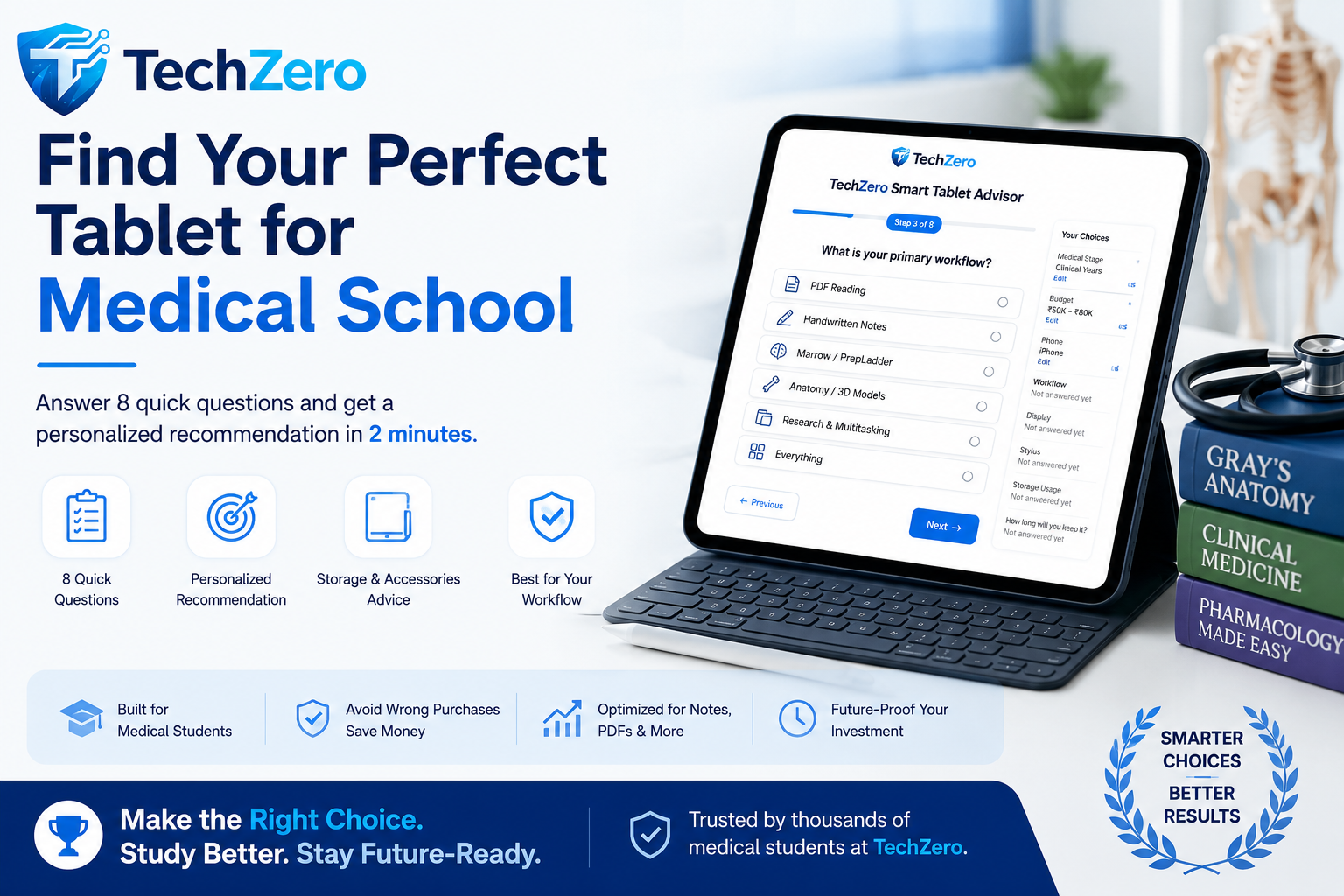
Answer 8 quick questions and let the TechZero Smart Tablet Advisor recommend the best tablet for your budget and workflow.
Launch Smart Tablet Advisor →Executive Summary & Strategic Overview
Whether your budget is ₹20,000 or ₹2,00,000, this guide helps you choose the right tablet based on your workflow—not your wallet. Medical education is a premium, multi-year commitment spanning 5.5 years of MBBS, entrance preparation (NEET PG / INI-CET), clinical internships, and residency. Purchasing a tablet for this journey is a vital, long-term professional investment.
TechZero Advisory Assessment
Modern medical tablets span three distinct tablet ecosystems—Apple iPadOS, Samsung Android, and Premium Android Alternatives. Today’s slates offer zero-latency handwritten note-taking, advanced multi-window flexibility, and high-fidelity displays that render multi-gigabyte 3D anatomy and radiological imaging with absolute clarity.
Quick Recommendation Guide (At a Glance)
Budget Essentials
Redmi Pad 2 Pro / Galaxy Tab S10 FE
Ideal for reliable PDF reading, split-screen notes, and Anki flashcards.
Android All-Rounder
Samsung Galaxy Tab S11 / S11 Ultra
Vibrant AMOLED, DeX multi-window multitasking, and S Pen included in-box[cite: 1, 2].
Apple Professional
iPad Air M4 / iPad Pro M5
Top-tier GoodNotes app polish, Tandem OLED clarity, and robust support[cite: 1, 2].
Value Flagships
OnePlus Pad 4 / Xiaomi Pad
High-refresh-rate displays and powerful chips without the accessory tax.
2026 Comprehensive Medical Tablet Matrix
Note: Prices are official MSRPs where available. “Starts at/around” indicates approximate market pricing at the time of writing and may vary by retailer and promotional offers.
| Model (2026 Edition) | Display & Brightness | Processor | Stylus & Latency | Software Support | Weight | Price Tier |
|---|---|---|---|---|---|---|
| Apple iPad Pro M5 (13″) | 13″ Tandem OLED Ultra Retina XDR (120Hz)[cite: 1, 2] | Apple M5 (9/10-core GPU)[cite: 1, 2] | Apple Pencil Pro (Extra)[cite: 1, 2] | Apple extended software support | 579g | Starts at ₹1,39,900[cite: 1] |
| Apple iPad Pro M5 (11″) | 11″ Tandem OLED Ultra Retina XDR (120Hz)[cite: 1, 2] | Apple M5 (9/10-core GPU)[cite: 1, 2] | Apple Pencil Pro (Extra)[cite: 1, 2] | Apple extended software support | 444g[cite: 1, 2] | Starts at ₹99,900[cite: 1] |
| Samsung Galaxy Tab S11 Ultra | 14.6″ WQXGA+ AMOLED (120Hz)[cite: 1, 2] | MediaTek Dimensity 9400+[cite: 1, 2] | S Pen Included (Zero Lag)[cite: 1, 2] | Up to 7 years OS & security updates | 732g[cite: 1, 2] | Starts at ₹1,10,999 |
| Samsung Galaxy Tab S11 | 11″ Dynamic AMOLED 2X (120Hz)[cite: 1, 2] | MediaTek Dimensity 9400+[cite: 1, 2] | S Pen Included[cite: 1, 2] | Up to 7 years OS & security updates | 469g[cite: 1, 2] | Starts at ₹80,999 |
| Apple iPad Air M4 (13″) | 13″ Liquid Retina IPS (60Hz)[cite: 1, 2] | Apple M4 Chip[cite: 1, 2] | Apple Pencil Pro (Extra)[cite: 1, 2] | Apple extended software support | 617g | Starts at ₹1,19,900 |
| Apple iPad Air M4 (11″) | 11″ Liquid Retina IPS (60Hz)[cite: 1, 2] | Apple M4 Chip[cite: 1, 2] | Apple Pencil Pro (Extra)[cite: 1, 2] | Apple extended software support | 462g[cite: 1, 2] | Starts at ₹64,900[cite: 1] |
| OnePlus Pad 4 | 13.2″ 3.4K IPS LCD (144Hz)[cite: 1, 2] | Snapdragon 8 Elite Gen 5[cite: 1, 2] | OnePlus Stylo (Extra)[cite: 1, 2] | Standard multi-year support | 672g | Starts at ₹59,999[cite: 1, 2] |
| Redmi Pad 2 Pro | 12.1″ 2.5K LCD (120Hz) | Snapdragon 7s Gen 4 | Redmi Smart Pen (Extra) | 2 years OS / 3 years security | 610g | Starts at ₹24,999 |
| Samsung Galaxy Tab S10 FE | 10.9″ 1.5K LCD (90Hz)[cite: 1, 2] | Samsung Exynos 1580[cite: 1, 2] | S Pen Included[cite: 1, 2] | Multi-year software support | 524g[cite: 1, 2] | Starts around ₹56,999[cite: 1, 2] |
Common Buying & Workflow Mistakes to Avoid
1. Committing to the Base 64GB Storage Tier: Purchasing a baseline 64GB model causes premature obsolescence. Multi-gigabyte 3D anatomy models, high-resolution histology atlases, and offline video lectures will saturate 64GB instantly. Always target 256GB minimum.
2. Choosing Oversized Hardware for Ward Rounds: While 14.6-inch displays excel at desks, carrying them during hospital rounds causes severe wrist fatigue. Prioritize an 11-inch form factor under 500g for ward portability.
3. Ignoring Stylus Inclusion Costs: Apple charges separately for active styluses, whereas Samsung bundles the zero-latency S Pen in the box[cite: 1, 2].
4. Overpaying for Cellular (5G) Models: Hospital and campus Wi-Fi cover 95% of student needs; phone hotspot tethering easily handles the rest.
🩺 TechZero Smart Tablet Advisor v2
Part I — The Three Tablet Ecosystems Compared
1. Apple iPadOS
- Strengths: Highly optimized handwriting experience, one of the most widely used note-taking applications (GoodNotes, Notability), exceptional software longevity, strong processor optimization, and robust secondary resale value.
- Weaknesses: High accessory costs (Apple Pencil Pro, Magic Keyboard), no expandable local storage (cloud dependency required), and more restrictive multitasking boundaries compared to desktop operating systems.
- Ideal For: Medical students, clinical residents, and doctors prioritizing smooth note-taking, fast PDF annotation, and seamless iOS integration.
2. Samsung / Android Tablets
- Strengths: S Pen included in the box at no extra charge, Samsung DeX desktop-like multitasking, vibrant AMOLED displays, and expandable microSD storage on select models.
- Weaknesses: App optimization for third-party medical tools can occasionally vary compared to iOS; smaller dedicated tablet app ecosystem than Apple.
- Ideal For: MBBS students, PG entrance aspirants (Marrow, PrepLadder), and clinicians seeking versatile multi-window split-screen performance.
3. Premium Android Alternatives (OnePlus, Xiaomi, HONOR)
- Strengths: High-refresh-rate IPS/OLED screens, massive battery capacities (such as the 13,380 mAh cell in the OnePlus Pad 4 or 12,000 mAh in the Redmi Pad 2 Pro), fast charging speeds, and competitive pricing compared to top-tier Apple hardware.
- Weaknesses: Varying software update timelines and brand ecosystem lock-in among secondary Android manufacturers. Note that brands like HONOR have limited mainstream offline retail availability in India compared to Samsung and Apple.
- Ideal For: Value-conscious power users who want flagship-level performance chips without paying a high ecosystem premium.
Part II — Re-evaluating the iPad Pro: Why It’s Not “Overkill” for Professionals
Many student buying guides dismiss the iPad Pro as unnecessary luxury. However, for medical professionals and senior residents, an iPad Pro serves as a high-performance clinical workstation:
- Radiologists & Imaging Specialists: Reviewing high-resolution DICOM and cross-sectional radiological scans requires Tandem OLED Ultra Retina XDR displays with peak brightness and absolute color accuracy.
- Surgeons & Procedure Planners: Studying complex 3D surgical atlases and video archives demands maximum GPU processing muscle and zero-latency rendering.
- Medical Illustrators & Educators: Faculty preparing high-yield lectures and anatomical diagrams benefit directly from the Apple Pencil Pro and M-series Neural Engines.
- Researchers & Rounding Clinicians: Replacing heavy paper charts during frantic ward rounds with a featherlight, powerful slate running UpToDate and hospital portals transforms daily clinical workflow.
Part III — 2026 Comprehensive Medical Tablet Matrix
Note: Prices are official MSRPs where available. “Starts around” indicates approximate market pricing at the time of writing and may vary by retailer and promotional offers.
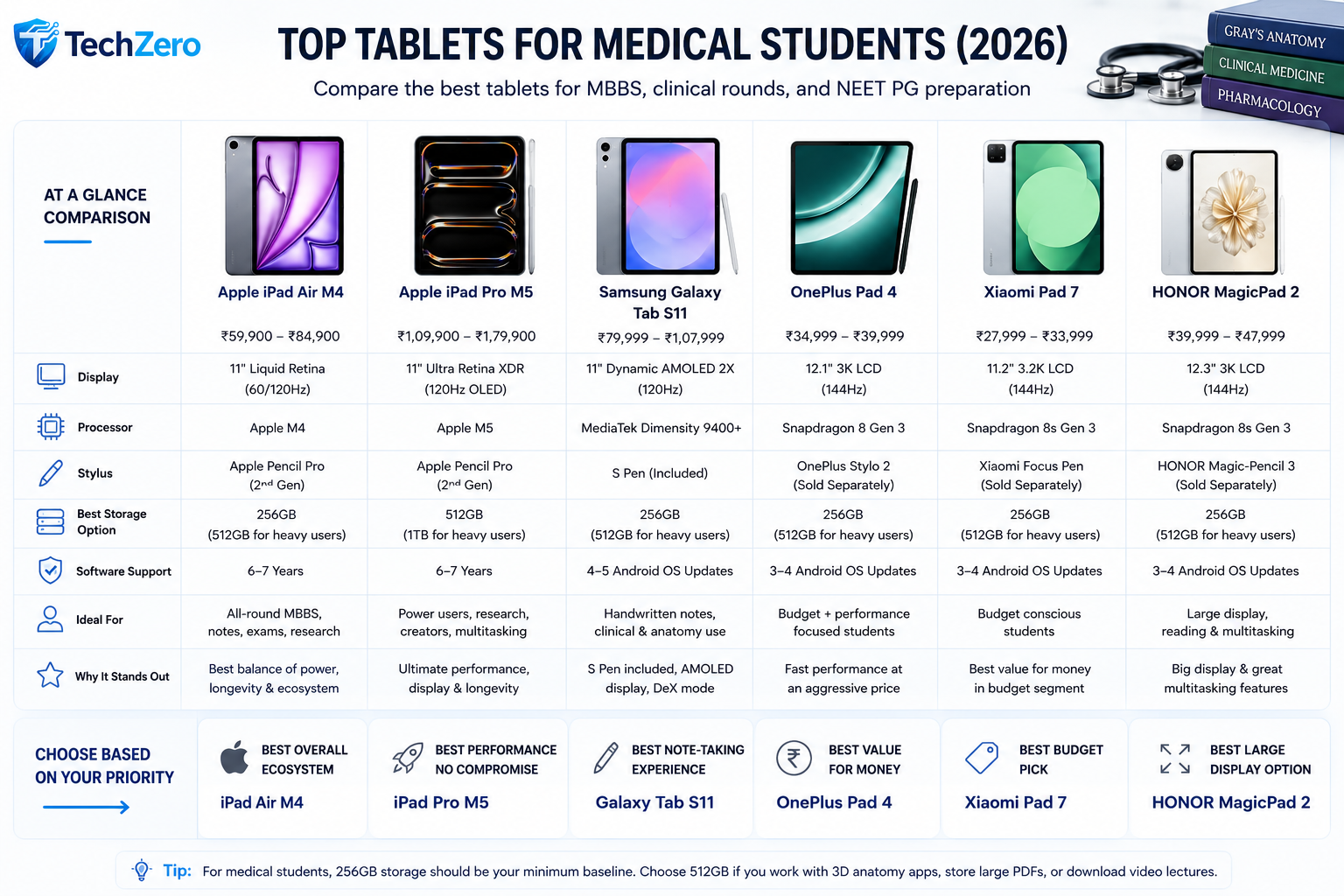
| Model (2026 Edition) | Display & Brightness | Processor | Stylus & Latency | Software Support Track Record | Weight | Official Price Tier |
| Apple iPad Pro M5 (13″) | 13″ Tandem OLED Ultra Retina XDR (120Hz) | Apple M5 (9/10-core GPU) | Apple Pencil Pro (Extra) | Apple has a long track record of extended software support. | 579g | Starts at ₹1,39,900 |
| Apple iPad Pro M5 (11″) | 11″ Tandem OLED Ultra Retina XDR (120Hz) | Apple M5 (9/10-core GPU) | Apple Pencil Pro (Extra) | Apple has a long track record of extended software support. | 444g | Starts at ₹99,900 |
| Samsung Galaxy Tab S11 Ultra | 14.6″ WQXGA+ AMOLED (120Hz) | MediaTek Dimensity 9400+ | S Pen Included (Zero Lag) | Samsung promises up to 7 years of OS and security updates on eligible flagship tablets. | 732g | Starts at ₹1,10,999 |
| Samsung Galaxy Tab S11 | 11″ Dynamic AMOLED 2X (120Hz) | MediaTek Dimensity 9400+ | S Pen Included | Samsung promises up to 7 years of OS and security updates on eligible flagship tablets. | 469g | Starts at ₹80,999 |
| Apple iPad Air M4 (13″) | 13″ Liquid Retina IPS (60Hz) | Apple M4 Chip | Apple Pencil Pro (Extra) | Apple has a long track record of extended software support. | 617g | Starts at ₹1,19,900 |
| Apple iPad Air M4 (11″) | 11″ Liquid Retina IPS (60Hz) | Apple M4 Chip | Apple Pencil Pro (Extra) | Apple has a long track record of extended software support. | 462g | Starts at ₹64,900 |
| OnePlus Pad 4 | 13.2″ 3.4K IPS LCD (144Hz) | Snapdragon 8 Elite Gen 5 | OnePlus Stylo (Extra) | Standard multi-year manufacturer support. | 672g | Starts at ₹59,999 |
| Redmi Pad 2 Pro | 12.1″ 2.5K LCD (120Hz) | Snapdragon 7s Gen 4 | Redmi Smart Pen (Extra) | Xiaomi provides up to 2 years of OS and 3 years of security patches. | 610g | Starts at ₹24,999 |
| Samsung Galaxy Tab S10 FE | 10.9″ 1.5K LCD (90Hz) | Samsung Exynos 1580 | S Pen Included | Samsung provides a multi-year software support policy (up to 4 generations of OS upgrades). | 524g | Starts around ₹56,999 |
Part IV — Essential Medical App Ecosystem by Workflow
- Anatomy & 3D Visualization: Complete Anatomy 2026, Visible Body Human Anatomy Atlas (utilizing robust GPU acceleration).
- Clinical Reference & Pharmacology: Amboss, Medscape, UpToDate, Epocrates for evidence-based bedside verification.
- Active Recall & Flashcards: AnkiMobile (iOS) and AnkiDroid (Android) for spaced repetition memorization across MBBS and PG entrance prep.
- PDF Annotation & Document Management: GoodNotes, Notability, Samsung Notes, and PDF Expert for managing massive multi-gigabyte textbook libraries.
Part V — AI Integration in Modern Medical Learning
By 2026, artificial intelligence is deeply embedded in medical study workflows. Your tablet hardware should support seamless integration with modern AI productivity tools:
- Syllabus & Textbook Ingestion (e.g., Google NotebookLM): Uploading multi-hundred-page clinical guidelines or lecture notes to generate instant study guides, briefing documents, and audio summaries.
- Case-Based Learning & Diagnostics (ChatGPT / Copilot / Gemini): Utilizing LLMs to brainstorm differential diagnoses for simulated clinical vignettes and test active recall limits.
- Literature Review (Perplexity / Elicit): Rapidly synthesizing peer-reviewed medical journals and extracting evidence-based data for research summaries.
Part VI — Surviving the Hospital Environment & Ergonomics
Medical hardware faces rigorous physical conditions that consumer reviews rarely address:
- Sanitizer & Disinfectant Resistance: Hospital protocols require frequent wiping with isopropyl alcohol and disinfectant wipes. Devices must feature robust oleophobic coatings and chemically strengthened glass (e.g., Gorilla Glass Armor or Ceramic Shield) that won’t degrade under chemical exposure.
- One-Handed Bedside Use: During ward rounds, clinicians often hold patient files in one hand while operating the device with the other. Heavy 13-inch+ tablets cause rapid wrist fatigue; an 11-inch form factor under 500 grams is significantly more practical for mobile ward use.
- Lighting & Glare: Hospital corridors and emergency wards feature bright fluorescent overhead lighting. High peak-brightness displays (1,000+ nits) and anti-reflective matte screen protectors prevent debilitating glare during patient chart reviews.
Part VII — Long-Term Value & Investment Perspective
Because medical training spans over half a decade, hardware longevity is critical. Apple has a long track record of extended software support, while Samsung promises up to 7 years of OS and security updates on eligible flagship tablets. Furthermore, iPad and Samsung flagship models hold the strongest secondary resale value in the medical student community.
Part VIII — Common Buying & Workflow Mistakes to Avoid
Critical Mistakes to Avoid:
- Committing to the Base 64GB Storage Tier: Purchasing a baseline 64GB model creates early obsolescence. Multi-gigabyte 3D anatomy assets, high-resolution histology atlases, and offline video lecture modules will saturate 64GB before your first clinical posting. Always target a minimum of 256GB.
- Choosing Oversized Hardware for Ward Rounds: While 14.6-inch displays are excellent for stationary desk setups, carrying them during frantic hospital rounds causes severe wrist strain. Balance desk productivity with ward portability.
- Ignoring Stylus Inclusion Costs: Factor in out-of-pocket accessory costs. Apple charges separately for active styluses, whereas Samsung includes the S Pen in the box.
- Overpaying for Cellular (5G) Models: Hospital and campus Wi-Fi cover 95% of student needs. Smartphone hotspot tethering easily handles the remaining 5%, making cellular tablet markups unnecessary.
📌 Before You Buy Your Tablet
❌ A Tablet Isn’t the Right Choice If…
- You only stream online lectures and rarely take handwritten notes.
- You already own a capable Windows 2-in-1 or Surface device with pen support.
- You expect a tablet to completely replace a laptop for every academic task.
- Your primary workload involves heavy desktop software or programming.
❓ Frequently Asked Questions
Is 128 GB enough for MBBS?
For most students, no. We recommend starting with 256 GB to comfortably store anatomy apps, PDFs, lecture videos and handwritten notes.
Should I buy Cellular?
Only if you frequently study away from Wi-Fi. Otherwise, Wi-Fi models offer better value.
Can Android tablets run Marrow and PrepLadder smoothly?
Yes. Modern flagship and upper-midrange Android tablets handle these apps very well.
Which stylus is best?
S Pen offers the best bundled value, while Apple Pencil Pro provides the most refined writing experience.
🎯 Ready to Choose?
Use the TechZero Smart Tablet Advisor to receive a personalized recommendation based on your budget, study workflow, handwriting needs and preferred ecosystem.
Find My Perfect Tablet →TechZero Final Recommendation
For medical learners and professionals looking for a reliable, long-term mobile investment, your choice is dictated by your ecosystem preference. If you want a dedicated mobile powerhouse with an S Pen included in the box, choose the Samsung Galaxy Tab S11 / S11 Ultra. If you prefer iOS app polish and M5 Tandem OLED clarity, the iPad Pro M5 (starts from ₹99,900 for 11″ / ₹1,39,900 for 13″) or iPad Air M4 (starts from ₹64,900 for 11″ / ₹1,19,900 for 13″) serve as elite, lifelong clinical companions.
Trusted Resources & Official Links
Looking for official specifications, regulatory standards, and educational tool documentation? These authoritative external sources help verify medical education guidelines and hardware compatibility.



[…] For Students iPad vs Android Tablet for Medical Students: 2026 Buying Guide […]
[…] iPad vs Android Tablets: 2026 Buying Guide — Compare the strengths of iPad and Android tablets for demanding users. […]